KVR Audio is the Internet's number one news and information resource for open standard audio plug-ins. We report new releases, product announcements and product updates (major and minor) for all VST Plug-ins, Audio Unit Plug-ins and RTAS Plug-ins. We manage a fully searchable audio plug-in database (updated daily), and offer many free member services including user reviews, product update notifications and a very active discussion forum. We also host official forums for many plug-in and soundware developers.
Plug-ins, Hosts &
Mobile Apps Search
Developer Search
News & Products
Groups
Whats's in?
Banks & Patches
Download & Upload
Listen to Music
by KVR Members
Search
KVR
Developers » Waves »
?
KVR Rank: 689 422 660 [30-Day: 974; 7-Day: 1167; Yesterday: 2447]
3 members are following Vocal Rider and 83 members are following Waves @ KVR.
Product Vocal Rider
Developer Waves
Price (MSRP) $400
Type / Tags
Plug-in, App & Soundware Format(s)
Effect(s)    
Operating System Availability
Operating
System
Latest
Version
Download Released
 8r12  Demo / Trial Released
 8r12  Demo / Trial Released
Miscellaneous Information
Copy Protection Dongle (PACE iLok Smart Key)
Average User Rating
Vocal Rider

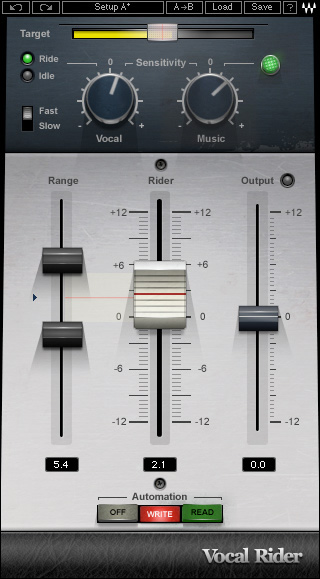
Vocal Rider rides the levels of vocal tracks, automatically. Instead of manually riding the physical mixing console fader, or tediously drawing in each individual level change on a DAW track, Vocal Rider does it for you, making it a true timesaver.

All you need to do is set the target range of the vocal level in relation to the rest of the mix. Then, Vocal Rider compensates for all deviations from the target, intelligently raising or lowering the vocal volume, instantly. And unlike everyday compression, Vocal Rider adds absolutely no additional coloring to the track.

Features:

  • Keep steady vocal & dialog levels automatically.
  • Save time by automating the vocal riding part of the mixing process.
  • Write the automatic riding to an automation track for fine tuning.
  • Real-Time means no latency and no pre-scan needed.
  • Up to 24bit 96kHz resolution.

Controls:

  • Target sets the reference range for vocal mix positioning.
  • Vocal Sensitivity differentiates vocal content from noise floor and ambience.
  • Vocal Activity LED indicates when vocal activity is detected.
  • Attack sets the vocal detection attack behavior.
  • Music Sensitivity determines the amount Vocal Rider adapts to instrumental levels.
  • Music Sensitivity LED indicates Vocal Rider's response to instrumental levels.
  • Range Min/Max set the boundaries of the Rider Fader movement range.
  • Effective Range displays the total gain range available for automatic riding.
  • Idle Arrow sets the Rider Fader value when there is no vocal activity.
  • Rider Fader is Vocal Rider's automatic control.
  • Automation Mode controls the Rider Fader operation.
  • Output trims the vocal output gain, post-auto riding.
  • Clip LED shows when output is clipping.
Discussion: Active
Posts displayed newest at the top
Replies to posts run old to new below the parent

Discussion

Please log in to join the discussion

Username: Password: