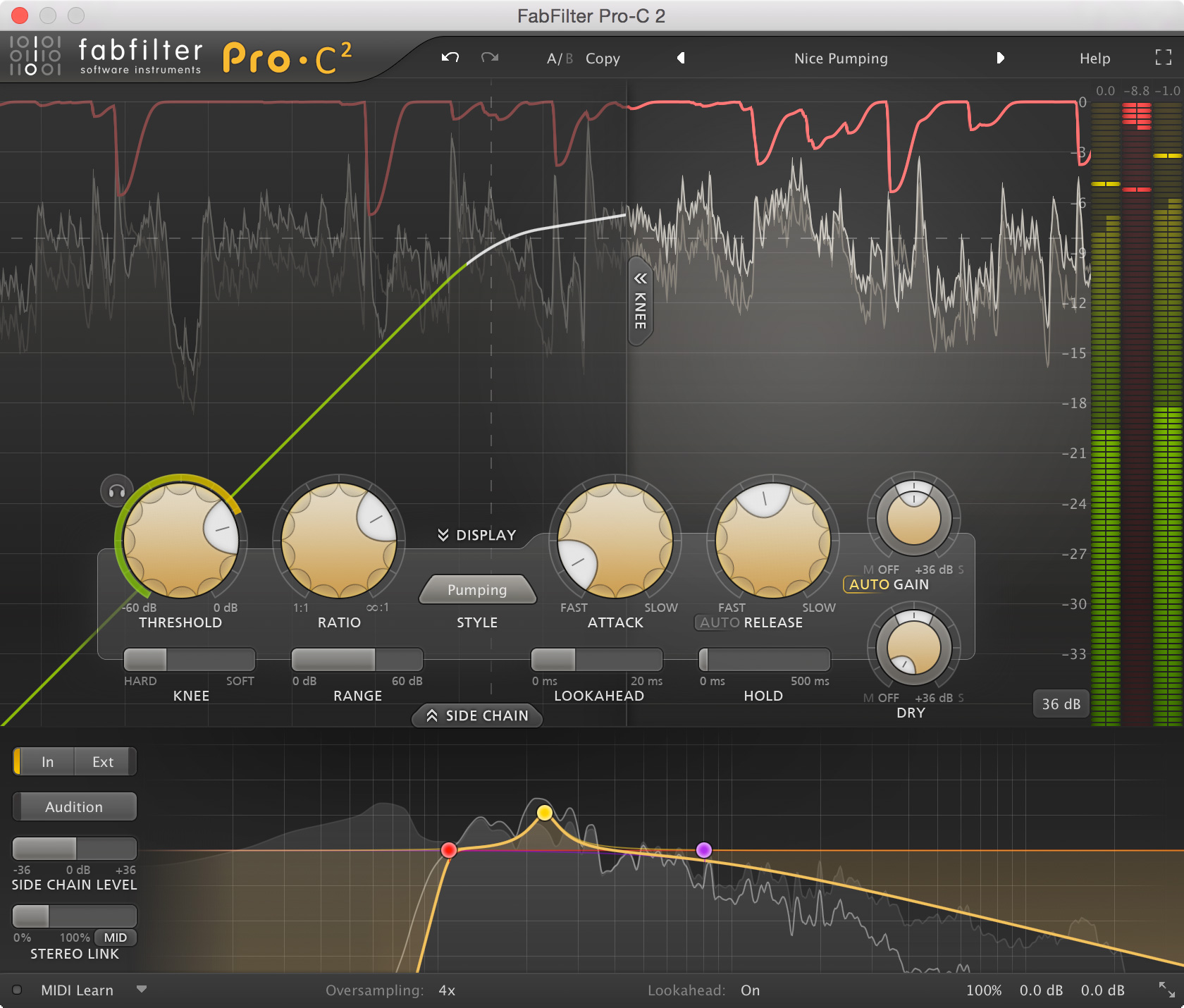


FabFilter Pro-C 2 is a major update to the FabFilter Pro-C compressor plug-in. Five brand-new compression styles make Pro-C 2 even easier to set up and more effective in common scenarios such as vocal processing, mastering or EDM pumping. It's like getting five new compressors. Together with an abundance of new features, such as lookahead, range, hold, side-chain EQ, oversampling, and a fully redesigned user interface, FabFilter Pro-C 2 surpasses its predecessor in every way while respecting the original's transparency and elegance.
Compress with style
FabFilter Pro-C 2 introduces five new, carefully designed compressor algorithms, each with a unique character and feel. Using the Vocal style, getting a lead vocal upfront in your mix is as easy as choosing the right threshold. The Mastering style is designed to be as transparent as possible, while still being able to catch those fast transients. To add a pleasant 'glue' to drums or mix buses, the Bus style will work wonders. Finally, the Punch style delivers traditional, analog-like compression behavior, which sounds good on anything, while the Pumping algorithm offers deep and over-the-top pumping — great for drum processing or EDM.
All you need
A rich set of new features offers more control over the compressor's sound and character. The knee is now freely adjustable from 0 dB up to 72 dB, and the range setting lets you easily limit the maximum amount of gain change. The smooth lookahead (up to 20 ms) and hold settings help you to catch any peak while minimizing distortion. The optional high-quality oversampling (up to 4x) further ensures the most transparent results possible by reducing aliasing. Last but not least, advanced side-chain EQ'ing and M/S processing is easier than ever thanks to Pro-C 2's dedicated side-chain section.
Redesigned interface
The well laid-out, fully-redesigned Retina interface offers insightful metering with real-time displays that will greatly improve workflow. The large animated level/knee display visualizes exactly when, why and how compression is applied to incoming audio. Accurate level meters show the exact peak and loudness values, while the circular side-chain input meter turns finding the perfect threshold setting into a trivial task. In short, FabFilter Pro-C 2 wraps superb sound quality and an extensive feature set in a polished, time-saving user interface.
Key features:
{See video at top of page}
Reviewed By oskroskroskr [all]
April 14th, 2014
Version reviewed: 1.23 32b on Mac
Ok, so I've just been messing around with the FF Pro-C and thought you should be subjected to a whole lot of my ideas and opinions.
*It's got a graph!!! Yep that's right a graph that shows gain reduction over time as well as the input and output waveforms. I believe the Pro-C was the first ever compressor to do something like this. If you're a total compressor noob you can use this to get your head around concepts like attack and release. However the implementation is not great. The GR is pale pink, the input is pale white and the output is pale yellow. It's a horrible choice of colours. To make matters worse, when you click "expert", the graph slides away to the left and becomes mostly obscured. Not exactly a clever design. Compare this to the huge, very legible graphs you get on the Pro-L and Pro-G. (These were produced subseqently to the Pro-C so I guess they learned from their mistakes).
*FF make a big deal about this being "program dependent". What does that mean? Well it means that rather than responding to a fixed value, the attack and release times vary somewhat depending on other variables such as frequency and duration. Maybe I'm not nerdy enough to care about any of this. I switched back and forth between the clean, feedback and opto modes to examine the differences (using drum loops). At normal GR (ie -5db) they all sounded the same to me. You also have the option of using an "automatic" release, but again I don't really see the point.
*The wet/dry option is implemented as two separate volume knobs. This makes it slow and clumsy to do parallel compression. You can however pan the dry signal to the left, right, mid, sides, etc. I tried it out and it does sound interesting in some situations.
*The sidechain option suffers from a similar problem. Instead of having a single pan and gain you get two pans and two gains. I really can't imagine ever needing this, and if I did I could employ it directly in the daw.
*The attack starts at 0.5ms and the release at 50ms. This makes the Pro-C slow compared to other compressors and totally inadequate for some applications. It might be well suited to long accoustic tracks where the volume wanders considerably.
*I think the Pro-C bears more than a small resemblance to the native ableton compressor. They both aim for transparency and do opto and feedback emulations. And from Ableton 9 they both have graphs. Is Ableton copying Fab Filter?
*It would be nice to have a clean bypass button on the gui.
Conclusion: This one could be a good choice for vocals or accoustic recordings with a meandering volume. Maybe try it on jazz or classical. There's nothing special here for EDM producers.
Read Review
THIS POST HAS BEEN REMOVED
THIS POST HAS BEEN REMOVED

I just came back here to check out my review of the Pro-C. Come on - only 3 out of 8 people found that useful?
I've recently been messing around with the Pro-C2. I have to say it is a BIG improvement on the predecessor. There is a peak hold, a range, a lookahead, oversampling, a wet/dry knob, a much improved sidechain section, and a much improved graph. There's also a little button that allows you to gate the audio below the threshold and allows you to only hear what is therefore triggering the compressor (I haven't seen a function like this anywhere before).
I'm still of the feeling that there are probably too many styles that potentially sound identical - ie the opto/ bus/punch/pump/clean modes all sound pretty darn similar when operating in a normal range.
Also I think the mid/side switch in the sidechain section is a vast improvement. If you push that little bar over to the mid (etc) button you will only compress the mid channel. Great but you can't boost the mid volume only without messing with some other knobs in a different area of the gui. Essentially there's three different knobby things in different areas of the gui that control the wet/dry/mid/side. Maybe this could all somehow be bundled up together into one easy knobby thing. Or maybe there's no easy way of doing it.
Thanks and good work FF. :-)
Please log in to join the discussion
Submit: News, Plugins, Hosts & Apps | Advertise @ KVR | Developer Account | About KVR / Contact Us | Privacy Statement
© KVR Audio, Inc. 2000-2024