?
KVR Rank: 3541 [30-Day: 3968; 7-Day: 4676; Yesterday: 4934]
0 members are following studio.M and 0 members are following Sound Trends @ KVR.
| Product | studio.M |
| Developer | Sound Trends |
| Price (MSRP) | Free / $7.00 MX upgrade |
| Type / Tags |
Plug-in, App & Soundware Format(s)
| Utility | Stand-alone utility / application |
Operating System Availability
| Operating System |
Latest Version |
Download | Released |
| 1.0 | Free Download | ![]() |
Miscellaneous Information
| Copy Protection | Unspecified |
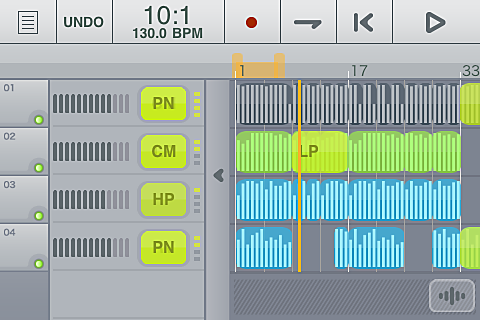
studio.M is a DAW application based on Sound Trends’ studio.HD app that offers 4 streaming audio tracks (upgradeable to 8) with 16-bit / 44.1 kHz recording, editing, extensive loop library and automated mixing with effects all controlled by a touch interface.
It includes an in-app Store with more loops by established 3rd parties and producers. The in-app “MX” upgrade adds 4-more audio tracks (8 total), 5 more effects and 130 more loops.
Features:
- Up to 4 tracks (stereo or mono) of playback, upgradeable to 8 tracks (via in-app studio.Mx edition upgrade). Grab a drum loop, throw down a guitar part, add some overdubs and layer-on some cool textures then export the CD-quality audio recording to your Mac/PC if you want.
- Increase/decrease the song tempo to conform audio to Project's BPMs.
- Included Loop Sets logically group loops in color-coded instrument parts (drums, bass, guitars, keys, etc.) that work well together. Loops can be auditioned at Project tempo.
- Access to over 100 loops as Loop Sets spanning Trance, Hip-Hop, Breakbeat, Drum ’n’ Bass, Minimal, Progressive House, Reggaeton, Industrial, Rock, Pop, Funk and Country styles. Upgrade to MX for 130 more loops.
- New loops available from well-known, major 3rd party providers plus boutique producers in in-app store.
- Standard Cut, Copy Paste, Split and Crop functions are supported and operations intelligently snap to Bar/Beat based on Zoom level. The LOOP CONTROL BAR sets loop regions for recording and playback and serves as an edit tool to Cut/Copy/Paste whole verses/choruses. Easily loop/repeat audio to play longer. 10 levels of Undo prevent any big mistakes. Pull and pinch zoom plus double-touch to quickly Auto-Zoom your whole composition into view.
- Each track has a volume fader and up to 4 real time effects – all with automation! You get Compression, Pan, Low/Hi Pass Filter and Reverb. Buy the studio.MX upgrade to add Delay, Flanger, Gate, Stutter, BitCrusher and Glitchy Repeater! An X-Y touch pad controls effect setting and automation.
- New recordings associated with your project can be browsed, renamed and tagged with BPM. Delete recordings by simply dragging them off the timeline. Archive recordings, Projects, mixdowns and user-created custom loops to the computer.
- Import/Export your own 44.1/16 bit WAV files via iTunes. Edit your studio.M recordings and add to your "My Loop" sets for reuse across multiple Songs/Projects.
- Create your CD-quality mix and save it to your Mac/PC and post it for friends to hear.
- Use Gruvtron or other apps to create new instrument parts and paste them to a track.
Discussion: Active
Posts displayed newest at the top
Replies to posts run old to new below the parent
Posts displayed newest at the top
Replies to posts run old to new below the parent

Discussion
Please log in to join the discussion


