
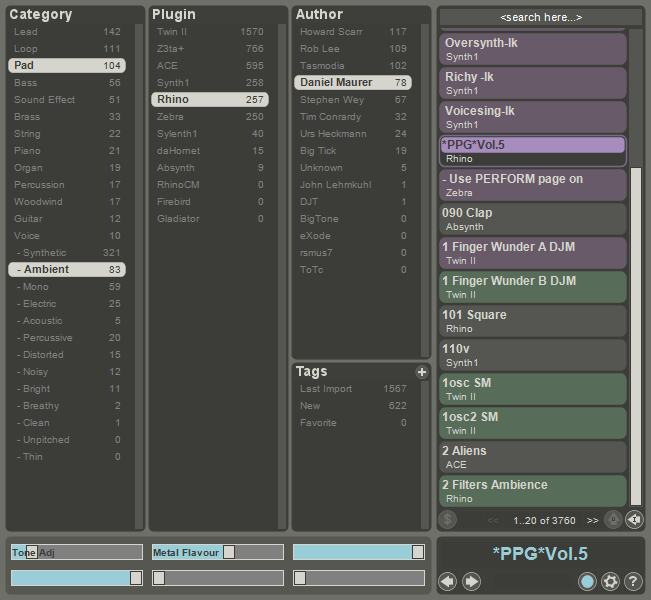
Zen is a Universal Presets Manager: It loads in any host as a VST instrument, and acts as a loader for other VSTis. So with Zen, you can search for "Rhodes piano" and get a list of all matching presets – regardless of the final VSTi (Rhino, Zebra, Absynth... whatever). When you select one of the presets in Zen, the corresponding VSTi is automatically loaded to play the requested preset.
Many popular VSTis are supported, and new ones are added daily. Eventually Zen aims to categorize all available presets, for all VSTis.
Zen is online
It constantly synchronizes its own local database of presets with a master online database hosted at www.bigtickaudio.com – users get new presets daily, delivered right into their sequencer, already categorized.
Zen for commercial presets designers
Commercial presets designers can use Zen to send demo versions of their presets to all potential customers. Users can preview the presets in Zen, directly in the context of their track, and buy the presets they like with just one click. Presets can be bought individually, as opposed to purchasing a full bank of presets.
Note: This is an edited review. Since first writing this review, I've updated Zen to v 1.7.1. The stability issues I was experiencing before when switching between synths/presets seem to have been fixed. I've not had any crashes despite switching between loads of presets and different synths. I haven't tried scanning my VSTs though.
I've left the original review here but have edited it (edits and comments in bold).
[original review starts here]
I very much like the premise of Zen. It provides a nice solution for managing presets, including the ability to download presets from the internet. Be warned that if you have a load of VSTs or particularly popular ones (Synth1), downloading all the presets will take a while. You're reliant on the presets you download already being categorised sensibly, because there's no way you'll be able to categorise the nearly 8,000 Synth 1 presets yourself.
You can rate presets (1-5 stars), search for presets by synth, author, category (e.g. lead/pad etc.) and name and add your own categories as required.
You can click on a preset in Zen, and the VST will be loaded and you can play the preset. You can assign presets to patch slots (for want of a better name), and you can use the patch change command on your controller to switch between the presets you have set up in this way. I can see this being quite useful in live situations - either on stage or if you are jamming with a band.
Sound designers can also upload their presets from within Zen, although I haven't done this myself.
UI:
The UI is relatively straightforward and there are tips displayed whenever you move the mouse cursor over a UI element. Once you've got the hang of it, it's pretty intuitive to use. It did take me a while to figure out how to do the most basic stuff though (e.g. import my own presets) - I do think the icons used by the buttons could be improved. I'd also like to be able to resize the interface to fit more presets on each page, but that's no biggie.
Addendum: Not sure if it's just on my system, but using the mouse wheel to scroll lists is painfully slow - it takes about 10 seconds to scroll down 8 entries because it scrolls about a pixel at a time.
Another downside for me is that the UI pretty much requires you to use both hands to categorize presets, because you need to hold down Ctrl while clicking to categorise a preset. It would be nice if you could do this with one hand on your MIDI controller so as to preview the sounds you are categorising.
Sound:
Zen doesn't make any sound per se. It sounds as good as your presets and VSTs.
Features:
It's more than just a preset organiser - as well as being able to load up VSTs to play a preset, you can also map VST parameters to CCs and record the output to a wav file - it's similar to Toby Bear's mini host in terms of being a very basic VST hostt. Zen basically does what it says on the tin and throws in a couple of nice features to boot.
Addendum: One thing that I missed that would be great is the ability to split the keyboard into various zones, with each zone mapped to a different preset and synth.
Documentation:
The documentation isn't particularly long (Zen is relatively simple), but provided answers to all the questions I had. As I said before, I did need to look at the docs to figure out how to do some of the more basic things - but it only took a minute or so to find the information I wanted.
Presets:
I've given Zen a 10 here because if you go online you'll end up with loads of presets. Obviously they aren't all the bee's knees, but that's not Zen's fault.
Customer Support:
Never actually needed customer support, but Big Tick have a forum here on KVR and seem pretty active. Zen has been updated several times since I first tried it.
VFM:
It's free. If you need something like this, you can't get better value than free.
Stability:
Edited: Since updating to v 1.7.1 I have had no stability issues.
[the following text is from the original review, but no longer applies]
Unfortunately I have to agree with the previous review on this point. While I don't feel I'm wasting my time using Zen, stability definitely could be improved. I've had crashes switching between presets on both different plugins and the same plugin. To what extent the plugins themselves are to blame I don't know, but it has crashed on me several times. You might want to think twice before using Zen in a live situation, or at least extensively stress test your system! Hopefully stability will be improved in future.
I've not had problems with Zen crashing while scanning VSTs (mentioned in the previous review), but I haven't got very many VSTs - around 10 show up in Zen at the moment. I've never really understood why hosts do this as one single VST can crash the system and fixing the problem can be a real pain.
Overall I'd say that if you like the idea of being able to search for and preview patches across a whole range of synths in one go, you could do a lot worse than try Zen. It's a lot more efficient to search for a pad in Zen than to load up several VSTs and go through the presets one by one. It's thus a boon both to those whole rely mainly on presets (possibly tweaking them) and for sound designers who can categorise and distribute their patches to users.


Great solution to managing presets. Where do you manage the MIDI-settings?

If Zen is used in a DAW, it is simply used as if it was an instrument, so the MIDI settings are those of the DAW.
But if you use Zen in its standalone version, click the cogwheel at the bottom right, then in the panel which opens, you can see at its bottom a link called I/O settings. It is here that you will manage your audio devices, your channels, your sample rate, your buffer size... and your MIDI inputs and outputs.
Have fun.
Thanx, found it.
This is great stuff! Thanks for all the work that went into this.
If I may ask a question: on 64-bit Windows, I have a couple of VSTs that are on the list -- specifically SQ8L and AM Freehand Free. I can download the patches, and when I click on one, I'm given a "file finder" window where I'm supposed to locate the DLL. For some VSTs, like Synth1, this works great (and thanks again!). For these two, though, I get a "plugin file not found" message, even though it's clearly there. Might this be the result of a version mismatch somehow? Or a 32- vs 64-bit problem? Has anyone run into a similar problem, or have any thoughts on this?
I ran into the same error message and I'm can say with a fair bit of confidence that its a 32 vs 64-bit issue. If you want to add or use a 32-bit VST you'll need to run the 32-bit version of Zen.
Hi PrtScr, I agree, and now I have both versions. My host can handle either version, but it can't run the two simultaneously. So like you I'm trying to come up with ways to use Zen to find presets I like, then push those out to the VST. I don't have anything smart to say about this yet, though. Good luck.
I was wondering if anyone knows about a good/convenient way to export the presets so I can run them from the vst's natively. Meaning after they've been downloaded I want the presets added to the VST so I can access it from within the VST without running it from Zen. I think Zen overall is a great idea, but for me I'd prefer to just use it as a straight up download manager and not necessarily launch the vst's from within it.
I've tried adding the zen preset folder to various VST synths, but I'm having some issues.. My next step is to look up more how I add banks to vst's in general cause I'm in no way an expert on vst's, but I just figured I would ask this here to see if anyone found a good way of doing this.
This was a pretty awesome preset browser/manager, but it's now discontinued (the downloads were moved on the BigTick website to https://www.bigtickaudio.com/discontinued-plugins/) the final macOS version 1.7.2 Beta (Zen Core #12) remains a 32-bit app, which means it's toast on 10.15 / Catalina and later. It's one of the few left on my list needing an update/replacement before I can upgrade my O/S (not that I'm looking forward to that in the least).
If anyone knows of something similar on macOS - especially free;-) - and can point me to it, you'd make my day.
Thanks, Chris.
Please log in to join the discussion
Submit: News, Plugins, Hosts & Apps | Advertise @ KVR | Developer Account | About KVR / Contact Us | Privacy Statement
© KVR Audio, Inc. 2000-2024

