MuLab 9.0.59 App + Plugin

Official support for: mutools.com
Post Reply New Topic
RELATED
PRODUCTS

Post

Thanks for answering, Jo.
mutools wrote: Sat Feb 19, 2022 10:40 am They've fused conceptually, but not as products. MuLab 9 App and MuLab 9 Plugin still are 2 separate products just like MuLab 8 and MUX 8 Plugin. So shop-wise everything continues more or less as with M8. Also prices stay the same.
Then I am confused as to why you wrote "Mulab 9 can be loaded as plugin now". From this I understand that MuLab (standalone) and MUX ("core" plugin) is the same code now and not separate tools anymore.

Hence me asking.


mutools wrote: Sat Feb 19, 2022 10:40 am
And considering that there is a shift in plugin development, and a lot of developers will deprecate this.
I'm not sure if i understand this sentence. How do you mean?
With Steinberg now aggressively pushing VST3, the VST2 SDK being non-available anymore, more and more developers therefore being forced to drop VST2 (deprecating)... the focus is now "the future" with releases only in VST3/AU/AAX.

But you mentioned several times on the forum at this point (realized it hours after I posted), that VST3 is on the radar sometime after M9. My only question would be, an estimated time-frame for that.


mutools wrote: Sat Feb 19, 2022 10:40 amOne thing: I'm thinking of adding a "MuLab For Life" product which is MuLab App + MuLab Plugin + all MuLab updates free for life, thus also all main updates like MuLab 10, 11, 12, ...
That would be 199 euro. Users who already have a M8/M9 user key could step up to M4L for a reduced price. (To be worked out). What do you think of the idea?
While I like the "Updates For Life" concept, and I'd definitely support that... I have to think about a possible considered fair pricing and can't give you an answer to that off-hand. I might get to that with a personal mail.
[ Mix Challenge ] | [ Studio Page / Twitter ] | [ KVRmarks (see: metering tools) ]

Post

What would also be really nice to fix, since I'm now checking V8 vs V9 to see why I haven't used MuLab more before, is the UI responsiveness when rack mixer is displayed. Whenever that's the case, editing anything in main composer window or any other type of editor is just not optimal, there is too big lag between the moment when you do the action and UI response to your action. Fixing that would be quite great. Nevertheless great release, I think I'll purchase the upgrade as soon as it's available. It could just be related to my ancient computer, but pattern is there fore sure. Fortunately there is a workaround by just disabling mixing desk, but... I would rather have a bit slower meters than slow response while editing. If there is another workaround except not showing the mixer, please advise.
 sc | bc | yt | at | sfy

Post

mutools wrote: Wed Feb 16, 2022 5:02 pm
cousin_itt wrote: Wed Feb 16, 2022 4:36 pm
mutools wrote: Sun Feb 13, 2022 12:25 pm Can you pls make another video that shows the sync issue you're experiencing but with that host info monitor window opened at the same time.
Here's a video with the issue in 9.0.25
Thx for the video. Cantabile is doing something wrong: The Frame Position should not continue running in stop mode. It should always reflect the Music Position. Please email the Cantabile devs that they should have a look at the definition and related notes on VstTimeInfo::samplePos in aeffect.h
Brad, at Cantabile, has now fixed this issue.

Post

Jo, I think Mulab should allow users to quickly copy all elements in a Scene to the Timeline, by simply dragging the Scene name to the Timeline. Bitwig has that feature, please look at the gif below.
DragSceneNames.gif
Maybe I'm wrong but at the moment, we have to lasso each Sequence in the Scene then drag then to the Timeline. That's difficult when there are no empty slots.
You do not have the required permissions to view the files attached to this post.

Post

pljones wrote: Sun Feb 20, 2022 10:33 pm See the little "Oo" button in the composer toolbar (last but one, before the "*" tool button)? That's the sync to host button (IIRC). Left click for default, right click to pick.
Spot on . thx

Post

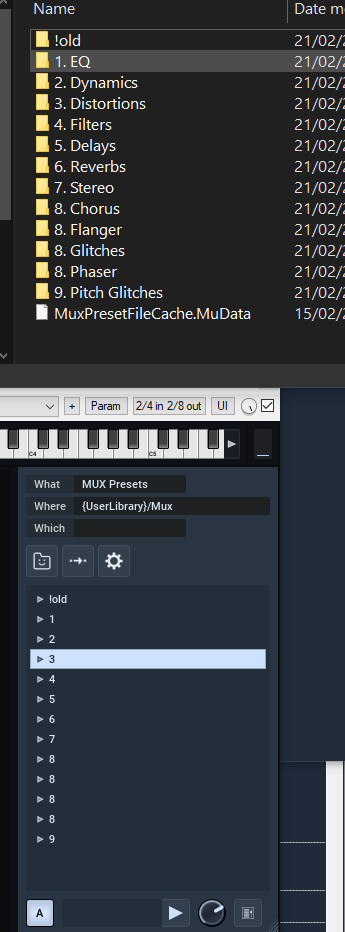
name bug for folders in the user presets:
I created this folders from explorer...

Image

Post

Compyfox wrote: Mon Feb 21, 2022 8:02 am Then I am confused as to why you wrote "Mulab 9 can be loaded as plugin now". From this I understand that MuLab (standalone) and MUX ("core" plugin) is the same code now and not separate tools anymore.
MuLab 9 App and MuLab 9 Plugin are conceptually/functionally the same but they still are 2 separate products just like MuLab 8 and MUX 8 Plugin. A user who only wants M9 stand-alone can buy a user key for only that, same for M9 Plugin. If you want to have both that option is there too.
But you mentioned several times on the forum at this point (realized it hours after I posted), that VST3 is on the radar sometime after M9. My only question would be, an estimated time-frame for that.
I can't comment or give an estimation on that atm. I'm focused on finishing M9.0. When M9.0 has been released (will still take several weeks before it can be released) and i've taken a deep breath, then i'll reflect on the next global steps, and the VST3 question is one of the topics then.

Post

digaldeman wrote: Mon Feb 21, 2022 5:40 pm Jo, I think Mulab should allow users to quickly copy all elements in a Scene to the Timeline, by simply dragging the Scene name to the Timeline.
Surely a logical request. It's on the wishlist. (M9.0 or M9.x, that's undecided atm)
Maybe I'm wrong but at the moment, we have to lasso each Sequence in the Scene then drag then to the Timeline. That's difficult when there are no empty slots.
FYI: You can also lasso bottom-up.

Post

HarmonicD wrote: Mon Feb 21, 2022 9:21 pm name bug for folders in the user presets:
I created this folders from explorer...
It's the point in the folder name that is confusing MuLab <-> extension point.
Please avoid points in folder names.

Post

mutools wrote: Mon Feb 21, 2022 11:12 pm MuLab 9 App and MuLab 9 Plugin are conceptually/functionally the same but they still are 2 separate products just like MuLab 8 and MUX 8 Plugin. A user who only wants M9 stand-alone can buy a user key for only that, same for M9 Plugin. If you want to have both that option is there too.
Apologies - but I'm still confused.

Does this mean there are three(!) products now?

MuLab 9 App (Standalone), MuLab 9 Plugin and eventually MUX Modular 9 as well?
Or will MUX Modular 9 now turn into MuLab 9 Plugin?
[ Mix Challenge ] | [ Studio Page / Twitter ] | [ KVRmarks (see: metering tools) ]

Post

Compyfox wrote: Tue Feb 22, 2022 7:45 am Apologies - but I'm still confused.

Does this mean there are three(!) products now?

MuLab 9 App (Standalone), MuLab 9 Plugin and eventually MUX Modular 9 as well?
Or will MUX Modular 9 now turn into MuLab 9 Plugin?
MUX Modular 9 = MuLab 9 Plugin
The name of the product had to be changed because the functionality increased, MuLab 9 plugin is pretty much the entire Mulab in vst form. So there are two products and Jo is evaluating the idea of adding a bundle of the two with lifetime free updates.

Post

Compyfox wrote: Tue Feb 22, 2022 7:45 am Apologies - but I'm still confused.
Does this mean there are three(!) products now?
MuLab 9 App (Standalone), MuLab 9 Plugin and eventually MUX Modular 9 as well?
Or will MUX Modular 9 now turn into MuLab 9 Plugin?
Indeed MUX Modular 8 has evolved into MuLab 9 Plugin.
So there only are 2 products.
And based on those 2 a bunch of upgrade, crossgrade and bundle products.
And possibly also a lifetime product, but that's still under evaluation.

Post

MuLab 9.0.26 is available in https://www.mutools.com/mulab/beta/m9

What's changed:
  • Tools -> Added option to upgrade rack presets.
  • Tools -> Upgrade MUX and rack presets: Finetuned dialog.
  • Non-looped MuClips that were saved from a clip that didn't start on 1.1.0 were not previewed as expected. Fixed.
  • Previewing MuClips that use an Audio Sequence didn't make sound. Fixed.
  • When saving MUX presets that contain a composer module, the composer module was not fully restored on reload. Fixed.
  • Inserting a Poly Synth module now again creates a Poly Synth with the very basic synth modules all ready. That was not the case anymore due to a recent new bug. Fixed.
  • When a VST plugin was set as project main module, things could go wrong, depending on the VST plugin. Fixed.
    Note that eventhough the fix it is not recommended to use a VST plugin as main module.
    Rather put it in a MUX and set that MUX as main module.
  • More options for diagnostic logging wrt VST plugins.
  • Other small improvements.
How to update MuLab 9 App:
Windows: Replace the current MuLab.exe and MuLab.ID by the new versions. (2 files in total)
MacOS: Replace the current MuLab.app by the new version. (1 file in total)

How to update MuLab 9 Plug-in:
Windows: Replace the current MuLab DLL and ID files by the new versions. (4 files in total)
MacOS: Replace the MuLab .VST files by the new versions. (2 files in total)

Post

What do you mean by "setting a vst as main module"?

Post

<deleted: that was meant to be the cancel button but everything's changed...>

Post Reply

Return to “MuTools”