

Where is Cubase 12.5 or 13? [Update: It's here C13 is released!]
-

- KVRian
- 755 posts since 20 Nov, 2000 from Valencia, Spain
-
- KVRist
- 410 posts since 9 Oct, 2013 from uk
Well, can't imagine this replacing HSO template, because that has all the percussion section and other stuff that Iconica (Sketch) doesn't provide for... Importantly by looks of it, one solitary violin isn't going to get folk that far anyway.! HSO is very much still needed.Trensharo wrote: Fri Sep 15, 2023 5:38 am Iconica Sketch - Great for sketching. I hope they release a new template for Dorico to integrate it there, as well - to replace HALion Symphonic Orchestra (I am assuming that Dorico 5.5 or 6 will eventually do that, anyways).
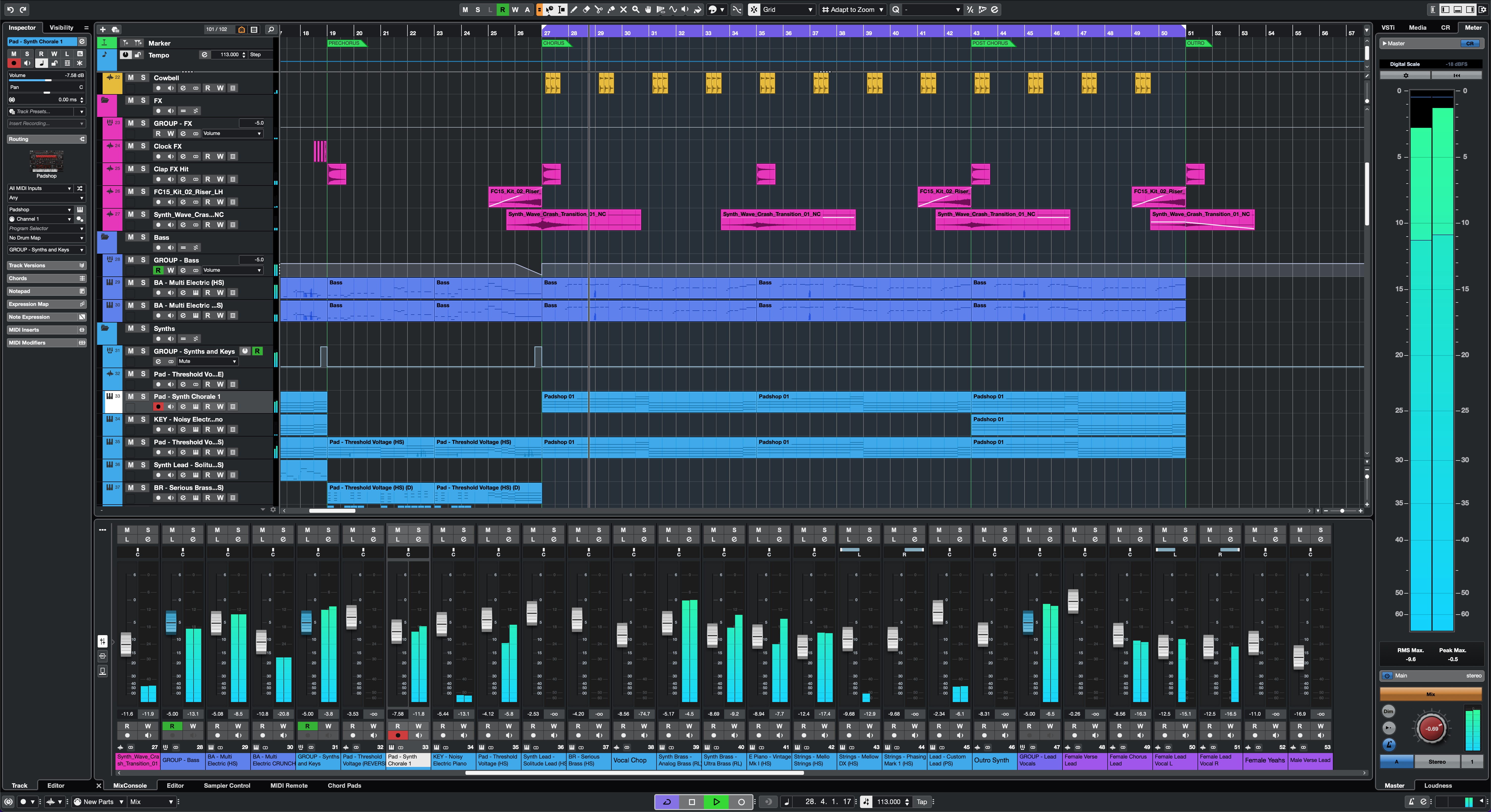
Looking at the screenshots:-
Vol/Pan controls on the Track Header (like Studio One) not implemented this time
No 'Gain Reduction' metering in the channel meters by looks of it (see S1, ProTools, Logic, Mixbus)
Couldn't see this new 'Channel Tab' as I'd hoped in the Lower Zone - must be something/somewhere else
We're still with those gradient colour fills. See the Metering/Control Room buttons in MixConsole screenshot.
Design language for VocalChain and Vocoder 'plugin' UI - both these seem dull/dated. Areas not well defined, understated use of colour... dare I say, not so 'modern' or forward thinking... Maybe they will be/feel better to use in real-life.!
Otherwise, I'll be buying straight away, of course...

Last edited by thebutler on Fri Sep 15, 2023 8:48 am, edited 1 time in total.
System 1 - Win11; i9 13900HK miniPC; 64Gb; Iris XE graphics; Cubase 15.0.10; Studio Pro v8.0.3;UR44 i/o
System 2 - Win10; i7 4790; 16Gb; GTX750Ti; Cubase v14.0.41; WLab Pro v12.0.51; StudioOne v6.6.4
System 2 - Win10; i7 4790; 16Gb; GTX750Ti; Cubase v14.0.41; WLab Pro v12.0.51; StudioOne v6.6.4
-
- KVRian
- 755 posts since 20 Nov, 2000 from Valencia, Spain
They also modernized some parts that still remained from the Cubase SX era, such as the upper Inspector area.

Last edited by Sahul on Fri Sep 15, 2023 8:16 am, edited 1 time in total.
-
- KVRian
- 755 posts since 20 Nov, 2000 from Valencia, Spain
-
- KVRian
- 755 posts since 20 Nov, 2000 from Valencia, Spain
Yes, the new Channel Tab seems to be this one:thebutler wrote: Fri Sep 15, 2023 7:25 am Couldn't see this new 'Channel Tab' as I'd hoped in the Lower Zone - must be something/somewhere else

-
- KVRist
- 410 posts since 9 Oct, 2013 from uk
Ah.! Thanks... where/how do you access this feature please.?
System 1 - Win11; i9 13900HK miniPC; 64Gb; Iris XE graphics; Cubase 15.0.10; Studio Pro v8.0.3;UR44 i/o
System 2 - Win10; i7 4790; 16Gb; GTX750Ti; Cubase v14.0.41; WLab Pro v12.0.51; StudioOne v6.6.4
System 2 - Win10; i7 4790; 16Gb; GTX750Ti; Cubase v14.0.41; WLab Pro v12.0.51; StudioOne v6.6.4
-
- KVRist
- 410 posts since 9 Oct, 2013 from uk
Sahul wrote: Fri Sep 15, 2023 8:01 am They also modernized some parts that still remained from the Cubase SX era, such as the upper Inspector area.
 Yes, and about time.!
Looking S1-esque now...

System 1 - Win11; i9 13900HK miniPC; 64Gb; Iris XE graphics; Cubase 15.0.10; Studio Pro v8.0.3;UR44 i/o
System 2 - Win10; i7 4790; 16Gb; GTX750Ti; Cubase v14.0.41; WLab Pro v12.0.51; StudioOne v6.6.4
System 2 - Win10; i7 4790; 16Gb; GTX750Ti; Cubase v14.0.41; WLab Pro v12.0.51; StudioOne v6.6.4
-
- KVRian
- 755 posts since 20 Nov, 2000 from Valencia, Spain
If you look at the main window screenshot, there is a new icon at the upper right to open it, first one starting from the left.thebutler wrote: Fri Sep 15, 2023 8:24 am Ah.! Thanks... where/how do you access this feature please.?
-
- KVRist
- 410 posts since 9 Oct, 2013 from uk
Got you now... ta...
Probably not so helpful for me, over my usual workflow of having the Channel Settings window open (on 2nd screen)... presumably, this 'Channel Tab' opens as a strip along/inside the left-zone.? More designed to help those on laptop/single screen use - which I can imagine would be good...

Last edited by thebutler on Fri Sep 15, 2023 9:09 am, edited 1 time in total.
System 1 - Win11; i9 13900HK miniPC; 64Gb; Iris XE graphics; Cubase 15.0.10; Studio Pro v8.0.3;UR44 i/o
System 2 - Win10; i7 4790; 16Gb; GTX750Ti; Cubase v14.0.41; WLab Pro v12.0.51; StudioOne v6.6.4
System 2 - Win10; i7 4790; 16Gb; GTX750Ti; Cubase v14.0.41; WLab Pro v12.0.51; StudioOne v6.6.4
-
- KVRAF
- 3339 posts since 19 Mar, 2008 from germany
Mmmmhhh, well, I think the left side looks better. The content is easierSahul wrote: Fri Sep 15, 2023 8:01 am They also modernized some parts that still remained from the Cubase SX era, such as the upper Inspector area.
to grasp and is easier on the eye.

Am I the only one who feels this way?

free mp3s + info: andy-enroe.de songs + weird stuff: enroe.de
-
- KVRian
- 906 posts since 25 Jan, 2014
I would say the left looks better but the right is more consistent with the rest of the software. I would add they both look uglyenroe wrote: Fri Sep 15, 2023 9:04 amMmmmhhh, well, I think the left side looks better. The content is easierSahul wrote: Fri Sep 15, 2023 8:01 am They also modernized some parts that still remained from the Cubase SX era, such as the upper Inspector area.
to grasp and is easier on the eye.
Am I the only one who feels this way?

-
AdvancedFollower AdvancedFollower https://www.kvraudio.com/forum/memberlist.php?mode=viewprofile&u=418780
- KVRian
- 1342 posts since 8 May, 2018 from Sweden
I'm not a huge fan of the "flat" fad in UI design, but at least it looks more consistent now since most of the rest of the GUI had already transitioned to this style.
Take a single oscillator, producing a drone. Send it to the wave shaper, altering the tone.
This can be a triangle, Sawtooth or a square. Modulate the pulse width, nobody will care
This can be a triangle, Sawtooth or a square. Modulate the pulse width, nobody will care
-
- KVRist
- 410 posts since 9 Oct, 2013 from uk
Yes, ok I agree - the new has also lost a bit of personality... mind, it is a twenty-year old design. We have to move on.enroe wrote: Fri Sep 15, 2023 9:04 am Mmmmhhh, well, I think the left side looks better. The content is easier
to grasp and is easier on the eye.
Am I the only one who feels this way?
Also, how often are you actually rummaging around in here and not doing those things elsewhere anyway (channel settings, mixer channel).? Also, you'll surprise yourself... its amazing how quickly you'll become accustomed.
 no workflow killer involved here...
Don't let yourself get a 'thing' about it... 100% no going back...

System 1 - Win11; i9 13900HK miniPC; 64Gb; Iris XE graphics; Cubase 15.0.10; Studio Pro v8.0.3;UR44 i/o
System 2 - Win10; i7 4790; 16Gb; GTX750Ti; Cubase v14.0.41; WLab Pro v12.0.51; StudioOne v6.6.4
System 2 - Win10; i7 4790; 16Gb; GTX750Ti; Cubase v14.0.41; WLab Pro v12.0.51; StudioOne v6.6.4