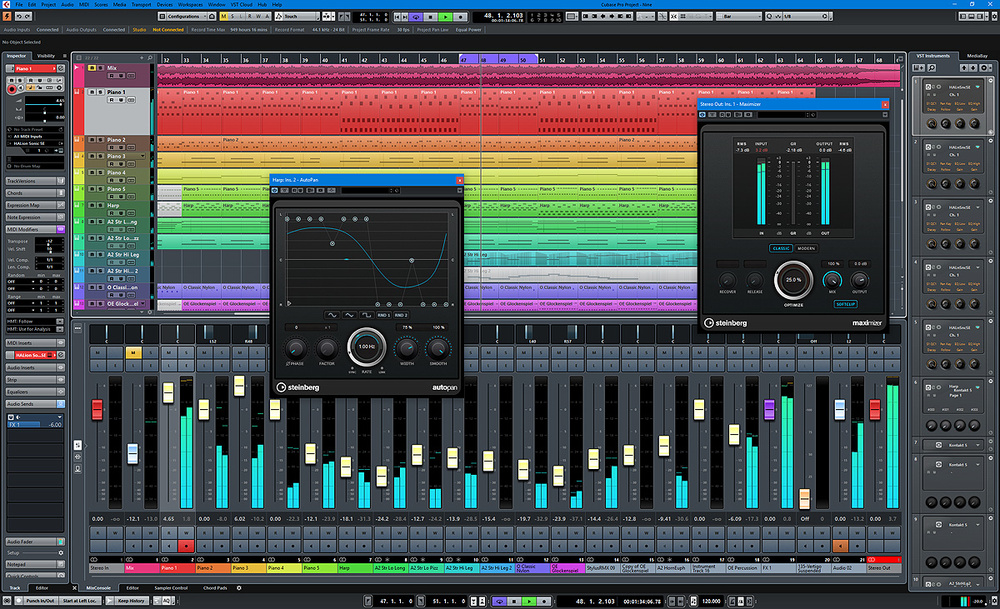
Where is Cubase 12.5 or 13? [Update: It's here C13 is released!]

Audio Plugin Hosts and other audio software applications discussion
Post Reply New Topic
RELATED
PRODUCTS

Post

AdvancedFollower wrote: Fri Sep 15, 2023 1:27 pm
VitaminD wrote: Fri Sep 15, 2023 12:16 pmI'm afraid we're going to a more generic look and feel though. Will 'DAW' software become like SUVs have in all looking essentially the same?
Well it does make it easier to jump from DAW to DAW which saves time and money (for professionals).
That can't be the argument though, can it?

I think it's just a design pattern these days. A fashion.

Post

AdvancedFollower wrote: Fri Sep 15, 2023 1:27 pm
VitaminD wrote: Fri Sep 15, 2023 12:16 pmI'm afraid we're going to a more generic look and feel though. Will 'DAW' software become like SUVs have in all looking essentially the same?
Well it does make it easier to jump from DAW to DAW which saves time and money (for professionals). When I switched from Studio One to Cubase I felt right at home. I immediately knew how to do most basic things, even if I wasn't aware of the most efficient or quick way to do some things.
Yeah I thought that too after I posted, but then it goes the other way as well -- If it is easy to pick up your software it is easy to move to another. So it is two sided.

I like Cubase to be Cubase. I like it to look like Cubase and function like Cubase. If I wanted to interact with a software that looks like Studio One, I'd just go use Studio One. But I don't. I like Cubase for it being Cubase.

I just hope Steinberg doesn't go the route of blending in for the sake of it. The world is slowly going beige/grey and that's sad. One of the beauties of design is in the differences.

Post

thebutler wrote: Fri Sep 15, 2023 12:01 pm
Trensharo wrote: Fri Sep 15, 2023 11:23 am One solitary violin. I don't even know what that is supposed to mean...
Ok, forgive my ignorance... haven't seen anything yet of course.

Was only (naively) going on the screenshot link that was posted .. :ud: where did you see that Iconica Sketch has 30+ different instruments.!?
If you have read the patch note cited upthread:
ORCHESTRAL LIBRARΥ
Sketch out your scores
Iconica Sketch allows everyone from beginners to professional composers to create full orchestral scores of the highest quality with 140 articulations for 34 instruments in a compact 5GB library.
(PRO-ARTIST-ELEMENTS)
Basically, it's a compact version from Iconica comparable to libraries like Amadeus Symphonic, HALion Symphonic, PreSonus Symphonic, etc. for sketching.

I highly doubt they would just omit percussion from that. 34 is enough for all sections and some solo instruments for a full orchestral sketching template.

It's not going to be "amazing," but it should be usable for its intended purpose and I expect it to replace HSO in Dorico Pro. I just hope they backport the Playback Template to v5 (or add it in an update after Cubase 13 is released).

If I said you are blocked, I won't see your posts. Please kindly refrain from quoting or replying to me.
"Notifications for Nothing" are annoying. Blocking me in return is a good way to avoid this.


Post

ORCHESTRAL LIBRARΥ
Sketch out your scores
Iconica Sketch allows everyone from beginners to professional composers to create full orchestral scores of the highest quality with 140 articulations for 34 instruments in a compact 5GB library.
(PRO-ARTIST-ELEMENTS)
"create full orchestral scores of the highest quality" could hardly be called a "sketch".
Funny marketing people :D

Post

In one screenshot I saw somewhere, it looked like the track list under the Visibility tab finally has either a smaller font or is wider so that the track names aren't cut off. Before, the font was too huge compared to the track list in PT for example. Looks like they also added an icon on the right to show what kind of track it is (MIDI, etc).

Post

Trensharo wrote: Fri Sep 15, 2023 2:00 pm If you have read the patch note cited upthread:
:dog:

thanks for your patience... :wink:

I must read more slowly, and pay more attention.
System 1 - Win11; i9 13900HK miniPC; 64Gb; Iris XE graphics; Cubase 15.0.10; Studio Pro v8.0.3;UR44 i/o
System 2 - Win10; i7 4790; 16Gb; GTX750Ti; Cubase v14.0.41; WLab Pro v12.0.51; StudioOne v6.6.4

Post

Don't worry. Useful info can quickly go under in such threads. ;)

Post

T-CM11 wrote: Fri Sep 15, 2023 1:35 pm
Scotty wrote: Fri Sep 15, 2023 1:22 pm The routing of instruments available to audio inputs is the feature I’ve been wanting. I use the bouncing and reimport function now but this is going to help with my external instruments for sure. Looks like a great update.
Maybe this is something else or differently implemented, but it was always possible (Pro version only) to route any track to a FX/Group track and use that as an audio input. :shrug:
It looks like the new routing will allow you to directly route an instrument track to an audio track - without having to set it to go through a group first.
My milkshake brings all the girls to the yard

http://soundcloud.com/the-boogee-man

Post

enroe wrote: Fri Sep 15, 2023 9:04 am
Sahul wrote: Fri Sep 15, 2023 8:01 am They also modernized some parts that still remained from the Cubase SX era, such as the upper Inspector area.

Image
Mmmmhhh, well, I think the left side looks better. The content is easier
to grasp and is easier on the eye. :o

Am I the only one who feels this way? :scared:
I agree.

Post

chk071 wrote: Fri Sep 15, 2023 1:36 pm
AdvancedFollower wrote: Fri Sep 15, 2023 1:27 pm
VitaminD wrote: Fri Sep 15, 2023 12:16 pmI'm afraid we're going to a more generic look and feel though. Will 'DAW' software become like SUVs have in all looking essentially the same?
Well it does make it easier to jump from DAW to DAW which saves time and money (for professionals).
That can't be the argument though, can it?

I think it's just a design pattern these days. A fashion.
I don't think it's the reason, but it is one advantage of having a uniform design language.
Of course UI design follows certain fashion trends but I don't think that's anything new. In the Win9x/MacOS 9 era, everything was grey and boxy, in the XP era it was bubbly and colorful, in the Vista/7 era everything was translucent and reflective, and now everything is flat and minimalist.
Take a single oscillator, producing a drone. Send it to the wave shaper, altering the tone.
This can be a triangle, Sawtooth or a square. Modulate the pulse width, nobody will care

Post

AdvancedFollower wrote: Fri Sep 15, 2023 10:09 am Personally I think Cubase 9 hit the sweet spot. It's more subdued but they hadn't yet made everything completely flat and monochromatic. I especially like how events in the sequencer have a bit of gradient so they "pop" more.
Image
I on the other hand think this is even worse... it's neither fish nor flesh somehow... and really bland.

Post

rageix wrote: Wed Sep 13, 2023 12:08 am
Ou_Tis wrote: Tue Sep 12, 2023 11:01 pm Any word on features yet?
3. Range select in the piano roll, like in Ableton.
5. Easier way to setup automation lanes. Like click vst param to create lane like in Ableton.

I am however prepared for disappointment.
I hope not. Automation Lanes and Piano Roll in Ableton to me is a PITA and the biggest reason why I don't use it (and I got a Live Suite license laying around collecting dust).

I think their automation lanes are fine.

Post

AdvancedFollower wrote: Fri Sep 15, 2023 2:31 pm
chk071 wrote: Fri Sep 15, 2023 1:36 pm
AdvancedFollower wrote: Fri Sep 15, 2023 1:27 pm
VitaminD wrote: Fri Sep 15, 2023 12:16 pmI'm afraid we're going to a more generic look and feel though. Will 'DAW' software become like SUVs have in all looking essentially the same?
Well it does make it easier to jump from DAW to DAW which saves time and money (for professionals).
That can't be the argument though, can it?

I think it's just a design pattern these days. A fashion.
I don't think it's the reason, but it is one advantage of having a uniform design language.
Of course UI design follows certain fashion trends but I don't think that's anything new. In the Win9x/MacOS 9 era, everything was grey and boxy, in the XP era it was bubbly and colorful, in the Vista/7 era everything was translucent and reflective, and now everything is flat and minimalist.
I understand the advantage/necessity of uniformity, or conforming to the design language of the OS, for example, but, I'm pretty sure that they don't do it, because it makes using competitive products easier.

And, there definitely seem to be certain design trends as well.

Post

Sahul wrote: Wed Sep 13, 2023 8:53 am
thebutler wrote: Wed Sep 13, 2023 8:26 am
felis wrote: Tue Sep 12, 2023 10:48 pm Jan. 19, 2022 - official statement:

https://helpcenter.steinberg.de/hc/en-u ... scontinued

:....Moreover, within the next 24 months, Steinberg's host applications and plug-ins across macOS and Windows will offer VST 3 compatibility only...."

I've got three vst2 left. everything else is vst3. The one I'm most nervous about is impOSCar2 which is due to be updated. I hope they hurry up.
Leave all anxieties aside...
1. Cubase 12 will keep working the same if you update (it doesn't get uninstalled/replaced)
2. try to hold off updating straight away, see what others are saying - difficult one I know...!
What surprises me is that, at this point, and knowing in advance that Steinberg would remove VST2 support in two years, still a transparent VST2>VST3 wrapper hasn't been released by any third-party developer.
There is one. Blue Cat Audio Patchwork. It has a bunch of functionality and does chains as well. Pretty good product.

Post

bysbox1 wrote: Fri Sep 15, 2023 3:04 pm I hope not. Automation Lanes and Piano Roll in Ableton to me is a PITA and the biggest reason why I don't use it (and I got a Live Suite license laying around collecting dust).

I think their automation lanes are fine.
I agree with you that generally speaking the Piano Roll in Ableton does suck compared to most DAWs out there, but it does do some things right. Like it has range select! Which I'm glad to see coming in Cubase 13 because honestly the way you have to copy and paste midi notes in Cubase is terrible.

But the automation lanes are way better in Ableton. If I want to get a clean automation lane in Ableton all I have to do is click on the parameter I want to automate, and wala! In Cubase if I want a clean automation lane I have to click the write button, start playback, click the parameter I want to automate, stop playback, then Ctrl+z to undo what it just wrote. It makes zero sense, and harder than basically any DAW I've ever used. It's very annoying.

Post Reply

Return to “Hosts & Applications (Sequencers, DAWs, Audio Editors, etc.)”