


RapidComposer v5 beta feedback and discussion
-
 musicdevelopments musicdevelopments https://www.kvraudio.com/forum/memberlist.php?mode=viewprofile&u=223336
 - KVRAF
- Topic Starter
- 6009 posts since 9 Jan, 2010
RapidComposer v5.5b11 is available!
Minor changes in this update.
Improvements:
Minor changes in this update.
Improvements:
- Filtering by key is possible for keyboard shortcuts
- New menu item: Save as default for 'New Composition'
https://www.musicdevelopments.com
Home of RapidComposer, Melodya, MIDI Mutator and Syne
Summer Sale • June 3-15 • 40% off RapidComposer, Melodya, MIDI Mutator, Syne
Home of RapidComposer, Melodya, MIDI Mutator and Syne
Summer Sale • June 3-15 • 40% off RapidComposer, Melodya, MIDI Mutator, Syne
-
- KVRAF
- 2150 posts since 15 May, 2017
Thanks man, may all your wishes come true!
-
- KVRAF
- 2150 posts since 15 May, 2017
Yes indeed! This is why that function is so important! Look at all my CTRL-A's! lol
It took me a sec to realize that it didn't actually search on CRTl-A, but, the Character 'A', which, I guess is ok. Still can fix conflicts much easier now..., again thanks.

It took me a sec to realize that it didn't actually search on CRTl-A, but, the Character 'A', which, I guess is ok. Still can fix conflicts much easier now..., again thanks.
-
- KVRer
- 3 posts since 23 Mar, 2019
AUTO-ADMIN: Non-MP3, WAV, OGG, SoundCloud, YouTube, Vimeo, Twitter and Facebook links in this post have been protected automatically. Once the member reaches 5 posts the links will function as normal.
RC already enough unique.Fast paint draw.
 (https://ibb.co/RG3rvbKS)
 (https://ibb.co/8gzmTP7f)
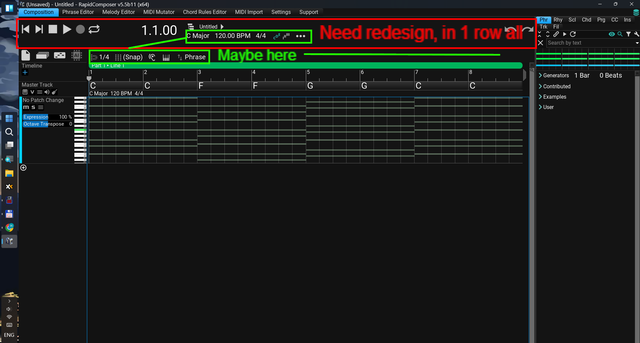 (https://ibb.co/s9jNgdBc)
-
musicdevelopments musicdevelopments https://www.kvraudio.com/forum/memberlist.php?mode=viewprofile&u=223336
- KVRAF
- Topic Starter
- 6009 posts since 9 Jan, 2010
Yes, it looks for the key without any modifiers.BluGenes wrote: Fri Mar 21, 2025 11:54 pm It took me a sec to realize that it didn't actually search on CRTl-A, but, the Character 'A', which, I guess is ok. Still can fix conflicts much easier now..., again thanks.
It is no problem to have multiple Ctrl-A shortcuts as they all work in different keyboard focus areas.
Thanks,
Attila
https://www.musicdevelopments.com
Home of RapidComposer, Melodya, MIDI Mutator and Syne
Summer Sale • June 3-15 • 40% off RapidComposer, Melodya, MIDI Mutator, Syne
Home of RapidComposer, Melodya, MIDI Mutator and Syne
Summer Sale • June 3-15 • 40% off RapidComposer, Melodya, MIDI Mutator, Syne
-
- KVRist
- 72 posts since 28 Jul, 2014
As far as I know every articulated note should have 2 different note values. One related to the note's actual value and one related to the keyswitch that note enables. For example a sustain C4 note should have a value C4 and another one C1 (keyswitch for activating sustain). But I checked the output value for note C4 in ShowMIDI and found out only C4 is displayed in it. If this is true, how can I enable keyswitch for separate notes that Kontakt can feel it?
-
- KVRAF
- 2150 posts since 15 May, 2017
If using R-Tic, it's possible the range is set wrong. You can move the range for the key switches by octaves. I forget which way it moves, but, Kontact was always an octave off from what RC uses.foster911 wrote: Tue Mar 25, 2025 6:52 pm As far as I know every articulated note should have 2 different note values. One related to the note's actual value and one related to the keyswitch that note enables. For example a sustain C4 note should have a value C4 and another one C1 (keyswitch for activating sustain). But I checked the output value for note C4 in ShowMIDI and found out only C4 is displayed in it. If this is true, how can I enable keyswitch for separate notes that Kontakt can feel it?
-
- KVRist
- 72 posts since 28 Jul, 2014
Thanks I could solve it. For it to work without problems, I had to hit the play button to apply it. I was selecting the note and review it without pressing the play button.BluGenes wrote: Tue Mar 25, 2025 8:48 pmIf using R-Tic, it's possible the range is set wrong. You can move the range for the key switches by octaves. I forget which way it moves, but, Kontact was always an octave off from what RC uses.foster911 wrote: Tue Mar 25, 2025 6:52 pm As far as I know every articulated note should have 2 different note values. One related to the note's actual value and one related to the keyswitch that note enables. For example a sustain C4 note should have a value C4 and another one C1 (keyswitch for activating sustain). But I checked the output value for note C4 in ShowMIDI and found out only C4 is displayed in it. If this is true, how can I enable keyswitch for separate notes that Kontakt can feel it?
-
- KVRAF
- 2150 posts since 15 May, 2017
Hey Atilla!
When collapsing the keyboard shortcuts in settings they disappear. You have maximize all to return them to view. Same when single clicking the elements..
edit: never mind, it's working again. I just relaunched RC and it works now.. so, maybe a bug there for sure.
second edit: oops, the search field wasn't empty, so it working correctly..
edit #3: yes it is a bug. It happens after you search for a key character, the new search.
When collapsing the keyboard shortcuts in settings they disappear. You have maximize all to return them to view. Same when single clicking the elements..
edit: never mind, it's working again. I just relaunched RC and it works now.. so, maybe a bug there for sure.
second edit:
oops, the search field wasn't empty, so it working correctly..edit #3: yes it is a bug. It happens after you search for a key character, the new search.
-
- KVRAF
- 2150 posts since 15 May, 2017
Thanks Atilla! Bug is fixed..
hey all! It's not announced, but, you can update RC (V5.5 to v5.5.1) with a maintenance patch now.
hey all! It's not announced, but, you can update RC (V5.5 to v5.5.1) with a maintenance patch now.
-
- KVRAF
- 1752 posts since 30 Nov, 2013
I would really like to have a command and keyboard shortcut "replace master track chord from phrase", i.e. calculate a chord or chords and replace the master track chord or chords from any phrase in the composition without using the command "Convert to relative form / Replace Master Track Chord". Thank you.
-
- KVRist
- 119 posts since 29 Oct, 2024
Hey gang, sorry I don't know where the proper place to post questions is.
Is there a way to have nested "folders" for instrument presets?
I'm using RC mostly as a standalone, then take comp to DAW.
As a result, I'm creating ALOT of Instrument presets that I then make Track Templates from for ease of loading.
With Track Templates you can create folders with the Finder to organize.
With Instrument presets you have to use the "group" keyword but that only nests one level.
I'm finding myself wanting to organize deeper, multiple levels. Is this possible?
I'm wishing that instrument presets could be organized by folders I guess.
Is there a way to have nested "folders" for instrument presets?
I'm using RC mostly as a standalone, then take comp to DAW.
As a result, I'm creating ALOT of Instrument presets that I then make Track Templates from for ease of loading.
With Track Templates you can create folders with the Finder to organize.
With Instrument presets you have to use the "group" keyword but that only nests one level.
I'm finding myself wanting to organize deeper, multiple levels. Is this possible?
I'm wishing that instrument presets could be organized by folders I guess.
-
musicdevelopments musicdevelopments https://www.kvraudio.com/forum/memberlist.php?mode=viewprofile&u=223336
- KVRAF
- Topic Starter
- 6009 posts since 9 Jan, 2010
Hi heliacal,
good question. You are right that "group" must be used for hierarchy for instruments.
It works in the browser, however I found that the instrument menu does not correctly show the groups as sub-menus. If this is important for you, I'll fix this ASAP.
You can use backslash to make sub-groups:

Thanks,
Attila
good question. You are right that "group" must be used for hierarchy for instruments.
It works in the browser, however I found that the instrument menu does not correctly show the groups as sub-menus. If this is important for you, I'll fix this ASAP.
You can use backslash to make sub-groups:
Thanks,
Attila
https://www.musicdevelopments.com
Home of RapidComposer, Melodya, MIDI Mutator and Syne
Summer Sale • June 3-15 • 40% off RapidComposer, Melodya, MIDI Mutator, Syne
Home of RapidComposer, Melodya, MIDI Mutator and Syne
Summer Sale • June 3-15 • 40% off RapidComposer, Melodya, MIDI Mutator, Syne