New: Dusty Devices Radiation [Rack Extension]

VST, AU, AAX, CLAP, etc. Plugin Virtual Effects Discussion
RELATED
PRODUCTS

Post

Image

https://www.reasonstudios.com/shop/rack-extension/radiation/

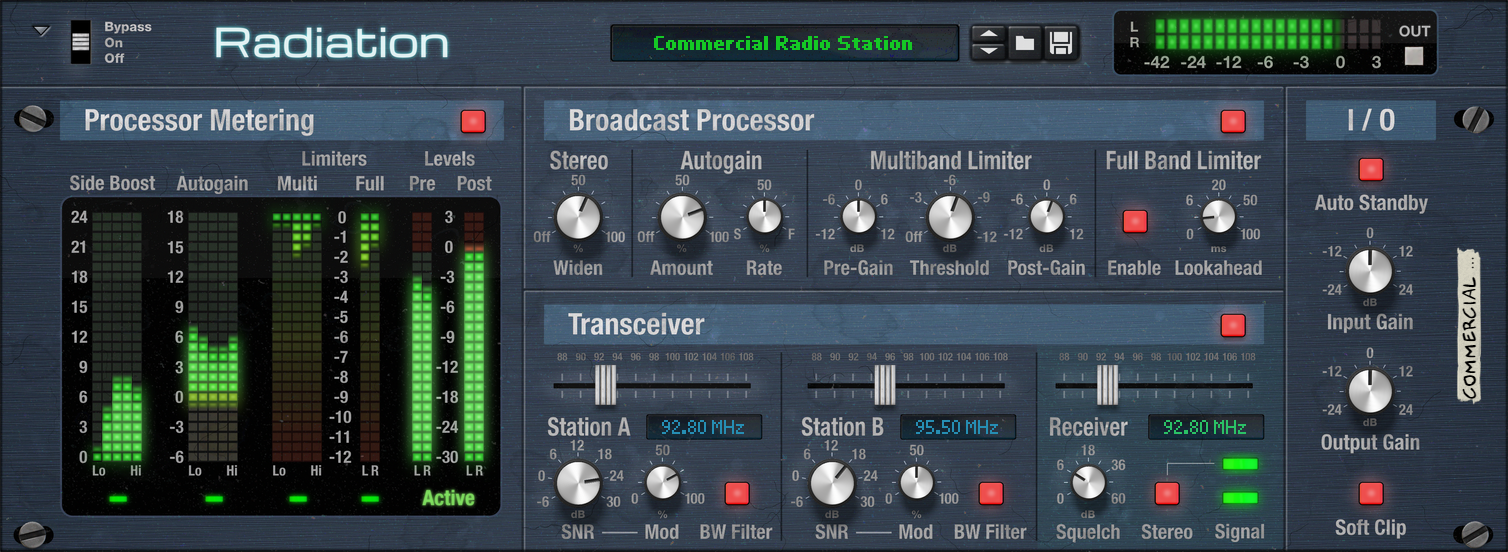
Radiation is an FM radio simulation effect for Reason. Radiation features a simple but powerful Broadcast Processor to enhance the audio levels, and two simulated FM transmitters and an FM receiver to tune your radio however you like.

The Broadcast Processor can be used alone to sculpt sounds in a mix, and to bring extra power in the master. The Transceiver offers full control of the FM stage from start to finish, letting you decide whether you want a pristine radio station sound quality, or two stations that interfere with each other.

Post

VST3 thx :D
Soft Knees - Live 12, Diva, Omnisphere, Slate Digital VSX, TDR, Kush Audio, U-He, PA, Valhalla, Fuse, Pulsar AUDIO, NI, OekSound etc. on Win11Pro R7950X & RME AiO Pro
https://www.youtube.com/@softknees/videos Music & Demoscene

Post

Yeah, would love VST of Needle! :hyper:
A well-behaved signature.

Post

legendCNCD wrote: Tue May 12, 2026 9:30 am VST3 thx :D
The todo list lengthens!
JerGoertz wrote: Wed May 13, 2026 8:13 pm Yeah, would love VST of Needle! :hyper:
I hear you! Resources are scarce but I'll do what I can.

Post

Would this be able to work in audacity?

Post

dakotaz wrote: Thu May 14, 2026 5:30 am Would this be able to work in audacity?
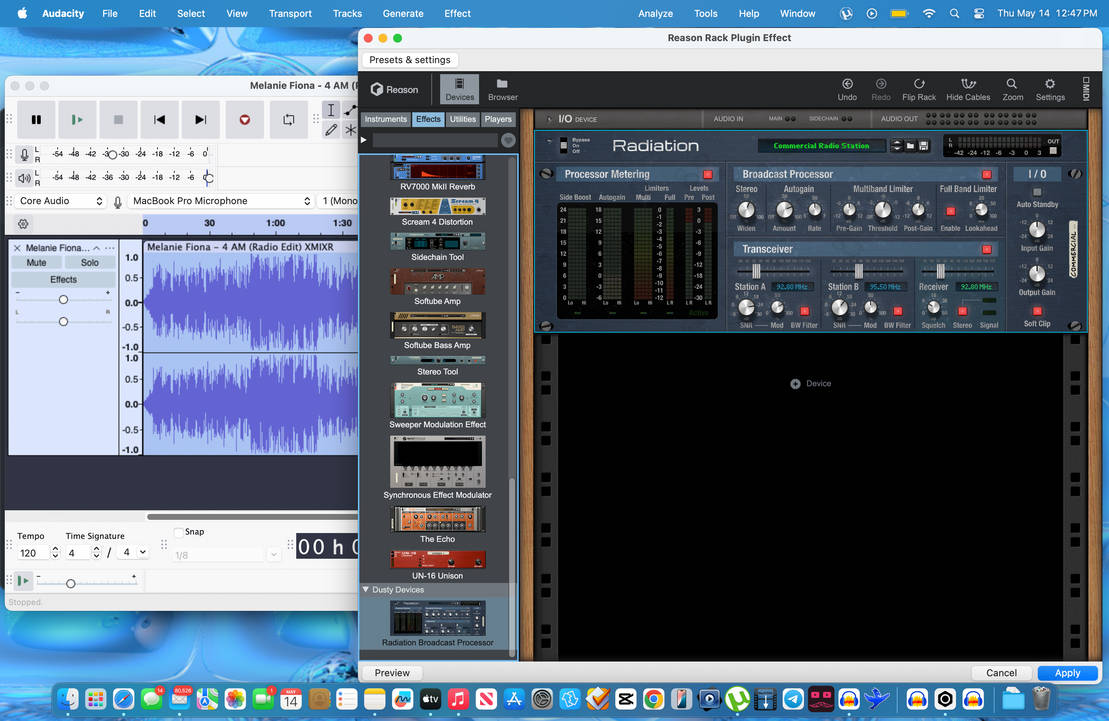
Yes, although it requires having a Reason Rack license, so in Audacity you can run the Reason Rack VST which then runs Radiation.

Post

jakke wrote: Thu May 14, 2026 12:20 pm
dakotaz wrote: Thu May 14, 2026 5:30 am Would this be able to work in audacity?
Yes, although it requires having a Reason Rack license, so in Audacity you can run the Reason Rack VST which then runs Radiation.
How do I get the effect to work? I’m using the trial version. Whenever I apply it to whatever song I imported it’s just static.

Post

dakotaz wrote: Thu May 14, 2026 4:00 pm How do I get the effect to work? I’m using the trial version. Whenever I apply it to whatever song I imported it’s just static.
When you create Radiation in the Reason Rack plugin, it should automatically route the cables to Radiation's Station A input and Output. The signal then passes the Broadcast Processor and then the Transceiver. Can you explain your setup more specifically?

Post

dakotaz wrote: Thu May 14, 2026 4:00 pm
How do I get the effect to work? I’m using the trial version. Whenever I apply it to whatever song I imported it’s just static.
I'm getting this too, I just opened empty reason rack plugin and added this effect from the browser. The default preset just sounds like radio static, and playing with the transceiver frequencies it's like it's impossible to tune into the station.. Turning off the transceiver bypasses the problem and the processor part works.

Post

pchase wrote: Thu May 14, 2026 7:23 pm
dakotaz wrote: Thu May 14, 2026 4:00 pm
How do I get the effect to work? I’m using the trial version. Whenever I apply it to whatever song I imported it’s just static.
I'm getting this too, I just opened empty reason rack plugin and added this effect from the browser. The default preset just sounds like radio static, and playing with the transceiver frequencies it's like it's impossible to tune into the station.. Turning off the transceiver bypasses the problem and the processor part works.
That's weird. The Station A and Receiver should be tuned to the same frequency (92.8 MHz) by default, and Ctrl/Cmd-clicking the frequency displays or the frequency sliders should reset them both to 92.8 MHz.

Post

jakke wrote: Thu May 14, 2026 4:37 pm
dakotaz wrote: Thu May 14, 2026 4:00 pm How do I get the effect to work? I’m using the trial version. Whenever I apply it to whatever song I imported it’s just static.
When you create Radiation in the Reason Rack plugin, it should automatically route the cables to Radiation's Station A input and Output. The signal then passes the Broadcast Processor and then the Transceiver. Can you explain your setup more specifically?
This is what I'm working with Image

I'm probably not doing this right...

Post


Post

pchase wrote: Thu May 14, 2026 8:19 pm https://files.catbox.moe/45dup7.mp4
That's strange, something's not working properly indeed. I'm gonna have to investigate what might be going on here.

Thanks for the video!

Post

If it helps I'm using macos 26.4.1 with an M4

Post

jakke wrote: Thu May 14, 2026 8:31 pm
pchase wrote: Thu May 14, 2026 8:19 pm https://files.catbox.moe/45dup7.mp4
That's strange, something's not working properly indeed. I'm gonna have to investigate what might be going on here.

Thanks for the video!
Any luck on figuring out what could be going on and how to fix it?

Post Reply

Return to “Effects”