

Does anyone know whether in version 1.5
- successive drum patterns can be triggered from avenger in live play (song mode)?
- arps can be exported/imported in logic?
Thanks!

Vengeance Producer Suite - AVENGER - 1.8.5 the main thread
-

- vvvvvvv
- 2595 posts since 24 Oct, 2000 from skelmersdale, west lancs, uk
@yesman
Play your arp in avenger
then record the output to another midi track.
It'll record the arp for you.
re exportarps can be exported/imported in logic?
Play your arp in avenger
then record the output to another midi track.
It'll record the arp for you.
Member 12, Studio One Pro 7, VPS Avenger, Kontakt 8, Spitfire, Sonible, Baby Audio, CableGuys. Recent best buy - EZ Drummer 3 with Bandmate
-
- KVRist
- 63 posts since 3 Apr, 2004
May i ask you about the procedure for picking the expansions?Ryan99 wrote: Sat Dec 14, 2019 8:30 pm
Previous sale, I bought 2 X 5 pack of expansions at Sweetwater. I used 3 of 10, only to find a couple of days later that they were unlocked and available for free.
I mean you buy from Sweetwater the package of 5 expansions and then how you can choose which expansion you want?
Or are they giving you random expansions?
Thank you in advance!!
-
- KVRAF
- 2418 posts since 9 Nov, 2016
You get 5 slots on your Vengeance account where you can pick any expansion at any time.
-
- KVRist
- 63 posts since 3 Apr, 2004
You mean in my VPS account? And how they unlock it without knowing my user name or email?Stefken wrote: Tue Dec 17, 2019 5:10 pm You get 5 slots on your Vengeance account where you can pick any expansion at any time.
Sorry for asking but i want to be sure.....
-
- KVRist
- 256 posts since 9 Jun, 2018
They don't need to know. They just send you a code via email. You then log in to your Vengeance account, and there's a section to redeem product codes. Paste it in there and hit submit. Then it will show you 5 slots to pick your expansions, and you can pick them whenever. It's really not all that complicated.
-
- KVRist
- 299 posts since 15 Dec, 2019
I really like this free Nextgen skin that was shared by the author in the Avenger facebook group. Sorry, if it has been already mentioned here.
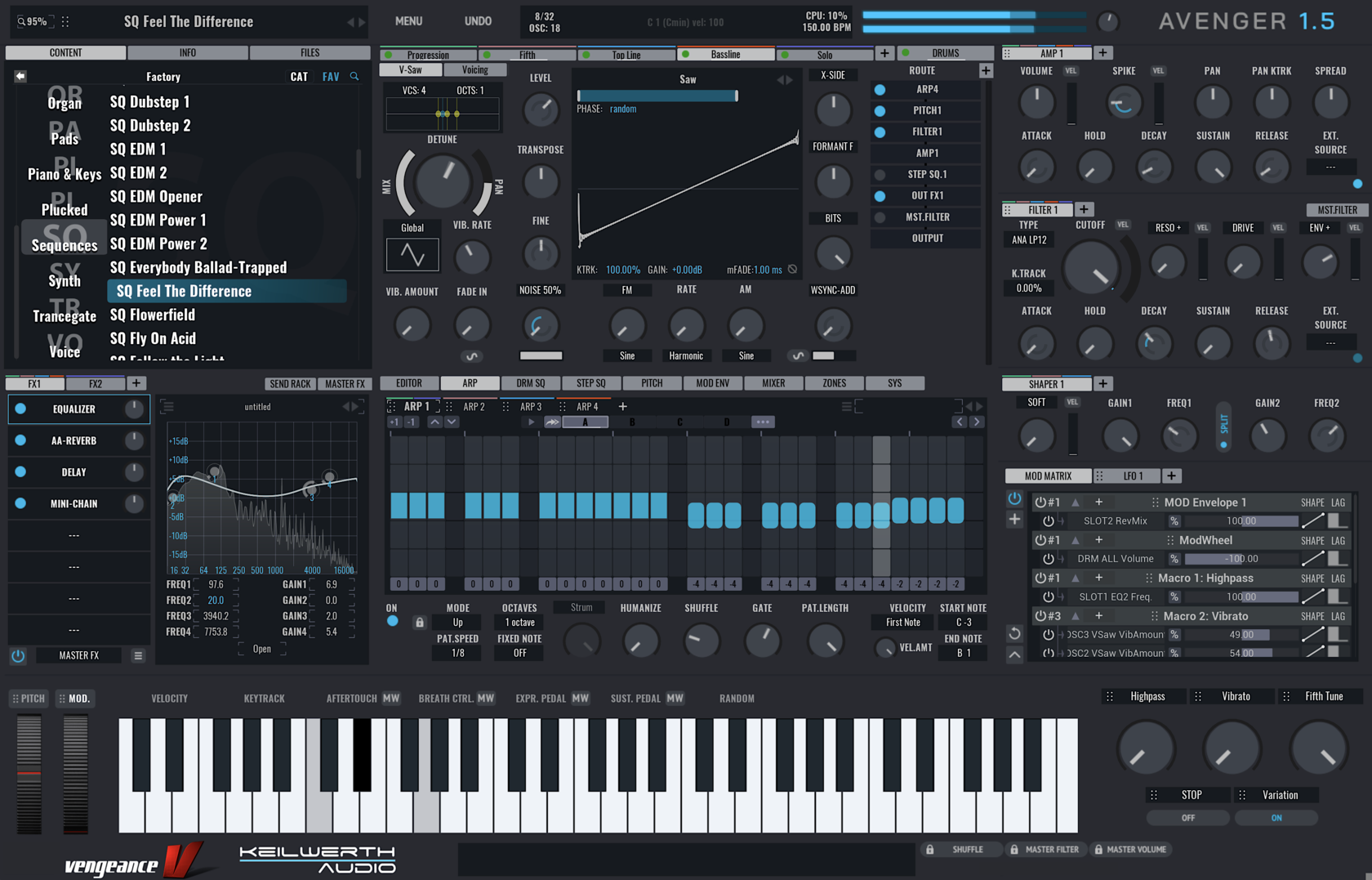
-
- KVRist
- 63 posts since 3 Apr, 2004
Thank you very much for you help. Very kind from you!rageix wrote: Tue Dec 17, 2019 6:43 pmThey don't need to know. They just send you a code via email. You then log in to your Vengeance account, and there's a section to redeem product codes. Paste it in there and hit submit. Then it will show you 5 slots to pick your expansions, and you can pick them whenever. It's really not all that complicated.
-
- KVRAF
- 2429 posts since 11 Jan, 2009 from Portland, OR, USA
Hi everyone,
Could folks here confirm if the appearance of the drop down menu for the presets of the Impulse module looks the same as mine? As you see in the pic, the categorized folders appear first, but then after those are over 100 individual presets, making this context menu enormous (the whole list isn't even pictured here, it keeps going....).
The reason I ask is because I just watched Manuel's video on 1.5's new features, and when he opens his preset menu for Impulse, only the category folders are visible and those 100+ presets don't show up at all. Which makes me think they aren't supposed to show up.
So, it would be helpful to confirm: 1. do other people's installations look like this and, if so, 2. is it supposed to look like this? (even though it looks different in Manuel's video...)
thanks,
-M
Could folks here confirm if the appearance of the drop down menu for the presets of the Impulse module looks the same as mine? As you see in the pic, the categorized folders appear first, but then after those are over 100 individual presets, making this context menu enormous (the whole list isn't even pictured here, it keeps going....).
The reason I ask is because I just watched Manuel's video on 1.5's new features, and when he opens his preset menu for Impulse, only the category folders are visible and those 100+ presets don't show up at all. Which makes me think they aren't supposed to show up.
So, it would be helpful to confirm: 1. do other people's installations look like this and, if so, 2. is it supposed to look like this? (even though it looks different in Manuel's video...)
thanks,
-M
You do not have the required permissions to view the files attached to this post.
-
- KVRAF
- 5913 posts since 25 Jan, 2007
Just checked, and mine looks like yours (except its arranged in columns in Windows).mholloway wrote: Wed Dec 18, 2019 8:40 amCould folks here confirm if the appearance of the drop down menu for the presets of the Impulse module looks the same as mine?
http://www.guyrowland.co.uk
http://www.sound-on-screen.com
W11, Ryzen 7900, 64gb RAM, RME Babyface, 1050ti, PT 2024 Ultimate, Cubase Pro 14
Macbook Air M2 OSX 10.15
http://www.sound-on-screen.com
W11, Ryzen 7900, 64gb RAM, RME Babyface, 1050ti, PT 2024 Ultimate, Cubase Pro 14
Macbook Air M2 OSX 10.15
-
- KVRAF
- 2429 posts since 11 Jan, 2009 from Portland, OR, USA
Thanks for checking. My hunch is it's not supposed to be this way, because most (possibly all?) of those individual presets overlap with the content inside the folders. So they are basically redundant, and make the menu comically oversized, imho...noiseboyuk wrote: Wed Dec 18, 2019 8:49 amJust checked, and mine looks like yours (except its arranged in columns in Windows).mholloway wrote: Wed Dec 18, 2019 8:40 amCould folks here confirm if the appearance of the drop down menu for the presets of the Impulse module looks the same as mine?
-
- KVRAF
- 5913 posts since 25 Jan, 2007
Sounds plausible. Worth dropping Rene a line as they might well not see this here.mholloway wrote: Wed Dec 18, 2019 8:52 am My hunch is it's not supposed to be this way, because most (possibly all?) of those individual presets overlap with the content inside the folders. So they are basically redundant, and make the menu comically oversized, imho...
http://www.guyrowland.co.uk
http://www.sound-on-screen.com
W11, Ryzen 7900, 64gb RAM, RME Babyface, 1050ti, PT 2024 Ultimate, Cubase Pro 14
Macbook Air M2 OSX 10.15
http://www.sound-on-screen.com
W11, Ryzen 7900, 64gb RAM, RME Babyface, 1050ti, PT 2024 Ultimate, Cubase Pro 14
Macbook Air M2 OSX 10.15
-

- KVRist
- 160 posts since 3 Jan, 2012
Anyone else having to install CodeMeter before they can access purchased expansions? I don't trust this thing at all.
There is a new message at the top of the registration page that reads:
IMPORTANT:
Download and install the CodeMeter software
before you activate your VPS Avenger license (by clicking on "Manage Activations")
But from the CodeMeter installer:
"CodeMeter WebAdmin can be accessed by other computers. Port 22352 und Port 22353 are used for TCO communication and entered into the Windows firewall."
I am not installing anything until I know what the shit this is.
There is a new message at the top of the registration page that reads:
IMPORTANT:
Download and install the CodeMeter software
before you activate your VPS Avenger license (by clicking on "Manage Activations")
But from the CodeMeter installer:
"CodeMeter WebAdmin can be accessed by other computers. Port 22352 und Port 22353 are used for TCO communication and entered into the Windows firewall."
I am not installing anything until I know what the shit this is.
A heaping dose of outrageously goofy synth tracks, scores and chiptunes.
https://raddlandstudios.com
https://youtube.com/NorrinRadd22
https://raddlandstudios.com
https://youtube.com/NorrinRadd22
-
- KVRAF
- 5913 posts since 25 Jan, 2007
Er... try skipping back 100 pages or so for the full spectrum of views....Norrin_Radd wrote: Wed Dec 18, 2019 12:50 pm Anyone else having to install CodeMeter before they can access purchased expansions? I don't trust this thing at all.
There is a new message at the top of the registration page that reads:
IMPORTANT:
Download and install the CodeMeter software
before you activate your VPS Avenger license (by clicking on "Manage Activations")
But from the CodeMeter installer:
"CodeMeter WebAdmin can be accessed by other computers. Port 22352 und Port 22353 are used for TCO communication and entered into the Windows firewall."
I am not installing anything until I know what the shit this is.
http://www.guyrowland.co.uk
http://www.sound-on-screen.com
W11, Ryzen 7900, 64gb RAM, RME Babyface, 1050ti, PT 2024 Ultimate, Cubase Pro 14
Macbook Air M2 OSX 10.15
http://www.sound-on-screen.com
W11, Ryzen 7900, 64gb RAM, RME Babyface, 1050ti, PT 2024 Ultimate, Cubase Pro 14
Macbook Air M2 OSX 10.15
-
- KVRAF
- 9586 posts since 5 Aug, 2009
seems it is used by codemeter officiallyNorrin_Radd wrote: Wed Dec 18, 2019 12:50 pm Anyone else having to install CodeMeter before they can access purchased expansions? I don't trust this thing at all.
There is a new message at the top of the registration page that reads:
IMPORTANT:
Download and install the CodeMeter software
before you activate your VPS Avenger license (by clicking on "Manage Activations")
But from the CodeMeter installer:
"CodeMeter WebAdmin can be accessed by other computers. Port 22352 und Port 22353 are used for TCO communication and entered into the Windows firewall."
I am not installing anything until I know what the shit this is.
https://www.iana.org/assignments/servic ... =23&page=5
i dunno if elicenser, ilok etc are also needing specific open ports? but ports shouldnt be opened lightheartedly.
DAW FL Studio Audio Interface Focusrite Scarlett 1st Gen 2i2 CPU Intel i7-7700K 4.20 GHz, RAM 32 GB Dual-Channel DDR4 @2400MHz Corsair Vengeance. MB Asus Prime Z270-K, GPU Gainward 1070 GTX GS 8GB NT Be Quiet DP 550W OS Win10 64Bit