



piz midi looper (beta!)
-
- KVRAF
- Topic Starter
- 2237 posts since 12 Nov, 2002 from swordfish
i didn't like it that if you stopped recording a little after the end of a bar, it would take the loop as two bars... so i made it so it will loop one bar (or whatever loop length step) unless you record past 1/4 of the next length increment. the whole thing is still recorded, so you can still get it back by adjusting the endpoint.
i'm still testing this, but it will be in the next upload. i'll apply it to recording start time as well.
other plans: when i get around to allowing multiple loop slots, i will need to add a GUI to make sense out of all the parameters, but i think i'll maintain an efficient single-loop version as well. it will be useful with multiple instances in modular hosts, for example. since in a multi-slot version all the midi would have to go through one output, multiple instances would allow more flexibility...
i'm still testing this, but it will be in the next upload. i'll apply it to recording start time as well.
other plans: when i get around to allowing multiple loop slots, i will need to add a GUI to make sense out of all the parameters, but i think i'll maintain an efficient single-loop version as well. it will be useful with multiple instances in modular hosts, for example. since in a multi-slot version all the midi would have to go through one output, multiple instances would allow more flexibility...
hmmm... it already records CC and all other midi data. i'm not sure what you mean. how would you use this as an XY pad?ethnix73 wrote:insertpizhere,
It would be really great if midilooper could manage note and also CC. This way , it could be use like an XY pad for exemple. There is one in Usine, and it's great function for live use.
wrongtastic, baby
tucson's number one gothic rock band since 1995
tucson's number one gothic rock band since 1995
-
- KVRAF
- 5629 posts since 22 Sep, 2005
PIZ sorry for being a pain but can you post pics when you update plz? I dont have access to my audio comp right now but would love to get a visual idea of the upgrades. Any help is greatly appreciated!
Thanks again..
L
Thanks again..
L

-
- KVRist
- 131 posts since 19 May, 2004 from France
"i didn't like it that if you stopped recording a little after the end of a bar, it would take the loop as two bars... so i made it so it will loop one bar (or whatever loop length step) unless you record past 1/4 of the next length increment. the whole thing is still recorded, so you can still get it back by adjusting the endpoint.
i'm still testing this, but it will be in the next upload. i'll apply it to recording start time as well."
great!!! By the way, my first note is usually not in sync. It's a 8th or 16th note later than it should be.
i'm still testing this, but it will be in the next upload. i'll apply it to recording start time as well."
great!!! By the way, my first note is usually not in sync. It's a 8th or 16th note later than it should be.
-
- KVRist
- 131 posts since 19 May, 2004 from France
"hmmm... it already records CC and all other midi data. i'm not sure what you mean. how would you use this as an XY pad?"
I did not know that midilooper already records CC...
Conccerning the XYpad, i should have said an XYpad looper, or an automation looper.
I did not know that midilooper already records CC...
Conccerning the XYpad, i should have said an XYpad looper, or an automation looper.
-
- KVRAF
- Topic Starter
- 2237 posts since 12 Nov, 2002 from swordfish
http://thepiz.org/xt/midiLooper20071227.zip
this version fixes a number of problems with recording across bar lines. it also should be a little smarter about guessing how long you wanted to record.
here's how it works: say you're recording a 1-bar pattern. when you start recording, the start point is taken to be the next bar line if you're close to it. then when you stop recording, if the length is a little longer than one bar, the end point is moved back.
overdub mode still needs some work...
current screenshot in XT2:

this version fixes a number of problems with recording across bar lines. it also should be a little smarter about guessing how long you wanted to record.
here's how it works: say you're recording a 1-bar pattern. when you start recording, the start point is taken to be the next bar line if you're close to it. then when you stop recording, if the length is a little longer than one bar, the end point is moved back.
overdub mode still needs some work...
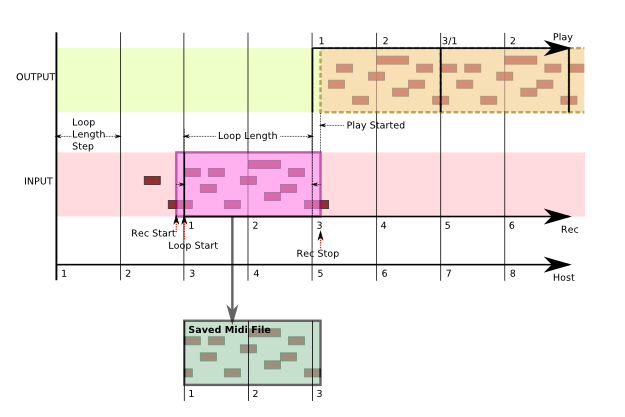
i do have a few illustrations of how it works... it's complicated enough that pictures help me understand what i'm doing. here's one:Lagrange wrote:PIZ sorry for being a pain but can you post pics when you update plz? I dont have access to my audio comp right now but would love to get a visual idea of the upgrades. Any help is greatly appreciated!
current screenshot in XT2:
wrongtastic, baby
tucson's number one gothic rock band since 1995
tucson's number one gothic rock band since 1995
-
- KVRAF
- Topic Starter
- 2237 posts since 12 Nov, 2002 from swordfish
here's a picture of what overdub mode does:

but it doesn't work too well yet if you don't stay within the bar lines...
but it doesn't work too well yet if you don't stay within the bar lines...
wrongtastic, baby
tucson's number one gothic rock band since 1995
tucson's number one gothic rock band since 1995
-
- KVRAF
- Topic Starter
- 2237 posts since 12 Nov, 2002 from swordfish
it does give notes some special treatment, but yes, it records everything.Lagrange wrote:IT FRIGGIN RECORDS CC TOO!
I was wondering if it did that!
L
does it help if you wait before playing the first note?ethnix73 wrote:great!!! By the way, my first note is usually not in sync. It's a 8th or 16th note later than it should be.
the problem could be with the vst automation... the start of recording may be delayed, which would cut off part of the first note. it would be more accurate if i make the plugin respond to a cc directly. i'll put that in the next version.
wrongtastic, baby
tucson's number one gothic rock band since 1995
tucson's number one gothic rock band since 1995
-
- KVRAF
- 5629 posts since 22 Sep, 2005
Wow that clears it up a lot! So technically it works the same as splitting MIDI clips in XT1.41 sequencer. I dont see this being that much of a problem but it could be extremely difficult to have the plugin what gets dropped and what is cut and kept. You got me sitting here with my jaw to the floor..insertpizhere wrote:


Again I commend you for working this out! Keep up the good work!
Another question is how this would respond to PDC..hmmm...insertpizhere wrote:the problem could be with the vst automation... the start of recording may be delayed, which would cut off part of the first note. it would be more accurate if i make the plugin respond to a cc directly. i'll put that in the next version.
L
Last edited by Lagrange on Fri Dec 28, 2007 6:46 am, edited 1 time in total.
-
- KVRAF
- Topic Starter
- 2237 posts since 12 Nov, 2002 from swordfish
if you stop recording and the resulting length would be too long by less than 1/4 of a step, the extra data is still there, but not played back. the only way recorded info gets discarded is if you start recording during the last 1/4 of a loop length increment (i.e. the last beat in 1-bar mode). i'm not even sure that feature is needed, so it may be removed, or optional.Lagrange wrote:Wow that clears it up a lot! So technically it works the same as splitting MIDI clips in XT1.41 sequencer. I dont see this being that much of a problem but it could be extremely difficult to have the plugin what gets dropped and what is cut and kept. You got me sitting here with my jaw to the floor..
another picture, showing a weirder recording area:

there are probably too many things going on in the picture, but anyway... when looped in sync, the loop acts as though it has been repeating since time 0. this isn't always good, but it will be addressed with other triggering options.
wrongtastic, baby
tucson's number one gothic rock band since 1995
tucson's number one gothic rock band since 1995
-
- KVRAF
- 5629 posts since 22 Sep, 2005
I see so basically what gets "kept" is between bars 2 and 3? If yes its almost exactly what happens when you split a clip (as I was saying), which techincally cuts an overlapping note into 2 peices. The part that is before the split bar get discarded and other starts at the very begining of the split or in MIDI loopers case the start of the bar. This is probably what is "moving" the 1st note or subsequent note(s) that either overlap or come in too lateinsertpizhere wrote:
there are probably too many things going on in the picture, but anyway... when looped in sync, the loop acts as though it has been repeating since time 0. this isn't always good, but it will be addressed with other triggering options.
 .. Is this close or am I as tired as I think I am ...
L
-
- KVRAF
- 5629 posts since 22 Sep, 2005
Ok so I like the MIDI loop dump to file! I'm considering making an auto import to eXT (1.41 & 2) sequencer app (using AHK  ) once the kinks have been ironed out...
Here are some concerns I have so far (BTW I tested with eXT 1.41 in Audiomulch)...
- Record ON should probably trigger MIDI thru on (easier method to preview what your recording).
- Maybe there should be a way to clear a pattern and its corresponding MIDI file.
- The 'end bar' cut off has to be as close to the end loop point as possible (I'm getting a lot of cut off notes toward the end)
- I get strange pattern behavior in the playback after I switch MIDIthru to off.
- When I record with MIDI thru off the pattern totaly changes..
- I know theres no GUI but is there a way to show that something has actually been recorded by chance?
- Is there anyway of putting the version number in there (ie midiLooper_ver_4.dll) as I'm testing and comparing different iterations and getting quite confused!
So far so good PIZ! Just have to address the pattern playback issues and the cutting off notes! Also I'm putting the LoopStart Point to -8 and end to 8. Is this correct?
Let me know..
L
) once the kinks have been ironed out...Here are some concerns I have so far (BTW I tested with eXT 1.41 in Audiomulch)...
- Record ON should probably trigger MIDI thru on (easier method to preview what your recording).
- Maybe there should be a way to clear a pattern and its corresponding MIDI file.
- The 'end bar' cut off has to be as close to the end loop point as possible (I'm getting a lot of cut off notes toward the end)
- I get strange pattern behavior in the playback after I switch MIDIthru to off.
- When I record with MIDI thru off the pattern totaly changes..
- I know theres no GUI but is there a way to show that something has actually been recorded by chance?
- Is there anyway of putting the version number in there (ie midiLooper_ver_4.dll) as I'm testing and comparing different iterations and getting quite confused!
So far so good PIZ! Just have to address the pattern playback issues and the cutting off notes! Also I'm putting the LoopStart Point to -8 and end to 8. Is this correct?
Let me know..
L
-
- KVRAF
- Topic Starter
- 2237 posts since 12 Nov, 2002 from swordfish
if you start or stop recording in the middle of a note, the note will be cut. so yes, in that sense, it's the same as splitting a clip.Lagrange wrote:I see so basically what gets "kept" is between bars 2 and 3? If yes its almost exactly what happens when you split a clip (as I was saying), which techincally cuts an overlapping note into 2 peices. The part that is before the split bar get discarded and other starts at the very begining of the split or in MIDI loopers case the start of the bar. This is probably what is "moving" the 1st note or subsequent note(s) that either overlap or come in too late
L
by having the loop length round down in some cases, the idea is that you can start recording early and stop late to make sure you get everything, but not have the loop end up longer than you wanted it to be. hopefully this will keep the first note intact.
normally, everything you play while "Record" is on will be kept. the only exception is when you start recording near the end of a bar. i don't really like discarding anything, but it is "cleaner" if the recording starts on a bar line (or whatever step)... i already decreased the size of the zone where that feature applies... it may end up being adjustable.
wrongtastic, baby
tucson's number one gothic rock band since 1995
tucson's number one gothic rock band since 1995