Valhalla DSP updates ValhallaVintageVerb to v1.7.1 and ValhallaRoom to v1.5.1
10th May 2017
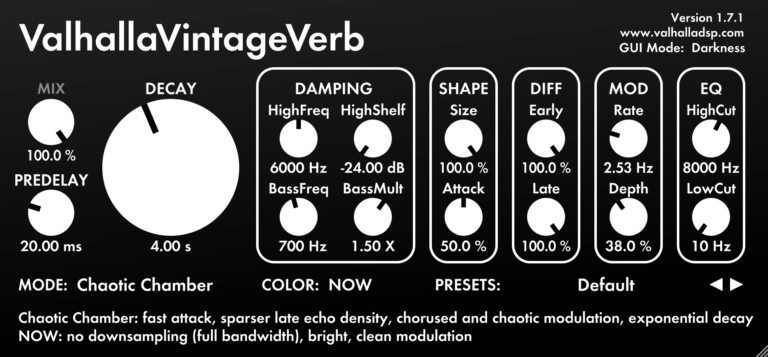

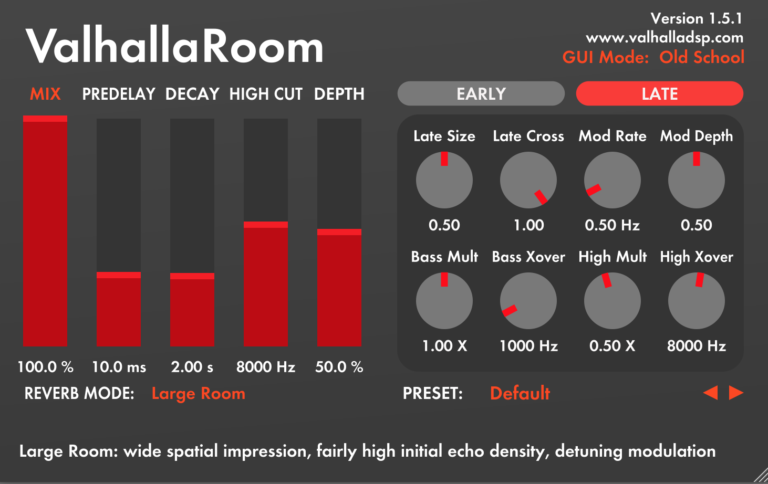
Valhalla DSP has released updates for ValhallaVintageVerb and ValhallaRoom.
ValhallaVintageVerb v1.7.1 adds 2 new reverb modes, Chaotic Hall and Chaotic Chamber. These modes are the results of a thought experiment: what would "old school" digital reverb algorithms sound like if they were made using tape delays?
The "chaotic" aspects of Chaotic Hall and Chaotic Chamber:
- The saturation and pre/de-emphasis are based on tape delays, with a higher internal drive level than the other VintageVerb algorithms.
- The digital quantization noise of the "Dirty" algorithms in VintageVerb has been replaced by tape modulation noise, which results in a more broadband spread of frequencies as the reverb decays.
- The "random walk" used for chorusing in most of the VintageVerb algorithms has been replaced by a more "chaotic" modulation source. The "chaotic" modulation is closer to the wow/flutter/tape crinkle noise that can be heard in tape echoes, where the wear and tear of the tape loops results in a distinctive pitch modulation.
Chaotic Hall is fairly close to Dirty Hall in its basic structure, just with "chaotic" elements. Chaotic Chamber is closer to the Smooth algorithms, but with the "digital" artifacts of the Smooth algorithms replaced with "analog" artifacts. Chaotic Chamber also adds some unique signal dependent diffusion parameters, which results in a clearer sounding reverb tale.
Valhalla DSP say "When I was adding the chaotic algorithms to VintageVerb, I presumed that the results would be closer to the dark murkiness of tape delays. It turns out that adding chaos to these algorithms resulted in more clarity and transparency in many cases. There are definitely tape-esque artifacts in the decay, but the analog-style saturation reduces ringing in the tail, and the tape chorusing results in less random pitch shifts than the random walk modulation used in the other modes."
The other major change to VintageVerb is a GUI option added to the NOW Color mode. A new text field in the upper right corner of the GUI, that is displayed when viewing the NOW mode, allows the user to select between Brightness (the original white background GUI) or Darkness (the new mode, which is white text against a dark background). Both GUIs retain the "absence of color" that is a critical visual cue for the sonic characteristics of the NOW Color mode.
The main update in ValhallaRoom 1.5.1 is the GUI. The Room GUI has been updated to fit in with the other Valhalla plugin GUIs:
- "ValhallaRoom" title is smaller.
- Version info in upper right corner.
- Entire bottom of GUI dedicated to interactive tool tips.
- Knob pointers are larger, easier to see.
The new GUI takes up considerably less room than the older GUI, while having the same amount of room for the sliders and knobs.
The default color scheme of the ValhallaRoom GUI has been changed as well. The grey & red color scheme of the previous versions wasn't optimized for folks with color blindness. They've changed the GUI colors to the "Electric Blue" color scheme. This was influenced by the LED displays on some older hardware reverbs, and is much easier on the eyes than the previous color scheme.
For those folks that liked the old color scheme, you can switch back to the Old School color scheme by clicking the GUI Mode text in the upper right corner. This allows you to toggle back and forth between Electric Blue and Old School GUI colors, and your preference will be saved for all instances of ValhallaRoom.
Also, tool tips that correspond to the Reverb Mode have been added, so you can see a brief description of the reverb mode at a glance.
KVR Audio, Inc.
www.kvraudio.com