Log InCreate An Account
  1. Plugins
  2. »
  3. Brainstorming Audio
  4. »
  5. BSA Master EQ
  6. »
  7. Details
BSA Master EQ
BSA Master EQ by Brainstorming Audio is a Virtual Effect Audio Plugin and a Software Application for macOS and Windows. It functions as an Audio Units Plugin, a VST 3 Plugin and a Standalone Application.
Product
Version
0.1.0
Product
Version
0.1.0
Effect
Formats

MyKVR: Groups, Versions, ...

2 KVR members have added BSA Master EQ to 2 MyKVR groups 2 times.

Download KVR Studio Manager (FREE)

Not In Your MY KVR Groups
(or group limitation prevents versioning)
+2 in private groups

KVR Rank

Overall: 31989   19258   23216

30-Day: 30056; 7-Day: 18865; Yesterday: 20716

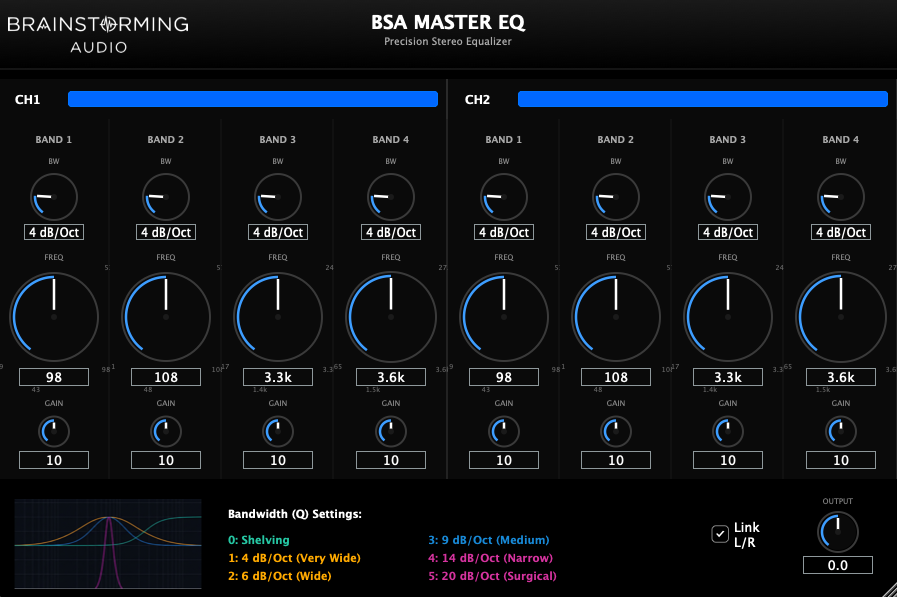
BSA Master EQ is a precision stereo equalizer plugin designed for mastering and critical mixing. The program offers clean, transparent sound with discrete controls.

Interface Overview

The interface is divided into two identical channels (CH1 and CH2), each featuring 4 equalization bands.

Parameters & Controls

Each of the 4 bands features the following controls:

  • Frequency (FREQ): Selects the center frequency of the band.
    • Band 1: 19Hz - 530Hz.
    • Band 2: 21Hz - 572Hz.
    • Band 3: 617Hz - 24kHz.
    • Band 4: 665Hz - 27kHz.
  • Gain (GAIN): Adjusts the boost or cut at the selected frequency.
    • Range: +/- 10dB (approximate) in discrete steps.
    • Default: 0dB (Unity Gain).
  • Bandwidth (BW / Q): Controls the shape and width of the frequency band.
    • 0: Shelving.
    • 1: 4 dB/Oct (Very Wide / Musical).
    • 2: 6 dB/Oct (Wide).
    • 3: 9 dB/Oct (Medium).
    • 4: 14 dB/Oct (Narrow).
    • 5: 20 dB/Oct (Surgical / Notch).
  • Active (IN Button): Turns the individual band ON (Active) or OFF (Bypassed).
    • Lit: Band is Active.
    • Unlit: Band is Bypassed.

Global Controls

  • Link L/R: When enabled (checked), any parameter change made on Channel 1 is automatically mirrored to Channel 2, and vice versa. This ensures perfect stereo synchronization for mastering.
  • Output: Master output gain control to compensate for overall level changes.

Visual Aids

A legend table and graph are provided at the bottom of the interface to visualize the curve shapes corresponding to each Bandwidth (Q) setting.

Latest User Reviews

Average user rating of 0.00 from 0 reviews

Products similar to BSA Master EQ...

Comments & Discussion for Brainstorming Audio BSA Master EQ

Discussion
Discussion: Active

Please log in to join the discussion

Log In To KVR Audio
