







2 KVR members have added OVERCOMP to 1 MyKVR group 2 times.
Download KVR Studio Manager (FREE)
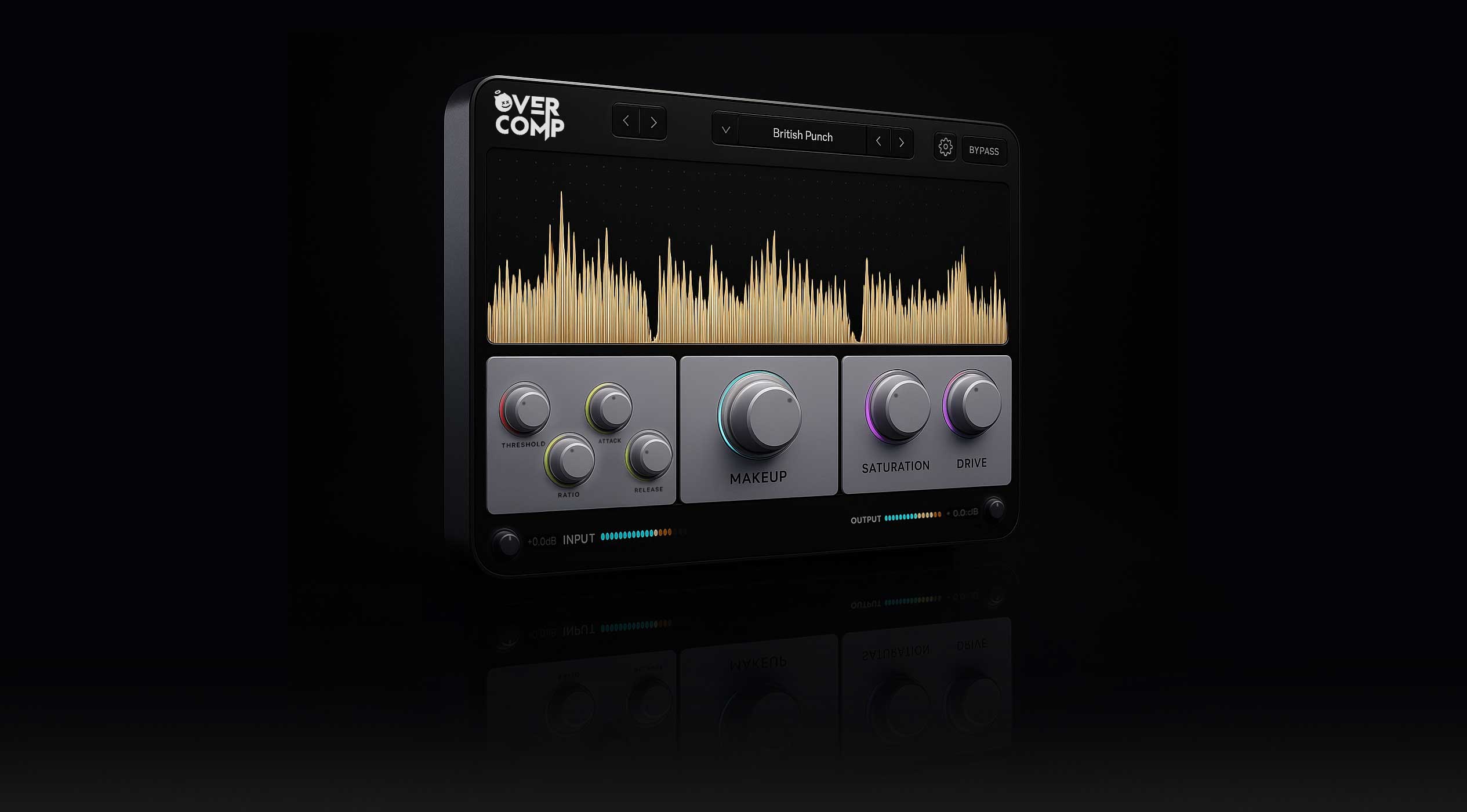
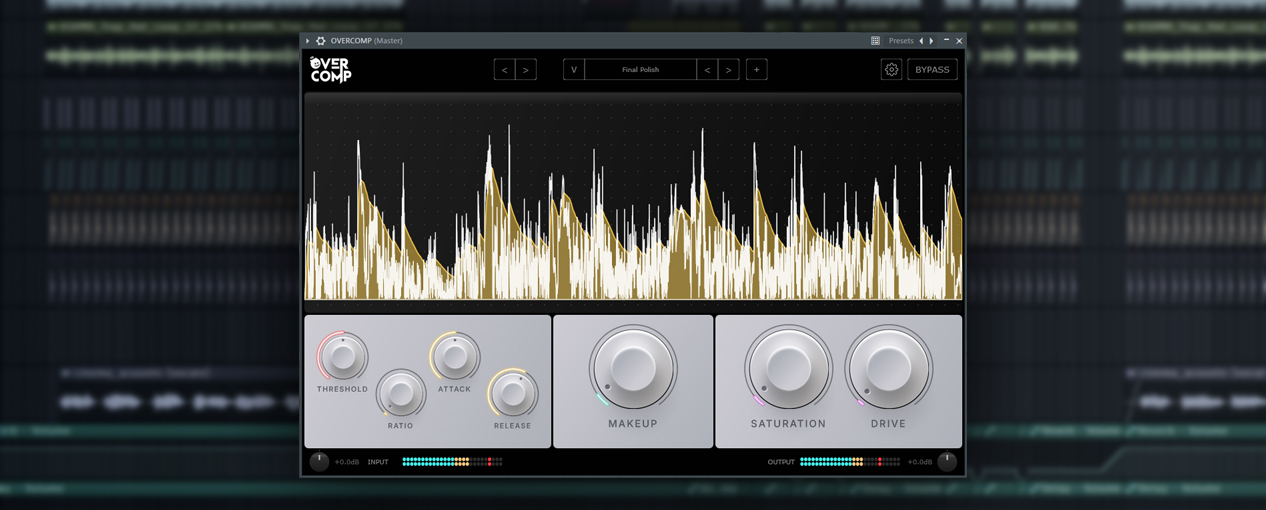
OVERCOMP is a visual compressor/saturator plugin built by a solo developer who's tired of seeing producers price-locked out of quality tools.
You get professional-grade compression with real-time visual feedback, integrated saturation, and 18 factory presets - for the price of lunch.
[Version 1.0.1 is Now Available]
---
Real-Time Waveform Display:
See exactly what your compression is doing as it happens. No guessing, no "trust the meters" - you SEE the audio transform in real-time.
Flexible Compression:
Threshold, Ratio (1:1 to 20:1), Attack (0.1-100ms), Release (10-1000ms). From transparent glue to aggressive limiting.
Integrated Saturation:
Analog-style warmth and harmonic enhancement with adjustable drive and saturation amount. Add thickness without needing another plugin.
18 Factory Presets:
Organized by category: Character, Glue, Drums, Creative, Mastering, Utility. Get professional results instantly, then tweak to taste.
High-Quality Oversampling:
2x and 4x oversampling for pristine saturation without aliasing artifacts.
CPU Optimized:
Run 15+ instances with UI open, 50+ with UI closed. Automatic waveform pausing when not in focus.
Professional Features:
Undo/Redo, comprehensive tooltips, preset management, input/output metering, stereo/mono operation.
WINDOWS VERSION
- Windows 10 or later (64-bit).
- VST3 + Standalone Application.
- Professional installer included.
- Fully tested and optimized.
MAC VERSION
- macOS 10.13 (High Sierra) or later.
- Intel & Apple Silicon (M1/M2/M3) supported.
- VST3 + AU (Audio Units) + Standalone.
- Note: Not code-signed yet (see Mac install instructions).
BOTH VERSION ARE INCLUDED IN YOUR PURCHASE.
- Vocals - Smooth, controlled dynamics with added presence.
- Drums - Punchy compression that preserves transients.
- Mix Bus - Glue your mix together without killing dynamics.
- Mastering - Final polish and loudness control.
- Creative Effects - Lo-fi crunch, parallel compression, pumping.
WINDOWS:
- Windows 10 or later (64-bit).
- VST3-compatible DAW.
- 4GB RAM minimum (8GB recommended).
MAC:
- macOS 10.13 (High Sierra) or later.
- Intel or Apple Silicon (M1/M2/M3).
- VST3 or AU-compatible DAW.
- 4GB RAM minimum (8GB recommended).
- Important: Plugin is not code-signed. Simple security bypass required on first launch (instructions included).
SUPPORTED DAWs:
- FL Studio, Ableton Live, Logic Pro, Reaper, Studio One, Cubase, Pro Tools, GarageBand, Bitwig, and more.
Standalone Application.
VST3, AU, Standalone.
18 Factory Presets.
Comprehensive PDF Manual (60+ pages).
Professional Installer.
Lifetime Updates.
Email Support.
"OVERCOMP.pkg cannot be opened" or Security Warning During Installation.
This is the most common Mac issue when using the .pkg installer - happens because the package is not code-signed.
Symptoms:
You try to open OVERCOMP.pkg and get a security warning.
macOS says "package cannot be opened because it is from an unidentified developer".
Installation is blocked.
Solution:
- Don't try to open the .pkg again yet.
- Go to System Preferences (or System Settings on macOS 13+)
- Click Privacy & Security
- Scroll down - you'll see a message: "OVERCOMP.pkg was blocked from use because it is not from an identified developer"
- Click the "Open Anyway" button next to this message
- Enter your admin password when prompted
- Now double-click OVERCOMP.pkg again - the installer will launch normally
- Follow the installation wizard.
You only need to do this once. After bypassing security for the installer, all installed components (VST3, AU, Standalone) will work without additional security prompts.
All updates to version 1.x are completely free. When you buy OVERCOMP, you own it - no subscriptions, no upgrade fees, no BS.
Bug fixes typically ship within days. Feature updates every 2-3 months.
Solo dev = direct line to the person who built this. Email whitepeak.creative.co@gmail.com and you'll get a real human (me) who actually knows the code.
Connect with other OVERCOMP users in our Discord server:
- Get support and troubleshooting.
- Share presets and techniques.
- Suggest new features.
- Connect with producers.
Join here: [https://discord.gg/y2z2mHF4ew].
Because I'm tired of plugins costing $200+ when they shouldn't. I'm a bedroom producer who learned to code, not a massive corporation with shareholders.
This is my first plugin. Your purchase helps me keep building affordable tools for the community.
If you're used to paying Plugin Boutique prices, this might feel suspiciously cheap. It's not. It's just honest pricing.
$20 CAD (normally $40) - Launch discount ends Nov 30th
After that, price increases. Lock in the launch price now.
One license = install on all your personal computers. Use in unlimited commercial projects. No dongles, no iLok, no activation servers. Just download and use it.
Q: Will this work in my DAW?
A: Yes! Works in any VST3 or AU -compatible DAW (FL Studio, Ableton Live, Logic Pro, Reaper, Studio One, Cubase, Pro Tools, GarageBand, Bitwig, etc.).
Q: Mac version?
A: Yes, MacOS is now a supported feature.
Q: Can I use this commercially?
A: Absolutely. One license = unlimited commercial projects.
Q: Refund policy?
A: At this time there is no refund option as you will instantly have access to the product and have no means to return it without still having access to it.
Q: "Which format should I use - VST3 or AU?"
A:
- Logic Pro / GarageBand: Use AU (Audio Units)
- Ableton / FL Studio / Reaper: Use VST3
- Both included - try whichever your DAW prefers.
Q: "Does it work on M1/M2 Macs?"
A: Yes! JUCE builds universal binaries by default (Intel + Apple Silicon).
Q: "Why the security warning?"
A: Plugin isn't code-signed yet (requires $99/year Apple Developer account). Just right-click Open on first launch.
Built with JUCE framework. Tested in real sessions on real projects. No corporate bloat, just features that matter.
Questions? Email me: whitepeak.creative.co@gmail.com.
- Deklin Barber.
Solo Dev, Whitepeak Creative.

Please log in to join the discussion
Submit: News, Plugins, Hosts & Apps | Advertise @ KVR | Developer Account | About KVR / Contact Us | Privacy Statement | Sell @ KVR | KVR Marketplace Terms & Conditions
© KVR Audio, Inc. 2000-2026

