KVR Audio is the Internet's number one news and information resource for open standard audio plug-ins. We report new releases, product announcements and product updates (major and minor) for all VST Plug-ins, DirectX Plug-ins and Audio Units Plug-ins (and RTAS too). We manage a fully searchable audio plug-in database (updated daily), and offer many free member services including user reviews, product update notifications and a very active discussion forum. We also host official support forums for many plug-in developers plus the official Receptor support forum.
Plug-in Database: Virtual
Instruments, Effects & Hosts
Plug-in
Ranks
Banks & Patches
Download & Upload
Plug-in Ratings
by KVR Members
Wiki: Tutorials,
Audio Lexicon, ...
Listen to Music
by KVR Members
Search
KVR

Google Powered Search:

in new window

KVR Powered Plug-in Search:

Tunafish
by Bram Bos
?
KVR Rank: 1179 1138 [30-Day: 2001; 7-Day: 2459; Yesterday: 3658]
15 members are watching Tunafish for news
Product Tunafish
Developer Bram Bos
Primary Type Sequencer / Multitrack
Price (MSRP) $30
Plug-in Formats
Can Host
Instruments
VST
Can Host
Effects
VST
Operating System Availability
Operating
System
Latest
Version
Download Is it
Available?
Windows 1.8 Demo / TrialReleased
Miscellaneous Information
Copy Protection Serial Number
Supported Sample Formats include WAV
advertisement
Tunafish

The Tunafish philosophy: a low-cost, lightweight sequencer that's as simple as possible yet with the versatility of a big sequencer. Stripped of confusing, exotic bells & whistles, focusing on what's essential and fun.

Key features:

  • VST 2.3 compatible host for instruments and effects.
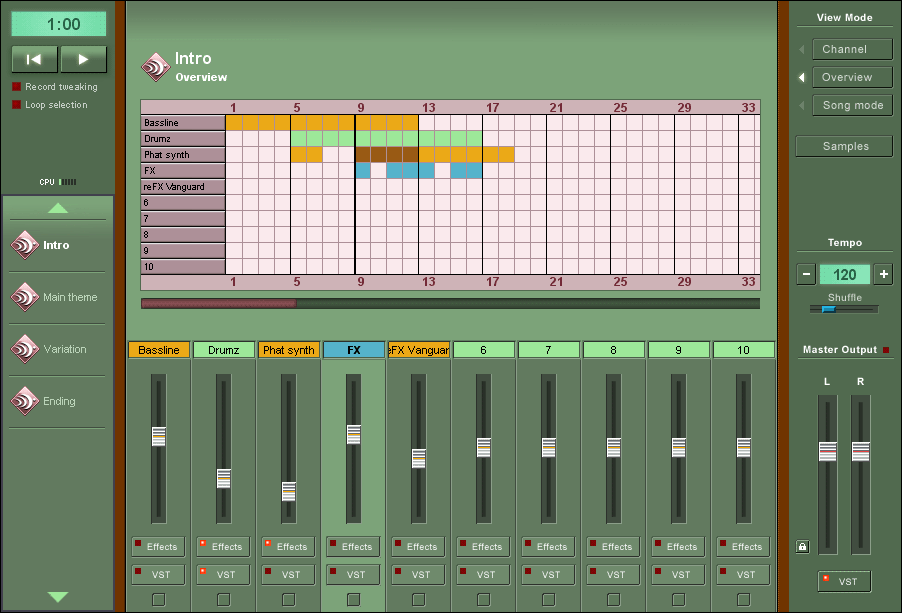
  • Single window interface, modeled after the successful Hammerhead formula.
  • Built-in sample/drum sequencer.
  • Use your own WAVs as samples.
  • An easy alternative to complex, bloated sequencers.
  • Resource friendly, ideal for use on a laptop.
  • Internal 32 bit audio processing engine with various built-in FX.
  • Export to high quality WAV files.
  • Import and export of MIDI (.mid) files.

RSS FeedAll KVR Audio news items relating to Tunafish.

Bram Bos updates Tunafish to v1.8 14th April 2007
Bram Bos updates Tunafish to v1.7 2nd January 2007
Bram Bos updates Tunafish to v1.6.2 6th November 2006
Bram Bos updates Tunafish to v1.6.1 21st August 2006
Bram Bos updates Tunafish to v1.6 31st July 2006
Bram Bos updates Tunafish to v1.5.2 29th May 2006
Bram Bos releases Tunafish v1.5 24th May 2006
Bram Bos releases Tunafish v1.4.1 27th February 2006
Bram Bos updates Tunafish to v1.3 26th January 2006
Bram Bos updates Tunafish to v1.2 27th November 2005
Tunafish updated to v1.1 30th August 2005
Bram Bos releases Tunafish v1.0 26th August 2005

User Reviews by KVR Members for Tunafish.

CLICK HERE TO ADD YOUR REVIEW

By mrblitz000
On 25th August 2009
Version: 1.8

Read all reviews by
mrblitz000


Was this review
helpful to you?
Yes | No
The terminology for Tunafish is that an individual 'track' within a sequence is called a 'channel.' There are 10 individual channels in Tunafish.

The overall mix of the channels, as programed into sequences ('segments'), and finally assembled, then rendered to .wav is called a 'track.'

In the channel mode, each of the 10-channel (or less) sequences ('segments') are created, and these segments are glued together in song mode. The overall segment the user is working on at the moment can be viewed in 'overview' mode. Here, the user can cut and paste measures amongst all of the channels in a segment.

So far, I've worked only in 'single-segment' mode, so have not cut and pasted various segments together in song mode, but have made entire pieces within one large (up to 350 measure) segment.

I like the way it looks and works. The one thing which it does is allocate a lot of unused measures, and oftentimes sets the overall window slider way off to the 'end,' usually hundreds of measures past the actual end of the patterns; so I've got to drag the slider back to where I'm actually working.

It looks like the thing is designed for making small, 8 and 16-bar sequences ('segments') in the channel mode, and mixing them together in the song mode window. I've been doing these longish pieces in a lone segment, and the thing with the 'autoscroll to way past the actual end of the piece' is a bit annoying.

This can happen in 'channel mode.' It looks like the app employs a drawgrid control from Delphi. If that is the case, the app needs perhaps to call a small function, in which it figures out where the last note of the 'segment' ends, and keeps the total number of cells in the grid to that number of measures. That would fix the problem, methinks.

I think it's worth $30, even with the peeve.

It's easy to load up a custom, drum sample bank. As someone else pointed out, you could even load other instrument samples into the drum bank, and play them back through the drum programming interface.

The piano roll editor for the both the sampled sounds and the VST instruments (VSTi) is fairly easy to use, particularly on smaller loops.

I save my work often, because Tunafish will crash out once in awhile. This is on a 1.8Ghz machine, with 1gb of RAM, running Windows XP. Tunafish will usually go 'poof' if the VSTs or VSTi are changed too much, particularly while the thing is playing the segment which is being worked upon at the moment. It's stable enough that, with a bit of saving - or by employing the autosave feature in the app (backup every 4 minutes) - workloss is minimal.

Tunafish has its own powerful, custom EQ VST made specifically for it. My understanding is that the EQ VST will work in other hosts, but is best in Tunafish.

Tunafish does a pretty good job of hosting VST and VSTi alike. It could use a few more features; a bit more stability; and a fix to that slider problem; but it's definitely a good looking, easy to use (especially for small sequences), intuitive, and sounds good when you render it. It allows 3 VSTs per channel, and 3 VSTs on the main, stereo out. It also has custom, built-in effects including panning on each of the 10 channels.

One thing I do with Tunafish, as with all VST-type hosts; is to put a brickwall limiter on any channel where I'm messing around with VST/VSTi (loading and unloading; tweaking). This will help prevent undue signal spikes when certain 'too loud' VSTs are accidentally loaded or tweaked.

I like the Tunafish!
 
   Report
Latest 1 review from a total of 1

Reviews, articles, interviews, etc. for Tunafish.

None listed yet.
Quick Jump:


Products by Bram Bos

Product: Tunafish
Developer: Bram Bos
Type: Sequencer / Multitrack
Price: $30
OS: Windows
Formats: VST
The Tunafish philosophy: a low-cost, lightweight sequencer that's as simple as possible yet with the versatility of a big sequencer. Stripped of confusing, exotic bells & whistles, focusing on what's essential and fun. Key features: VST 2.3 compatible host for instruments and effects.Single window interface, modeled after the successful Hammerhead formula.Built-in sample/drum sequencer.Use your own WAVs as samples.An easy alternative to complex, bloated sequencers.Resource friendly, ideal for use on a laptop.Internal 32 bit audio processing engine with various built-in FX.Export to high q... [more]

 
None found
Coming Soon...