



883 KVR members have added REAPER to 57 MyKVR groups 1353 times.
Download KVR Studio Manager (FREE)
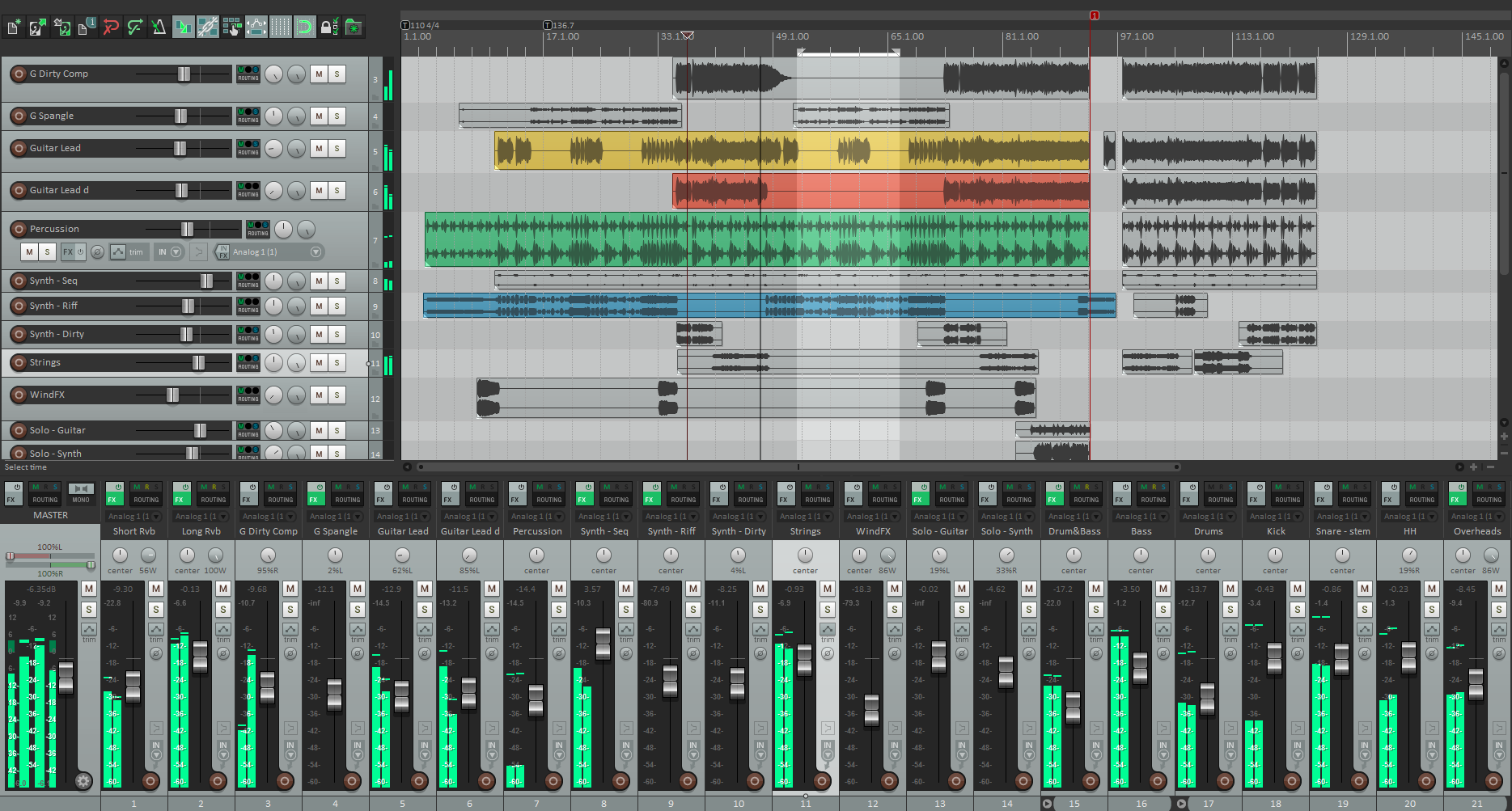
REAPER (Rapid Environment for Audio Prototyping and Efficient Recording) is designed for the recording, arrangement, editing, mixing and rendering of audio.
Basic features:
Advanced features:
Other features:
When I originally chose to use Reaper, it was solely for the low cost of entry. However, after several years of use, and forcing myself to dig in to all it has to offer, I'm really glad it's what I chose. For my use, Reaper is just the best. Here's a few things that I like:
Now for downsides:
For certain people, Reaper will just click; other's will bounce right off. Like I said at the beginning, it's perfect for me, and I can't see myself ever needing to switch to another DAW.
Last year I've been sequencing in Studio One, FL Studio 21, Serato Studio, Mixcraft, Cubase 13, etc...nothing comes close to the quality of tools and sequencing that comes with Reaper version 7, a beast of a DAW, among the top 3 on the market almost on par with Pro-tools and Logic X, with the lack of quality virtual synthesizers...and put a few hours playing at the beginning and you will see how impressive is REAPER .
Greatest strength of this program:
Singular experience across 2 affordable price tiers, evaluation and 3 operating systems
(everyone has the same set of features no matter the OS or level of investment).
Performance and GUI consistency are at the forefront. It feels very much like a fully professional DAW. Combines functionality patterns from Cubase, Logic, Pro Tools, Cakewalk. Has its own feel, yet feels familiar.
It's actually worth the price, because it's not a lock-in.
My fav features and highlights:
Reviewed By lolilol1975 [all]
March 12th, 2022
Version reviewed: 6.5 on Windows
Just a reply to user pentapower below:
No REAPER doesn't access to your contacts. It has never done anything like this in the 6+ years I've used it and I can confidently say it never will.
Unless of course you've stupidly downloaded a torrent that has been mined with a Trojan from some shady russian source, instead of the official website...
Reaper is a really great DAW, especially for a couple of thing where it is better than its competition. For recording/tracking of audio and editing of audio it is the best and extremly fast and efficient when you learn the workflow. The program also has a really small footprint, can be customised and is very flexible. The fact that all channels can be routed to everywhere and receive anything is great. Very very powerful, but might not be super easy for beginners.
Some of the stock plugs are pretty good and a lot of functionality can be added if you dig a bit deeper, but they will be pretty basic right out of the box. So beginners might find them a bit underwhelming.
I would advice all new (and old) users to learn from the videos at https://www.reaper.fm/videos.php to get a better understanding of the possibilities within Reaper.
PS: I now use Reaper mainly for tracking when I have recording-sessions with bands and artists, and when I do audio-editing. Production I now do mostly in Bitwig, but I have done a lot of production earlier in Reaper.
 25%OFF$149.00Bitwig Studio Producer
 $399.00RX 12 Standard
 $99.99Cubase Elements 15
 $99.99Dorico Elements25%OFF$299.00Bitwig Studio 6$1399.00RX 12 Advanced

Help is there a hard copy of reaper, I don't seem to find a place where I can order it.
You need to purchase Reaper online with Credit card or Paypal account. It is not available in stores. Maybe you may request for hard copy delivery during purchase, but i think it is impossible.
As far as I know it is download only.
Thanks man.
THIS POST HAS BEEN REMOVED
THIS POST HAS BEEN REMOVED
THIS POST HAS BEEN REMOVED
THIS POST HAS BEEN REMOVED

i love Marmite. what on earth do you mean? are you a hater?
i had to comment as this is the first negative review of reaper i have seen for quite some time : /.
i understand your criticism though, reaper's interface seems (is) overly complex, esp. for those with little knowledge. however, if you stick through the steep learning curve and you can get your head around the infinitely customizationable nature of it, it is a great piece of software. if you are looking for an opposite on terms of a much more streamlined interface, them studio one is a good choice.
i also want to point out that you can get a lot of stuff on the reaper site to do a lot of skinning and customization, i have just d/l a set that simlifies the plethora of menus you find in it's default install. it's a fantastic piece of kit and .. it's very VERY cheap for what you get.
i am going to buy it very soon as it also has a great forum and very regular (every few weeks it seems), updates. as i say i am still 'seeing other DAWs' but i come back to reaper more and more as i explore and play.
and Marmite is food of the Gods :)
just my tuppence worth x.
I have always used Propellerhead Reason 7.1 Which has a fantastic mixer and is pretty. Lol. I bought Reaper two years ago because I wanted to use vst's. And after I got my head around it, I fell in love. I have quite a lot of Refiils for Reason. So I can bounce down my tracks to reaper and use VST and back again to Reason to use the Mixer. And because it's all digital, there is no loss of audio quality. Amazing! Reaper 5.18 is a Superb DAW that shines with each update. It has scoring as well now. :-)
Happy days, .
Joseph.
Thank you.
Please log in to join the discussion
Submit: News, Plugins, Hosts & Apps | Advertise @ KVR | Developer Account | About KVR / Contact Us | Privacy Statement | Sell @ KVR | KVR Marketplace Terms & Conditions
© KVR Audio, Inc. 2000-2026

