KVR Audio is the Internet's number one news and information resource for open standard audio plugins. We report new releases, product announcements and product updates (major and minor) for all VST Plugins, DirectX Plugins and Audio Units Plugins. We manage a fully searchable audio plugin database (updated daily), and offer many free member services including user reviews, product update notifications and a very active discussion forum. We also host official support forums for many plugin developers plus the official Receptor support forum.
Plug-in Database: Virtual
Instruments, Effects & Hosts
Banks & Patches
Download & Upload
Plug-in Ratings
by KVR Members
Wiki: Tutorials,
Audio Lexicon, ...
Listen to Music
by KVR Members
Search
KVR
Quick
Links

(open in a new window)

Sonalksis - FreeG

10 members are watching FreeG for news
Details
Software: FreeG
Developer: Sonalksis
Primary Type: Dynamics (Compressor / Limiter)
Price (MSRP): Free
Effect(s): VSTAudio Unit
 VersionDownloadAvail?
Windows 1.0.8 DownloadReleased
Mac OS XMac OS X Universal Binary 1.0.8 DownloadReleased

Copy Protection: None
Average User Rating: Average rating - 0.000

Compatibility Unknown
Resources
Related software [list them]
FreeG

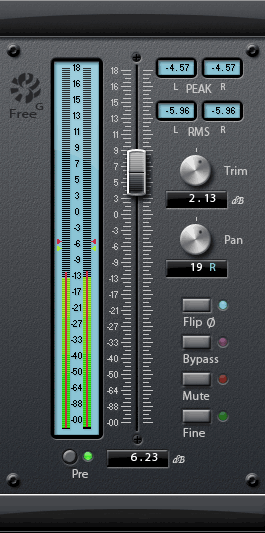
FreeG is a Gain / Fader plug-in that can be used for a variety of applications to increase the control and flexibility of the signal flow in the insert chain of the host - FreeG provides extensive, customizable metering features and settings.

Main controls:

  • The meter displays a current indication of signal level. The main display is a classic Peak-type level meter, which follows the signal in accordance with the metering type selected on the Preferences panel. The superposed red bar displays the current instantaneous signal RMS.
  • Selecting 'Pre' switches the fader to display the pre-fader, pre-pan, pretrim input signal.
  • The fader is the main plug-in control, and allows you to adjust the level of the incoming signal.
  • PEAK: This box, and the red arrows on the meter, displays the current highest peak value recorded (using the metering law configured on the Preferences panel). Click boxes to reset.
  • RMS: This box, and the yellow arrows on the meter, displays the current highest instantaneous RMS value recorded. Click the boxes to reset.
  • The Trim dial provides a course input level adjustment. The Trim range can be configured using the preferences panel.
  • The Pan dial allows a stereo signal to be panned to the left or to the right. The Pan law is configured using the preferences panel.
  • The Flip Phase button inverts the phase of the signal, for mixing applications.
  • The Bypass button provides a soft-bypass for the plug-in.
  • The Mute button will mute the signal.
  • Fine mode allows for an alternate method of fine-calibration of the fader. When the fader is set approximately, pressing 'Fine' will 'zoom in' on the fader, and offer a linear-law fader, which you can adjust with greater accuracy. The range of the Fine scale can be configured in the Preferences panel.

User Reviews for FreeG

Click here to add a review

There aren't any reviews yet!

Musician's Friend Stupid Deal of the Day Musician's Friend Product of the Day
