By fandango
On 27th January 2006 Version: XP Read all reviews by fandango
3 of 3 people found this review helpful.
Was this review helpful to you? Yes | No |
When you view the screenshots for Home Studio 4, you might be forgiven for thinking that it is just a heavily cut down version of Sonar 4. However, I've been really quite suprised at how much has been included in the Home Studio version. If the full Sonar package seems quite pricey, you may find all you want already available in the Home Studio version. You can, of course, upgrade to Studio or Producer if you find HS lacking in any way.
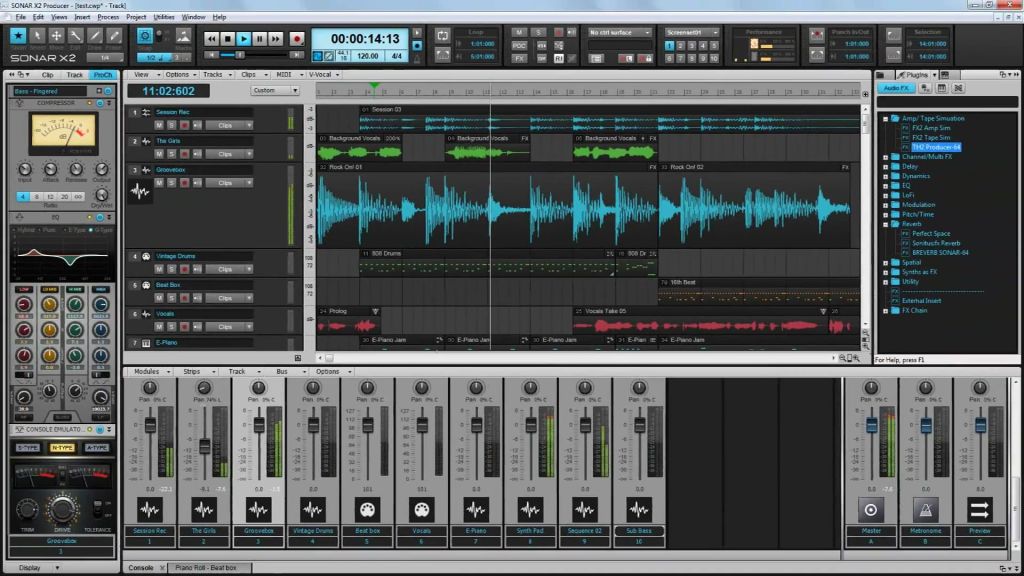
GUI - Home Studio is based on Sonar 4, hence the GUI is much the same. When you first start Home Studio, much of the interface, layout and toolbars is hidden behind a simplified functionality toolbar at the top. This can (thankfully) be removed and set up with as many dockable toolbars as you like. Transport, Metronome, Event Inspector, pretty much most of the toolbars you'd find in Sonar. Specific areas such as Piano Roll and Staff View can be docked into a tabbed area at the bottom right of the track view. You can, of course, undock and maximise these windows to concentrate on specific areas.
FEATURES - Decent Piano Roll (lacks some of features of packages like FLS/eXT which allow note slicing, modifying velocities for selected notes only etc.). The staff view is basic, but if you like to see your MIDI sequences in notation, it's decent enough. It's no Finale/Overture/Sibelius though. The mixer is quite comprehensive, allowing per-track inserts, sends, MFX for MIDI tracks and a bus section allowing you to add more stereo or surround tracks if you need them. PDC seems to be working fine. You can use automation envelopes on tracks and clips, which is nice. You can record automation interactively via synth interfaces by arming the parameters you want to automate.
This version also includes the audio metronome as well. There were quite a few complaints about earlier Cakewalk products only having a MIDI metronome.
There are no folder tracks in Home Studio, so you may want to hide tracks that you aren't wanting. You can do this independantly for both the Track and Mixer view.
SOUND - HS will default to using non-ASIO drivers, so make sure you set these up first. These changes require restarting the program, which can be annoying. Otherwise, you have a nicely laid out mixer where you can add a master track, extra aux buses etc. The included synths and Cakewalk effects are, sadly, a rather naff affair, but if you have your own arsenal of effects and generators then that shouldn't really be an issue. Also, I have not encountered any problems with the VST adapter. PDC seems to work fine too. Make sure the adapter detects latency in your plugins. If not, you can set this manually.
DOCS - Online help. Big thick manual, but most of this is divided into different languages. Basic tutorials on recording MIDI, AUDIO, setting up audio drivers, using the track view, etc.
PRESETS - N/A
SUPPORT - Well, I can't review Cakewalk's tech support specifically, as I haven't needed to utilise it. However, there is a forum at Cakewalk where people can post and ask questions. Cakewalk staff occasionally comment on these forums, but likewise they occasionally appear on KVR too and seem to be polite. The forums however, like any community, contain a mixture of characters, some of whom may not be helpful in their replies, especially for questions that are asked often. If in doubt, search the forum first.
VFM - I initially obtained Home Studio at quite a discount from Amazon and it seemed like a good way to move towards the Studio or Producer edition of Sonar. However, so much has been included in the Home Studio version in terms of sequencer functionality that for many people, home musicians etc. an upgrade may not even be necessary. The included synths and effects aren't, imo, very good. However, with so many quality effects available for free, this may not be a problem if all you want from the package is just a sequencing environment as apposed to a 'soft studio' such as Reason, FLS or Orion, with their own specific array of synths and effects.
STABILITY - Home Studio is, imo, very stable. Initially, I had problems with crashes, but this was apparently a problem in the audio driver setup (which can be quite a confusing dialogue with options over different tabbed areas). Also, the package became unstable when I went to set metronome options on the transport toolbar. This was because I had not specifically set a MIDI output device to route the metronome to. This should not cause a crash. However, it is fixed now.
All in all, I am really quite surprised at how much is included in the Home Studio version of Sonar. It derives much of it's functionality from Sonar 4, so if the full version of Sonar is a bit too expensive for your needs, the Home Studio might be just the thing you're after. As far as ease of use is concerned, hosts like Tracktion, energyXT etc. might be more 'immediate', but those who like a traditional mixer view and notation support might find Home Studio more recognisable |
|
 |
|
|
By Sensational
On 17th March 2005 Version: 4.02 Read all reviews by Sensational
3 of 3 people found this review helpful.
Was this review helpful to you? Yes | No |
First I have to say that Sonar's audio engine is very good. If you are having problems with it I suggest you check your buffer settings, because with the proper settings it flows very smooth. FLStudio loads plugins really well and Sonar loads plugins while running audio better than FLStudio.
GUI: The gui is perfect! You can modify it to your work flow, by setting up windows in any kind of arrangement you like. Colors are configurable to any color scheme you like. You can even save presets for your favorite layouts.
Sound: Sonars sound quality is outstanding. I get nothing but the best sound out of it.
Features: To many features to list but my favorites are track folders, track layers, clip muting, slip editing of audio and key binding, which makes you projects flow along so smooth and easy. The midi is a little iffy for me though because I'm so use to using FLSudio, but I like how easy it is to move around a project in Sonars pianoroll view.
Docs: Sonars documentation covers every base. You get a giant manual to carry around and study as you need, and the in program help contents which is the same as the manual is very easy to navigate.
Presets: The basic preset templates for whatever situation you need Sonar for are covered, along with the basic effects presets.
Support: The support is excellent for such a large company. I emailed them about an external wave editor issue I had and it was answered in a couple of hours. I also got answers right away on the user forum. The only problem I had was that I couldn't get register to the forum because of the info that they sent me in a registration email, that was not what the forum ask me for to confirm my registration. Oh well! I need to make music not hang out in user forums anyway.
VFM: I think Sonar is a really great VFM. Sonar does everything you expect and a whole lot more. I have other software like FLS, Oplat, eXT and Rebirth and Hardware like the Triton, Mophatt, EMX - 1 and a DR770 and Sonar plays fair with all of them, making it easy to work all over the place. I have to admit, I also finish more songs because of Sonar, I find it easy to work with a linear flow than the pattern base flow.
Stability: It's like a rock for me! I have clients come in and work for hours with out crashes, dropouts or having to restart and lose work.
Like I said before take the time to setup Sonar to work properly for you and it is awesome! If you just load it on to your system and expect instant success life just doesn't work that way. Check your buffer settings most importantly and it should be smooth sailing from there. |
|
 |
|
|
By MotorMind
On 31st January 2005 Version: 4.0.2 Read all reviews by MotorMind
3 of 16 people found this review helpful.
Was this review helpful to you? Yes | No |
In this review I will cut straight to the cheese: Sonar's audio engine has some serious issues. Every time you edit something - anything it all - the audio output starts gapping, crackling and distorting. This could happen while adding/removing plug-ins, manipulating faders or - worse still - editing MIDI. Yes, that's right: every time you edit a MIDI note the audio stops for a while, which can wreak havoc on any kind of real-time workflow. This already happens at very low CPU consumption and gets exponentially worse when the load gets higher. Forget about using ReWire; the audio gaps will go up to over a second, not to mention the stress on the monitors every time you dare to move a note in the piano roll.
I am by far not the only one with this complaint. The Cakewalk Sonar user-forums are filled with posts about this issue.
I wish I could be more constructive, but this is just how it is. Sonar 4 is an application that is great in its conception, but flawed in its execution. Now this gapping issue might not affect everyone, since some people hardly do any MIDI editing at all and simply go for the looping/recording features of Sonar. Those people will be just fine.
For the rest of us it might be wise to wait until the next major release of this package, when Cakewalk has solved the audio-gap issue. At least that is what they promised to do. |
|
 |
Last edited by MotorMind on 31st January 2005
|
|
By bandasound
On 4th February 2004 Version: 3.1.1 Read all reviews by bandasound
0 of 3 people found this review helpful.
Was this review helpful to you? Yes | No |
first i would like to start off and say that I have been a Cakewalk user since version 3 ...and have seen it evolve over the version and have to say that Sonar 3.1.1 is an excellant tool that (IMHO) rivals all brands out there. Even Pro TOols!! I think that it has matured as a multi-tracking Application and is capable of producing post producing quality material as long as it is complimented with the right equiment (I.E. apogee converters...neve, manley, or avalon preamps...and so on) so i think across the board, for me, it is also the most friendliest. I think that the competitors like cubase, samplitude, logic, etc. also compare relatively but is a matter of taste and past usage. so for me Sonar is my choice. for people just getting into recording Sonar also is more friendly then the others. But the fact that it implements WDM drivers which is the lowest latency protocol...also is a plus. The looping tools are excellant (acidized loop support)and streamlined making the song writing experience very smooth and transparent. I quoted to one of my clients that is seems to disappear in the background while i am writing songs...recording...I dont feel like I have to battle with the interface. also with the new updates with 3.11 you get MIDI looping (like audio looping)for quick click tracks and/or grooves! also the support for multiple sample rates it very nice addition...and the midi note editing "as usual" is suppior to most apps out there. audio edit "offline" to my is still not my cup of tea for Sonar....only con about that app...so i went out and got Sound Forge for offline track editing and mastering.
Sonar is the way to go... |
|
 |
|
|
By thenumber23
On 19th January 2004 Version: 3.0 Read all reviews by thenumber23
5 of 5 people found this review helpful.
Was this review helpful to you? Yes | No |
This review would best be read by someone who has used (or demoed) an old version of Sonar or Cakewalk. It is not meant to debate the differences between all the excellent sequencer/hosts/DAWs on the market. All have their good and bad points, and all have downloadable demos.
I've used every version of Cakewalk since version 1 for Windows (not Sonar 1, but Cakewalk 1 - back in 1993!) but Sonar 3 far exceeds them.
Cakewalk/Sonar has always been usable to me. Sonar 2 was technically excellent - it included about every feature that I could ever want, and actually made it feasible to start selling my hardware synths because the sound quality and convenience of softs really hit home.
Unfortunately, I still found Sonar 2 to be only 'usable'. Meaning, I knew what to do, but found it slightly uncreative. Therefore, I didn't have dreams during the day to come home and use Sonar to write songs.
Then, I went to a Sonar 3 clinic. I was amazed! Here was an excellent presenter showing off the product in its best light, and also acting like a human user manual. I bought the upgrade on the spot.
I didn't regret it. Actually, it's one of the best purchases I've ever made. Sonar 3 isn't just usable, it's highly creative, addictive, and streamlined. Now, I do daydream about coming home to write songs with it. I've written more songs with Sonar 3 in two months than I did with Sonar 2 during the 5 months prior.
I find I don't have to concentrate on the process as much - I just start recording, add what I want, and it just works! I get a variety of crashes (I'm still using Sonar 3.0, not 3.1), but that's probably because I'm doing far more things with my songs than in Sonar 2. Also, Autosave covers my behind. And, like Cakewalk has always done in the past, they work hard to fix any bugs that customers find to make an extremely stable product.
Other points of interest (what really sold me on the upgrade)
* Confidence recording. You see the waveform/MIDI data drawn as you record so there's no worry of a lost take.
* Flexible MIDI routing. My multiple MIDI controllers can be routed to multiple destinations (including softsynths).
* Flexible bus architecture. Create audio busses as you need them. Great for creative effects.
* User interface. Feels much more comfortable to work with.
* Quality automatable effects. Continues in the tradition of tons of useful goodies included with each upgrade.
What's not so nice:
* Still no audio metronome. The workarounds work, but aren't always simple. I use Ping DXi (see my review of that plugin for details).
* There's got to be something else, so when I think of it, I'll update this line.
Conclusion: This is the best release of Sonar to date, and is definitely worth the upgrade price. In fact, it is worth more than twice the upgrade price. |
|
 |
|
|
|
Latest 5 reviews from a total of 5 |