
213 KVR members have added Renoise to 15 MyKVR groups 308 times.
Download KVR Studio Manager (FREE)
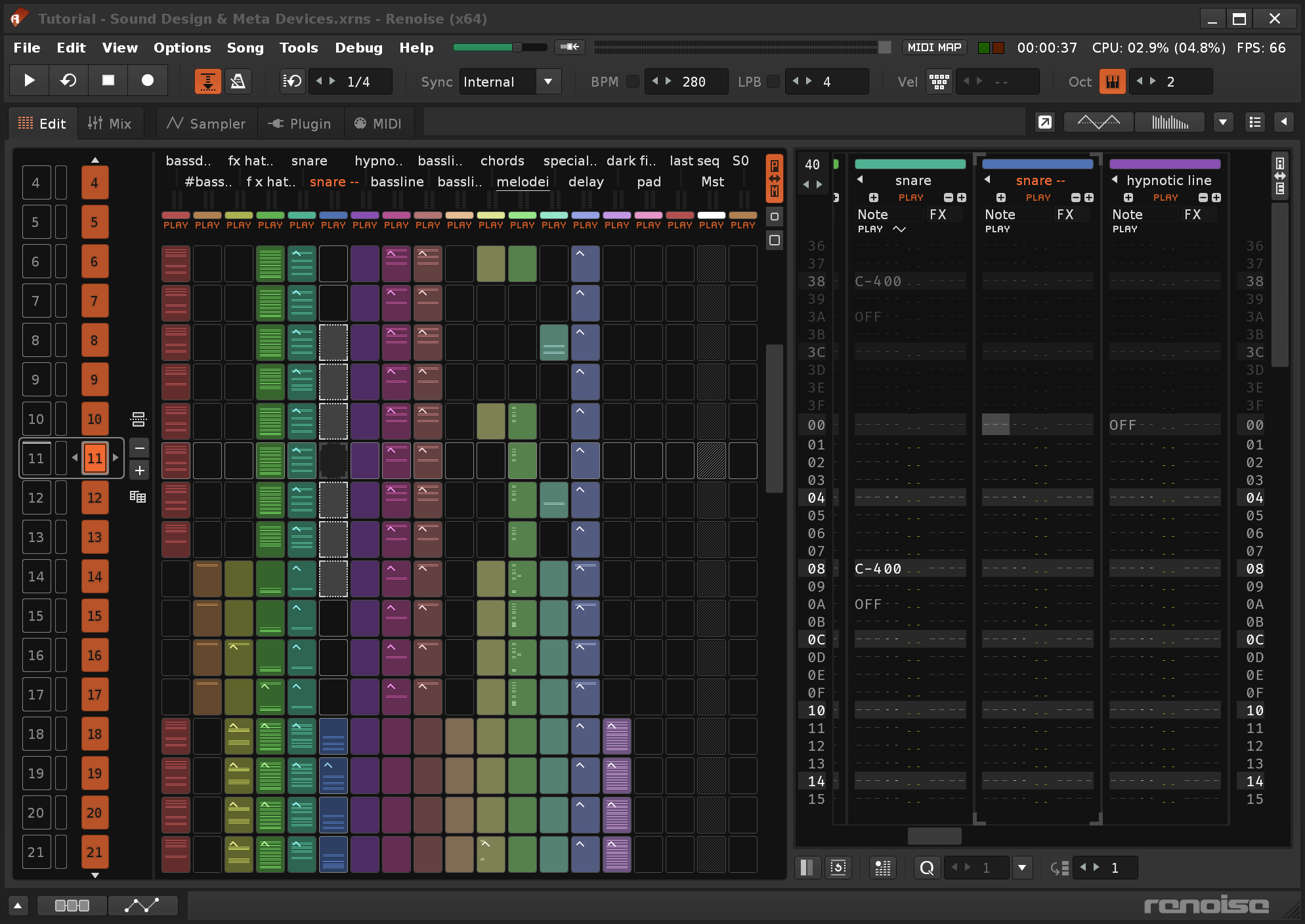
Renoise is a complete, multi-platform and expandable Digital Audio Workstation. It lets you record, compose, edit, process and render production-quality audio using a music-tracker-based approach.
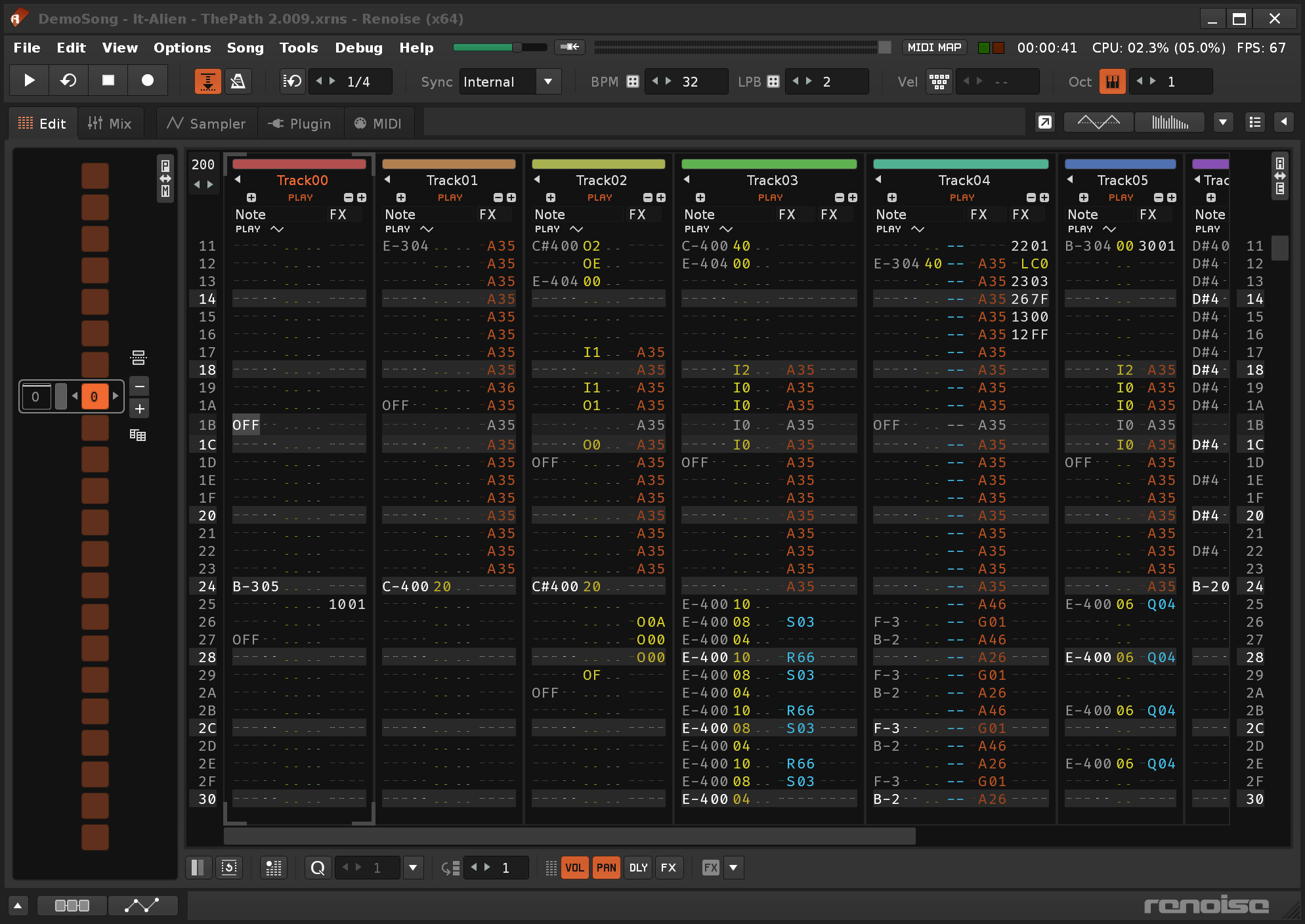
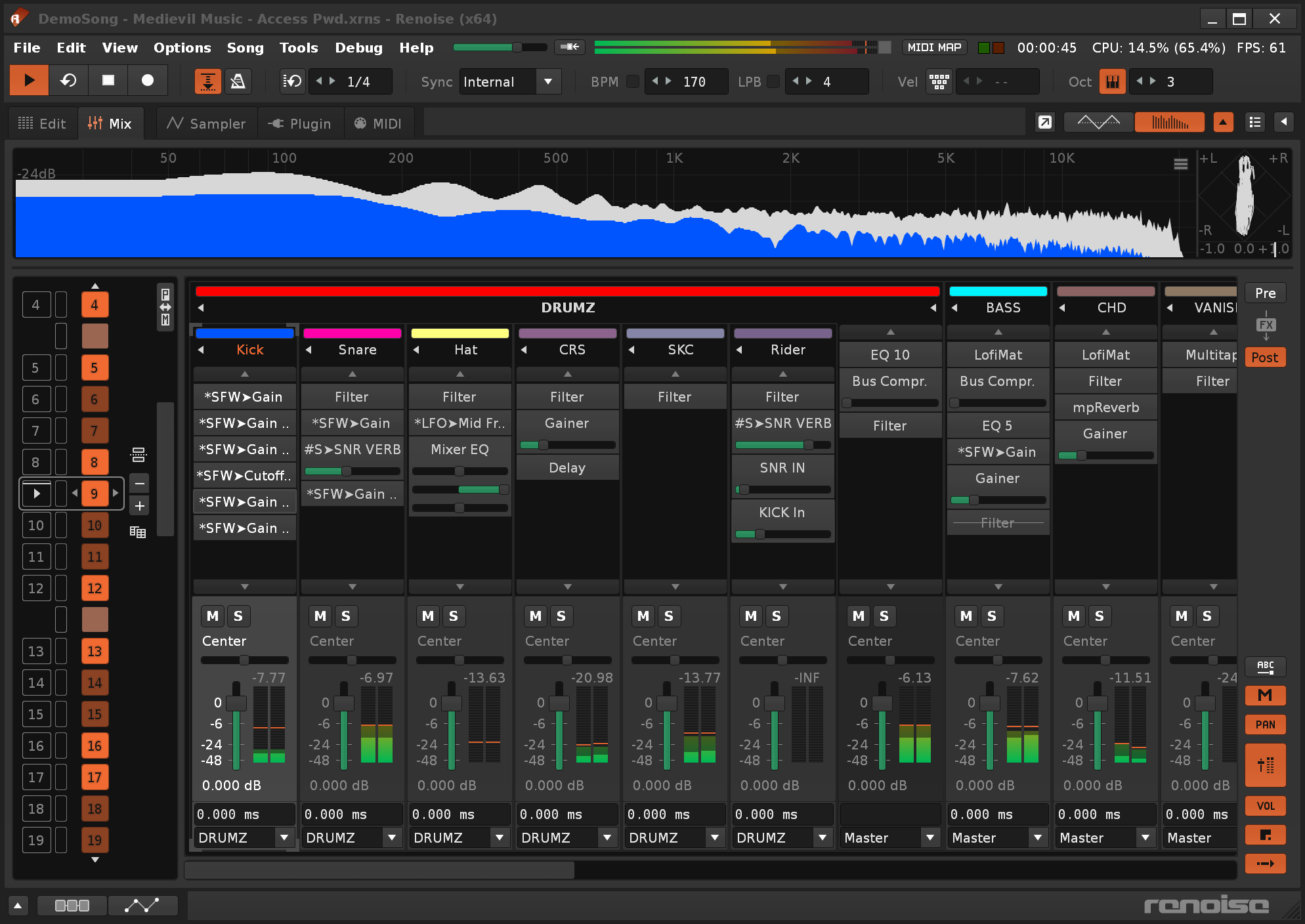
In a tracker, the music runs from top to bottom in an easily understood grid known as a pattern. Several patterns arranged in a certain order make up a song. Step-editing in a pattern grid lends itself well to a fast and immediate workflow. On top of this, Renoise features a wide range of modern features: dozens of built-in audio processors, alongside support for all commonly used virtual instrument and effect plug-in formats. And the software can be extended too: with scripting, you can use all of your MIDI or OSC controller to control it in exactly the way you want.
Features highlights:
Renoise never stops to amaze me, after all those years.
It's just a workflow that once you get the grips, you cannot let that easily. It boils down to the simple facts:
There are actually so many things this program is good at, that making a full list of feature it gives you is just not possible. One of my all time favourite programs out there.
Renoise has been one my two go-to trackers since the late 2000's(the other one being OpenMPT).
Renoise is a tracker, which means it is good at intricate sequencing and lends itself to a percussive workflow. In a piano roll you are inclined to view parts as interlocking pitches with an appendage of modulation on top; in trackers it's almost the opposite, as the note data is squashed down into parity with everything else. The "clean tracker sound" comes from it being easy to make every note fine-tuned - it's informationally dense and you can see every velocity and pan for every track at every moment, which means that your first pass at mixing can be done without adding anything to the FX chain, just by tweaking some velocities or panning to make everything sit a little better - and then you can add in some processing to finish it up, but less than what you might have done otherwise. A side effect is that you are likely to rely on hearing your parts, not reading them, because it's harder to read a cluster of A-4, D#5, etc. than it is to see a triad in the piano roll.
On the subject of note entry, Renoise also offers a snap-to-scale feature which helps greatly in using the computer keyboard for part-writing. As well, there is a "phrase" feature which lets you write a detailed sequence and then trigger it from a single note-on event. Phrases are great for simplifying loops, chord vamps, and articulations, and they're a great antidote to the intimidating aspects of seeing hundreds of notes scrolling down a grid - turn some of those parts into phrases and your main sequence gets less dense, easier to manipulate.
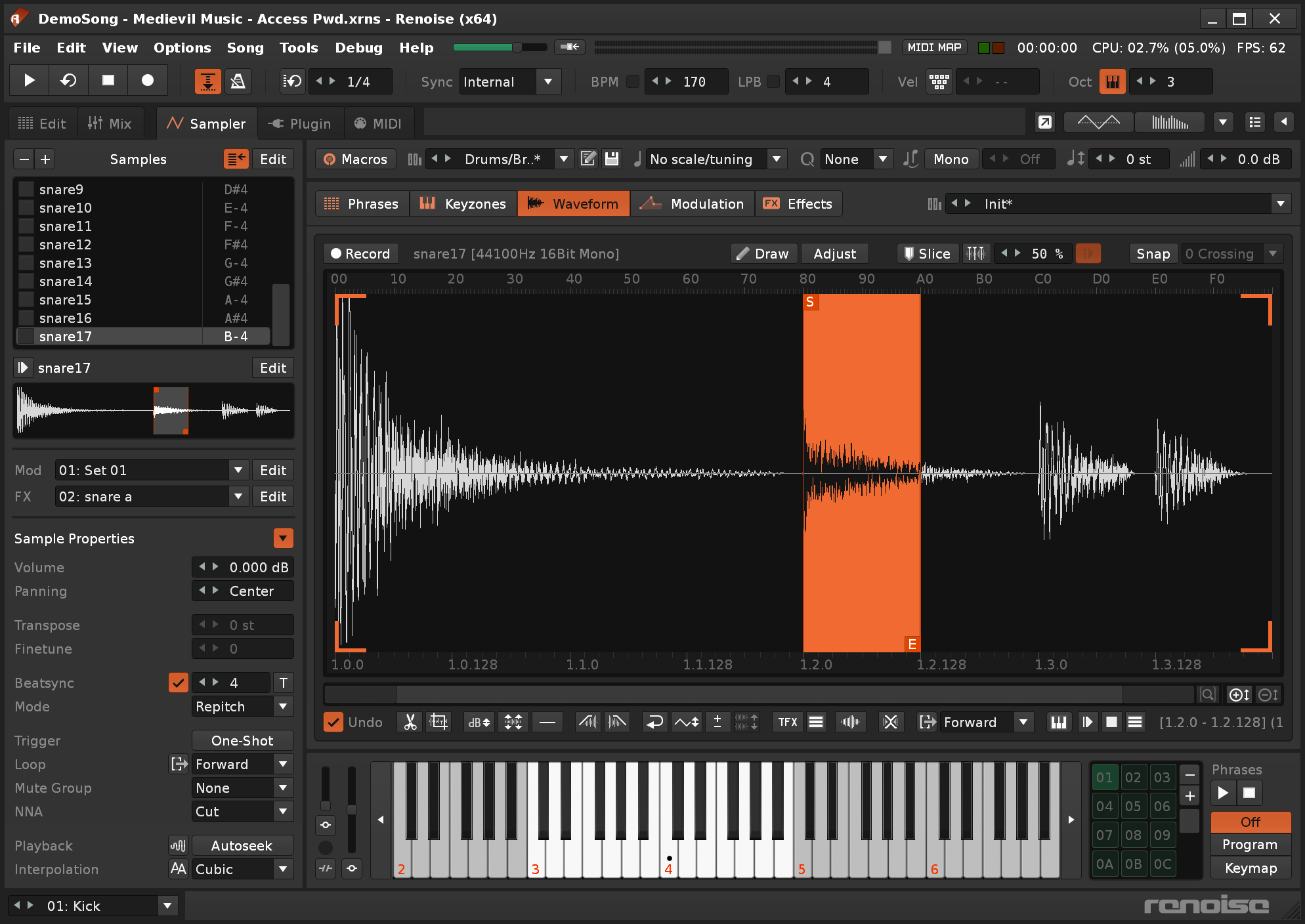
Renoise is primarily a sampler. The VST support is good - not perfect, I have seen bugs - but good enough that I can and often do rely on it. But it's second-class and a bit "bolted on" in that it's not totally seamless to automate VSTs. In contrast, the sampler and built-in effects are clearly the star of the show and they are very powerful, letting you write multisampled and sliced instruments with of all the effects used as modulations. If you're after minimalism, it can easily be made into your sole instrument and mixing tool. There isn't a huge amount of built-in content, but what does exist is usable and does a good job of demonstrating the power on offer.
There is a lot of programmability in Renoise. Just about everything, including UI state changes like "select track", can be assigned to a hotkey or MIDI event, so it's easy to set up some knobs and buttons for live performance. There is a lot of "more than one way to do it" as well - many functions are duplicated across the various sequencing and sampling features. You can automate on the grid with FX commands, but you can also automate in a graphical interface. You can arrange in the classic tracker mode, one pattern at a time, or you can use the pattern view to toggle track muting for something more like an Ableton session. And if that's not enough, you can write Lua scripts and extend the UI further. It can be overwhelming, but it helps to get familiar with a classic tracker first and then gradually upgrade your process to add the extra stuff. A laptop with Renoise plus a cheap knob controller is more than enough to achieve some expressive parts and speedy mixes.
In summary, I suggest seeing Renoise as a complementary tool to a clip-based multitrack DAW, with potential to be the sole tool if you're primarily a solo producer. While you can arrange and remix all sorts of things in it - sliced jungle loops, multisampled orchestral instruments, session backing parts, etc. - one thing it doesn't really accommodate is "record a band in the studio". That said, even in that scenario, you can definitely make use of it to generate backing material.
Reviewed By alienistcog [all]
March 2nd, 2021
Version reviewed: 3.1.1 on Mac
Renoise is part of a rich tradition of music development software that tracks its lineage all the way back to the 90's Amiga demo scene. Trackers have been around for years and left their mark on electronic music in ways many musicians may not realize. And while Renoise is not the only game in modern tracking, it is almost certainly the most successful modern implementation of that concept.
Tracking music in Renoise may be different than using a standard DAW, but pretty much everything you might need is in there : sampling, composition, plugin integration, MIDI sequencing, seamless Rewire integration, and even a built-in development environment for installing and if you wish, creating new sequencing tools of your own. Add to that the fact that Renoise is rock solid and cross platform, and you've got the full package - albeit turned on its head, in the best possible way. An inspiring piece of audio engineering all around.
This is a very special piece of software. It's obviously not for everyone, and the developers know that.
That being said the scope of what it can do is unbelievable
They nailed it, best tracker ever IMO.
Reviewed By EnergyCrush [all]
April 23rd, 2016
Version reviewed: 7 on Windows
(Update)
I've just discovered DDFM Metaplugin, which provides stable VST3 and side-chain functionality that can be used within Renoise. Awesome.
(/Update)
I've been using Renoise for 14 years (since v1.28), and regard it as my primary DAW for composition. I primarily write EDM, Ambient or Glitch in a home studio using plugins (monitors or headphones on a laptop). I also sing, but don't use Renoise for vocals/recording (currently using Reaper for that).
One liner: It's an amazing composition tool with a highly functional workflow geared for getting ideas down quickly and working to completion (sans raw audio).
Pros:
Cons:
I've looked into a few other trackers, but nothing has been as polished and complete as Renoise.
Trackers aren't great for every music workflow, but I've found Renoise to be an unparalleled sequencer for modern composition. Workflow subtleties, like the fact that notes are assumed to keep playing on a track until hitting a cutoff, make them ideal for sound design and construction using external plugins. In almost every major DAW on a Mac or PC, composition like this commonly requires drawing every unique note and it's duration using a mouse, and the sheer pain of that experience has not been taken seriously enough for DAW-makers to incorporate this style of composition (nor really take the time understand why accommodations to their own workflow are both ineffectual and unsavory).
In my time using Renoise, I've used many versions/tiers of other DAWs or hardware sequencers:
Most have unique merits, but none have been as near to a complete and reliable solution for me as Renoise for composition. For vocal work, I'm currently using Reaper. Don't want to start off poking at the DAWs other people use and love, but if you ask, I'll respond with my personal experiences in some cases.
Thanks,
Mickey.


Great to see another positive review for Renoise. I still use Live, but for the money, Renoise should be on everyone's list as a creative tool to supplement or (just maybe) replace their DAW, even if they've never used a tracker. It's robust, easily configurable, well-supported, lightweight, and just plain fun.

Renoise IS fantastic. Not very popular (might never be) for two main reasons I suspect: one is of course that most musicians (well, people really! Musicians usually being people, they commonly present the same drawbacks) are too dumb, lazy and narrow/simple-minded followers to even consider trying it out and getting used to something else than their cherished piano-roll display (of course, every other guy having known and experienced the tracker method is well aware of its own advantages!! Not necessarily saying that one is better than the other, they compliment themselves (or should anyway -- aren't there a plan to implement a piano-roll view at some point in the future in Renoise as well IIRC?) but nobody should ignore the tracker view does allow features and possibilities either very difficult and just plain annoying to use with a piano-roll).
The 2nd reason on the other hand is in my opinion completely on the Renoise devs to blame: as long as Renoise won't allow something as _fundamental__ as modular MIDI chaining (not sure how to put it precisely, but I'm of course refering here to the astonishing and pathetic fact that it is still impossible to use a third-party arpeggiator, sequencer or ANY other pure MIDI control plugin really inside Renoise!!!!!! Sure, there are many to choose from within Renoise own scripted extensions, but clearly no freeware add-on would blatantly claim to be able to cope against say, Kirnu Cream or Cthulhu from Xfer, right?). Come on dev guys, this is like DAW 101 stuff! Can't believe after all these years of development (more than a dozen already!!!), such a basic and absolutely VITAL feature still remains inexistant in Renoise 3 (or is it? Not 100% sure, as I haven't tested v3, but I seem to remember having checked out the What's new features list without finding it). I've been planning to /invest/ the massive sum of around 50$ needed to purchase Renoise for YEARS now, and though like with any other DAW there ARE always a few details nagging me (missing bits and other), THIS is the one reason that has stopped me thus far. Soon as it gets implemented, I'll finally gladly jumb onboard.
I love Renoise (and not just because I love trackers!), but I can too easily spot and overhear the general DAW community (whose opinion, let's face it, is that any tracker is more a gadget and a beginner's tool, and can never NEVER be nothing close to a true professional DAW) laughing their ass out at this quite obvious gaping void in Renoise features list, conforting them in their spiteful opinion of it.
Were I a part of these guys, I know I'd laugh too...

the tracker... it's fun and geeky in one way, but its really impractical to work with a bunch of numbers and arcane hex values and codes flying by that mean nothing unless you have a photographic memory. it took me a really long time to learn, but i couldnt even finish a track because of hanging notes and losing control of the pitch of the vsti's. it is far too easy to accidentally bork your track in renoise, causing so many invisible mistakes in frustratingly hard to find places in the sequence. i quit trying to work on Renoise because i had some pro work to do, and now I can't even turn it on again since I forgot all the tracker codes already. patterns longer than 32 steps result in a dizzying scrolling nightmare for me, so the first thing i wonder is how people like Vsnares presumably makes patterns that are flying by at 900 lines per beat, while maintaining precise control over it. How is it even possible to edit in those conditions shall remain a mystery to me, since operating a tracker unintuitive and unmemorable unless you stick to it permanently. Reaper and similar traditional DAWs are difficult to learn from zero as well, but they are not so abstract that all meaning disappears if you stop using them for a while.
Deist: there is a new beta at their site claiming to have implemented MIDI chaining in Renoise...
THIS POST HAS BEEN REMOVED
@Protocol_b: thanks for the info man! I'm gonna check this out ASAP and if it's confirmed, it will be great news indeed (though not a year -- or six -- to soon in my opinion)
@overhishead: your post underlines sth which I never had to think about myself (having used trackers since my Amiga back so I go way way back), but it my in fact well be that Renoise isn't for beginners (ie. with trackers!), althoug I rather suspect it might especially not be for EVERYBODY.
What you complain about is all perfectly understandable and make sense, but it sounds likely to me that what experience you had while using Renoise may not be the same for someone else -- even though there IS a stepping curve with hexa codes and stuff obviously, but nothing as nightmarish and inconvenient as you relate I believe, not to everybody anyway (I still remember most of the special effect hexa codes for Protracker and Fasttracker after all, and I haven't used it for like 15 years...).
Finally, several things that you mention, above all any functionality and stability issues, are just NOT what my experience have been with Renoise!
"Hanging notes and losing control of the pitch of the vsti's" you say? NEVER had that, not once (and I've been using Renoise for the last six years with a BIG amount of VSTIs. "Accidentally bork your track", "mistakes in frustratingly hard to find places in the sequence", "patterns longer than 32 steps result in a dizzying scrolling nightmare"... All your complaints scream "not used to a tracker" when I read them! As I said, I won't deny that tracking is prolly not fitting for ALL musicians out there, but you shouldn't feel so mystified that people like Vsnares can use it so efficiently when you couldn't even finish one project with it: it only further shows that it's not for everybody. But what you can't achieve with Renoise, other people might!
For that very reason, all your judgements about Renoise (unintuitive, impractical, etc.) seem useless to me because they apply to YOU and you only: others might fell the opposite (and actually many do), while yet others might have completely different issues with it than you have, so it doesn't really help anybody.
Also, your coin phrase-like that Renoise is "fun and geeky" but you had to "quit trying to work on Renoise because you had some pro work to do", is one more perfect illustration (as countless times before) of what I mentioned in my previous post: "that any tracker is more a gadget and a beginner's tool, and can never NEVER be nothing close to a true professional DAW". Which is so obviously false and misguided, it's only a matter of trend! Trakers were fashionable, in a time when there wasn't anything but notation software to compose, cause they simplified that and made the composition process accessible to people who couldn't read music. Nowadays, piano-roll simplified this further, for so-called "PRO" people who are in need of more visual aid & feedback to understand what is going on on their screen, but if we're honest, although much more trendy a piano-roll DAW __ISN'T__ in any way more powerful than Renoise is (with the exception of the tragic lacking point about MIDI routing I mentioned previously but which appears to finally be addressed!). What a real pro can do with a piano-roll, he can do with Renoise, period! Also, just as a piano-roll view allows for more practical access to some features, a tracker also allows for its own! I repeat that they complement each other well, and to tell that one is superior would just be proof of ignorance.
Still it should be acknowledged that a tracker program will almost always feel most confortably used in the hands of a tracking artist (ie. one who has known trackers for a long time), and let's not forget that is the VERY reason why Renoise was developed in the 1st place: to allow long-time tracking artists, who have been making computer music history since the days of Soundtracker on the Amiga, to continue using their favourite method to compose with all the modern advantages and present requirements.
Now will the "pro musicians" hypocrisy continue to be so presentt if ever a piano-roll view gets integrated in Renoise as well (like it has been talked about for quite some time I believe)? Unfortunately, I suspect it will...
Renoise is the best modern tracker. It is not expensive and the demo is almost 100% functional with only the export to wave feature disabled. If you are wondering why use a tracker instead of a DAW, the primary advantage is switching between samples rapidly. It is a creative technique that is laborious in a ProTools-type DAW, but very easy with a tracker. Original trackers were limited by the number of samples, but not so today. You quickly load up a folder of samples, as many as you like, and create catchy bass lines or melody lines that use multiple samples and rapidly switch between them. The grid system looks scary, but the numbers mainly relate to which sample # and its velocity. The other columns are for effects like pitch bend and varying the cutoff frequency. Another advantage is adding effects to a track instead of each sample individually (which is possible too.) Add a little delay and it quickly sounds great. Try it out, its fun and addictive. We can hunt for more samples together ;)
THIS POST HAS BEEN REMOVED
Currently my main DAW and i love it. For my taste the best tracker view, supports VST3, VST MIDI plugins, HDPI support, native time stretching and has a very powerful API, which allows users to develop tools like piano roll and more. Demo version is fully working, just WAV export is disabled. The updates have become less frequent in the past, but they are still coming.
Please log in to join the discussion
Submit: News, Plugins, Hosts & Apps | Advertise @ KVR | Developer Account | About KVR / Contact Us | Privacy Statement | Sell @ KVR | KVR Marketplace Terms & Conditions
© KVR Audio, Inc. 2000-2026

