KVR Audio is the Internet's number one news and information resource for open standard audio plugins. We report new releases, product announcements and product updates (major and minor) for all VST Plugins, DirectX Plugins and Audio Units Plugins. We manage a fully searchable audio plugin database (updated daily), and offer many free member services including user reviews, product update notifications and a very active discussion forum. We also host official support forums for many plugin developers plus the official Receptor support forum.
Plug-in Database: Virtual
Instruments, Effects & Hosts
Banks & Patches
Download & Upload
Plug-in Ratings
by KVR Members
Wiki: Tutorials,
Audio Lexicon, ...
Listen to Music
by KVR Members
Search
KVR

Google Powered Search:

in new window

KVR Powered Plug-in Search:

DrumStar
by Sonic Sidekick
6 members are watching DrumStar for news
Product DrumStar
Developer Sonic Sidekick
Primary Type Drum Sampler
Price (MSRP) $89
Plug-in Formats
Instrument(s)VST
Operating System Availability
Operating
System
Latest
Version
Download Is it
Available?
Windows 1.0.2 Demo / TrialReleased
Miscellaneous Information
Copy Protection Key File
Supported Sample Formats include WAV
Average User Rating Average rating - 0.000
Compatibility Unknown
advertisement
DrumStar

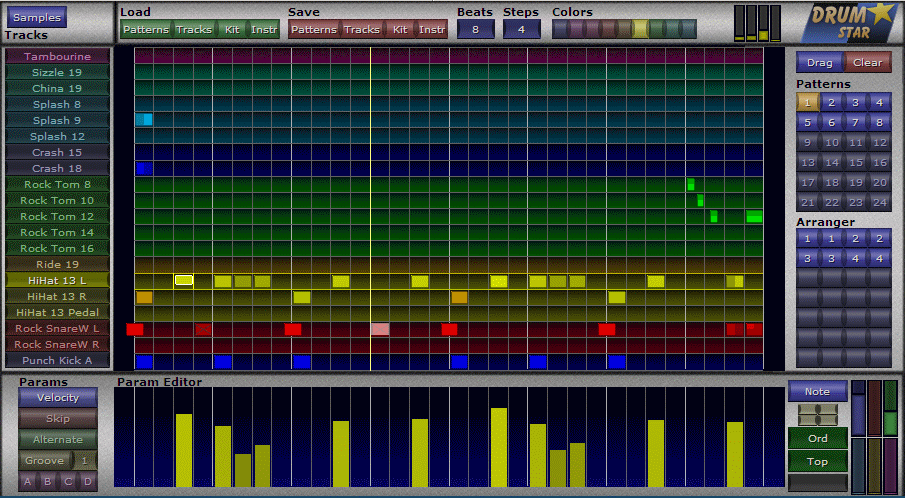
DrumStar is a VST drum sampler and step sequencer for creating original drum patterns. The sampler can handle large complex sample libraries and their nuances. It contains several workflow improvements to speed up sample mapping including the ability to: drag multiple samples, create layers with a single button click, and set global values in one location using groups and subgroups.

The sequencer provides multiple ways of editing notes for a fast workflow. These include a note editor, where all settings for a single note can be changed without switching modes, a parameter lane, where a single parameter can be edited in the context of the track, and the pattern editor where velocity and timing can be adjusted by dragging existing notes. It also includes several randomization features so that patterns that can have subtle differences each time they play. It is tightly coupled with the sampler so that nuances such as the hit type are easy to adjust.

It also features skinning support to change background images and color schemes.

Sampler:

  • 20 instrument tracks allowing combinations of:
    • Up to 12 hit types.
    • Up to 128 velocity layers.
    • Up to 128 control layers.
    • Up to 128 crossfade layers.
    • Up to 128 round robin layers.
  • High quality sinc interpolation.
  • Multi sample drag and drop.
  • One button layer mapping.
  • Disk Streaming.
  • 8 Mute Groups with release control.
  • 4 Aux Outputs.
  • Groups and subgroups for setting shared values.

Sequencer:

  • 24 Patterns.
  • 20 Instrument tracks.
  • Arrangements with up to 28 patterns.
  • 24 groove presets.
  • Adjustable beats and steps per pattern.
  • Random pattern variations including:
    • 4 random groups.
    • Alternate hit type.
    • Velocity.
    • Note skipping.
    • Timing.
    • Control level.
  • Drag finished patterns to host as wave files.

Effects:

  • Tuning.
  • 5 band equalizer.
  • AHDSR envelope.
  • Saturation.

RSS FeedAll KVR Audio news items relating to DrumStar.

Sonic Sidekick updates DrumStar to v1.0.2 9th November 2007
Sonic Sidekick releases DrumStar v1.0 25th October 2007

User Reviews by KVR Members for DrumStar.

CLICK HERE TO ADD YOUR REVIEW

There aren't any reviews yet!

Reviews, articles, interviews, etc. for DrumStar.

None listed yet.
Quick Jump:


Products by Sonic Sidekick

Product: DrumStar
Developer: Sonic Sidekick
Type: Drum Sampler
Price: $89
OS&Formats: WindowsVST
DrumStar is a VST drum sampler and step sequencer for creating original drum patterns. The sampler can handle large complex sample libraries and their nuances. It contains several workflow improvements to speed up sample mapping including the ability to: drag multiple samples, create layers with a single button click, and set global values in one location using groups and subgroups. The sequencer provides multiple ways of editing notes for a fast workflow. These include a note editor, where all settings for a single note can be changed without switching modes, a parameter lane, where a single... [more]

 
None found
Coming Soon...
