

163 KVR members have added Automap to 21 MyKVR groups 195 times.
Download KVR Studio Manager (FREE)
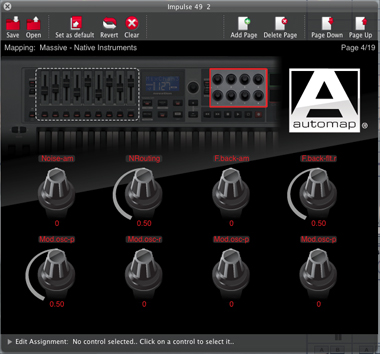
Automap is free software that comes with all Novation controllers. It gives you instant access to your DAW and plug-ins so you can get hands-on control of your music software. It features a software edit page that graphically shows what is assigned to which knob, fader or button on the hardware. Automap 4 has a re-designed GUI and now features a notification system that pops up in the corner of your monitor to tell you what you are controlling when you move a knob, slider or button.
Automap 4 was launched with Novation's new Impulse controller keyboard range in Summer 2011. The v4.1 update now enables Novation's top of the range SL MkII controllers to work with Automap 4 for instant assignment and convenient control. Other Novation controllers and keyboards are now also compatible with Automap 4 including: Nocturn, Launchpad, UltraNova, ReMOTE SL, Nocturn Keyboard and the SL Compact.
Automap is the original music software control technology. It was launched in 2006 and has evolved over the years with significant workflow improvements. Automap 4 is simple to set up and start using right away, and gives you unparalleled control over your DAW and plug-in instruments/effects.


Hello,
I am new here, therefore I napoplgize in advance for possible stupid questions. So here it comes: Is it possible to get automap 3.7.4 somwhere? In order to run certain templates on my Novation Remote SL Zero mk2 in combination with reaper I need that version because it will not work with automap 4. Any suggestions?
Thanks,
boertsch
Please log in to join the discussion
Submit: News, Plugins, Hosts & Apps | Advertise @ KVR | Developer Account | About KVR / Contact Us | Privacy Statement | Sell @ KVR | KVR Marketplace Terms & Conditions
© KVR Audio, Inc. 2000-2026

