By oroboros
On 22nd February 2007 Version: 2.0.1 Read all reviews by oroboros
2 of 2 people found this review helpful.
Was this review helpful to you? Yes | No |
I've been using Project5 since v1.0, so I'm very familiar with it; I've probably clocked over 1000 hours with it, by now. Since I don't play a physical instrument, don't sing, don't record audio (though P5 can), and make primarily synth-centric songs, I didn't see the need for any of the more full-featured, "traditional" audio-centric hosts, such as Sonar, Cubase, Logic, etc.
First of all, as syrath says, P5 is not set up like a traditional DAW. Having said that, this can also be a blessing in disguise. Inserting instruments and modifying midi data is about as quick as I've ever seen in any host. Which highlights P5's major strength - workflow. If you want to get an idea down before you forget it, P5 is perfect. It includes enough instruments, especially with Dimension, to get any idea mostly down, without having to purchase external gear (but of course, you will, anyway). After this point - getting the idea mainly down, you might need another application. Or not. Some people mix completely within P5, myself included, to quality results. Many musicians, though, instead start their projects with P5, and then master in another - using P5 as a sort of audio "sketch pad". P5 for speed of creation, some other app for the fine tuning and "mastering".
Which brings us to the main question of, "What does P5 shine at?" Answer: Midi workflow. Nothing, in my opinion, is faster or more convenient than P5 in this area. I own or have used: Reason, FLStudio, Live, ACID, ProTools M-Powered, and SONAR. P5 is the quickest and most flexible when it comes to Midi manipulation, of all of these, in my opinion. It is the ONE THING that P5 does better than anything else.
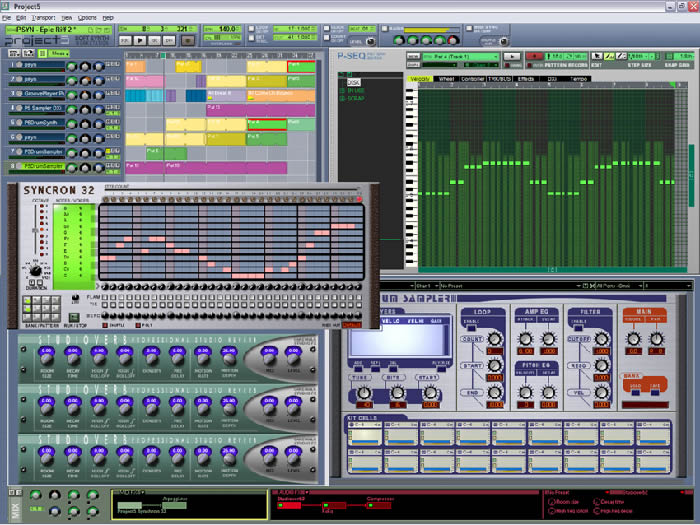
To try to explain this as best I can, P5 operates based upon a "pattern clip" system, where you can copy and paste clips of notes, Midi data, or instrument/effect data - instead of individual notes or data - wherever you want them. This distinction, which perhaps seems insignificant at first, can completely change your workflow. For example, if you wanted to change all versions of a particular section in your song, changing just one clip in your song will change the midi patterns of all identical copies of that clip (aliases of that clip, if you will) in *all* sections of your song. No longer will you need to go through, modifying your song measure by measure, note by note, starting at the beginning and moving slowly through to the end. One change, in one clip - and all copies of this clip throughout your song are also changed. Bam, done. You can also put automation in these clips, then cut-and-paste these automation clips wherever you want one - without having to recreate an automation pattern over and over again. Or in other words, make once, use many. Fast. Or you can create a spinoff version of a current clip - with all of its current properties - and then change only the parts you want to from there, without having to start from scratch again - just modify the parts you want. Speedy. Clips can contain nearly all forms of Midi or instrument data within them - notes, velocity, pan, instrument automation, effect automation, effect values, instrument values, basically anything accessible and/or modifiable from the host. If you want, you can include all information within one clip, or separate this data out into many clips, each with its own specific type of data, and cut-and-paste these clips wherever you need them to be. Don't like a change? - select, delete, done - no messing with curves, or spending the time to recreate what was there before. Decide to change something after doing a bunch of other things, such that you can't use undo? Not a problem with clips - just change the clip. Swap one clip for another, mix and match, move clips in and out of use, try different ideas NON-DESTRUCTIVELY - just move in new clips and preview. Bam, your idea is down. Bam, your song changes. Bam, change one clip, changes happen to all alias clips instantly. Faaaast. No other way of modifying Midi/automation data, IMO, is even remotely as close to as fast. This is the one thing P5 shines at and does better than anybody else, bar none.
Where P5 fails, however, is in audio/sample use. While P5 does record audio (added in v2), it's included audio manipulation features are, to put it bluntly, primitive at best. You *will* need an external audio tool if you plan on doing any sort of serious audio manipulation. Also, unlike the majority of non-traditional "alternative" hosts out there these days ...
Since you seem to have made it this far, and as KVR would only allow 5000 characters max for reviews and mine was closer to 14000, for the rest of this review, go here ...
http://kvraudio.com/forum/viewtopic.php?p=2396246
... or do a search for 'Project5 Review' under the 'Hosts' forum, with my user name. There you can read the rest, which goes into far greater detail - including the good, the bad, and the odd about Project5. |
|
