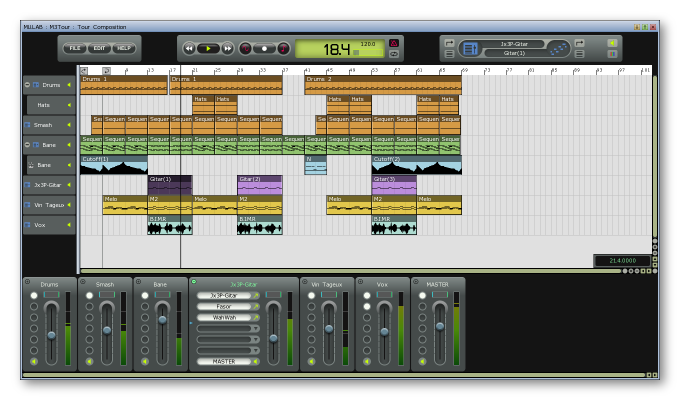
 MUTOOLS has upgraded MU.LAB, the sequencing application for Mac OS X and Windows, to version 4.
Next Generation Modular System:
- Simplified, more transparent and enriched modular architecture.
- New MuDrum module.
- New MuSynth VA synth module.
- New Super Modulator module.
- New Note To Modulation module.
- New Controller To Modulation module.
- New Aftertouch To Modulation module.
- New PitchBend To Modulation module.
- New Tanh Distortion module.
- New Constant Modulator.
- New Event Delay module.
- Many new inspiring patches, special thanks to AD.
- MUX and PolySynth now can have a variable number of inputs and outputs.
- MUX and PolySynth can also have modulation inputs. You can use a modulation input on the PolySynth to input global LFO which will be common to all voices.
- Oscillator, SamplePlayer, MultiSamplePlayer, NoiseGenerator: Volume parameter now uses a more relevant 'multiplied' modulation.
- Oscillator, SamplePlayer, MultiSamplePlayer: New Pitch parameter (replaces the Pitch Mod Depth).
- Oscillator, SamplePlayer, MultiSamplePlayer now have rich portamento features.
- Improved the oscillators' pitch modulation code resulting in even better sound.
- Oscillator now has 300. accurately selected and hi-quality waveforms. Thanks to adventurekid.se.
- Oscillators now have the option to start at fixed start phase from 0 to 359 degrees.
- MultiSample Player now has 4 outputs. Each MultiSample zone can be routed to 1 of these 4 outs.
- The Main Audio Input + Output modules (the one that stream from/to the audio device) can be used anywhere, in any modular level.
- Improved ADSR module:
- Now using logarithmic slopes for a natural sound, other slopes possible too for broad sonic creativity.
- Much higher envelope times possible.
- More musical options.
- Continued smooth sound on changing/automating the envelope times.
- ADSR speeds are modulatable.
- Velocity Sensitivity.
- Includes a Process On/Off switch.
- Improved LFO module:
- Many more waveforms.
- Tempo Syncable.
- Nicer User Interface.
- Frequency and Amplitude is modulatable.
- Includes a Process On/Off switch.
- Improved Audio Balancers 1->2 and 2->1:
- Balance parameter is modulatable.
- Now also have a crossfade curve.
- Fine-tuned editors.
- Improved Wobble Generator:
- Now also has a Process On/Off switch.
- Fine-tuned parameter strings.
- Fine-tuned MM Filter resonance.
- Filter Mod Depth parameter has been removed, use mod cable Amplitude or Mod Mapper.
- Improved modulation cables now use a more relevant Amplitude + Offset properties instead of Min-Max values. Same for the Modulation Mapper module and the Wobble Generator.
- Besides the standard MIDI controllers, now also Aftertouch and Pitchbend can be used to MIDI control parameters.
- When mapping a MIDI controller to parameter 'None', all mappings for that controller are deleted. (within its context).
- Deep Editor now uses full featured meta-parameter editors on top.
- Meta-parameters now use similar auto naming as tracks etc: if no explicit user name, then an auto name is used.
- You can drag-drop parameters on a meta-parameter so to add/edit that mapping.
- Fine-tuned the GUI of many module editors.
- MUX Play Editor is much more customizable: You can drag-drop parameters and editor buttons onto it and move them around. Also support for group frames.
- New "Revert Preset" function for modules.
- All modules have a Open/Save Preset context function.
- Streamlined "Save As" for patches: Always using a file browser. File browser will open in the most relevant location.
- At many places you can choose the 'curve' for example when applying modulation to a parameter you can choose whether it should be applied linear - exponential - logarithmic -...
- Racks now have direct parameters to its Gain, Stereo Pan, Stereo Width and Mute.
- Racks now use plain knobs to control stereo pan and stereo width.
- Racks can open-save presets.
- Extended sample library.
- Optimized performance: MuLab 4 uses up to 35% less than MuLab 3.
Composer & Sequencing
- The "Part Targets" feature has been removed. This simplifies the concept without loosing anything essential. For it is still possible to set a separate MIDI channel per part. You can even use separate MIDI channels per event.
- Improved Track/Part MIDI channel management:
- Tracks and parts now evaluate the target channel apart from the target module.
- Sub-tracks can overwrite the MIDI channel of the main track.
- Parts take the MIDI channel of the track, if any, else they can have their own MIDI channel.
- Events take the MIDI channel of the sequence part, if any, else they can have their own MIDI channel.
- Composer has a + button with feature-rich Add New Instrument Track / Add New Audio Track / Add New Track options.
- Composer and Sequence Editor have an integrated grid panel.
- Extra preset grid: "MIDI Clock".
- New way for editing audio, sequence and envelope parts using floating windows.
- New way to draw parts and to indicate selected parts and unique/shared sequence parts.
- New: Envelope Parts.
- New Focused Target Module Panel always shows the module that is played by the MIDI keyboard.
- The Part Property Panel is moved below composer.
- Audio Parts now have a gain-pan-fadin-fadout play parameter.
- Sequence Parts now have a key+vel play parameter.
- Improved Mute/Solo behaviour for tracks.
- Fine-tuned context menu for track mute.
- Fine-tuned the algorithm to define the destination track when recording a new part.
- Greatly improved the Audio Recording Options panel.
- In the sequence editor, when moving the loop-end locator, you get a set of nice options how the new loop should be filled.
- When drawing line curves in the Event Graph Editor, now the used value resolution is 1024 instead of 128, but with a min of 10 ms between value.
- Improved the "Modify Time/Length/Value 1/Value 2/..." sequence functions.
- Fixed: "Thin Out" sequence function reported a wrong number of deleted events.
- Sequence functions sub-menu is more optimized to the context resulting in a cleaner, less bloated sub-menu.
- Sequence editor: When drawing new notes, they're monitored while you draw. (preferencable).
Extended Drag-Drop Features
- Reworked Drag-Drop sub-system opens many options. For example: Drag drop a module on a track = Set Track Target.
- You can drag-drop modules with [Ctrl] to copy them.
- Drag-drop module on the "+" track button = create new track for that module.
- You can drag-drop modules and parameters on (envelope) parts.
- You can drag-drop a module onto the Focused Target Module Panel to explicitly play that module from MIDI input.
Multi-Session
- Open and play multiple sessions at the same time.
- Cut-copy-paste and drag-drop parts and modules from one session to another.
- Undo/Redo works per session.
User Interface
- Racks and modules can now be colored. The colors are used by the tracks and parts targeting the module. This makes a visual link between the composition and the sounds/effects.
- Improved behaviour when doing "Reset Graphic Resources": Also all module editors now properly reset themselves.
- String valuators: double-click = select all, cfr standard behaviour in most software.
- When showing the source file path of audio files, relative and absolute paths are shown, if different.
- Tab key has been freed from hard-coded behaviour. So it's freely usable as a shortcut key. (Control + Tab still is reserved for stepping thru the open windows though).
- Right-click anywhere on a rack to popup the context menu.
- Knobs and sliders now step to more default values on Alt+click.
- Meta parameter editor: Minimum and Maximum values now use the effective parameter values.
- Modulation cable property panels are non-modal floating windows.
- Modulation cable property panels now use knobs with clear value displays.
- When selecting an output for a rack, all relevant inputs are shown, not only racks and output interfaces.
- You can directly drop a.Mux file onto a rack slot.
- Alert popups: You can use the first char of the options. But as "Cancel" can be done by by [Esc], it will not eat the [C] from any other option starting with a C. (and so "Close Without Save" can be done via [C] ;)).
- Improved shortcut handling.
- The Session Modular Area window includes the session name.
- Improved font system.
- Font icons better match the accompanying text and color.
- Rack slots also show the module icon.
- Individual rack slots can get the GUI focus and this can process shortcuts.
- Optimized and beautified module editors.
- FolderBrowser shows big icons.
- More skinning options for the audio level meter.
- Fine-tuned editing of musical positions in bars.beats.ticks, frames, seconds,...
- Fine-tuned editing of parameter values.
- Right-click Play button -> "Panic" function for quick access when needed. As a note: The Panic function is also shortcuttable of course.
- Clicking Play while the audio engine is not running now gives a friendly alert with the option to go to the Audio Setup.
- [Alt]-click on slots, modules or cables = toggle mute.
- When loading a patch, sample or waveform from outside the library, you can now simply step to the previous/next patch, sample or waveform in that folder.
- Oscillators: You can drag-drop a wave file onto the display.
- When activating a synth editor, then the MIDI focus also is auto switched to this synth.
- VST plug-in manager: multi selection possible => easier grouping.
Others
- Imports MP3 files as samples.
- "Save Session As" now uses a new method: MuSessions are saved in a separate folder so that the Audio subfolder becomes more private per session. This will make it more easy to bundle a MuSession into a zip.
- New options to to manage the audio/sample files within the session's audio folder.
- Rack Sends popup menu now also include 'Copy As Parameter Event'.
- Improved VST engine.
- Tuned new VST naming algorithm: MuLab prefers to use the VST patch name rather than the VST plug-in name, if relevant.
- MuLab now supports opening sessions via the command line.
- Fixed: When saving a session in some parent folder of the library folder, then there could be a file reference problem when loading the session on another system.
- New "Save As 'New' Session" function.
- Inline Sample Browser: You can step thru the samples in a folder while the music is playing and using the selected sample. For example: choose a snare drum sample while the drum pattern is playing it.
- New type session menu.
- New MidiSetup preference "MidiOutputMicroTimeCompensation".
- Fixed: When your computer was up and running for many days without restart, then there could be some practical problems.
- Fixed: Possible denormalizations bug.
- Fine-tuned management of sequenced sustain pedal events.
- And many many other micro improvements, too many and too detailed to list them all.
Pricing & Availability
MU.LAB 4 comes in 3 versions: MU.LAB FREE, MU.LAB XT (€25) and MU.LAB UL (€75). See here for differences.
Customers purchasing MU.LAB UL before January 15, 2012, will receive a free upgrade to MU.LAB 5 (expected Q2 2012).