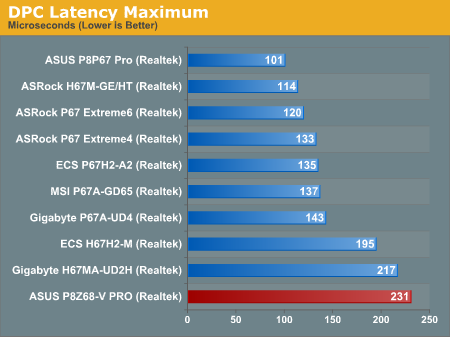
at the same time pointing out a single bad driver can cause massive DPC.

Scott

As Scott says, it would be if they did it properly.egbert wrote:
It's great that this info is now being published.
The isegbert wrote: What you might find is that there are a couple of settings in the BIOS that could turn that whole graph upside down
They do- some of those boards might get right down into double figures with appropriate settings.


I did consider it when I first read that review but like Scott we've spoken to them in the past and it's not always been overly constructive. The thing that has to be remembered about sites like that is that they are enthusiasts sites and I fully expect them to have set up the test machine to give the best overall performance mainstream applications and gaming which is what they do.egbert wrote:I would humbly suggest that guys like you two would be in a good position to do all of your audio crunching brethren - here on KVR and elsewhere - a solid and with a pointed email or two wise Anandtech the f@#$ up on DPC latency.
Many times, unless these systems are being built specifically to be OC'd high performance systems- if they are just evaluating a CPU or motherboards or graphics card or whatever- the builds and installs aren't optimized at all. Install the OS, install support software and drivers, run the tests. When evaluating graphics cards of the same model, manufacturers reference drivers are used and the installation is usually not even changed between cards. Anandtech and Tom's don't try to do anything that would misrepresent the performance of a particular setup, and writers who do so don't work for them long. Why? becaus e then vendors don't supply their units for review. It is hard to have a review of the latest gee-whiz graphics card up the day they are announced when you ticked off someone at ATI....Kaine wrote:I did consider it when I first read that review but like Scott we've spoken to them in the past and it's not always been overly constructive. The thing that has to be remembered about sites like that is that they are enthusiasts sites and I fully expect them to have set up the test machine to give the best overall performance mainstream applications and gaming which is what they do.egbert wrote:I would humbly suggest that guys like you two would be in a good position to do all of your audio crunching brethren - here on KVR and elsewhere - a solid and with a pointed email or two wise Anandtech the f@#$ up on DPC latency.
Nowt wrong with that, but us audio guys don't have the same requirements from our machines that they do and I know for sure that I tweak my machines in a far different way from out gaming guys... as such I'm not quite sure they'd be happy having to set up a machine configuration twice for the same review!
That said it does kinda make a mockery of even doing the DPC test, but then squeezing a few extra frames out of 3dmark will always be more important in those reviews than an extra 150 on the DPC test... expecially as 250us will have no impact on any normal user so they'll never notice or even care.
Missed this last week....Ashe37 wrote:Anandtech and Tom's don't try to do anything that would misrepresent the performance of a particular setup, and writers who do so don't work for them long. Why? becaus e then vendors don't supply their units for review. It is hard to have a review of the latest gee-whiz graphics card up the day they are announced when you ticked off someone at ATI....
So would you recommend the noctua? I'm not sure if I really need the overclocking abilities at this point, but want it as a means of future proofing. Could you overclock safely at all with the stock cooler and how much?monkeymanx wrote:So far so good. This easily overclocks to 4.5ghz with pretty much the standard voltage. It really doesn't seem to generate much more heat when stress tested either. The jump to 4.6ghz is slightly hotter and needs a tad more voltage. Running at 5ghz stable works but gets a tad warm and needs more voltage obviously. I'm pretty sure I could go beyond 5ghz but the setup at 4.5ghz is very nice.
So, if you get this processor and can not easily over clock it, then you probably have a dud. I'm very happy with the total purchase. I did have to use a grinder to shave off some of the heat sink on the Noctua because it is huge and the Corsair Vengance RAM is tall. Works great in the end though, the Noctua is pretty quiet and keeps this CPU nice and cool.
Curious as to which model you have is it this one? NH-C12P SE14monkeymanx wrote:The Noctua is huge so make sure you get a big case like the HAF I bought. The issue was the Vengance RAM is really tall so if you bought lower profile RAM then you would be all set. I didn't even take the stock cooler out of the box. They are usually louder and less efficient. The 4.5ghz is easy to get to so you might as well do it.

Looks like there's now a lower-profile version of the Vengeance sticks...monkeymanx wrote:I did have to use a grinder to shave off some of the heat sink on the Noctua because it is huge and the Corsair Vengance RAM is tall.
Submit: News, Plugins, Hosts & Apps | Advertise @ KVR | Developer Account | About KVR / Contact Us | Privacy Statement
© KVR Audio, Inc. 2000-2026