Products @ KVR
Blue Cat's ChorusBlue Cat's Digital Peak MeterBlue Cat's Digital Peak Meter ProBlue Cat's DynamicsBlue Cat's FlangerBlue Cat's FreqAnalystBlue Cat's FreqAnalyst MultiBlue Cat's FreqAnalyst ProBlue Cat's Gain SuiteBlue Cat's Liny EQBlue Cat's MB-5 DynamixBlue Cat's MB-7 MixerBlue Cat's Oscilloscope MultiBlue Cat's Parametr'EQ seriesBlue Cat's PhaserBlue Cat's ProtectorBlue Cat's Remote ControlBlue Cat's Stereo Triple EQBlue Cat's StereoScope SeriesBlue Cat's Triple EQBlue Cat's Widening Meter ProBlue Cat's Widening Triple EQ
|
|||
New versions of our award winning audio analysis plug-ins are now available: this update mainly brings output data refresh rate customization to improve MIDI or automation output for smoother side chaining, new trigger mode for the oscilloscope, note display for spectrum analyzers, pan law selection for stereoscopes, performance improvements on Mac and much more... Details are available for each plug-in on the products pages.
The upgrade is free for existing customers (emails are on their way) and can be downloaded from the same location as the previous version. If you do not own these plug-ins yet, demo versions in DirectX, VST, RTAS and Audio Unit formats are available for download. Check them out! Last edited by Blue Cat Audio on Mon Oct 03, 2011 10:03 am; edited 1 time in total |
|||
| ^ | Joined: 07 Sep 2004 Member: #39981 Location: Paris (France) | ||
|
|||
Quote: pan law selection for stereoscopes
awesome. Thx for following through Quote: note display for spectrum analyzers
this too |
|||
| ^ | Joined: 20 Nov 2010 Member: #243906 Location: stuck in transition | ||
|
|||
You are welcome! Thanks again for your feedback. |
|||
| ^ | Joined: 07 Sep 2004 Member: #39981 Location: Paris (France) | ||
|
|||
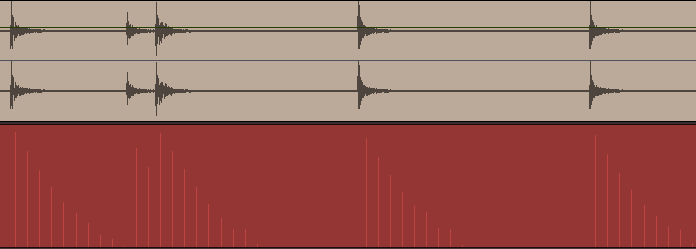
To illustrate the influence of the output data rate on the MIDI output, here are some screenshots of the output of the Blue Cat's Digital Peak Meter Pro plug-in. The recorded parameter is the peak value, with release time set to 100 ms. The input signal is a snare drum.
20 Hz (old default)
50 Hz (new default)
500 Hz (max)
As you can see, 500 Hz is probably overkill in this case, and it is likely to overload some MIDI devices or software that do not support very high MIDI data rates. But the plug-in lets you manage the precision vs performance that best suits your needs. |
|||
| ^ | Joined: 07 Sep 2004 Member: #39981 Location: Paris (France) | ||
|
|||
Excellent! |
|||
| ^ | Joined: 11 Aug 2008 Member: #186852 Location: Dark Side of the Moonies | ||
|
|||
Thanks for yet another update. Blue Cat analysis tools are still my preferred ones, even though I have several others.
Just one humble request: Could you, please, include a version number in the downloads like almost all other plugin producer do. It is nice to be able to go back, if an update suddenly give you problems. And we need the version numbers to keep track of things. |
|||
| ^ | Joined: 23 May 2004 Member: #26715 Location: Denmark | ||
|
|||
Thanks! Do you mean adding version numbers to the installers file names? |
|||
| ^ | Joined: 07 Sep 2004 Member: #39981 Location: Paris (France) | ||
|
|||
Blue Cat Audio wrote: Thanks! Do you mean adding version numbers to the installers file names?
Exactly. Like BlueCatFreqAnalyzer194.zip etc. They almost all do it this way. This way I can download to my BlueCat folder without overwriting any previous versions in case I need to go back if the new version gives me problems. |
|||
| ^ | Joined: 23 May 2004 Member: #26715 Location: Denmark | ||
|
|||
Makes sense! Will try to make this happen asap In case you lost an older version, you can also redownload most of them from our website (check out the link at the bottom of the download page. It gives you access to older versions). |
|||
| ^ | Joined: 07 Sep 2004 Member: #39981 Location: Paris (France) | ||
|
|||
Hello,
The FreqAnalyst Multi 'Peak Reset' doesn't work correctly. When set to '0' it doesn't hold & appear as a line. (& as it does in your free Blue Cat's FreqAnalyst) Thanks Win 7 |
|||
| ^ | Joined: 07 Apr 2010 Member: #229353 | ||
|
|||
Hi,
The "peak reset" parameter is only affects "peak"-type curves, and it won't apply to others. If you want to see the peak signal in addition to the instant signal like in the free FreqAnalyst plug-in, you need to select both the instant and peak curves in the routing pane. Hope this helps! |
|||
| ^ | Joined: 07 Sep 2004 Member: #39981 Location: Paris (France) | ||
|
|||
I've just tried to download the update for the Oscilloscope. It accepts the login but then throws up a 404. I didn't get an email about the updates - have they been moved? |
|||
| ^ | Joined: 08 Jun 2009 Member: #209020 Location: UK | ||
|
|||
Gamma-UT wrote: It accepts the login but then throws up a 404. I didn't get an email about the updates - have they been moved?
I could download Oscilloscope Multi now. I received the updated e-mail from Blue Cat Audio in Jul., 2011. |
|||
| ^ | Joined: 18 Dec 2009 Member: #221959 Location: Japan | ||
|
|||
Hayate Yagami wrote: Gamma-UT wrote: It accepts the login but then throws up a 404. I didn't get an email about the updates - have they been moved?
I could download Oscilloscope Multi now. I received the updated e-mail from Blue Cat Audio in Jul., 2011. I'm using the download link supplied when I bought the analysis pack in 2009. It still gives a 404. The most recent version I've been able to download was 1.4. So, I can only assume that the link has changed since purchase but as I've received no further updates from Blue Cat since 2009, I've no idea what it's meant to be. |
|||
| ^ | Joined: 08 Jun 2009 Member: #209020 Location: UK | ||
|
|||
Gamma-UT wrote: I'm using the download link supplied when I bought the analysis pack in 2009.
I think you have the right to get the recent version of Analysis Pack. Blue Cat Audio might solve your problem. |
|||
| ^ | Joined: 18 Dec 2009 Member: #221959 Location: Japan |
| KVR Forum Index » Blue Cat Audio | All times are GMT - 8 Hours |
|
Printable version |
Disclaimer: All communications made available as part of this forum and any opinions, advice, statements, views or other information expressed in this forum are solely provided by, and the responsibility of, the person posting such communication and not of kvraudio.com (unless kvraudio.com is specifically identified as the author of the communication).
Powered by phpBB © phpBB Group