Latest News: u-he updates all their plug-ins
|
|||
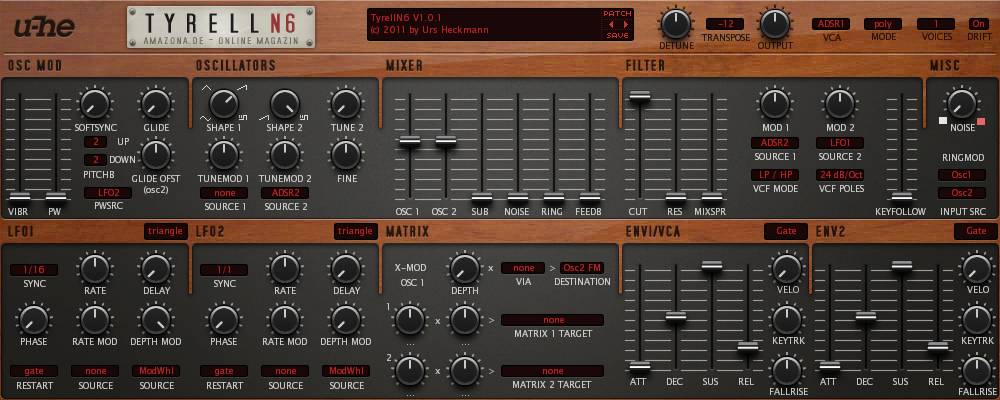
Here is a vintage looking Tyrell N6 skin:
Click the image for full size preview. Download here. A person with a color blindness problem asked me to make a skin without red text. Here it is in case someone else finds it useful:
Click the image for full size preview. Download here. Both versions are updated for V2.0: Red:
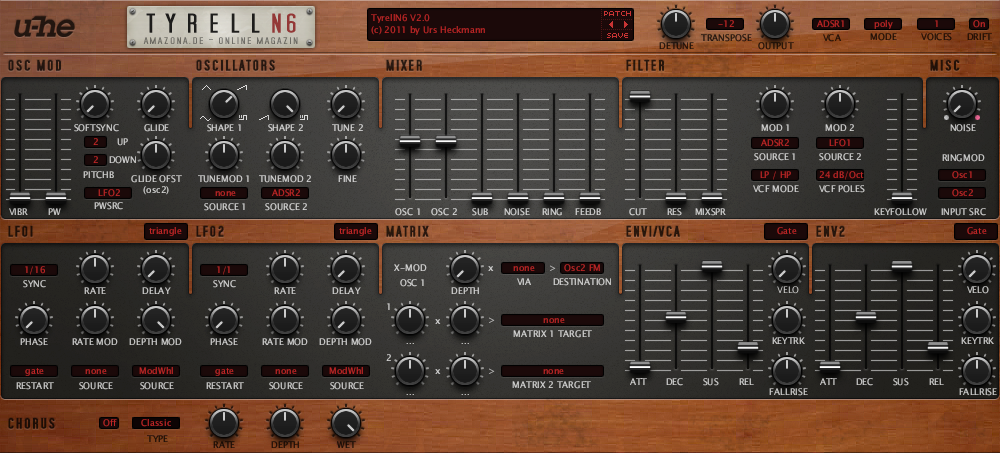
Click the image for full size preview. Download here. White:
Click the image for full size preview. Download here. Last edited by Branis on Wed Mar 21, 2012 1:57 pm; edited 2 times in total |
|||
| ^ | Joined: 21 May 2004 Member: #26467 Location: Serbia | ||
|
|||
Wow! Nice! Another great skin for an Uhe synth Thanks! Very much appreciated! Cheers Dennis ---- Back from the dead - Sorry if I didn't answer your mails/PM/whatever during the last few months. I hope everything will be back to normal soon. Life can take some shitty turns sometimes. |
|||
| ^ | Joined: 13 Feb 2006 Member: #98170 Location: Wiesmoor, Germany | ||
|
|||
Nice. Makes it look a bit like Diva |
|||
| ^ | Joined: 27 Jul 2005 Member: #76240 Location: the wilds of wanny | ||
|
|||
Looks remarkably like a Prophet. Very nice ---- "I was wondering if you'd like to try Magic Mushrooms" "Oooh I dont know. Sounds a bit scary" "It's not scary. You just lose a sense of who you are and all that sh!t" SoundCloud |
|||
| ^ | Joined: 06 Sep 2008 Member: #188742 | ||
|
|||
Very nice! My new default skin! It's now even analogger than before |
|||
| ^ | Joined: 20 Jul 2010 Member: #236000 | ||
|
|||
like it, now just have to know where to put it |
|||
| ^ | Joined: 24 May 2009 Member: #208007 Location: spain | ||
|
|||
thats a really nice skin , good work. would its be possible to make one like that for ace please |
|||
| ^ | Joined: 10 Jan 2010 Member: #223465 Location: ld | ||
|
|||
Wow nice work! Gonna make this my default skin too, thanks!
Branding-wise, i'm not sure how Urs will feel about the use of the U-He logo in this unofficial variant though. I think he prefers the official version for skins. |
|||
| ^ | Joined: 12 Dec 2007 Member: #168030 Location: Belgium | ||
|
|||
Nice where do you put the file.Can you explain for both Mac and PC users
Cheers ---- www.voltagedisciple.com Patches for ACE,PREDATOR,SYNPLANT,SUB BOOM BASS,PUNCH AALTO,CIRCLE,BLADE and Ableton LIVE Packs http://syikom.wordpress.com/ my blog |
|||
| ^ | Joined: 30 Oct 2006 Member: #126390 Location: Australia, NSW | ||
|
|||
That's nice, but I'd kinda like to see a variant with less 'gloss.' |
|||
| ^ | Joined: 03 Sep 2001 Member: #1041 | ||
|
|||
Hey guys, thanks for your comments Mushy Mushy wrote: Looks remarkably like a Prophet. Very nice
Yup, that was the inspiration, thus the name el-bo (formerly ebow) wrote: like it, now just have to know where to put it
This is how to do it on Windows, I don't know exactly about Mac: The skin is placed in the TyrellN6.data folder. You should have a shortcut to that folder in the same place where you installed the plugin (e.g. C:\Program Files\VST Plugins\...). Double-click the shortcut to get to the actual folder. When you find the TyrellN6.data you'll see it has a Data folder inside which contains the original skin. You'll need to replace the original skin, so cut and paste the Data folder to a safe place, as a backup, and then extract the Data folder, from the TyrellN6-1978Skin.zip file you downloaded, at it's place. When you are done, the structure of the TyrellN6.data folder should be unchanged. It should contain only folders Data, Presets and Support (Data will be the one with the new skin). I hope that helps bassmonsta wrote: thats a really nice skin , good work. would its be possible to make one like that for ace please
I can't make any promises, it wouldn't happen any time soon anyway. You can check the Ace skin I already made (Clean skin). It's based on the original, which I like a lot, just a bit polished. |
|||
| ^ | Joined: 21 May 2004 Member: #26467 Location: Serbia | ||
|
|||
Branis wrote: el-bo (formerly ebow) wrote: like it, now just have to know where to put it
This is how to do it on Windows, I don't know exactly about Mac: The skin is placed in the TyrellN6.data folder. You should have a shortcut to that folder in the same place where you installed the plugin (e.g. C:\Program Files\VST Plugins\...). Double-click the shortcut to get to the actual folder. When you find the TyrellN6.data you'll see it has a Data folder inside which contains the original skin. You'll need to replace the original skin, so cut and paste the Data folder to a safe place, as a backup, and then extract the Data folder, from the TyrellN6-1978Skin.zip file you downloaded, at it's place. When you are done, the structure of the TyrellN6.data folder should be unchanged. It should contain only folders Data, Presets and Support (Data will be the one with the new skin). I hope that helps oooops, i should have specified mac....never mind, looks like someone else is after the windows instructions so not a waste of your time if anyone knows the mac location, please let us know...thanks |
|||
| ^ | Joined: 24 May 2009 Member: #208007 Location: spain | ||
|
|||
I like it! New default!!
Thanks |
|||
| ^ | Joined: 06 Jan 2009 Member: #197719 Location: Croatia | ||
|
|||
| ^ | Joined: 14 Oct 2002 Member: #4170 Location: Sweden | ||
|
|||
| ^ | Joined: 21 May 2004 Member: #26467 Location: Serbia |
| KVR Forum Index » u-he | All times are GMT - 8 Hours |
|
Printable version |
Disclaimer: All communications made available as part of this forum and any opinions, advice, statements, views or other information expressed in this forum are solely provided by, and the responsibility of, the person posting such communication and not of kvraudio.com (unless kvraudio.com is specifically identified as the author of the communication).
Powered by phpBB © phpBB Group