|
|||
Hi all,
I am looking for a real Digital Phosphor Oscilloscope. One that simulates a real analog oscilloscope like this one:
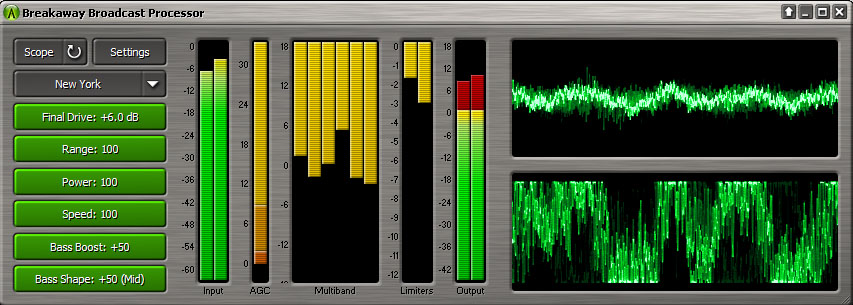
I want to write my own oscilloscope plugin but I need some help to figure out the math to build a DPO. If someone could provide me some source code to help me out in the right direction would be great! The goal is to share a free VST DPO plugin. Erwin. |
|||
| ^ | Joined: 03 Apr 2012 Member: #278029 | ||
|
|||
Well, basically what you want to do is apply a (little bit of) blur to the previous image, draw the current waveform, and add some of the blurred previous image on top. Then show the result and use it as the "previous" image for the next frame (ie we have a feedback loop). That'll get you the fade effect.
If you want to further mimic an analog scope, you could draw the waveform as lines (or cubic splines or whatever) and vary the intensity depending on how far the points are from each other. |
|||
| ^ | Joined: 11 Feb 2006 Member: #97939 Location: Helsinki, Finland | ||
|
|||
http://www.youtube.com/watch?v=tL-Gb4q0uXw
like this? ---- It doesn't matter how it sounds.. ..as long as it has BASS and it's LOUD! |
|||
| ^ | Joined: 04 Sep 2006 Member: #118997 Location: 127.0.0.1 | ||
|
|||
antto wrote: http://www.youtube.com/watch?v=tL-Gb4q0uXw
like this? Wow! |
|||
| ^ | Joined: 30 Jan 2005 Member: #56398 Location: New Zealand | ||
|
|||
Jeff! btw, thank you once again for synthedit ;]
i finally managed to get my head around linking a SE gui module with a frame buffer from GDI it *DOES* occasionally crash, and i couldn't solve why, i guess i haven't put my initialization code in the right places.. for this scope, i use 1 RGB 24bit frame buffer for the memoryDC but the actual drawing happens in a RGB-float (aka 96bit) buffer there is no fade effects or blurs happening, on each frame i clear the screen the magic happens in my drawing code i have an antialiased drawdot() algo, which draws "thick" dots on the screen then, each dot is blended with a "hacked" additive algo the memory effect of the scope actually comes from somewhere else on the DSP side, i got a signal buffer of 2 seconds depending on settings (the sweep rate) only the latest samples are sent to the GUI in a small buffer, since i'm using SendStringToGui() it can't be too big then, the GUI redraws the memory trick is actually, in the buffer, the oldest samples are drawn with darker color, fading to brightest color for the newest samples the ultimate niceness was to turn the drawdot() algo into a drawline() algo with the same characteristics - thickness, and rounded ends, but that would consume lots of CPU using these dots now, it looks very nice if the number of dots is big ---- It doesn't matter how it sounds.. ..as long as it has BASS and it's LOUD! |
|||
| ^ | Joined: 04 Sep 2006 Member: #118997 Location: 127.0.0.1 | ||
|
|||
the reason i made this scope, is more interesting
i need a scope, but i can't afford it right now i know there are software oscilloscopes which use the soundcard.. but these are not really helpful (i could do such things in SE already) but more importantly, i need to be able to see DC signals, but the soundcard is AC-coupled a few years ago, i asked at this forum, if it's possible to "undo" the effect of a HP filter, and some nice gentlemen proposed such a filter, i tested it and it seemed to work so i figured it would be very nice if this "inverse HP filter" is integrated into an oscilloscope! and finaly - there it is in this video, i was probing the VCO of an analog synth (x0xb0x) ---- It doesn't matter how it sounds.. ..as long as it has BASS and it's LOUD! |
|||
| ^ | Joined: 04 Sep 2006 Member: #118997 Location: 127.0.0.1 | ||
|
|||
| ^ | Joined: 23 Jun 2002 Member: #3139 Location: York, UK | ||
|
|||
antto wrote: Jeff! btw, thank you once again for synthedit ;]
i finally managed to get my head around linking a SE gui module with a frame buffer from GDI it *DOES* occasionally crash, and i couldn't solve why, i guess i haven't put my initialization code in the right places.. for this scope, i use 1 RGB 24bit frame buffer for the memoryDC but the actual drawing happens in a RGB-float (aka 96bit) buffer there is no fade effects or blurs happening, on each frame i clear the screen There's probably no need to do the drawing in RGB. You could just use a single float gray-scale buffer, then colorize it when converting to output format. As for fade feedback, that's useful if you want a longer glow-time (to reduce flicker) than a single frame without having to draw things several times. edit: oh forgot to say, it looks very nice .. I've been meaning to do something similar for my PicoScope which has fairly crappy software was far as looking nice goes. |
|||
| ^ | Joined: 11 Feb 2006 Member: #97939 Location: Helsinki, Finland | ||
|
|||
Hi Antto,
Yes, exactly like that. Very nice! So you draw a anti-aliased line with a anti-aliased dot instead of a anti-aliasing line drawing algo? I have tried the WU anti-aliasing line drawing algo but the lines are to thick. How do you calculate the thickness and brightness of the vertical lines? |
|||
| ^ | Joined: 03 Apr 2012 Member: #278029 | ||
|
|||
Erwin1975 wrote: I have tried the WU anti-aliasing line drawing algo but the lines are to thick. Anti-aliased lines are always going to be approximately as thick as what WU gives you simply because of the averaging (eg filtering) inherent in anti-aliasing. The only way you can give an impression of thinner lines is to draw them with less intensity. |
|||
| ^ | Joined: 11 Feb 2006 Member: #97939 Location: Helsinki, Finland | ||
|
|||
no, it's just a drawdot() algo
i could write a drawline() algo with the same characteristics, but it will kill the cpu ;] the algo started as an anti-aliased drawdot(float x, float y, float z, float size) which i used in my first experiments with 96-bit color buffer it looked like this:
so, the antialiasing happens around the edges of the dot, the inside is solid color, and the size and position can be fractional (float) size specifically goes from 0 to uhm, untill the cpu burns? for the scope, i modifyied that algo, so the innner part of the dot is not just solid, but fades out like a radial gradient, and the "z" parameter is fixed to 1.0, since it's no longer 3D mystran, yes i had the idea about using just a grayscale buffer and then colorizing at the end, but this scope has to be double channel (aka 2 colors for the 2 traces) and then, there will be some other stuff displayed on top of that in other colors.. ---- It doesn't matter how it sounds.. ..as long as it has BASS and it's LOUD! |
|||
| ^ | Joined: 04 Sep 2006 Member: #118997 Location: 127.0.0.1 | ||
|
|||
Hi Antto,
But how do you calculate the intensity of the dot? Horizontal lines are thick (like a analog scope) but vertical lines are darker depending the risetime of the signal. |
|||
| ^ | Joined: 03 Apr 2012 Member: #278029 | ||
|
|||
in my video?
that happens when you draw _many_ dots with low intensity since they are thick - the more dots are close to one another - the result becomes brighter (since it's based on additive blending) so when the signal doesn't "move" much - you get many dots close together.. ---- It doesn't matter how it sounds.. ..as long as it has BASS and it's LOUD! |
|||
| ^ | Joined: 04 Sep 2006 Member: #118997 Location: 127.0.0.1 | ||
|
|||
Are you willing to share a piece of code (dot drawing with blend) so I can try that in my own code? I wonder how it looks like with music. |
|||
| ^ | Joined: 03 Apr 2012 Member: #278029 | ||
|
|||
warning: ugly code follows (with my original comments) void setPS_AA(vx3 v, FCLR c, const float size) { if (v.z > 0.f) { // gotta figure out the bounding box for the circle // for a sz=1 the bounding box is 0,0 to 1,1 // for a sz=2 it'll be a box of -1,-1 to 2,2 // erm, if sz=1 then the worst case is 1 additional pixel, thus the box is 2x2 // if sz is more than 1 (say 1.2) i need two additional pixels on each side i think.. making 4x4 // if Z is 1.0 and size is 1.0 - the dot is of size 1.0 // if Z is 2.0 and size is 1.0 - the dot is of size 0.5 // if Z is 1.0 and size is 2.0 - the dot is of size 2.0 ... so it's size/z here too float rad; // radius int irad; int isz; int bx, by; // bounding box int bw, bh; // bounding box width and height int sx, sy; float fx, fy; // fractional part float i; float d = 1.f; v.x *= d; v.y *= d; rad = size * d; // size/z irad = (int)(ceilf(rad)); v.x = v.x * fsc + fscx; v.y = v.y * -fsc + fscy; fx = floor(v.x); fy = floor(v.y); sx = static_cast<int>(fx); // rounded center of dot (make bounding box around this) sy = static_cast<int>(fy); isz = irad/2; // (irad >> 1); bx = sx-isz; by = sy-isz; isz = 1+irad; bw = bx+isz; bh = by+isz; // clip the bounding box to screen rect (no need to draw outside the screen, right?) if (cliptoscreen(bx,by,bw,bh)) { // if at least 1 pixel is visible - draw it // using sx sy for temp vars here sx = bx; sy = by; float dx, dy; while (sy < bh) { // calc dy dy = (float)(sy) - v.y; while (sx < bw) { // calc dx dx = (float)(sx) - v.x; i = ddbc4(dx,dy,rad); getdot(sx,sy)->add_mul(c,i); ++sx; } ++sy; sx = bx; } } // ----------------- inline float ddbc4(const float dx, const float dy, const float Sz) { float in = 0.f; float ou = 1.f; float m = 1.f; if (Sz > 1.f) { in = (Sz - 1.f) * 0.5f; ou = Sz-in; } else { m = Sz; } float d = sqrt(dx*dx + dy*dy); if (d >= ou) { return 0.f; } float f = (d/ou); float f32 = f*f; f32 *= f32; f32 *= f32; f32 *= f32; f32 *= f32; f = (1.f-f32) * exp(f*-4.f); d = f; return d * m; } inline bool cliptoscreen(int &x1, int &y1, int &x2, int &y2) { x1 = max(x1,0); x2 = min(x2,_w1); y1 = max(y1,0); y2 = min(y2,_h1); int szx, szy; szx = x2-x1; szy = y2-y1; if (szx*szy >= 1) { return true; } return false; } vx3 is a struct with: float x,y,z; FCLR is a struct with float r,g,b; the "size" parameter is the dot size in pixels at z=1.0 so with size=1 and a dot with z=0.5 - the final size on screen would be 2.0 the drawing happens here: getdot(sx,sy)->add_mul_tube(c,i); getdot() returns a "FCLR" (pixel) from the 96-bit frame buffer "add_mul" is the blending algo inline void add_mul(const FCLR &x, const float &m) { R += x.R*m; G += x.G*m; B += x.B*m; } "c" is the color (phosphorus kinda) and "i" is an intensity coeff ---- It doesn't matter how it sounds.. ..as long as it has BASS and it's LOUD! |
|||
| ^ | Joined: 04 Sep 2006 Member: #118997 Location: 127.0.0.1 |
| KVR Forum Index » DSP and Plug-in Development | All times are GMT - 8 Hours |
|
Printable version |
Disclaimer: All communications made available as part of this forum and any opinions, advice, statements, views or other information expressed in this forum are solely provided by, and the responsibility of, the person posting such communication and not of kvraudio.com (unless kvraudio.com is specifically identified as the author of the communication).
Powered by phpBB © phpBB Group


