|
|||
i have a computer with 2.1 ghz and 4 gbs of ram and i was thinking of upgrading to 8 gbs. sometimes when im running fl studio (trance producer so lots of notes being hit in one second) it glitches up the sound for a second or two. if i get more ram, will this fix itself, or is it a problem with my other computer components? |
|||
| ^ | Joined: 08 Apr 2012 Member: #278327 Location: United States | ||
|
|||
more ram ONLY help when running x64. I don't think it will help much in this case because FL is 32 bit. But I guess if you are running out of ram you could put the higher ram plugs in the x64 wrapper. |
|||
| ^ | Joined: 20 Dec 2005 Member: #91716 | ||
|
|||
Did you try increasing the soundcard's buffer?
Mainly a faster cpu would help. More RAM is good for running sampled instruments, like Kontakt, but doesn't increase polyphony AFAIK. Cheers Definitely get a good soundcard, or replace CPU, before getting more RAM to fix buffer underrruns. You need a soundcard with ASIO drivers, what have u got ATM? ---- Smoke the pipe of peas, human beans! http://soundcloud.com/nix808 http://rekkerd.org/nix-plugs/ Phonics Audio |
|||
| ^ | Joined: 21 Jul 2006 Member: #113899 Location: Melbourne, Australia | ||
|
|||
Probably a new CPU could be really more helpful (I am assuming it is a 2.1 single/dual core), but try increase the buffer as said, or use some less demanding VST/settings until render.
I dont know if in FL you can render/freeze the VSTi track, if you can it would be quite helpful too. ---- http://soundcloud.com/pc999 http://www.youtube.com/user/pcfirebeats?feature=mhee Stop Austerity! |
|||
| ^ | Joined: 18 Aug 2009 Member: #213618 | ||
|
|||
nix808 wrote: Did you try increasing the soundcard's buffer?
Mainly a faster cpu would help. More RAM is good for running sampled instruments, like Kontakt, but doesn't increase polyphony AFAIK. Cheers Definitely get a good soundcard, or replace CPU, before getting more RAM to fix buffer underrruns. You need a soundcard with ASIO drivers, what have u got ATM? i do have asio but its too bad i cant upgrade my cpu because i have a laptop and srry if this is a no duh question but does an audio interface work as an external soundcard |
|||
| ^ | Joined: 08 Apr 2012 Member: #278327 Location: United States | ||
|
|||
Lazerbacon766 wrote: i do have asio but its too bad i cant upgrade my cpu because i have a laptop and srry if this is a no duh question but does an audio interface work as an external soundcard Yes it does work as that. Try ASIO4ALL it may help without buying a interface and safe money for a CPU/PC ---- http://soundcloud.com/pc999 http://www.youtube.com/user/pcfirebeats?feature=mhee Stop Austerity! |
|||
| ^ | Joined: 18 Aug 2009 Member: #213618 | ||
|
|||
How many CPUs does ur laptop have?
I have a crappy i3 quad, but decent USB soundcard/interface. It lets me do a decent amount of stuff. If you have more than 1 core, I would go the quality soundcard route. Hope it's running smooth real soon edit:PS, check task manager to see if it is the CPU causing glitches. If it goes high it can cause glitches. Then you know if it is actually the CPU. A good soundcard with quality drivers will help with that though ---- Smoke the pipe of peas, human beans! http://soundcloud.com/nix808 http://rekkerd.org/nix-plugs/ Phonics Audio |
|||
| ^ | Joined: 21 Jul 2006 Member: #113899 Location: Melbourne, Australia | ||
|
|||
You'll see a lot of improvement with more RAM if you're trashing. If not, then you'll see minor, no improvement. |
|||
| ^ | Joined: 25 Jun 2008 Member: #183594 Location: Montreal, Canada | ||
|
|||
I don't think you will notice any difference in upgrading the memory from 4GB to 8GB!
You might want to try the following (I will suppose that you have a dual processor with windows 7): 1. In Control Panel / Power Options choose High Performance 2. Try to increase the buffer of Asio4All to 512 If you can afford it, then buy an audio interface. I have just bought Focusrite Saffire 6 USB and I like the quality of its build and sound. It made a difference in both the asio performance and sound quality |
|||
| ^ | Joined: 07 Oct 2005 Member: #83574 Location: Auckland | ||
|
|||
RAM means random access memory. What you want is CPU. So, you actually want more of both. |
|||
| ^ | Joined: 20 Nov 2003 Member: #10484 | ||
|
|||
There seem to be a lot of misconception, misunderstanding and bad advice about of the role of RAM here.
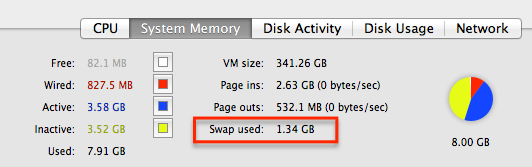
Adding more RAM is the easiest and cheapest way to make your computer run "faster". For this to understand, you have to define what faster mean and how RAM works. What happens when you are low on RAM, your system starts to write data into "Swap Space" and this is bad. So instead of accessing (read/write) data to and from the (fast) RAM, it has to shuffle data between the slow hard drive and the CPU (SSDs might improve that bit). As a result, everything gets S-L-O-W-E-R. This might be not that big when your browser slows down a little bit, but for DAWs this is critical. If you are loading Samples in your software instrument, the beginning of the samples get stored into RAM, so you can play right away when you hit the note , after that it streams (buffers) from the drive. However, If that piece of data get placed into the SWAP space, then you will hear glitches and all sorts of natty side effects. What seems that you system is not fast enough is just insufficient RAM space. If you are on a Mac, you should have always an eye on that page-ins and page-outs and if you have a increased Swap space. Use the "Activity Monitor" utility or even better Menu Meter (screenshot), a free utility that lets you monitor all kinds of vital signs on your Main Menu strip
Hope that helps ---- Edgar Rothermich (MacPro 8core, 16GB RAM, Fireface800, Euphonix MC Control, Logic Pro, FCPx) http://DingDingMusic.com/Manuals/ New Manual: "GarageBand - How it Works" |
|||
| ^ | Joined: 18 Jan 2009 Member: #198722 Location: West Hollywood | ||
|
|||
id go for a republic of gamers kind of laptop for mobility, thats an acer
or for a pc you can actually have it custom fitted with processors and ram ---- "This beat does not present a reduced risk of harm compared to other beats." |
|||
| ^ | Joined: 12 Nov 2012 Member: #292013 Location: Illanoiz | ||
|
|||
hibidy wrote: more ram ONLY help when running x64.
Thats true for when you exceed 4 Gigs. A 32 bit system CAN take advantage of upto 4, depending on the system. |
|||
| ^ | Joined: 12 Nov 2012 Member: #292021 | ||
|
|||
Faster Hard drive, faster Cpu also can make a considerable difference and not be overly expensive. |
|||
| ^ | Joined: 12 Nov 2012 Member: #292021 | ||
|
|||
PatchAdamz wrote: hibidy wrote: more ram ONLY help when running x64.
Thats true for when you exceed 4 Gigs. A 32 bit system CAN take advantage of upto 4, depending on the system. Well that is kind the same difference when we're talking about the OP's question. I switched to x64 almost 3 years ago. It's bliss. All of that monkeying around trying to squeeze more ram is pointless. All I have is 8 GB btw and it's wonderful. Ram run out crashes BE GONE! |
|||
| ^ | Joined: 20 Dec 2005 Member: #91716 |
| KVR Forum Index » Hosts (Sequencers, DAWs, Audio Editors, etc.) | All times are GMT - 8 Hours |
|
Printable version |
Disclaimer: All communications made available as part of this forum and any opinions, advice, statements, views or other information expressed in this forum are solely provided by, and the responsibility of, the person posting such communication and not of kvraudio.com (unless kvraudio.com is specifically identified as the author of the communication).
Powered by phpBB © phpBB Group