
Plug-ins, Hosts, Apps,
Hardware, Soundware
Developers
(Brands)
Videos Groups
Whats's in?
Banks & Patches
Download & Upload
Music Search
KVR
   
KVR Forum » Blue Cat Audio
Thread Read
Blue Cat's Oscilloscope Multi 2.0 Released
Blue Cat Audio
KVRAF
- profile
- pm
- e-mail
- www
PostPosted: Mon Oct 22, 2012 6:09 am reply with quote
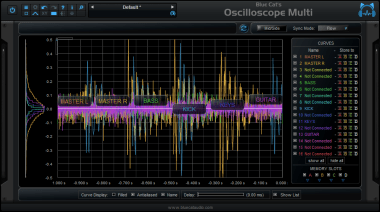
We are happy to unleash Blue Cat's Oscilloscope Multi 2.0, the new version of our unique multiple tracks oscilloscope plug-in.


This new version comes with a completely redesigned user interface with improved workflow and readability, as well as many new features and enhancements: a new presets manager with new presets, Windows AAX support, multiple display sizes, and much more...

The upgrade is free for existing customers who have purchased the plug-in in the past 6 months, and a very special upgrade price is available for others. Check your email!

If you do not already own the plug-in, check it out: you can purchase Blue Cat's Oscilloscope Multi 2.0 or the updated Blue Cat's Multi Pack bundle with up to 15% discount until the end of November!
^ Joined: 07 Sep 2004  Member: #39981  Location: Paris (France)
Blue Cat Audio
KVRAF
- profile
- pm
- e-mail
- www
PostPosted: Tue Oct 23, 2012 3:43 am reply with quote
We have had a couple of emails about customer upgrade offers: they have been all sent now, so feel free to contact us if you haven't received your coupon to upgrade from v1.0!
^ Joined: 07 Sep 2004  Member: #39981  Location: Paris (France)
awh22
KVRer
- profile
- pm
PostPosted: Fri Jan 18, 2013 9:54 am reply with quote
Phase alignment with BlueCat Oscilloscope (How to?)

There are no good tutorials yet for this plug-in that I could find. The manual is pretty ambiguous.

Can somebody describe the process of aligning the phase of two or more tracks that are out of phase. So far all I have heard is that there is a Sync button. What does that button do? Does that button actually align the tracks if they are out of phase and output that correct signal in your mix, or does it just make sure that the plug-in is showing you correctly the relationship that the two tracks "already" have to each other. And if that's the case, if the two tracks appear to be out of phase, how do I use the plug-in to align the phase in my mix? Or does the plug-in actually do that, or does it just analyze? What's is the process? Do I need to slide the digital track manually in my DAW untill the Oscilloscope shows that they are in phase?

Please explain this process.

A good manual should always explain the "process" of using it's features, not just waste a lot of time "describing" it's features. We already know what the plug-in can do, a manual should tell us how to do it.
----
Signature blocked until 5 posts made
^ Joined: 18 Jan 2013  Member: #296753  
Blue Cat Audio
KVRAF
- profile
- pm
- e-mail
- www
PostPosted: Mon Jan 21, 2013 4:02 am reply with quote
Hi,

Thank you for your interest in our plug-in.

First, this is an analysis/measurement plug-in, so it will help you find issues, but it won't fix them for you, as it does not modify the signal.

The "sync" button indeed synchronizes instances to make sure the display is in sync. It does not magically synchronizes out of phase tracks.

If what you are trying to do is synchronize tracks because they might have been recorded out of phase (because of mic placements etc.), maybe this video from Real Home Recording will help:

http://www.youtube.com/watch?v=nNEUzaDI1QE

You can alternatively insert a delay plug-in to compensate the delay, instead of moving tracks.
^ Joined: 07 Sep 2004  Member: #39981  Location: Paris (France)
awh22
KVRer
- profile
- pm
PostPosted: Mon Jan 21, 2013 10:23 am reply with quote
Wow. Great video! That's exactly what I needed. Love it. Love
----
Signature blocked until 5 posts made
^ Joined: 18 Jan 2013  Member: #296753  
Blue Cat Audio
KVRAF
- profile
- pm
- e-mail
- www
PostPosted: Tue Jan 22, 2013 12:36 am reply with quote
Smile
^ Joined: 07 Sep 2004  Member: #39981  Location: Paris (France)
All times are GMT - 8 Hours

Printable version
Page 1 of 1
Display posts from previous:   
ReplyNew TopicPrevious TopicNext Topic
You cannot post new topics in this forum
You cannot reply to topics in this forum
You cannot edit your posts in this forum
You cannot delete your posts in this forum
You cannot vote in polls in this forum
Username: Password:  
KVR Developer Challenge 2012