Products @ KVR
Blue Cat's ChorusBlue Cat's Digital Peak MeterBlue Cat's Digital Peak Meter ProBlue Cat's DynamicsBlue Cat's FlangerBlue Cat's FreqAnalystBlue Cat's FreqAnalyst MultiBlue Cat's FreqAnalyst ProBlue Cat's Gain SuiteBlue Cat's Liny EQ SeriesBlue Cat's MB-5 DynamixBlue Cat's MB-7 MixerBlue Cat's Oscilloscope MultiBlue Cat's Parametr'EQ seriesBlue Cat's PhaserBlue Cat's ProtectorBlue Cat's Remote ControlBlue Cat's Stereo Triple EQBlue Cat's StereoScope SeriesBlue Cat's Triple EQBlue Cat's Widening Meter ProBlue Cat's Widening Triple EQ
|
|||
Bonjour!
I am enjoying by Blue Cat Audio plugins. Could I request? [Digital Peak Meter Pro v3.4] - Resetting meter by one click Now I need 5 clicks to reset. Max peak, avg peak, max RMS, avg RMS, and clipped lamp. - K-8 Scale For CD-Mastering. - -30dB scale mode in envelopes graphs Now -60dB scale. Please zoom in. [Dynamics v3.1] (probably MB-5 Dynamix, too) - Mid/Side thresholds When Mid/Side processing, the Mid reduction is larger than the Side. I would like to set "the Side threshold = the Mid threshold - (6~10dB)". Merci, au revoir! --- DAW:Cubase 5.5.2 OS:Windows Vista 32bit SP2 --- |
|||
| ^ | Joined: 18 Dec 2009 Member: #221959 Location: Japan | ||
|
|||
Thank you for your suggestions.
We can indeed add a button to the DPMP to reset all fields with a single click as well as a zooming feature. K-8 can be achieved with a modification of the skin. For the threshold and mid/side mode, we are also thinking about a "Dual Channel" version that would let you modify all parameters independently for each channel. We will add these to our todo list! |
|||
| ^ | Joined: 07 Sep 2004 Member: #39981 Location: Paris (France) | ||
|
|||
I am looking forward to the news of Blue Cat Audio.
Thank you. |
|||
| ^ | Joined: 18 Dec 2009 Member: #221959 Location: Japan | ||
|
|||
The new version of the DPMP includes a couple of your enhancement requests. Enjoy! |
|||
| ^ | Joined: 07 Sep 2004 Member: #39981 Location: Paris (France) | ||
|
|||
Bonjour!
I am sorry for this late reply. Thank you very much. I always use DPMP.
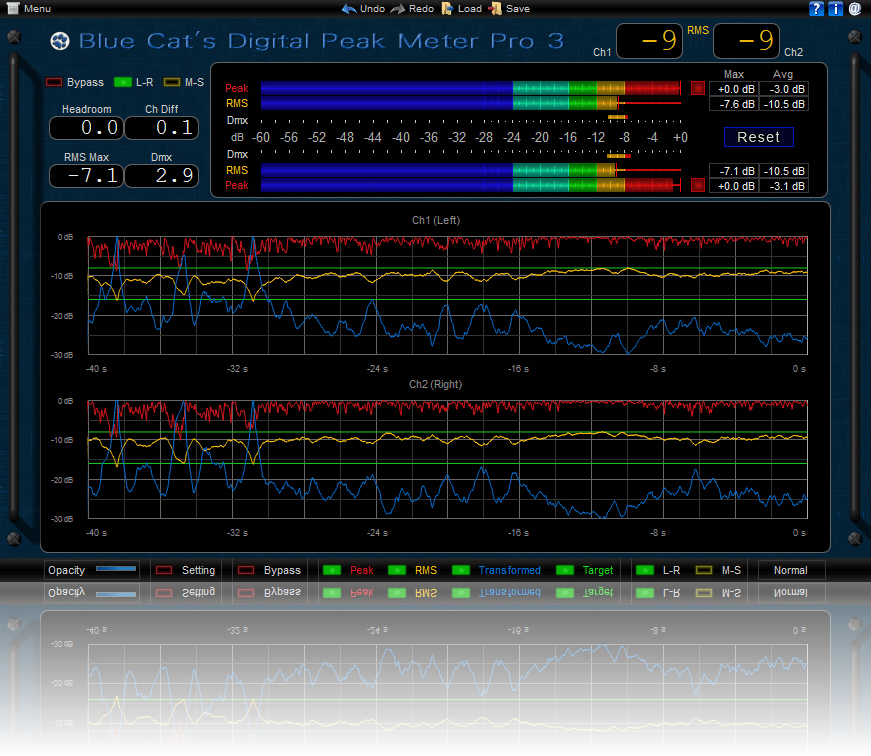
This is my preset for the pops mastering. I sight under -8dB/RMS. The blue line is a margin. The top is -16dB/RMS, the bottom is -8dB/RMS. If the blue line touches the bottom, this mastering is NG. Merci, au revoir! --- DAW:Cubase 5.5.2 OS:Windows Vista 32bit SP2 --- |
|||
| ^ | Joined: 18 Dec 2009 Member: #221959 Location: Japan | ||
|
|||
Thanks for your feedback. Your skin looks great! Would you mind sharing it with the community? |
|||
| ^ | Joined: 07 Sep 2004 Member: #39981 Location: Paris (France) | ||
|
|||
Yes.
I have finished new skin now. I will send to you, please check up on this. Thank you. |
|||
| ^ | Joined: 18 Dec 2009 Member: #221959 Location: Japan | ||
|
|||
I have sent an email to you. Could you receive this skin?
"Precise Gauge" for Blue Cat's Digital Peak Meter Pro 3.5 ![]() |
|||
| ^ | Joined: 18 Dec 2009 Member: #221959 Location: Japan | ||
|
|||
Thanks a lot for this beautiful skin! It looks awesome! We will upload it to our website next week. |
|||
| ^ | Joined: 07 Sep 2004 Member: #39981 Location: Paris (France) | ||
|
|||
I sent an updated skin to you.
Precise Gauge Skin Ver 1.01
Added max meters of RMS. I am sorry to trouble you, but I think this is a completion. |
|||
| ^ | Joined: 18 Dec 2009 Member: #221959 Location: Japan | ||
|
|||
Thanks, very nice! |
|||
| ^ | Joined: 07 Sep 2004 Member: #39981 Location: Paris (France) | ||
|
|||
| ^ | Joined: 07 Sep 2004 Member: #39981 Location: Paris (France) |
| KVR Forum Index » Blue Cat Audio | All times are GMT - 8 Hours |
|
Printable version |
Disclaimer: All communications made available as part of this forum and any opinions, advice, statements, views or other information expressed in this forum are solely provided by, and the responsibility of, the person posting such communication and not of kvraudio.com (unless kvraudio.com is specifically identified as the author of the communication).
Powered by phpBB © phpBB Group