

Hi all,
Does anybody know how to route multiple channels of MIDI (like you get from a MIDI guitar controller) to a single instrument plug-in in Ableton? I'm trying to help someone who's finding Ableton is converting all the channels to channel 1.
Thanks!

Ableton question: MIDI on multiple channels
-
AdmiralQuality AdmiralQuality https://www.kvraudio.com/forum/memberlist.php?mode=viewprofile&u=83902
- Banned
- 6657 posts since 10 Oct, 2005 from Toronto, Canada

-
- KVRian
- 750 posts since 30 Aug, 2011 from somewhere in universe
I'm not quite sure what is your problem, but open In/Out section to manage MIDI routing. Click on I/O button at the right side.
There you'll have something like this:

Under "MIDI From" the first selector allows you to choose MIDI source, the second selector allows you to choose MIDI channel.
Under "MIDI To" the first selector allows you to choose destination track, the second selector allows you to choose destination plugin.
In addition, you can use "External Instrument" plugin (it's in Ableton Live's instruments). This plugin routes MIDI to the specified plugin MIDI channel and the receives audio from specified plugin audio output channel.
There you'll have something like this:
Under "MIDI From" the first selector allows you to choose MIDI source, the second selector allows you to choose MIDI channel.
Under "MIDI To" the first selector allows you to choose destination track, the second selector allows you to choose destination plugin.
In addition, you can use "External Instrument" plugin (it's in Ableton Live's instruments). This plugin routes MIDI to the specified plugin MIDI channel and the receives audio from specified plugin audio output channel.
Wonder whether my advice worth a penny? Check my music at Soundcloud and decide for yourself.
re:vibe and Loki Fuego @ Soundcloud
re:vibe and Loki Fuego @ Soundcloud
-

- KVRAF
- 10173 posts since 16 Dec, 2002
Create 6 midi tracks each with the appropriate midi in from the guitar controller.
Then select the same midi out for those midi tracks which points to the midi track that contains the synth.
Then select the same midi out for those midi tracks which points to the midi track that contains the synth.
-
AdmiralQuality AdmiralQuality https://www.kvraudio.com/forum/memberlist.php?mode=viewprofile&u=83902
- Banned
- Topic Starter
- 6657 posts since 10 Oct, 2005 from Toronto, Canada
Seriously? That's the only way?VariKusBrainZ wrote:Create 6 midi tracks each with the appropriate midi in from the guitar controller.
Then select the same midi out for those midi tracks which points to the midi track that contains the synth.

-
AdmiralQuality AdmiralQuality https://www.kvraudio.com/forum/memberlist.php?mode=viewprofile&u=83902
- Banned
- Topic Starter
- 6657 posts since 10 Oct, 2005 from Toronto, Canada
I don't have Ableton handy at the moment, is there an "ALL" option under the channel selector(s) or does it always force it to a single channel?Loki Fuego wrote: Under "MIDI From" the first selector allows you to choose MIDI source, the second selector allows you to choose MIDI channel.
Under "MIDI To" the first selector allows you to choose destination track, the second selector allows you to choose destination plugin.
-
 thecontrolcentre thecontrolcentre https://www.kvraudio.com/forum/memberlist.php?mode=viewprofile&u=76240
 - KVRAF
- 37262 posts since 27 Jul, 2005 from Scottish Borders
-
AdmiralQuality AdmiralQuality https://www.kvraudio.com/forum/memberlist.php?mode=viewprofile&u=83902
- Banned
- Topic Starter
- 6657 posts since 10 Oct, 2005 from Toronto, Canada
Ok thanks! I'll pass that along.thecontrolcentre wrote:There's an option to receive MIDI from "All Channels" on each MIDI track.
-

- KVRAF
- 5175 posts since 29 Apr, 2006
did it work?
-
- KVRAF
- 5175 posts since 29 Apr, 2006
Did it work?
-

- KVRAF
- 13140 posts since 7 May, 2006 from Southern California
As far as I know, Live deals with MIDI channels in a kinda weird way. The input settings only reflect which ports and channels Live is listening on. If you select a specific port (ie the guitar/MIDI interface) and listen on 'All Channels', Live will merge all of those channels and pass the data to the plug-in on channel 1 only.AdmiralQuality wrote:Ok thanks! I'll pass that along.thecontrolcentre wrote:There's an option to receive MIDI from "All Channels" on each MIDI track.
The setup for controlling a single instrument from multiple channels is a bit convoluted, here is a screen grab...
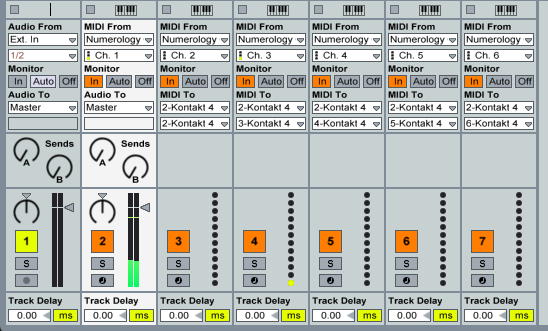
As you can see, you will need a total of 6 MIDI Tracks. You put your instrument on the first MIDI Track, and set the input to listen to the MIDI interface port on channel 1. On the second MIDI Track set the input to listen to the MIDI interface on channel 2 and set the MIDI out to the track your instrument is on. If Live see's your instrument as a multi-channle device, the second MIDI output pull down menu will have 16 options each corresponding to a MIDI channel. You will need to set the outputs of MIDI Tracks 2-6 to the corresponding inputs on your instruments.
Then you set each of these six channels to monitor incoming MIDI either by clicking the 'IN' button in the Monitoring section, or leaving it set to 'Auto' and activating the record enable button for each channel.
Hope this makes sense, it's a totally stupid setup but as far as I know it's the only way to transmit multiple channels to a single device in Live.
-
- KVRAF
- 13140 posts since 7 May, 2006 from Southern California
Oh and to tidy things up you can put all six tracks in a group track. Still kind of a pain in the ass.
-
- KVRer
- 2 posts since 21 Dec, 2020
open a midi track. this is where you put your midi notes. send it to "No Output".
for any midi track that needs to receive those midi notes, choose as input that first midi track with the notes,
and then choose the monitoring "In" option.
for any midi track that needs to receive those midi notes, choose as input that first midi track with the notes,
and then choose the monitoring "In" option.
-

- KVRAF
- 9581 posts since 6 Jan, 2017 from Outer Space
Ido the bumper… 9 years - respect…
Crucial information for the banned op…
Crucial information for the banned op…