KVR Audio is the Internet's number one news and information resource for open standard audio plug-ins. We report new releases, product announcements and product updates (major and minor) for all VST Plug-ins, DirectX Plug-ins and Audio Units Plug-ins (and RTAS too). We manage a fully searchable audio plug-in database (updated daily), and offer many free member services including user reviews, product update notifications and a very active discussion forum. We also host official support forums for many plug-in developers plus the official Receptor support forum.
Plug-in Database: Virtual
Instruments, Effects & Hosts
Plug-in
Ranks
Banks & Patches
Download & Upload
Plug-in Ratings
by KVR Members
Wiki: Tutorials,
Audio Lexicon, ...
Listen to Music
by KVR Members
Search
KVR

Google Powered Search:

in new window

KVR Powered Plug-in Search:

?
KVR Rank: 2628 2535 [30-Day: 1764; 7-Day: 1117; Yesterday: 2795]
11 members are watching TapeIt 2 for news
Product TapeIt 2
Developer Silverspike
Primary Type Audio Recorder
Price (MSRP) $19
Plug-in Formats
Effect(s)VST
Operating System Availability
Operating
System
Latest
Version
Download Is it
Available?
Windows 2.3 Demo / TrialReleased
Miscellaneous Information
Copy Protection Serial Number
Average User Rating Average rating - 8.812
Compatibility Unknown
advertisement
TapeIt 2
Silverspike TapeIt 2 is a VST-Plugin to record audio streams creating wave files in real-time.

You can plug TapeIt 2 into your VST host application at any point accepting VST plugins. While copying the sound unaltered from input to output, TapeIt 2 writes it to a standard WAV file. This way you can grab any audio signal that appears at one of the plugin-points of your audio host.

Features:

  • Manual and automatic recording level adjustment.
  • Automatic normalizing (optional, no need for level adjustment).
  • Various WAV formats: 8, 16 and 24 integer, 32 bit float.
  • Synchronized recordings. Four different synchronization methods: Locator mode, measure mode, midi mode, playback mode.
  • Generation of time stamped files (using broadcast wave format).
  • Integrated dithering with 2nd-order noise shaping.
  • Drag and drop of recorded files.
  • Waveform display.
  • Information and operations on past records.
  • Flexible user interface with variable window size.

Uses:

  • Export accurate mix-downs.
  • Listen in while exporting.
  • Record VSTi's while playing.
  • Bounce your tracks.
  • Record dry and wet effect signals.
  • Monitor any specific point in the signal chain.
  • Etc.

RSS FeedAll KVR Audio news items relating to TapeIt 2.

Silverspike releases TapeIt v2.3 19th November 2006
Silverspike TapeIt v2.1.2 released 25th May 2004

User Reviews by KVR Members for TapeIt 2.

CLICK HERE TO ADD YOUR REVIEW


By TOTAL
On 26th September 2007
Version: 2.3

Read all reviews by
TOTAL


Was this review
helpful to you?
Yes | No
  GUI
Sound
Features
Docs
Presets
Support
VFM
Stability
TapeIt 2 appears to be a very good tool. Its price is also attractive, given the drag and drop, sync recording, trigger options.

As I agree with Sahul, instead of restating the same info, I will rarther focus on the options, which in my opinion would make TapeIt 2 free from any competition.


1.
in play-triggered option, the recording starts only after the first pressing play. to get back to recording after a pause (resulting from host's stopping) you have to click TI's record again. quite good as an option, but allowing a possibility to resume recording whenever playback occurs without confirmation would vastly increase functionality. a setup-and-forget kind, until really needed.

2.
in-sync punch out here would be a miracle. in case of looped material you could easily divide it into parts after such a session. also, reverb tails could be recorded.

3.
in my opinion midi triggering should be combined, as an option, with sync

4. further developed, TapeIt2 might allow midi commands for basic file management, as overwriting the previous recording.

That all said, I admit TapeIt is even now very useful and it's price more than attractive. Only downside is interface, which although looks good and functional, makes me look for the triggering method key over and over each time I use it. But this might be just personal.

Stability - before, Tape It used to stop recording in Cubase SX3 without any apparent symptom (so you ended up with a spoiled session), but 2.3 is finally o'kay.
 
Last edited by TOTAL on 26th September 2007    Report

By Sahul
On 28th March 2004
Version: 2.07

Read all reviews by
Sahul


6 of 6 people found
this review helpful.

Was this review
helpful to you?
Yes | No
  GUI
Sound
Features
Docs
Presets
Support
VFM
Stability
From a long time I've been looking for a convincent freeze/rendering solution. My host is Cubase SX, but its freeze features aren't specially powerful, as everybody knows. I also tested FX-Freeze, but didn't find it intuitive enough. TapeIt 2, however, suited perfectly my needs, I'll explain why.

TapeIt 2, as its predecessor TapeIt, is basically a VST plugin that records streams of audio in realtime inside of a sequencer. Depending where you put it, it can be useful to save to disk the output of an specific VSTi or audio channel, a group or even an entire mix. But changes between v1 and v2 are extensive, and they put TapeIt 2 in a different level.

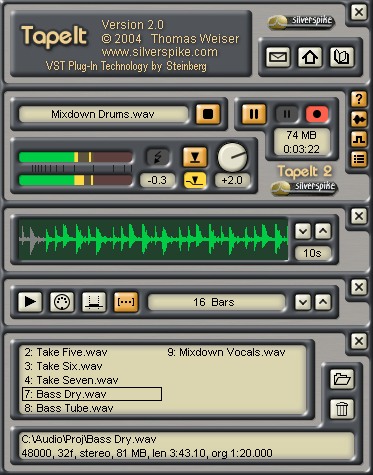
The GUI is very clear and functional. It has different bars, which can be hidden or showed individually, making it completely customizable:
- Main bar, which has the record buttons, level and peak indicator, file folder selection, etc.
- Waveform bar: it shows a graphical representation of the signal that is entering the plugin, useful for seeing what's going on in the recording, but also can be used, for example, to see how a compressor or eq affects the signal.
- History list: a complete list of all the files that have been recorded in the sessions. Including details like time stamp, frequency, size in MB, length.
- Sync bar: TapeIt 2 features four different synchronization modes: playback, midi, locator and measure. For example, you can make it record automaticaly between left and right locators (if your host supports this kind of cycle mode), excellent for creating exact loops; or record a precise number of bars in sync with the tempo of your host; or trigger the record start from your midi keyboard...

But there's more... drag'n'drop. Once you have the different .wavs, you can drag them from the TapeIt 2 GUI directly into a track in your sequencer. I can't imagine of a more intuitive and fastest way to render VSTi's to .wav and work with the different parts. It's really a dream for the workflow.

Documentation is also very complete and well written. It comes in the form of a help file, accesable from the GUI itself. The document explains in detail the different plugin features, and also includes pics of every part of the GUI.

Customer support: I've had the opportunity to test it, and I must say it's outstading. I reported a bug that made Cubase SX 2.02 crash and Thomas, the developer, sent me a fixed file 3 hours later! He also showed interest in implementing some suggestions I made about possible new features.

Value for the money: considering the usefulness, extensive features, support and low price ($19), I just can consider it as an absolute bargain, totally recommended for any user working in a VST environment. IMHO, this is the best option available for VSTi rendering.

Stability: as I said before, I found a little bug that made the plugin crash in SX when its GUI was put in "always on top" mode. It has been fixed. Apart from that, TapeIt 2 has been always rock solid.
 
Last edited by Sahul on 29th March 2004    Report
Latest 2 reviews from a total of 2

Reviews, articles, interviews, etc. for TapeIt 2.

None listed yet.
Quick Jump:


Products by Silverspike

Product: R2 Reverb
Developer: Silverspike
Type: Reverb
Price: $99
OS: WindowsMac OS X
Formats: VST
Features: High quality room simulation and reverberation. Simulates rooms of variable size. Early and late frequency response fully adjustable. Adjustable pan and stereo width for early and late reflections. Flexible mixing of dry and direct signal with early and late reflections. Highly optimized DSP code providing low CPU consumption. 32 bit floating point audio processing. Samplerates from 32 kHz up to 192 kHz. ... [more]

 
Product: Reverb.it
Developer: Silverspike
Type: Reverb
Price: $39
OS: WindowsMac OS X
Formats: VST
Reverb.it is a real time audio effect plugin that simulates diffuse reverberation of rooms. Its sound quality results from a novel reverb algorithm based on random reflection patterns. This VST plugin provides dense, smooth, and authentic reverberation. Two shelving filters and up to three separate reverb frequency bands give you full control on the spectral balance of the reverberated signal. And no matter what your room size is, Reverb.it provides realistic stereo imaging. Features: Smooth, authentic, high quality reverberation Adjustable reverb tail quality... [more]

 
Product: TapeIt 1
Developer: Silverspike
Type: Audio Recorder
Price: Free
OS: Windows
Formats: VST
Silverspike TapeIt 1 is a VST-Plugin to record audio streams creating wave files in real-time. You can plug TapeIt 1 into your VST host application at any point accepting VST plugins. While copying the sound unaltered from input to output, TapeIt writes it to a standard WAV file. This way you can grab any audio signal that appears at one of the plugin-points of your audio host. Features: Manual and automatic recording level adjustment. Various WAV formats: 8, 16 and 24 integer, 32 bit float. Uses: Export accurate mix-downs. Record VSTis while playing. Bounce your tracks. Record dry and ... [more]

 
Product: TapeIt 2
Developer: Silverspike
Type: Audio Recorder
Price: $19
OS: Windows
Formats: VST
Silverspike TapeIt 2 is a VST-Plugin to record audio streams creating wave files in real-time. You can plug TapeIt 2 into your VST host application at any point accepting VST plugins. While copying the sound unaltered from input to output, TapeIt 2 writes it to a standard WAV file. This way you can grab any audio signal that appears at one of the plugin-points of your audio host. Features: Manual and automatic recording level adjustment. Automatic normalizing (optional, no need for level adjustment). Various WAV formats: 8, 16 and 24 integer, 32 bit float. Synchronized recordings. Four diff... [more]

 
None found
Coming Soon...
