Plug-ins, Hosts &
Mobile Apps Search
Developer Search
News & Products
Groups
Whats's in?
Banks & Patches
Download & Upload
Listen to Music
by KVR Members
Search
KVR
   
Developers » MidiKarval »
?
KVR Rank: 4413 4152 [30-Day: 4664; 7-Day: 3119; Yesterday: 3374]
4 members are following MidiMaster and 7 members are following MidiKarval @ KVR.
Product MidiMaster
Developer MidiKarval
Price (MSRP) €10
Type / Tags
Plug-in, App & Soundware Format(s)
Effect(s) 
Operating System Availability
Operating
System
Latest
Version
Download Released
 2.0  Demo / Trial Released
Miscellaneous Information
Copy Protection None
Average User Rating
MidiMaster

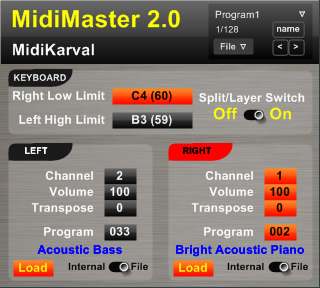
MidiMaster is a virtual master keyboard. Once connected in your host between the MIDI In and a multi-timbral VSTi, or some VST instruments set to different receiving MIDI channels, you can:

  • Split or layer your keyboard in two zones, defined by the left zone's highest note and the right zone's lowest note.
  • Set for each zone: the transmitting MIDI channel, the Program Change message to be sent on this channel, the transpose (+/- 36 semitones, i.e. +/- 3 octaves) and the volume level.
  • Switch off the split and use all the above-mentioned features on the whole extension of your keyboard (the "right" section will become the "main" one).
  • Assign, in your host, all the knobs, sliders and the switch to CC messages, so that you can move them from your "real" master keyboard (if any).
  • Save and load up to 128 of these settings and pass from one to another on the fly (useful in a live performance).

Moreover you can make the Program Change drop list of each zone showing only the programs' numbers (moving the relevant switch on the "internal" position) or also the name of each program (moving the relevant switch on the "file" position); in the latter case the name of the selected program is shown (in the picture: "Acoustic Bass" for the left section and "Bright Acoustic Piano" for the right section). By default MidiMaster shows the General MIDI (GM2) instruments' names, loaded from the "MIDImaster.mmf" file; but you can easily create different files with the programs' names of your VST instruments and load them into MidiMaster using the "Load" buttons of each section (it is possible to load different programs files for each section of MidiMaster).

Made with SynthMaker
Discussion: Active
Posts displayed newest at the top
Replies to posts run old to new below the parent

Discussion

Please log in to join the discussion

Username: Password:  
KVR Interview
Keeping it in the family - An interview with a founder of Universal Audio: Bill Putnam Jr
