





3316 KVR members have added Pro-Q 4 to 2921 MyKVR groups 3996 times.
Download KVR Studio Manager (FREE)
An equalizer is probably the tool you use most while mixing and mastering, so you need the best of the best. With FabFilter Pro-Q 4, you get the highest possible sound quality, a very extensive feature set, and a gorgeous, innovative interface with unrivalled ease of use.
FabFilter Pro-Q has one of the best GUIs of any EQ out there and sonically compares to the best.
Dave Pensado (Grammy Award-winning mix engineer)
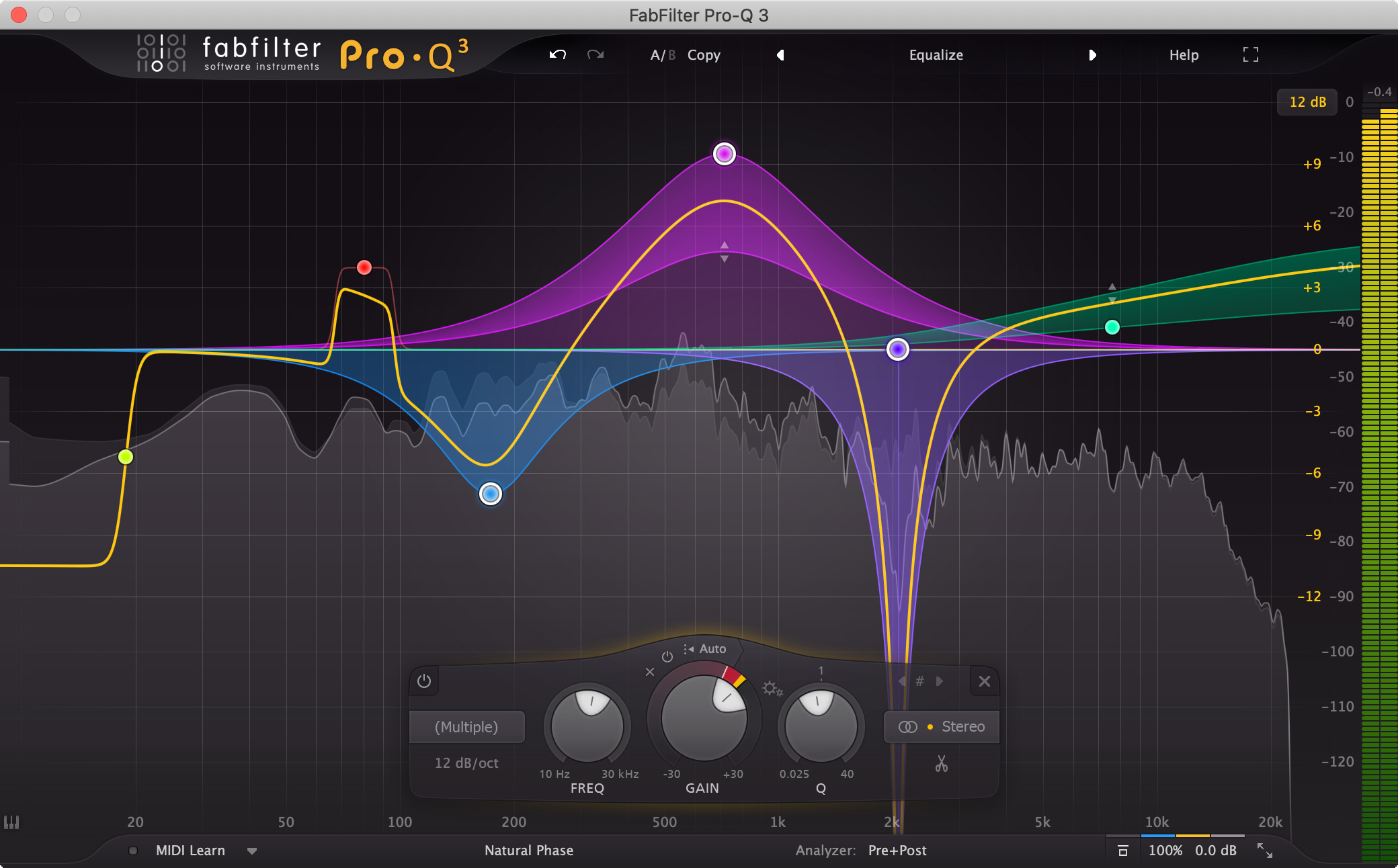
Pro-Q 4 offers everything that a demanding engineer could wish for: top-quality linear phase operation in addition to the zero latency and unique Natural Phase modes, smooth dynamic and spectral EQ, per-band mid/side processing, full surround support (up to Dolby Atmos 9.1.6), an intelligent solo feature, optional Auto Gain and a built-in, fully customizable spectrum analyzer.
FabFilter Pro-Q 4 is designed to help you achieve your sound in the quickest way possible. Via the large interactive EQ display, you can add or sketch bands where you need them, enable dynamic EQ for any band, and select and edit multiple bands at once.
Unique features like Spectrum Grab, Full Screen mode and EQ Match will speed up your workflow even more. Try it yourself.
Of course, you also get all the usual FabFilter goodies: perfectly tuned knobs, interactive MIDI Learn, undo/redo and A/B switch, Smart Parameter Interpolation for smooth parameter transitions, an extensive help file with interactive help hints, sample-accurate automation, advanced optimization and much more.
With Pro-Q 4, you can control any other plug-in instance in your session from a single interface, easily navigating the list by filtering, pinning and zooming as you like.
Once you know how to use it, the Instance List will be a huge time saver, making it much easier to setup initial EQing when starting your mix session.
In Spectral dynamics mode, Pro-Q 4 doesn't change the gain of the whole band, but triggers per specific frequency within that band when it exceeds the threshold, leaving other frequencies untouched. It's a great way of treating varying problem frequencies in your audio.
Typically, you would need a separate, dedicated and often complex plug-in for this type of processing, but Pro-Q 4 makes the process simple to use and easy to understand, as a logical extension of normal dynamic processing.
Setting up initial EQ settings in your equalizer often involves adding a few general bands to get started, like a low cut filter, a few bell filters and a high shelf, creating a general starting point. Wouldn't it be great if you could draw that curve in one gesture? Well... now you can with EQ Sketch.
{See video at top of page}
Reviewed By ex-sprinter [all]
June 19th, 2025
Version reviewed: 4.02 on Mac
I've tried a ton of different equalizers hoping to replace Pro-Q. Wasted more on all sorts of junk than it's even worth. This is the king of equalizers—get it and focus on creating.
Overwhelming EQ.
The new frequency collision makes it the ultimate weapon in my arsenal. There is no better, just "another".
I had purchased and used Pro-Q and Q2.
After that, of course, it was Q3.
I still don't need any other EQ at all, but it is the best EQ to choose at first.
Fab filter makes great products...will be buying more of their products soon...so far only own fab filter pro q 3.
Reviewed By stardustmedia [all]
May 20th, 2014
Version reviewed: 1.23 on Mac
10/10 for a clean EQ for technical and surgical usage with up to 24 (!!!) bands.
I use that clean, very versatile EQ every day on almost every channel at least as the LPF/HPF. It is my standard channel strip EQ right in the beginning before any other plugin.
Very helpful are the "solo" buttons to listen to the frequency range you're actually tweaking. Also awesome is that you can mark several bands at once and move them together in frequency and/or gain, whether you do it with the mouse or the knobs.
Thanks to the wonderful GUI, I also always use it to reduce resonance frequencies.
Want to work on MS? Easy done. Just change the whole EQ from L/R mode to M/S mode. Every band can be set separately to M, S or both, or respectively L, R or both.
The analyzer can be set to different settings (resolution) and on different signal path points: pre, post and pre&post. Very helpful.
On top of that, you can also choose between non linear phase with zero latency to different linear phase modes with different latency settings.
Although not my first choice for musical Eqing, the possibility to go up to 30kHz and work with a Baxandall bell curve can bring some nice high end shine.
For surgical and correction issues I wished you could switch every band independently to LR or MS. Let's hope that's possible in v2, although I'm not even sure if this is possible within one plugin ;)
And maybe Fabfilter starts to implement different GUI sizes in future versions.
Nevertheless: This is a must-have-workhorse-EQ for every DAW.


Is that an update? Since it installs parallel, it should be seen as a product of its own.

Yes and no, I think. They are no longer selling Pro-Q 1 on their website, so according to Fabfilter I would think that it really is an update. I believe that the parallel install is a compatibility measure. It prevents us from having to update our existing projects.
'Upgrading to Pro-Q 2
Upgrading from Pro-Q version 1 to the new Pro-Q 2 is safe and easy: installing Pro-Q 2 willnot replace or delete the previous Pro-Q 1 plug-in. Both versions will co-exist and can both be used at the same time. This ensures that you can open old songs that use Pro-Q 1 without problems! Of course, FabFilter Pro-Q 2 opens all presets from Pro-Q 1 without problems. See Upgrading to Pro-Q 2 for more information.'

The price is actually £124, not £149.
THIS POST HAS BEEN REMOVED
Anyone have both this and Spline EQ by Photosounder, and have an opinion on whether this is better/equal/worse? Both have linear EQ capabilities and I'm curious if anyone feels that one is more transparent than the other, more useable or preferable in some way, etc.
Please log in to join the discussion
Submit: News, Plugins, Hosts & Apps | Advertise @ KVR | Developer Account | About KVR / Contact Us | Privacy Statement | Sell @ KVR | KVR Marketplace Terms & Conditions
© KVR Audio, Inc. 2000-2026