?
KVR Rank: 5059 2543 4580 [30-Day: 4819; 7-Day: 4571; Yesterday: 5108]
2 members are following Mid-Side Suite and 4 members are following reFuse Software @ KVR.
| Product | Mid-Side Suite |
| Developer | reFuse Software |
| Price (MSRP) | Free |
| Type / Tags |
Plug-in, App & Soundware Format(s)
| Effect(s) |
Operating System Availability
| Operating System |
Latest Version |
Download | Released |
| 0.11 | Downloads | ![]() |
|
| 0.51 | Downloads | ![]() |
Miscellaneous Information
| Copy Protection | None |
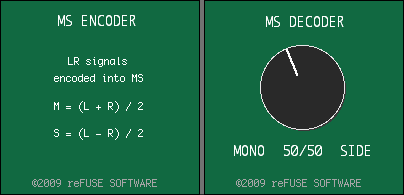
The Mid-Side Suite consists of two plug-ins: MS from LR (the encoder) and MS to LR (the decoder).
There are two primary uses for these:
- You have recorded material using a mid-side microphone pair, and you want to decode this on playback into stereo. In this case, you would simply place the MS to LR plug-in on a stereo buss, and feed the L side of the buss the mid mic, and the R side of the buss the side mic. Use the stereo width knob on the MS to LR to determine the stereo spread.
- Alternately, you can use both these plug-ins to selectively process mid and side information from a standard stereo track. In this case, you would place MS from LR at the start of your effects chain. Then, insert other plug-ins, like compression or EQ, and set these to operate in multi-mono mode. This will give you independent control over the two channels. You can now, for example, apply compression to just the mid channel, or place a hi-pass filter on the side channel… or whatever other crazy stuff you wanna try. At the end of the effects chain, place a MS to LR plug-in, to bring the two channels back to LR stereo. If you don't want to affect the stereo spread, just leave the dial at 50/50, which is the default setting.
Mid-Side Suite uses the Pluggo standard, and requires installation of the free Pluggo Jr or Pluggo Runtime in order to function.

Discussion: Active

Discussion
Please log in to join the discussion


