AQ Poly-Ana v1.3: New free custom skin (Note: skin currently at 1512 x 812 pixels resolution!!)

VST, AU, AAX, CLAP, etc. Plugin Virtual Instruments Discussion
RELATED
PRODUCTS

Post

Hi,

almost 3 weeks ago when Admiral Quality introduced skining for POly-Ana (with the latest Betas for Poly-Ana 1.3) i started creating my own skins. I am new to this (so i am NO professional skin designer while i did professional sound design which is a different story...) but was interested to do my own one.
I also wanted to created my own design which also included rearranging the controls compared to the default skin and also others taht were already posted.

I had alraedy posted screenshots and downloads of earlier versions in another threda here but due to cettain reasons (e.g. the behavior of some mebers) i had deleted all screenshots and downloads there. Anyway for a new update i wanted to start my own thread now.

For this so far i used free software like e.g. JKnobman (for custom knobs/switches), GIMP v2.8 (for picture editing & effects), Windows Paint (basic editing & knob positions/coordinates) and Windows Editor (for editing the XML files with knob positions etc.

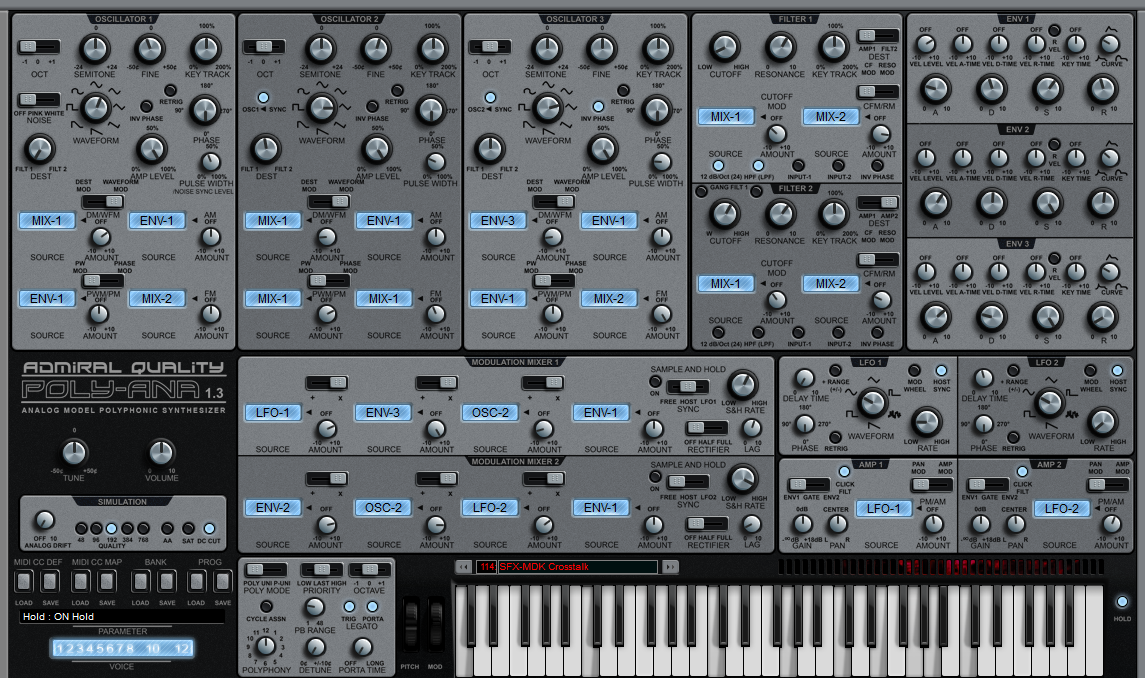
So here is a sceenshot of the current version of my skin which currently has a resolution of 1512 x 801 (a Full HD or bigger display is recommended):
https://dl.dropboxusercontent.com/u/532 ... G_v1.0.png
Image

You could switch the mod source selector to the "wheel" mode and i have added some new knobs with a display at the center for this (the original "wheels" were too big and/or difficult to read):
https://dl.dropboxusercontent.com/u/532 ... s_v1.0.png
Image

Here is a download link for the current skin:
https://dl.dropboxusercontent.com/u/532 ... 1_v1.0.zip

Besides the "skin" folder this includes a folder with the Knob fikes (created in JKnobman v1.3.2) and two sub-folders with ealier stages of teh background image for craeting your own ones based o those.

The locations of the "skin" folder at Windows are (the same locations as the key/license file):
- 32-bit Windows: C:\Program Files\Admiral Quality
- 64-bit Windows: C:\Program Files(x86)\Admiral Quality
Please just copy the "skin" folder there. The current versions of Poly-Ana is needed for this. I am currently using Poly-Ana v1.3 Beta 5:
http://www.admiralquality.com/products/ ... /skins.php


This is the "basic" version of the background image (included with the ZIP file) which was futher edited to get the current result:
https://dl.dropboxusercontent.com/u/532 ... wide_1.png
Actually after inverting the colors of that more "basic" skin a second layer was added to create the "brushed metal" effect of the background.


Changes made compared to my previous version of the skin are:
- Bigger size (previous one was 1260 x 680)
- New knobs design (different design for the big and small knobs)
- New and/or bigger fonts for the texts in both the background and the Knobs (the scales/fonts for the Knobs are included with the Knobman files)
- Positions of the Admiral Qualty logo and the Pitch/Mod Wheels switched
- light/glow effect added to the blue background for the mod source selection drop-down
- Color of the active voices displays (only displayed when playing notes) changed to blue
- lots of smaler changes for knob positions and "fine tuning"


--------------------------------------------------------------------------------------------------------------

About the size of the current skin:

The size of the current skin is indeed big but fits nicely into a display with Full HD (1920 x 1080) resolution or bigger ones (e.g. 4K).That size offers the opportunity toincrease the size of certain GUI elements and/or texts which i already did ín several cases.

If there is interest in that i could create a smaller version but that would involve some time and owrok.
Most work wil be necessary to edit the knob positions in the XML file and fine tuning of the positions.


----------------------------------------------------------------------------------------------------------

PS:
Please try to do a "civilized" discussion here and avoid "trolling" and/or bashing.
If it gets as worse as in the other thread i will maybe be forced to lock this one too at a certain point or ask the mods to "clean" certain posts in the thread.


Have fun,
Ingo
Last edited by Ingonator on Wed Aug 12, 2015 12:07 pm, edited 8 times in total.
Ingo Weidner
Win 10 Home 64-bit / mobile i7-7700HQ 2.8 GHz / 16GB RAM //
Live 10 Suite / Cubase Pro 9.5 / Pro Tools Ultimate 2021 // NI Komplete Kontrol S61 Mk1

Post

reserved for updates
Ingo Weidner
Win 10 Home 64-bit / mobile i7-7700HQ 2.8 GHz / 16GB RAM //
Live 10 Suite / Cubase Pro 9.5 / Pro Tools Ultimate 2021 // NI Komplete Kontrol S61 Mk1

Post

looks pretty good ingo

i think it would have more of the vintage look that fits the type of synth
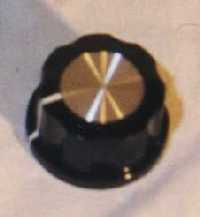
if you used radio shack knobs and minimoog rocker switches.
Image

Image
HW SYNTHS [KORG T2EX - AKAI AX80 - YAMAHA SY77 - ENSONIQ VFX]
HW MODULES [OBi M1000 - ROLAND MKS-50 - ROLAND JV880 - KURZ 1000PX]
SW [CHARLATAN - OBXD - OXE - ELEKTRO - MICROTERA - M1 - SURGE - RMiV]
DAW [ENERGY XT2/1U RACK WINXP / MAUDIO 1010LT PCI]

Post

layzer wrote:looks pretty good ingo

i think it would have more of the vintage look that fits the type of synth
if you used radio shack knobs and minimoog rocker switches.
Image

Image
Hi,

many thanks for your comment. Will check for other Knobs options later but the current ones are more or less my own design while they are inspired by existing ones.
Ingo Weidner
Win 10 Home 64-bit / mobile i7-7700HQ 2.8 GHz / 16GB RAM //
Live 10 Suite / Cubase Pro 9.5 / Pro Tools Ultimate 2021 // NI Komplete Kontrol S61 Mk1

Post

As already mentioned i could do a smaller version of the skin if people are interested. Currently the big version was enough work (and works nicely on both my dekstop PC and VAIO notebook which both are quite old).

Actually doing the smaller background is simple (by interpolation) and doing smaller knobs is simple too but editing all knob positions is the XML and doing fine tuning for the knobs would take much time and work.

Scaling the positions in percent does not work by simply using the gloabl offset for the knobs as this works in pixels. For example 120% of 10 pixels is 12 pixels while for 1000 pixels it is 1200 pixels so the difference in pixels is much bigger at higher coordinates.
Ingo Weidner
Win 10 Home 64-bit / mobile i7-7700HQ 2.8 GHz / 16GB RAM //
Live 10 Suite / Cubase Pro 9.5 / Pro Tools Ultimate 2021 // NI Komplete Kontrol S61 Mk1

Post

Here's a link to the original thread about Poly-Ana skinning:
http://www.kvraudio.com/forum/viewtopic.php?p=6206948

Image

(for those who missed it) :)

Post

Just received an e-mail from Mike with some hints for correctios like e.g. renaming "Uni Detune" to "Detune" and Programs" selction to "program selection".

He also mentioned taht the Tune and Volume knobs should not have a border as those are not saved with the patch. Not sure if removing that ione is really necessary.

Anyway will try to do some corrections ASAP and update the links.
Ingo Weidner
Win 10 Home 64-bit / mobile i7-7700HQ 2.8 GHz / 16GB RAM //
Live 10 Suite / Cubase Pro 9.5 / Pro Tools Ultimate 2021 // NI Komplete Kontrol S61 Mk1

Post

ugh....your skin is ugly Ingonator. I think metallic-silver on metallic-silver is a really bad idea.

you need much more contrast. and shading is OK if done tastefully and even usefully, but you should seriously drop the metallic stuff.

assuming that is you want a wider group of people to find your skin useful.

Post

Make the background darker (like a black or dark grey metallic surface) would help, IMO. Also, having the drop-down lists in the first Osc misaligned with the rest doesn't look good either. perhaps making the switches less tall would help in getting space to make everything fit.
Fernando (FMR)

Post

Ingonator wrote:As already mentioned i could do a smaller version of the skin if people are interested. Currently the big version was enough work (and works nicely on both my dekstop PC and VAIO notebook which both are quite old).

Actually doing the smaller background is simple (by interpolation) and doing smaller knobs is simple too but editing all knob positions is the XML and doing fine tuning for the knobs would take much time and work.

Scaling the positions in percent does not work by simply using the gloabl offset for the knobs as this works in pixels. For example 120% of 10 pixels is 12 pixels while for 1000 pixels it is 1200 pixels so the difference in pixels is much bigger at higher coordinates.
Just added some of those changes and updated the screesnhots and the download link.

There is a discussion about my renaming of the "oversampling" steps. will try to change taht if necessary. With 44.1 kHz and 48 kHt my way of naming seems to be OK but not with 96 kHz.

Mike also does not seem to be happy that i "split up" the performance controls (e.g. the Polyphony and Legato etc.).


UPDATE:
Mike mentioned taht the "borders" should only be at patch specific and not on global parameters. Will try to do corrections if i find time for it.
Last edited by Ingonator on Wed Aug 12, 2015 1:57 pm, edited 1 time in total.
Ingo Weidner
Win 10 Home 64-bit / mobile i7-7700HQ 2.8 GHz / 16GB RAM //
Live 10 Suite / Cubase Pro 9.5 / Pro Tools Ultimate 2021 // NI Komplete Kontrol S61 Mk1

Post

thecontrolcentre wrote:Here's a link to the original thread about Poly-Ana skinning:
http://www.kvraudio.com/forum/viewtopic.php?p=6206948

Image

(for those who missed it) :)

Looks calmer, but the labels are hard to read, black on dark gray, not really recommendable...

The switches are nice, I hate rocker switches, their state is often hard to tell.

Not sure it makes sense to have another PA skin thread 8)

Post

fmr wrote:Make the background darker (like a black or dark grey metallic surface) would help, IMO. Also, having the drop-down lists in the first Osc misaligned with the rest doesn't look good either. perhaps making the switches less tall would help in getting space to make everything fit.
Hi Fernando,

concerning the darker one i already had the same idea while it should not be too dark in som areas.

Anyway doing different colors for the background is simple and even doing changes to the knobs is no problem (with the same size there is no need to edit the XML file, in tother cases it is possible to use the global "offset" feature for the differnt knob types...).

Will try to offer alternatives for the background and knobs in the future and also try to do a smaller version of the skin but first i had to get a "starting point" for all that... :)

I also added the Knob files and two earlier grey skins without the metallic background (used for futher tweaking/layering) to the download (had mentioned that in the OP) for those who want to do their own changes. As already mentioned in the OP those more "basic" skins were used to layer wit hteh metallic backgroundand then combined to a single file (+ a little editing of brightness etc.).

I just implemented a few thing that Mike had mentioned in an e-mail (see my post above).


UPDATE:
This variation of the current background was done in a few minutes using GIMP (recolor + brightness/gamma settings):
https://dl.dropboxusercontent.com/u/532 ... blue_1.png
Image

Do you like orange? :) This one was done in GIMP in around a minute starting from the original one:
https://dl.dropboxusercontent.com/u/532 ... ange_1.png
Image

Those are just fast and more or less "exotic" examples but could be used with the current skin when renaming to the same name as the current background file in the skin folder.

This is a more "normal" darker version of the background in the OP (could be used with the skin after renaming):
https://dl.dropboxusercontent.com/u/532 ... rker_1.png
Image

Just changed the "Gamma" value in that one (not the brightness).
Ingo Weidner
Win 10 Home 64-bit / mobile i7-7700HQ 2.8 GHz / 16GB RAM //
Live 10 Suite / Cubase Pro 9.5 / Pro Tools Ultimate 2021 // NI Komplete Kontrol S61 Mk1

Post

I just found that discussions with Mike could be quite difficult, especially if you are new to skinning. He seems to expect perfection and that everyone who tries to do skins already knows everything about design.

Actually with some things he had mentioned and i just corrected he more or less told me i would try to "destroy" his product. He seems to expect that all possible failures that are doe are done "on purpose".

He also does not seem to like things that is different to the original design like e.g. splitting up controls like i did with the Polyphiony and keyboard controls (Legato etc.).

So finally if you want to do a design that fully pleases Mike you do not have much room for changes.
Hoverland had "only" changed the Knobs/switches and background deisgn so chances were low to do some of teh mistakes that i have done with a re-design of the skin...

I do not mean that Mike is wrong with all he mentioned (and i already corrected a few things) but his expectations are a bit too high maybe, especially as i already got a license since ages and do not want to participate in the contest (where maybe higher standards are necessary). Actually i do not even expect that he adds my designs (the current and future ones) to the official website.

UPDATE:
Mike just mentioned that i "destroyed" the Admiral Quality " logo, whatever that means. He mentioned i did not use a vector graphics to incease the size. I indeed used interpolation and a sharpening effect instead. This was also a question of priorities for me (and taht i have not learned using vector graphics in GIMP yet...). Besides that i do not see that it actuallöy looks that bad now..
Last edited by Ingonator on Wed Aug 12, 2015 3:48 pm, edited 1 time in total.
Ingo Weidner
Win 10 Home 64-bit / mobile i7-7700HQ 2.8 GHz / 16GB RAM //
Live 10 Suite / Cubase Pro 9.5 / Pro Tools Ultimate 2021 // NI Komplete Kontrol S61 Mk1

Post

Indeed, he is not very open to improvements and changes, which to him are equal to criticism of the current state, I suppose.
I did a much more radical color-coded concept for that synth some time ago, spent two hours or so with MS Paint, but his response was not exactly welcoming or constructive to put it mildly :hihi: I assume when one spends so many years on something, there is a certain tunnel vision and it becomes hard to look above one's own narrowed horizon...

So my advice, don't waste any more time on skinning, make patches or music instead :)

Post

Just got this comment from Mike:
You either must be blind or just in love with anything that's had your magic touch applied to it. Sorry but there's no nice way to say it. What I'm seeing is stupendously, outrageously, appallingly bad. Your
lines are jaggy (particularly the curves around the corners of the borders). You've increased contrast so all the antialiasing of the text is gone. It looks like it's made out of Lego. And you've annihilated the branding. Don't worry, there isn't a chance in hell that I'd ever let this go up on our site. (I wish I could make it
disappear from KVR!)
While some things in there are maybe true (and i will check that) the overall tone of his recent e-mails was not really nice...
Ingo Weidner
Win 10 Home 64-bit / mobile i7-7700HQ 2.8 GHz / 16GB RAM //
Live 10 Suite / Cubase Pro 9.5 / Pro Tools Ultimate 2021 // NI Komplete Kontrol S61 Mk1

Locked

Return to “Instruments”