UVI Falcon - v4 = 2026 released - rumors, ads, praise, kindergarden, auto-sampling and off-topic inside!

VST, AU, AAX, CLAP, etc. Plugin Virtual Instruments Discussion
Post Reply New Topic
RELATED
PRODUCTS
Falcon

Post


Post

superscan wrote:
Yes. I had to call credit card to clear their fraud department.
My bank called me because my purchase also triggered a fraud lock. Once they confirmed it was actually me, they unlocked it and when I tried again it worked.

KEv
Missiles Kill Militants / Avionik / Neutronaut
Cubase Pro/Wavelab Pro/SSL UF1, UF8, UC1/Binaural & 7.1
https://missileskillmilitants.bandcamp.com/

Post

Ingonator wrote:(in Rouen to be precise)
I was there too, shortly! Beautiful place.

Post

Yes, I hope all our friends here from Paris are safe and well, including the good people from UVI. I hope they check in here soon to let us know they're okay.

My thoughts go out to the victims and their families. This is a terrible situation we're in and I have a feeling it'll get worse before it gets better.

Post

Hi Guys,

Just wanted to let you know that all UVI employees are safe and sound.

Thanks for thinking of us !
Olivier Tristan
Developer - UVI Team
http://www.uvi.net

Post

otristan wrote:Hi Guys,

Just wanted to let you know that all UVI employees are safe and sound.

Thanks for thinking of us !
Very glad to hear it!
Awful thing to happen, I hope none of you are affected personally.

Post

otristan wrote:Hi Guys,

Just wanted to let you know that all UVI employees are safe and sound.

Thanks for thinking of us !
:hug:

Post

Yes, thanks for letting us know, Olivier.

Post

auricle wrote:Yes, thanks for letting us know, Olivier.
A little bit of light at a dark moment. :hug:

Post

It's so awful that such a few can ruin things for so many. Truly a shame. My thoughts and condolences to those impacted by this stupidity.
If you have to ask, you can't afford the answer

Post

otristan wrote:Hi Guys,

Just wanted to let you know that all UVI employees are safe and sound.

Thanks for thinking of us !
Good news on a terrible day, keep safe Olivier.
Mac Studio M4
15.7.3
Cubase 15, Ableton Live 12

Post

Could anyone here verify Falcon 1.0.1 crashing in Ableton Live 9.5.1b1 beta? Falcon 1.0 worked fine in both 9.5 and the beta. Updating to 1.0.1 causes the plugin to not be recognized by host. It is visible in the Plugins menu...but dragging it into a project causes an error box and Live shutdown.

Post

My condolences too.
:(
Was Große tun, beschwatzen gern die Kleinen.

Post

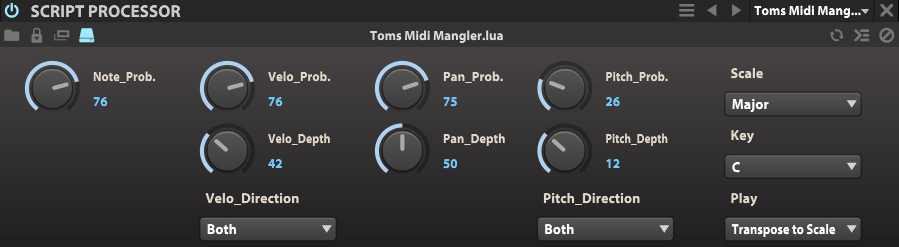
As a positive action in a crazy world, I'd like to present you guys with my very first Lua script ever to play with:
Image

Toms Midi Mangler is a tool you can use in the "Events" tab to randomize incoming midi.
  • Note Probability allows you to set how probable it is that the note will sound at all. Higher values will only drop a note every now and then, low values will make dense note clusters sparse...
  • Velocity Probability sets the probability for the velocity to be randomly changed in percent.
  • Velocity Depth is the maximum amount of the random change from 0-127.
  • Velocity Direction allows you to select if you want the change only to go up, only down or up and down.
  • Pan Probability defines how probable it is that Pan will change randomly.
  • Pan Depth is the amount of random change around the center.
  • Pitch Probability once more defines the probability of pitch changes in percent.
  • Pitch_Depth defines the maximum pitch change in halftone steps.
  • Pitch Direction defines if the pitch change should go up, down, or both.
  • Scale allows you to apply a scale to the end result of the mangling. Set it to Chromatic if you don't want that.
  • Key sets the key for the scale.
  • Play defines what notes go through:
    "Only Notes in Scale" will only play the notes that fit the scale after the mangling, all other will be discarded.
    "Transpose to Scale" on the other hand will transpose the notes in a random direction to fit the scale (therefore all notes will sound)
This kind of combination of probability and separate maximum random values sounds the most natural to me and provides the most flexibility in many scenarios.

This tool also works great together with other note processors like after an arpeggiator. Be sure to try that out!

Some tips:
  • If you just want the occasional off-note, put a low probabiliy on pitch.
  • If you want to every now and then lose a note, use a quite high note probability (but below 100 of course).
  • You want to only spread out the notes over the stereo field? Set note prob to 100, all other probs to 0 but pan prob to 100 or lower, then set pan depth to taste.
  • If you only want to use the conform to scale part, set note probability to 100, all other probabilities to zero and set your Scale, Key and the Play setting to taste.
Let me know if you encounter any problems!

The tool is free for private use, if you use it for a commercial library, I'd be happy if you sent me a copy :-)

Download (updated 15.11.2015, european notation that is ;-) ):
http://www.screendream.de/stuff/Falcon/ ... angler.zip

Put the extracted file "Toms Midi Mangler.lua" in your ...Documents\UVI\Falcon\User Presets\EventProcessors\Script Processor folder, then it should show up in Falcon in the Script Processor tab.
(The folder is not created automatically on installation so you may have to create it.
Dear UVI, please create ALL folders on installation so the user knows what goes where!!! Thanks).

Enjoy!!! :hug:

Cheers,

Tom
Last edited by ThomasHelzle on Sun Nov 15, 2015 4:19 pm, edited 4 times in total.
"Out beyond the ideas of wrongdoing and rightdoing, there is a field. I’ll meet you there." · Rumi
UrbanFlow.art · Instagram · YouTube

Post

Thanks Tom!!! I don't have the document folder that you have listed though. Under User Presets I just have FXs and Oscillators. I added the directories manually, but it didn't show up.
If you have to ask, you can't afford the answer

Post Reply

Return to “Instruments”
