Studio One workflow issues.. (Ableton fx-racks...?)

Audio Plugin Hosts and other audio software applications discussion
RELATED
PRODUCTS

Post

I have been fed up with Ableton and am doing some experiments with Presonus Studio One. I am having some mixing workflow problems.

First I explain how I mix in Ableton.


I use a lot of effect racks. In one song I might have up to 20-25 tracks where there is at least one effect rack, some have 2 or even 3. Usually i use rack which has one channel dry and one channel has a pingpong delay (the usual 1/8 D or so with no or little feedback). Some channels has one pingpong rack and one rack for reverb. Some channels might have even three racks: pingpong, reverb and Mid/Side rack.

The reason I use racks like this is that I have learned that it is best to mix the song first with most effects (especially delays/reverbs) turned off, and after you have a good balance, then it is good to start to add them. If I didnt use a rack, I would have to use wet/dry balance control on a pingpong delay or reverb because most of them dont have separate sliders for wet/dry. So if I add pingpong, it will reduce the level of the dry signal and break my carefully crafted balance and I need to touch the channel volume slider which I would want to avoid.

Also another thing I do is that I do initial mixing in mono and only in the end I start to adjust side channel volumes. Reducing side channel volume would easy in S1, you just put a Binaural Pan and decrease width knob. Increasing side channel volume (while keeping mid channel untouched) is harder because increasing width will reduce mid-level. This is why I use mid/side racks in Ableton.


I tried to replicate effect rack workflow in Studio One and this is what I got. I have an instrument track called. "MSyn1" with a Sylenth. Then I need to create two audio tracks, "MSyn1-pingrack-dry", and "MSyn1-pingrack-ping". I need to choose "MSyn1" as input for these tracks but I dont remember the name of the Synth so I go to "MSyn1" inspector and notice that it is "Sylenth 7" that is associated to this track. Then I choose "Sylenth 7" as an input for both of the tracks and enable monitoring button on them.

After this I need to mute the original MSyn1 track. The only way I found how to do this is that i create a bus called "NULLBUS", route the output to this bus and mute the bus. After this I need to create still a new bus called "MSyn1-pingrack", and route both "MSyn1-pingrack-dry", and "MSyn1-pingrack-ping". to this bus.

So to implement a 2 channel effect rack in addition to the instrument track I need 2 audio tracks and 1 bus, (+NULLBUS) so the amount of tracks increase from 1 to 4. Now to replicate the "MSyn1-reverb-rack", I need more tracks/channels: "MSyn1-revrack-dry" audio channel, "MSyn1-revrack-rev" audio channel, and "MSyn1-revrack" bus. So now the amount has increased from 1 track to 7 tracks.


If I still add the 3rd rack for Mid/Side balance I have already 10 tracks/channels (1 instrument track + 6 audio tracks + 3 buses) for adjusting sound of one instrument! This would multiply the amount of channels/racks I have in one song and would make song management very difficult. What do you suggest as a solution?

Also if you know what would be the most logical way to solve this same problem in Logic Pro or Cubase, then let me know as I am likely to collaborate with some friends that use them.


A few other questions about S1.

- do you have any idea if there is some way for perfect undo/redo...? Now if I remove a track with VST-instrument. Then choose "redo", it will undelete the track but it will not undelete the VST-instrument. Or any rumors if this will be in v 3.0...? :)

- what would be the best way to emulate Ableton drum rack in S1? I use them mostly for other stuff than drums (just random psychedelic sounds, etc..).

- i use often pingpong delay with zero feedback so that the delay is heard only once in both sides. In S1 delays if I put feedback to zero it will be heard only in one side. It is not so bad problem as I can use 3rd party delay if neccessary but I prefer using DAWs own effects for the things I do frequently

Post

-The best alternative to emulate rack behaviour is thru Sends. Setup up 3-4 different reverbs FX sends, same with delay and other stuff. THis will leave your original signal at the same level while changing sends amounts.

-you mean you insert the Binaural pan in every channel? Or just in the Master Bus? However you can run some test, Binaural pan doesn't interfere with mid information: it's just a side gain knob. As you already know 0% stands for no side while 200% stands fro more side than the original informations.

-If i were you i would do use just sends instead of adding more tracks, you have your Sylenth and your reverb and delay sends. Just quick, easy, CPU Friendly. And Sends volume will be linked to your channel fader, so you don't need to re-buss all the stuff for reduce or add more volume to your sound. You can have your 2-3 side mide-side FX sends for gain a little bit of side or just insert the plugin directly in the channel insert

-Logic and Cubase act like S1, they have more features. But i like most S1 mixer since i can solo directly my FX Sends and hear what's going on and solo a channel will solo is path, so you can here just the sounds you wanna here plus sends and other routings.

-a better Undo/redo stuff will be great for V3, but if you do "remove track and instrument" you can recall the deleted vsti in the trash section, could be better but atleat it's ok if you accidentaly remove some stuff

-For the delay stuff, you should go in-depth with Groove Delay, it has some nice features to create common and uncommon delay stuff, if you need something more creative and advanced check out Fabfilter Timeless, it's just crazy

i'll give you some tips:

-in your Reverb sends insert an EQ with Highpass, before the reverb plugin and one eq with Lowpass after the reverb this will make your reverb sit better in the mix

-Create a sends with one delay and one reverb, leave the delay dry/wet to 60-80% while the reverb to 100% this will give richness to your sounds and profondity.

-One trick i use a lot for reverbs and delays it's the Xfer Dimension Expander, it's a free plugin but it's fantastic. just leave the dry/wet about 10-20% and the "size" to 40-50% and your reverbs and delays will sound very open and rich.

hope it helps
Last edited by Knober on Fri Apr 03, 2015 11:05 am, edited 2 times in total.

Post

Use sends for delay and reverb effects ... it means you can use the same reverb and delay on any/every track without having multiple versions open. You can then easily turn the effect up and down for all tracks and save CPU.

Post

I have the impression that in modern mixing you should avoid using sends.

I quote what a notable psytrance producer (Tristan) told me:

"I don't keep busses on ableton. I set one up, waves H delay is my fave, if I want dubbed delay with filter or fx for example and then bounce it down. Never keep busses running live with a load of audio channels feeding into it, that's the best way to 'swamp' your mix and lose control of the sound. Otherwise every channel has its own audio effects rack. "


I remember that once in a Ableton project I had a pingpong delay in a return track and a send in a synth track sent some signal to it. while the synth was playing I drag&dropped the pingpong delay from the return track to the synths own track.

This made the sound to change significantly: apparently the pingpong on the return track had a fairly big latency that disappeared when I moved it to the synth track. I am not sure what caused this and I am not sure if the problem is there but I suspect it has something to do with that I had high latency VST plugins somewhere and that the plugin delay compensation does not work with send/return track routing.

Using sends/fx-racks would reduce the total amount of tracks/channels but then I could end up with like up to 30-50 effect channels as I would need each instrument reverb/delay separated from each other as I often equalize their reverbs (and sometimes even delays) differently.

Sometimes (not often though) I compress after adding delay/reverb and using sends would make doing this very hard.

Post

Knober wrote: -you mean you insert the Binaural pan in every channel? Or just in the Master Bus? However you can run some test, Binaural pan doesn't interfere with mid information: it's just a side gain knob. As you already know 0% stands for no side while 200% stands fro more side than the original informations.
ok I did not test it, I assumed that it works the same way as width control in Ableton Utility. In Ableton 0-100% controls the level of S, but when you go to 100-200% values, S stays constants but it reduces M level so that in 200% you have 0db of S and -inf of M.

So this is not the case..?

Post

golemus wrote:So this is not the case..?
yeah "Binaural Pan" only affects side signal while mid isn't touched.

I believe every producer has his workflow, some people use sends some people not. below i'll post an example of using sends

I know Ableton has some big problem regarding PDC, but Studio One doesn't have those kind of problems, you can run a effects on a plugin or in the channel, the sound is just the same. No latency at all in Studio One regarding heavy plugins, always in sync.

I get your point, but if the ending result is good you can run 30-50 FX sends and hide them. Routings in S1 are so simple and fast. Have 1 send every track isn't a big problem at all. Atleast this is the unique way for having effects without changing the original signal. Or you can try to run plugins directly in the channels with dry/wet knob.

Some Big Names in EDM use sends and also effects from the channels here is some quotes from Axwell forum:

"Some tips..
....
- Turn the FX (especially reverb and delay) OFF your synths and leave them off. Dryer sounds = cleaner mix.
- Use FX sends to add a small amount of reverb or delay to selected sounds, It will help prevent the whole mix sounding wishy washy.
- Use groups to control volumes of similar sounds like drum mix, synth mix, bass mix, etc..
- Use LESS plugins. Less plugs=cleaner mix
....
Ivan Gough."

and his track


Post

golemus wrote:[edit] I have the impression that in modern mixing you should avoid using sends.

I remember that once in a Ableton project I had a pingpong delay in a return track and a send in a synth track sent some signal to it. while the synth was playing I drag&dropped the pingpong delay from the return track to the synths own track.

This made the sound to change significantly: apparently the pingpong on the return track had a fairly big latency that disappeared when I moved it to the synth track. I am not sure what caused this and I am not sure if the problem is there but I suspect it has something to do with that I had high latency VST plugins somewhere and that the plugin delay compensation does not work with send/return track routing.
Hmmm ... I get the impression you've never used a mixing desk ;)

When you drop an effect directly on a track the audio goes directly through the effect. Unless there is a wet / dry control all of the audio is effected. With a send, some of the audio is sent to the effect (via the send control) then it is returned to a return track and mixed back in with the original signal via the master. It sounds different because it is different. Nothing to do with latency or PDC.

I agree that it's a good idea to print fx rather than "clogging up" your fx busses. Keep it as simple as you can.

Post

suspect it has something to do with that I had high latency VST plugins somewhere and that the plugin delay compensation does not work with send/return track routing
It works. Also, there is no "return" routing in these daws like on a desk where a send physically leaves the desk and "returns" to an aux return bus. The only case that would be technically true is if you mixed with outboard hardware. There is nothing to return because nothing leaves. All you're doing is sending a mult to another audio channel with plugins on it.

Post

It´s crazy that other daws dont have this feature. i too love audio fx rack in ableton and it´s very hard to switch to another daw because of this - i´m producing a project in Reaper (great DAW btw). There are a lot of threads with people asking "how can I do similar audio fx rack in my daw" and the answers are always with busses and/or other routings. But Audio fx rack is so simple and powerful, that all these alternatives stay very behind... Why don´t other DAW implement this?

Post

Dang this thread is old.
I don't think people even make "psytrance" anymore.
THIS MUSIC HAS BEEN MIXED TO BE PLAYED LOUD SO TURN IT UP

Post

gustavokoshikumo wrote: Fri Mar 18, 2022 1:44 am It´s crazy that other daws dont have this feature. i too love audio fx rack in ableton and it´s very hard to switch to another daw because of this - i´m producing a project in Reaper (great DAW btw). There are a lot of threads with people asking "how can I do similar audio fx rack in my daw" and the answers are always with busses and/or other routings. But Audio fx rack is so simple and powerful, that all these alternatives stay very behind... Why don´t other DAW implement this?
What is an Audio Effects Rack? Is it just a bunch of effects in some kind of container? Because if it is, then Studio One puts all the effects in a container by default. You can turn all your Inserts on/off with a single button.

I have to say, though that the workflow described in the first post is absolutely ridiculous. If you don't want to hear the effects until you get to a certain point in the process, then don't add the f**king things until you need them. Simple, really.
NOVAkILL : Legion GO, AMD Z1x, 16GB RAM, Win11 | Audient EVO 8 | Lumi Keys | Studio Pro 8
Korg Odyssey, bx-oberhausen, Proxima, PolyMax, GR8, JP6K, Union, Atomika,
Invader 2, Flow Motion, Olga, TRK 01, Thorn, Spire, VG Iron

Post

BONES wrote: Fri Mar 18, 2022 5:44 am
gustavokoshikumo wrote: Fri Mar 18, 2022 1:44 am It´s crazy that other daws dont have this feature. i too love audio fx rack in ableton and it´s very hard to switch to another daw because of this - i´m producing a project in Reaper (great DAW btw). There are a lot of threads with people asking "how can I do similar audio fx rack in my daw" and the answers are always with busses and/or other routings. But Audio fx rack is so simple and powerful, that all these alternatives stay very behind... Why don´t other DAW implement this?
What is an Audio Effects Rack?
Ableton's taxonomy/ontology of racks, chains, and macros for handling multiple plugins synergistically is highly efficient and quite elegant IMO...I've seen first hand it's one of those features that can create DAW envy once you have used it...it makes morphing between instruments and effect chains really intuitive and fast...allowing you to make your own custom type of vector synthesizer out of any group of plugins...which is in line with their philosophy of ableton being more of an instrument than an editor...
https://www.ableton.com/en/manual/instr ... ect-racks/
https://help.ableton.com/hc/en-us/artic ... -in-a-Rack

As for the thread age, ....not surprised the OP's point is still relevant 7 yrs later...ableton came up with this in like Live 6 I believe...look how long it took for pretty much everyone else to cry uncle and implement session view
Music had a one night stand with sound design.....And the condom broke

Post

Why would I want to do any of those things? Studio One doesn't have a session view, that's one of the things I like about it. We're not all DJs.
NOVAkILL : Legion GO, AMD Z1x, 16GB RAM, Win11 | Audient EVO 8 | Lumi Keys | Studio Pro 8
Korg Odyssey, bx-oberhausen, Proxima, PolyMax, GR8, JP6K, Union, Atomika,
Invader 2, Flow Motion, Olga, TRK 01, Thorn, Spire, VG Iron

Post

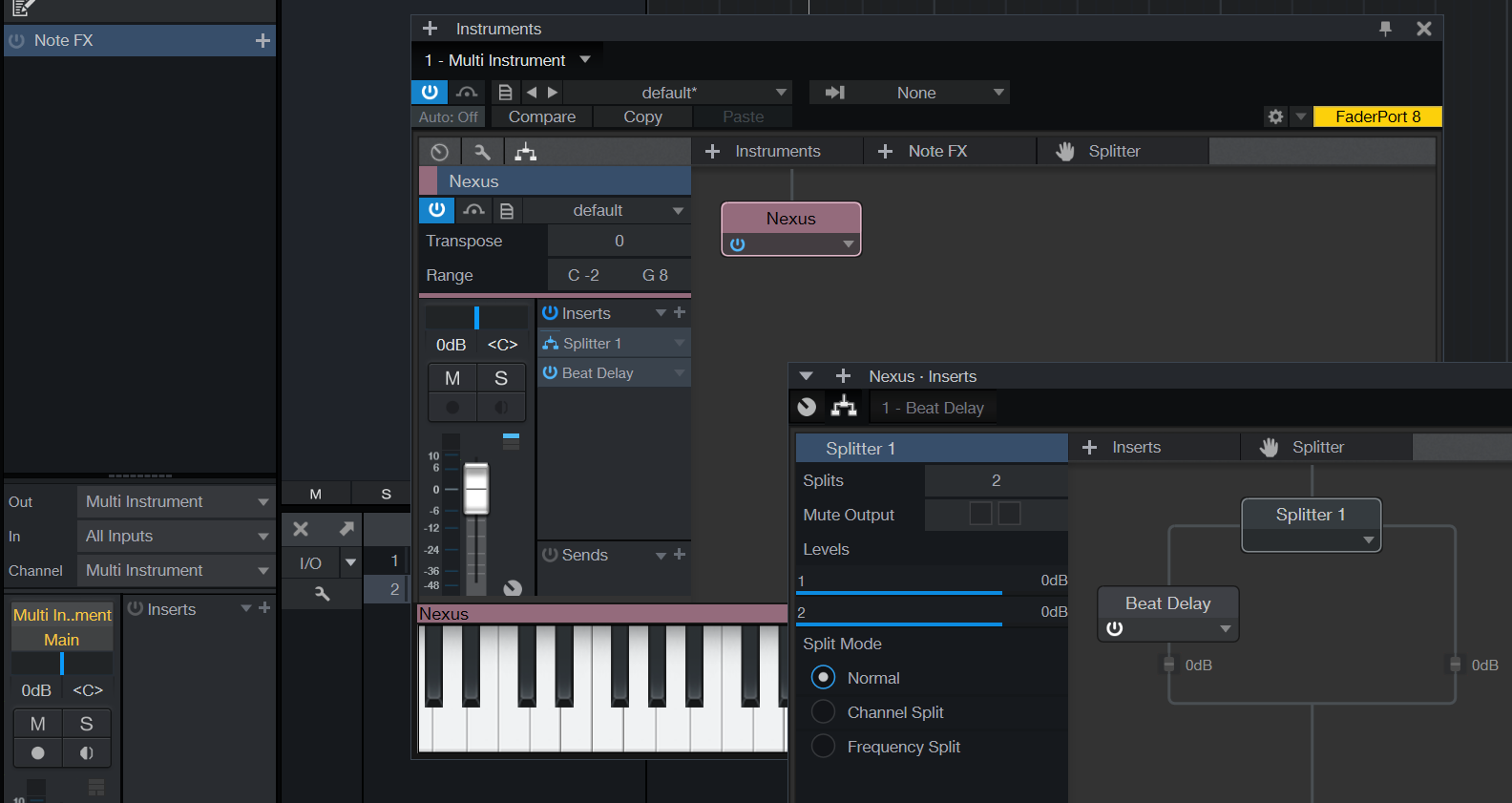
I would use Multi-Instrument (this is the rack solution of S1) containers and fx splitting
Image
for the layered instruments and simple fx splitting for non-layered ones

https://s1manual.presonus.com/Content/B ... uments.htm
https://blog.presonus.com/2021/06/11/ma ... ne-artist/
Last edited by xbitz on Fri Mar 18, 2022 5:16 pm, edited 2 times in total.
"Where we're workarounding, we don't NEED features." - powermat

Post

bermudagold wrote: Fri Mar 18, 2022 6:20 am which is in line with their philosophy of ableton being more of an instrument than an editor...
Here‘s the answer. And I‘m glad that Studio One is a more „traditional“ tool.

Post Reply

Return to “Hosts & Applications (Sequencers, DAWs, Audio Editors, etc.)”