

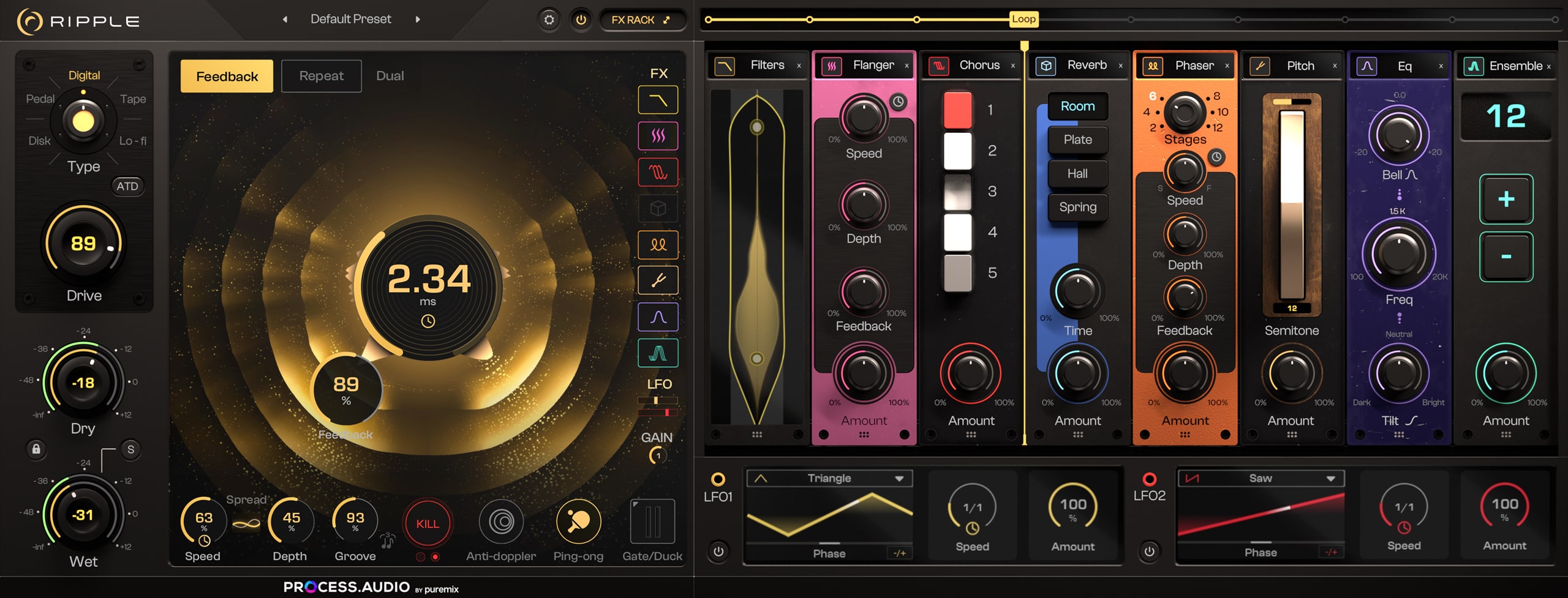
SameDigivolt wrote: Tue Nov 05, 2024 3:25 pm I just want the FX to look like this
So I don't have to scroll, that is my only complaint

Process Audio Ripple
-

- KVRist
- 481 posts since 26 Jun, 2024

-

- KVRAF
- 11322 posts since 18 Aug, 2007 from NYC
Anyone know how long the intro pricing is for?
I like their plugins. I used them when I had a Pure Mix subscription but I’m not a fan of their pricing only because I have too many similar effects.
I don’t really need this either, but it looks fun.
I like their plugins. I used them when I had a Pure Mix subscription but I’m not a fan of their pricing only because I have too many similar effects.
I don’t really need this either, but it looks fun.
-
- KVRian
- 601 posts since 5 Oct, 2004
You can do it, simply click this little resize icon, at default it's grey:Morty-C-137 wrote: Tue Nov 05, 2024 3:26 pmSameDigivolt wrote: Tue Nov 05, 2024 3:25 pm I just want the FX to look like this
So I don't have to scroll, that is my only complaint
You do not have the required permissions to view the files attached to this post.
-
- KVRist
- 481 posts since 26 Jun, 2024
Nopekinkajou wrote: Tue Nov 05, 2024 5:45 pmYou can do it, simply click this little resize icon, at default it's grey:Morty-C-137 wrote: Tue Nov 05, 2024 3:26 pmSameDigivolt wrote: Tue Nov 05, 2024 3:25 pm I just want the FX to look like this
So I don't have to scroll, that is my only complaint
Screenshot 2024-11-05 183231.jpg
-

- KVRAF
- 1581 posts since 21 Nov, 2018
He's right it works but it's this specific button

Thanks for the hint Kinkajou
 !
!-
- KVRist
- 481 posts since 26 Jun, 2024
A! I see, sorry Kinkajou.. I thought you meant simply the FX Rack button which just opens and closes the FX Rack at the same width it wasDigivolt wrote: Tue Nov 05, 2024 6:44 pmHe's right it works but it's this specific button
Thanks for the hint Kinkajou

Now all we need is the ability to adjust the FX Rack parameters with the mouse scroll wheel when we have the full width of the rack engaged (since we are not using the mouse wheel for scrolling left/right through the rack in that instance).
-

- KVRAF
- 6210 posts since 25 Dec, 2004
loving the groove control and the fact it's so light on the cpu!!
i'm still discovering stuff. more reverb controls might be nice. Groove controls also.
is there a simple pan knob anywhere (like the one in Dual mode) i can hook up to the LFO in single mode?
An panning/autopanning module for the rack would be handy.
i'm still discovering stuff. more reverb controls might be nice. Groove controls also.
is there a simple pan knob anywhere (like the one in Dual mode) i can hook up to the LFO in single mode?
An panning/autopanning module for the rack would be handy.
sketches... http://soundcloud.com/onesnzeros
some artists i support... https://bandcamp.com/spectraselecta
some artists i support... https://bandcamp.com/spectraselecta
-
- KVRer
- 17 posts since 28 Aug, 2011
Amazing plugin. It's on sale right now. https://process.audio/
-
- KVRist
- 96 posts since 13 Jun, 2023
Too many plugins stifles workflow efficiency imo.Constructed Identity wrote: Wed Oct 30, 2024 3:07 pmSome people on here have WAAAAY too many plug ins ...pekbro wrote: Sat Oct 26, 2024 9:49 pmThat's true, anyway, it still leaves 1600 ish non-ilok plugins for me (or you) to choose from,kritikon wrote: Sat Oct 26, 2024 9:40 pm Well, I AM missing out on 475 plugins, but I don't miss what I don't/won't have.

many of them stellar of course...
I just happen to be a plugin super consumer I guess, there's not much in the way of DRM
that can prevent me from getting something I like, only affordability...
Just spent the last two night doing nothing but updating plugs
-
- KVRAF
- 6210 posts since 25 Dec, 2004
i was absolutely certain i'd never buy another delay plugin.
but this one provides groove and motion that others don't.
throwing other effects into the feedback path can be fruitful,
and the only other decent sounding delay i know that does this is double the price.
repeating myself - need an autopan module for the FX rack.
and need a pan knob for single mode that can be modulated by the LFO
but this one provides groove and motion that others don't.
throwing other effects into the feedback path can be fruitful,
and the only other decent sounding delay i know that does this is double the price.
repeating myself - need an autopan module for the FX rack.
and need a pan knob for single mode that can be modulated by the LFO
sketches... http://soundcloud.com/onesnzeros
some artists i support... https://bandcamp.com/spectraselecta
some artists i support... https://bandcamp.com/spectraselecta
-
- KVRAF
- 11322 posts since 18 Aug, 2007 from NYC
Gave in. This one looks interesting for creating specific delay effects and I like the onboard effects from Spice(?).
-
- KVRAF
- 6210 posts since 25 Dec, 2004
only just starting to explore the other FX modules in Ripple...
Selecting the chorus module, or selecting a preset that utilises the chorus module causes the plugin audio stream to stop and need to re-load the instance to get the plugin working again.
I'm on Mac, Sequoia 15.1.1, VST3 version, anyone else having this issue with the chorus module?
Selecting the chorus module, or selecting a preset that utilises the chorus module causes the plugin audio stream to stop and need to re-load the instance to get the plugin working again.
I'm on Mac, Sequoia 15.1.1, VST3 version, anyone else having this issue with the chorus module?
sketches... http://soundcloud.com/onesnzeros
some artists i support... https://bandcamp.com/spectraselecta
some artists i support... https://bandcamp.com/spectraselecta
-
- KVRAF
- 11322 posts since 18 Aug, 2007 from NYC
I tried to crash it and could not. This is after adding/removing Chorus multiple times.sqigls wrote: Sun Dec 08, 2024 12:01 am only just starting to explore the other FX modules in Ripple...
Selecting the chorus module, or selecting a preset that utilises the chorus module causes the plugin audio stream to stop and need to re-load the instance to get the plugin working again.
I'm on Mac, Sequoia 15.1.1, VST3 version, anyone else having this issue with the chorus module?
No interruptions in audio signal. It was a seamless transition adding the chorus module at any point, even after adding other modules before or after it.
Mac
Sequoia 15.1.1
Live 12
VST3
Ripple 1.0.2
-
- KVRAF
- 6210 posts since 25 Dec, 2004
maybe it's a Cubase thing?
My machine is an M1 macbook pro - 2021
thanks for testing!
My machine is an M1 macbook pro - 2021
thanks for testing!
sketches... http://soundcloud.com/onesnzeros
some artists i support... https://bandcamp.com/spectraselecta
some artists i support... https://bandcamp.com/spectraselecta