Looking cool VS usable GUIs

VST, AU, AAX, CLAP, etc. Plugin Virtual Effects Discussion
RELATED
PRODUCTS

Post

Seriously... I think it’s called "user interface" for a very good reason... which is : this is nothing but an user interface !! :D

It’s absolutely impossible to objectively say which one is beautiful or not, because we all have tastes and preferences. When we find it beautiful, cool, that’s a bonus ! When we don’t, well, too bad !

As long as we still can use the plugin properly, it’s supposed to be OK.

And if the plugin is humanely unusable because the UI has been designed as a Clockwork Orange experience, such as the Admiral did for his synth, you’re f*cked.
1738363603031.jpg
Easy to sum up !
You do not have the required permissions to view the files attached to this post.

Post

DJErmac wrote: Fri Jan 31, 2025 10:42 pm Seriously... I think it’s called "user interface" for a very good reason... which is : this is nothing but an user interface !! :D

It’s absolutely impossible to objectively say which one is beautiful or not, because we all have tastes and preferences. When we find it beautiful, cool, that’s a bonus ! When we don’t, well, too bad !

As long as we still can use the plugin properly, it’s supposed to be OK.

And if the plugin is humanely unusable because the UI has been designed as a Clockwork Orange experience, such as the Admiral did for his synth, you’re f*cked.

1738363603031.jpg

Easy to sum up !
That looks so atrocious to use it's genuinely impressive. "So bad it's good" vibes.

Post

New skins have been added for the synth during the latest years. But it has stayed this way for decades. :D

At least it sounds pristine !

Post

DNAudio wrote: Wed Jan 29, 2025 10:36 pm
Separate but related rant:
You can make a good UI with knobs, great even, but a pet peeve of mine is that knobs are on hardware for a reason whilst almost every digital UI outside of the audio world uses sliders. Sliders make more sense as you don't "rotate" your mouse like a knob and (thankfully) knobs where you drag in a circular motion died out. It's one of those annoyances that isn't a big enough problem for most developers to switch from a style more people are familiar with
You can tell if a plugin had a minimal of UI design effort on it when knobs can be adjusted with up/down or left/right movements with the mouse, aand I think most modern stuff does it that way, at least up/down.

Also, a lot of plugins and DAW respond to mouse scroll wheel to control parameters, the one that doesn't and is a battle I will keep fighting for is Ableton Live, it is irritating.
dedication to flying

Post

I actually kind of like both approaches, for different reasons. It's nice to have some variety. And pretty pictures do make plugins sound better!! When I am just playing an instrument, I kind of like to look at a pretty skeuomorphic render. What I also like is some nice visual feedback that shows you what's going on with the sound. I love nice glowy oscilloscopes, waterfall spectrograms, 3D wavetable plots, animated filter plots (like the standard Serum set), animated envelopes, LFOs, and so on. I really like the oscilloscope in Flower Child Filter or in Bazille or Diva.

Some plugins, like the many virtual recreations of classic analog synths, are digital toys, part instrument, part video game sim. Part of the charm is that you are getting familiar with and learning about these dinosaurs. It is like playing a flight simulator and fiddling with the control panel on a P-51 Mustang. It isn't just about work and getting things done. I guess the same goes for physical instruments and whatnot too. People care a lot about what their guitars look like.

It's fascinating to me how, when using Analog Lab, the images, even though not of an instrument, make the presets sound more compelling to me than they otherwise would. The packaging helps to sell the product.

But the simple Valhalla interfaces are refreshingly straight to the point too.

Some interfaces are downright ugly though, with very tasteless designs, and only serve to undermine the appeal of the plugins.

Post

JO512 wrote: Sat Feb 01, 2025 5:33 am But the simple Valhalla interfaces are refreshingly straight to the point too.
But aren’t they boring ? I mean, since it’s software with a graphical UI, why not making it « attractive » ?
A lot of people complain about Live feeling like excel just by looking at it. Music sw shouldn’t look as « productivity » software. I mean for those 99% of users who aren’t professionals

Post

SebAV wrote: Sat Feb 01, 2025 9:12 am
JO512 wrote: Sat Feb 01, 2025 5:33 am But the simple Valhalla interfaces are refreshingly straight to the point too.
But aren’t they boring ? I mean, since it’s software with a graphical UI, why not making it « attractive » ?
A lot of people complain about Live feeling like excel just by looking at it. Music sw shouldn’t look as « productivity » software. I mean for those 99% of users who aren’t professionals
Minimalism has its advantages and lovers.

My father was an architect and I grew up looking at books of Mies van der Rohe, Le Corbusier, Frank Lloyd Wright, Barragán and design books of the Bau Haus and the swiss school. And obviously my aesthetic preferences favor minimalism and stuff that prioritizes function over form.

The Skeuomorphic designs look tacky to me, prioritizing looks over function in a tool. It is an anachronism that keeps digital tools trying to convey a way of doing things that doesn't exist in the digital realm, a disregard for the new medium, and bringing along limitations of the past into the present.
dedication to flying

Post

Whether you favour minimal UIs or enjoy complex ones, or love hardware-looking GUIs (skeuomorphic), we should all agree that the plugins should operate well.
My OP was making the case that many skeuomorphic plugins for the sake of looking like hardware actually limit themselves and loose on quality UX and functionality. Fake cables or wood panels might look cool, but having proper menus, MIDI learn, visualisation helpers etc.. is more important...!!

In an ideal world more manufacturers would provide their plugins with 2 interfaces, or a customisable one, to suit more people's working styles.

Post

As a plugin developer, i aim for clear and compact user interfaces. Plugins should not take up more space then needed and a user should be able to get familiar with the interface in minutes.

Some plugins have really fancy GUI's (3D, animations, etc..), which look really cool but in my opinion also distract the user too much from what the plugin is actually doing the audio. I'm not saying there is anything wrong with 3D or animations but the focus should be on visualising the audio processing algorithm.

Good to hear that many of you share the same perspective.

Post

RVAudio wrote: Sat Feb 01, 2025 3:50 pm As a plugin developer, i aim for clear and compact user interfaces.
Feel free to share your work here, we'll be happy to give some feedback. :tu:

Post

Cool!

My plugin called Disseptor has just been released. It's a multiband dispersion + distortion plugin. The user can control 5 EQ points to delay (not gain) frequencies which can either change the distortion character when applying small delays (phase shifts) or gives pitch bend like effects when applying large delays.

I am very happy to hear your thoughts and will take valuable feedback into account. :)

Post

Would like to give some props to AudioThing for this UI. Please, add some damn color coding to your plugins if they're otherwise just a wall of knobs, it makes the UI 100 times more readable and pretty looking!!!

Image

Post

DNAudio wrote: Sun Feb 02, 2025 5:30 am Would like to give some props to AudioThing for this UI. Please, add some damn color coding to your plugins if they're otherwise just a wall of knobs, it makes the UI 100 times more readable and pretty looking!!!

Image
The colour knobs are very helpful indeed. I'd just suggest a slightly larger fonts, many of us users have passed our youthful sight unfortunately.
At least the skeuomorphic parts, eg the wooden boards, do not interfere with the use.

Post

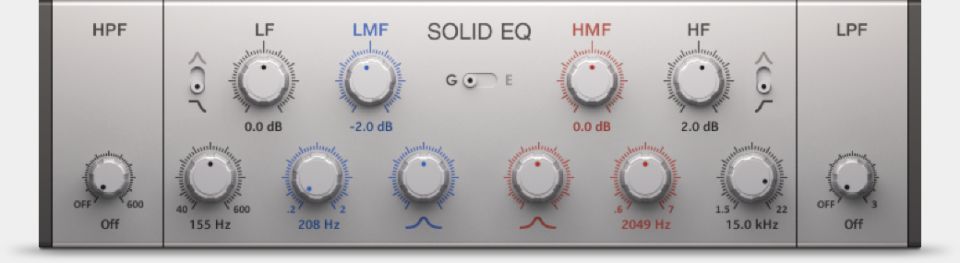
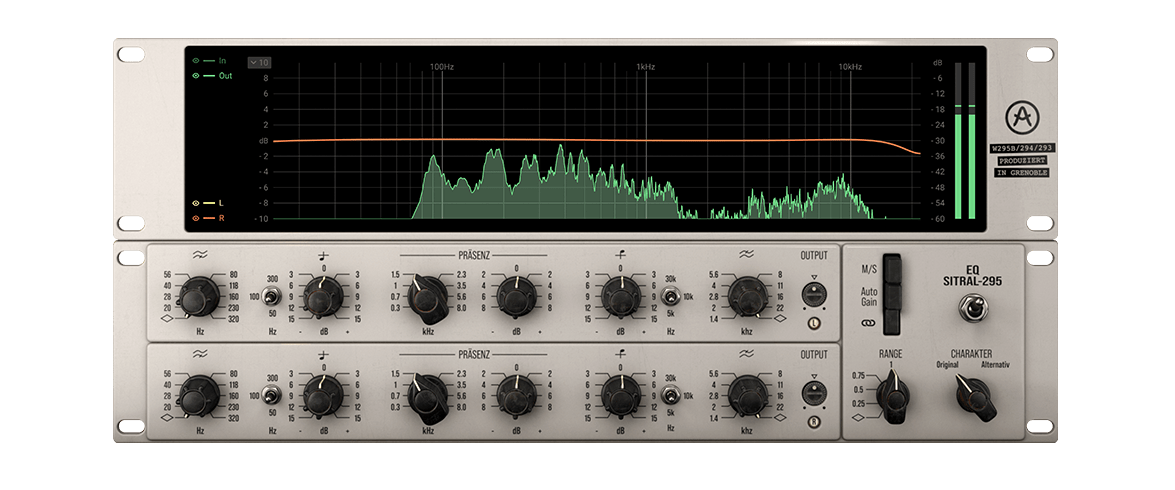
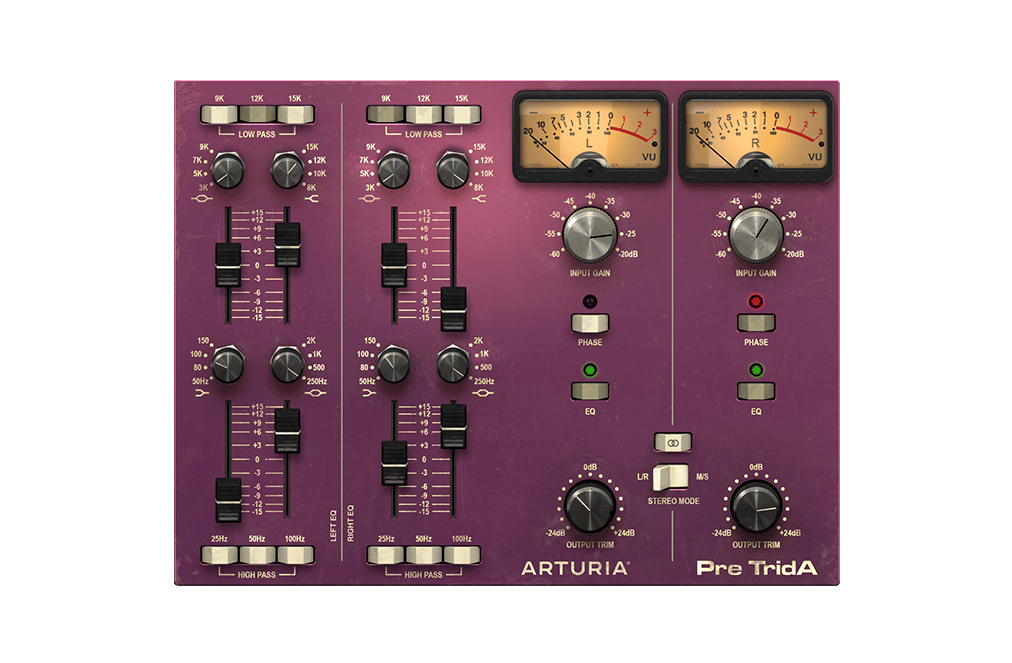
I have no idea why, but in particular my eyes always have trouble with reading console style EQs, since the knobs related to each frequency can be on top of each other, side by side, or positioned diagonally.

Even such a small thing like the color coding in NI's Solid EQ makes using the plugin so much quicker and more convenient than other EQs. Image

I actually like the sound of Arturia's EQs/preamps more overall, but I don't really like using them because I always have to take a moment to figure out what is where. Not a deal-breaker, but enough that I find it annoying:
Image
Image

Post

MeowSynth_2.jpg
You do not have the required permissions to view the files attached to this post.
aliasing plugin owner
:?

Post Reply

Return to “Effects”