


Discovery Pro synthesizer 6.4 to 8.0
-

- KVRian
- 575 posts since 30 Jan, 2021
Discovery's Sync To Host parameters confuse me. In other synths, you'd see values like 1/4, 1/16, 1/16 dotted, etc. Here, you have ticks, from 128 to 0.5 in 1-unit increments. How does this translate into 1/4, 1/16, 1/16 dotted, etc.? Is there a formula?
If you can't dazzle 'em with brilliance, baffle 'em with bullshit.
-

- KVRAF
- 1769 posts since 1 Mar, 2010 from Paris
The vst3 version is buggy in Bitwig 4.3. For example, if I move the OSC2 pitch knob, the amplitude attack knob also moves (they sync together). This doesn't happen with the vst2 version.
-

- KVRAF
- 20664 posts since 22 Nov, 2000 from Southern California
The red skin is gorgeous. Is that the Nordic Dawn skin? Is there an equivalent red skin for Discovery?
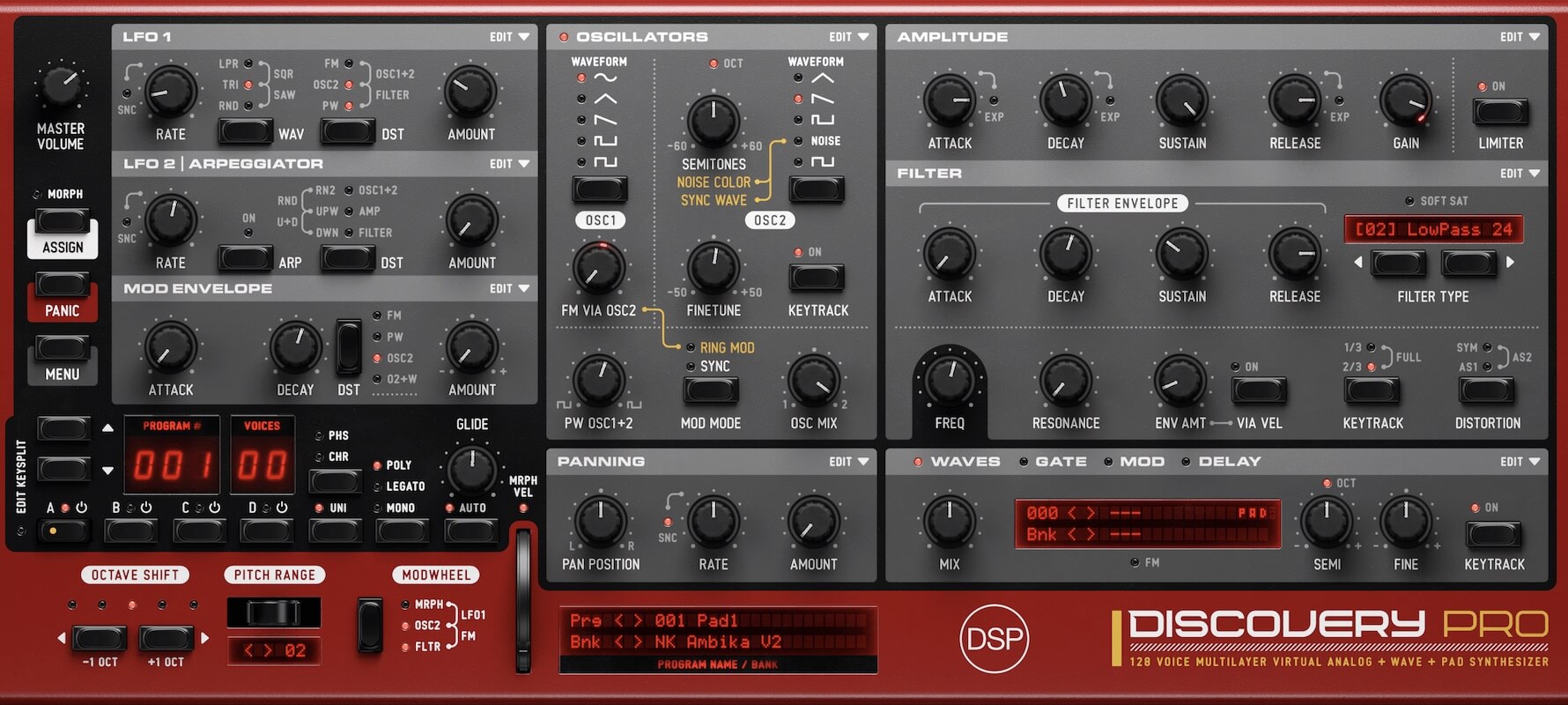
-
- KVRAF
- 9843 posts since 15 Sep, 2005 from East Coast of the USA
IIRC a setting of 4 ticks is 1/4, 2 is 1/2 and 1 tick is 1/16. Something like that, but George might have a better explanation for you.Boy Wonder wrote: Sun May 28, 2023 7:46 pm Discovery's Sync To Host parameters confuse me. In other synths, you'd see values like 1/4, 1/16, 1/16 dotted, etc. Here, you have ticks, from 128 to 0.5 in 1-unit increments. How does this translate into 1/4, 1/16, 1/16 dotted, etc.? Is there a formula?
-
- KVRist
- 282 posts since 4 Feb, 2015
Hm, strange ... After updating, the new skins are listed in "Skins" but clicking on either of them doesn't do anything. The assets (images), however, are all there, in the Documents folder, where they are supposed to be, and where all the pictures for the other skins reside, too.discoDSP wrote: Sun May 28, 2023 10:35 am Discovery Pro 7.8 released.
- New Silver Haze skin by Ilkka Rosma.
- Updated default Nordic Dawn skin.
- New Shadow Wave skin.
- Updated and new skins now include 30x and 40x assets for high-resolution 1.5x and 2x GUI size display.
- Fixed standalone program change function.
- Fixed Quick Stack behavior. Now, current layer blinks if it's active.
- Added octave submenus to Custom Key Split dropdown.
- Clicking Key Split dropdown / led now rotates between Off, Dual, Custom, Custom (edit) states.
- Other minor fixes and enhancements.
Loading the new skins doesn't work, no matter if standalone, VST2 or VST 3, and no matter which size is chosen. And as the default red Nordic Dawn is not in the Documents folder, I can't tell if the skin that loads per default is the updated version.
The version number, though, is shown as 7.8.
Has anyone else been encountering this problem? Or, has anyone been able to successfully load the new skins?
BTW: I'm on Windows 10.
-
 mountainmaster mountainmaster https://www.kvraudio.com/forum/memberlist.php?mode=viewprofile&u=153531
 - KVRian
- 620 posts since 10 Jun, 2007 from Netherlands
I am now using the new Silver Haze skin. No problems with loading on Windows 11.e-musician wrote: Tue May 30, 2023 10:06 am Hm, strange ... After updating, the new skins are listed in "Skins" but clicking on either of them doesn't do anything. The assets (images), however, are all there, in the Documents folder, where they are supposed to be, and where all the pictures for the other skins reside, too.
Loading the new skins doesn't work, no matter if standalone, VST2 or VST 3, and no matter which size is chosen. And as the default red Nordic Dawn is not in the Documents folder, I can't tell if the skin that loads per default is the updated version.
The version number, though, is shown as 7.8.
Has anyone else been encountering this problem? Or, has anyone been able to successfully load the new skins?
BTW: I'm on Windows 10.
-
- KVRAF
- Topic Starter
- 5632 posts since 18 Jul, 2002
Please unzip the attached file and add the MIDI template Custom.xml and switch to that one. You can find the location of the file at Documents > discoDSP > Discovery Pro > MIDI. Once you replace the file, it should work correctly. We are working on a fix.Ghostwave wrote: Sun May 28, 2023 9:31 pm The vst3 version is buggy in Bitwig 4.3. For example, if I move the OSC2 pitch knob, the amplitude attack knob also moves (they sync together). This doesn't happen with the vst2 version.
You do not have the required permissions to view the files attached to this post.
Last edited by george on Tue May 30, 2023 8:13 pm, edited 1 time in total.
-
- KVRist
- 282 posts since 4 Feb, 2015
mountainmaster wrote: Tue May 30, 2023 10:34 amI am now using the new Silver Haze skin. No problems with loading on Windows 11.e-musician wrote: Tue May 30, 2023 10:06 am Hm, strange ... After updating, the new skins are listed in "Skins" but clicking on either of them doesn't do anything. The assets (images), however, are all there, in the Documents folder, where they are supposed to be, and where all the pictures for the other skins reside, too.
Loading the new skins doesn't work, no matter if standalone, VST2 or VST 3, and no matter which size is chosen. And as the default red Nordic Dawn is not in the Documents folder, I can't tell if the skin that loads per default is the updated version.
The version number, though, is shown as 7.8.
Has anyone else been encountering this problem? Or, has anyone been able to successfully load the new skins?
BTW: I'm on Windows 10.
Thanks for your reply!

Meanwhile, I have found out what the reason for the issue I described is, and I am posting this here just in case others might encounter the same problem - which I highly doubt
 .
.It seems that Discovery Pro can only deal with a certain amount of skins inside the "Skins" folder, with the maximum number of skins being 35 (so, together with the default one, that gives you a total of 36 skins).
If you have more than 35 skins in the folder, you will be able to choose from the first 35 skins listed "only". In my case, I had 39 skins in the folder at the time of writing. And as the new skins Shadow Wave and Silver Haze were at the very bottom of the list, I could not load them.
So, deleting some skins in the folder has solved the problem.
-
- KVRAF
- 1769 posts since 1 Mar, 2010 from Paris
Thanks for looking to it. I did exactly what you asked but the issue is still present. Maybe it's a problem on my end. Is anyone else having the same issue?discoDSP wrote: Tue May 30, 2023 7:47 pmPlease unzip the attached file and replace the MIDI template Default.xml with the new one. You can find the location of the file at Documents > discoDSP > Discovery Pro > MIDI. Once you replace the file, it should work correctly. This fix will be added for version 7.8.1.Ghostwave wrote: Sun May 28, 2023 9:31 pm The vst3 version is buggy in Bitwig 4.3. For example, if I move the OSC2 pitch knob, the amplitude attack knob also moves (they sync together). This doesn't happen with the vst2 version.
-
- KVRAF
- Topic Starter
- 5632 posts since 18 Jul, 2002
Rename it to Custom.xml and select it using MIDI. The issue wasn't as easy to fix and we are working on it.Ghostwave wrote: Tue May 30, 2023 8:05 pm Thanks for looking to it. I did exactly what you asked but the issue is still present. Maybe it's a problem on my end. Is anyone else having the same issue?
-
- KVRAF
- 1769 posts since 1 Mar, 2010 from Paris
Still the same problem. However, If I select another one like the Access Virus TI2 Desktop, the knobs are no longer linked (but they are with the next one down, Arturia MicroFreak)discoDSP wrote: Tue May 30, 2023 8:14 pmRename it to Custom.xml and select it using MIDI. The issue wasn't as easy to fix and we are working on it.Ghostwave wrote: Tue May 30, 2023 8:05 pm Thanks for looking to it. I did exactly what you asked but the issue is still present. Maybe it's a problem on my end. Is anyone else having the same issue?
Edit: Another thing I noticed is that most of the vst3 version's automation parameters aren't picked up by Bitwig. The vst2 one works as it should.
-
- KVRAF
- Topic Starter
- 5632 posts since 18 Jul, 2002
Yes, it looks like the VST3 wrapper can't handle two different internal parameter types properly, which explains why it happens with VST3 build only. Working on a fix.Ghostwave wrote: Tue May 30, 2023 8:20 pm Still the same problem. However, If I select another one like the Access Virus TI2 Desktop, the knobs are no longer linked (but they are with the next one down, Arturia MicroFreak)
-
- KVRAF
- 1689 posts since 7 Dec, 2017
Man you guys (Disco DSP) really need to get a proper account management system on your site. Tried five times to login to get the update, entered the invoice # and it supposedly emailed me a 6 digit code which never arrived (checked spam folder of course, blah blah blah). So no way to access the update. This has happened before to me with Disco DSP and it's pretty damn annoying. Just use a standard email/password combo to let us login and download our products like pretty much every other developer. I need to look up the invoice number every time I want to download something and half the time the email verification isn't sent. It's putting me off to their products, too much aggravation and time wasting.
-
- KVRAF
- 3398 posts since 6 Nov, 2006
i had the same issue. it showed up eventually but took all day. there's a logjam in the system somewhere.seangm wrote: Tue May 30, 2023 10:21 pm Man you guys (Disco DSP) really need to get a proper account management system on your site. Tried five times to login to get the update, entered the invoice # and it supposedly emailed me a 6 digit code which never arrived (checked spam folder of course, blah blah blah). So no way to access the update. This has happened before to me with Disco DSP and it's pretty damn annoying. Just use a standard email/password combo to let us login and download our products like pretty much every other developer. I need to look up the invoice number every time I want to download something and half the time the email verification isn't sent. It's putting me off to their products, too much aggravation and time wasting.
-
- KVRAF
- 1689 posts since 7 Dec, 2017
Yeah it finally came through after a few hours. I'd still prefer a real account to login to but as long as I can get to the download for now.dayjob wrote: Wed May 31, 2023 1:29 ami had the same issue. it showed up eventually but took all day. there's a logjam in the system somewhere.seangm wrote: Tue May 30, 2023 10:21 pm Man you guys (Disco DSP) really need to get a proper account management system on your site. Tried five times to login to get the update, entered the invoice # and it supposedly emailed me a 6 digit code which never arrived (checked spam folder of course, blah blah blah). So no way to access the update. This has happened before to me with Disco DSP and it's pretty damn annoying. Just use a standard email/password combo to let us login and download our products like pretty much every other developer. I need to look up the invoice number every time I want to download something and half the time the email verification isn't sent. It's putting me off to their products, too much aggravation and time wasting.