Freeware VSTeffects roundup 64-bit

VST, AU, AAX, CLAP, etc. Plugin Virtual Effects Discussion
Post Reply New Topic
RELATED
PRODUCTS

Post

Free utility plugin I created called SendBlender. Basically uses the sidechain input to support sample accurate wet/dry mixing for parallel FX chains. Useful for wet/dry blending a chain with more than one processor (compressor and EQ for example). Just added supported for automatic level matching of the dry & wet signals.

https://minordrama.studio/plugins/sendblender


Image

Post

What do you guys think about Yuri Semenov plugins?
Hello, they sound amazing, but some of them tend to freeze or crash in my projects. Has anyone else experienced this?

Post

TB-303 Distortion VST Plugin – Free Download | Authentic Acid Sound for Techno & Acid House

Post

@Mr. Rafael: The only Yuri Semenov plug I've tried is his recent release. YS Compressor. I haven't had any issues with it, but can't speak for the rest. I'll go beyond this one at some point and will post here if any issues come up.
By the way, this compressor is solid. A Distressor-ish plug. I don't have a Distressor or other emulations to compare but I like what I hear!
https://m.vk.com/yriisem
(as of this writing it's the 4th plug down the page. And yes, there's an extensive library to dig through)

Post

YS - Compressor 2025 v.1.0.1 link in video description.

Image

Post

GuitarML https://guitarml.com/
Free guitar amp sims and tone packs.

Post

We made Sotto Spindown free at Sotto Spindown. Kind of like Kilohearts tape-stop but with more control of the spindown. It can also do a spindup effect.


Image

Post

minordrama wrote: Mon Oct 06, 2025 12:10 am Free utility plugin I created called SendBlender. Basically uses the sidechain input to support sample accurate wet/dry mixing for parallel FX chains. Useful for wet/dry blending a chain with more than one processor (compressor and EQ for example). Just added supported for automatic level matching of the dry & wet signals.

https://minordrama.studio/plugins/sendblender

Image
Thank you, that looks cool!

A quick question: I am imagining using this to give dry/wet to plugins that don’t natively have a dry/wet function like AUD Verve Analog Machines. But in order to do that I would like to not rely on send and return but rather have Sendblend after the Verve plugin on the same channel and have the Senblender sidechain input be the audio from the same channel it’s on but taken from before the Verve plugin and have that be the ‘dry’ portion and the audio from after the Verve plugin be the ‘wet’ portion.

Can that be done?

Post

Morty-C-137 wrote: Wed Nov 05, 2025 8:31 am
minordrama wrote: Mon Oct 06, 2025 12:10 am Free utility plugin I created called SendBlender. Basically uses the sidechain input to support sample accurate wet/dry mixing for parallel FX chains. Useful for wet/dry blending a chain with more than one processor (compressor and EQ for example). Just added supported for automatic level matching of the dry & wet signals.

https://minordrama.studio/plugins/sendblender

Image
Thank you, that looks cool!

A quick question: I am imagining using this to give dry/wet to plugins that don’t natively have a dry/wet function like AUD Verve Analog Machines. But in order to do that I would like to not rely on send and return but rather have Sendblend after the Verve plugin on the same channel and have the Senblender sidechain input be the audio from the same channel it’s on but taken from before the Verve plugin and have that be the ‘dry’ portion and the audio from after the Verve plugin be the ‘wet’ portion.

Can that be done?
Hey good question, so the short answer is that it depends on the DAW. What SendBlender needs is for either the wet or dry signal to be routed to it's sidechain input. In most DAWs this requires an extra track to process on—but note that this doesn't necessarily need to use an actual send. A lot of DAWs support routing the output of one track into another directly. In practice I don't find it to be that cumbersome but it's a matter of workflow preference.

I am mainly an Ableton Live user and I know some additional tricks for Live that allow skirting the need to create an extra track. For example, Live let's you route the pre-FX (input) signal of a track as the sidechain to a plugin on the same track. So this works if your compressor (or whatever) is the first plugin on the track, and then SendBlender is the second plugin. The wet signal flows from the compressor into SendBlender like usual, and then the sidechain input is connected "pre-FX".

I am not a user but I understand Bitwig's routing to be so flexible that you can pretty easily execute just about any setup you'd like. That said I think Bitwig also has a built-in wet/dry mix function.

One thing to be aware of with the Verve plugin (I have this) is that some of the modes likely introduce some phase shift (there are some tape modes for example) and so blending these with the dry signal will probably have the side effect of shifting the frequency content (like an EQ would). This can be good or not so good depending on what you are going for, but if it sounds good then it is good. :wink:
Last edited by minordrama on Wed Nov 05, 2025 3:51 pm, edited 1 time in total.

Post

I posted this in a separate thread, but this thread is probably a better place for it.

Tonecarver tcDualSequencer

MIDI generator. Two sequencers with an arbitrator that selects which sequencer (or both) is used to produce the output notes. Each sequencer has independent direction, velocity, and channel settings. Output notes can be snapped to a scale. Random/chance controls provide an opportunity to add some variation to the sequence.

Version 1.0.1. VST3/CLAP.

Get it here: https://www.dropbox.com/scl/fi/8ab9qq7y ... duspd&dl=0

Post

minordrama wrote: Wed Nov 05, 2025 2:50 pm One thing to be aware of with the Verve plugin (I have this) is that some of the modes likely introduce some phase shift (there are some tape modes for example) and so blending these with the dry signal will probably have the side effect of shifting the frequency content (like an EQ would). This can be good or not so good depending on what you are going for, but if it sounds good then it is good. :wink:
Hey thanks! I will test some stuff out. Would love it all on 1 track though. Having to do 2 tracks to dry/wet would already be enough of an annoyance to be a workflow killer for me. But everyone has their preference of course.

Post

Morty-C-137 wrote: Wed Nov 05, 2025 6:30 pm Hey thanks! I will test some stuff out. Would love it all on 1 track though. Having to do 2 tracks to dry/wet would already be enough of an annoyance to be a workflow killer for me. But everyone has their preference of course.
Yeah I get it, what DAW are you using? Maybe I can offer a pointer or two.

Post

Logic Pro

Post

Hm unfortunately I don't know a way to do it in Logic Pro that doesn't involve two tracks. Maybe someone that knows Logic Pro better than I do would know but my hunch is that it is not possible.

The two track setup looks like this (from the SendBlender manual):
Screenshot 2025-11-05 at 2.58.00 PM.png
Logic Pro has more limited routing options than some other DAWs.
You do not have the required permissions to view the files attached to this post.

Post

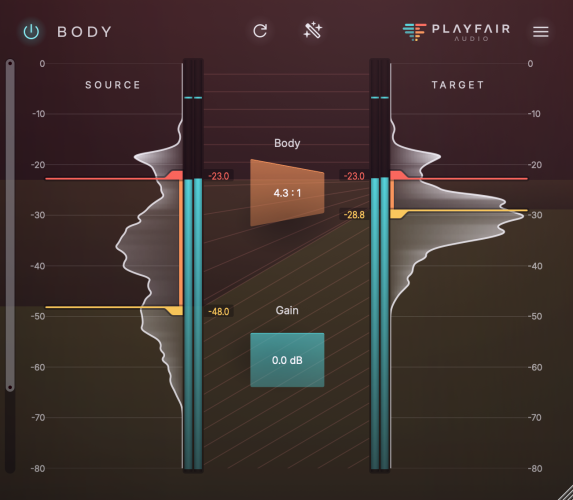
Playfair Body: Interesting and free fancy dynamics processor, lite version of their flagship Dynamic Grading.

https://playfair-audio.com/body/

Image

Post Reply

Return to “Effects”