Which DAW Has The Most Uncluttered Interface ?

Audio Plugin Hosts and other audio software applications discussion
Post Reply New Topic
RELATED
PRODUCTS

Post

Ploki wrote: Thu Sep 02, 2021 8:22 am - i can see the channel strip and all its destinations in the inspector
Destinations?
- i find it easier to navigate through the song to check what i just did on more spots where the element in question is located.
Not sure I understand this, either.
- i find it easier to see and edit automation.
I prefer the Piano Roll for all that stuff.
i'd have mixer on my secondary monitor when mixing 100% of the time but am currently working with a single monitor.
I work with both open, it would annoy me considerably to have to make it an either/or situation. That said, I mostly use the arrangement window to navigate to the point I want to do something, I don't actually use it for much at all. That's why if I had to hide anything, that would be it. And with my new laptop I can also have the Piano Roll open all the time, too, which is even betterer. Maybe it's because of Orion but I tend to do everything in the PR so with my old machines I was constantly flipping from mixer to PR. Not any more, though.
You do not have the required permissions to view the files attached to this post.
NOVAkILL : Legion GO, AMD Z1x, 16GB RAM, Win11 | Audient EVO 8 | Lumi Keys | Studio Pro 8
Korg Odyssey, bx-oberhausen, Proxima, PolyMax, GR8, JP6K, Union, Atomika,
Invader 2, Flow Motion, Olga, TRK 01, Thorn, Spire, VG Iron

Post

You can see above how obvious a track/channel selection is and this is how obvious selected clips are. I did a separate screen shot because it requires 100% zoom.
You do not have the required permissions to view the files attached to this post.
NOVAkILL : Legion GO, AMD Z1x, 16GB RAM, Win11 | Audient EVO 8 | Lumi Keys | Studio Pro 8
Korg Odyssey, bx-oberhausen, Proxima, PolyMax, GR8, JP6K, Union, Atomika,
Invader 2, Flow Motion, Olga, TRK 01, Thorn, Spire, VG Iron

Post

Yes, you are bringing your workflow from Orion! So that it looks strange!

In S1 and most other Linear traditional DAWs. You don't need the mixer to be shown all the times in the stage of composing/arranging. You mostly need the midi/audio editor with the arrangement view. When you are ready to mix, you use the mixer and the arrangement view above it. This is what I see in 99% of all, so you are in the smallest minority to use S1/Cubase like that ;)
Using: Cubase Pro 15, Reason 13, Tascam US-4x4HR, MODX6, DM12D, LaunchKey 49, Yamaha guitar(Pacifica 612v) and bass (BB234) and some virtual instruments and synths.

Post

BONES wrote: Thu Sep 02, 2021 11:43 am Destinations?
Sends and outputs
BONES wrote: Thu Sep 02, 2021 11:43 am
Not sure I understand this, either.
I mix and i can see where the track i'm working on has audio so i can quickly jump to those spots to see if everything fits
BONES wrote: Thu Sep 02, 2021 11:43 am I prefer the Piano Roll for all that stuff.
doesn't work for audio :)
Image

Post

It does in Studio One.
You do not have the required permissions to view the files attached to this post.
NOVAkILL : Legion GO, AMD Z1x, 16GB RAM, Win11 | Audient EVO 8 | Lumi Keys | Studio Pro 8
Korg Odyssey, bx-oberhausen, Proxima, PolyMax, GR8, JP6K, Union, Atomika,
Invader 2, Flow Motion, Olga, TRK 01, Thorn, Spire, VG Iron

Post

THE INTRANCER wrote: Wed Sep 01, 2021 9:43 pm
EnGee wrote: Wed Sep 01, 2021 9:22 pm One big advantage for Cubase over S1 (GUI related) is the contrast of the selecting track, channel in the mixer, or any selection really. It is very obvious to the eyes what you highlighted. S1 is horrible when you add colours to the tracks and mixer like THE INTRANCER example above!
Sorry don't see anything of significance in this respect, the shading is slightly lighter than other channels whilst selected but not very in the way Cubase is blindingly white which is more of an eye strain. If that's not clear enough, you have red and blue buttons to indicate the selected channels in Studio One.

If you don't like the whole channel strip to be coloured, you can limit this to a slim line.
Personally I prefer the complete channel strip to be highlighted in colour as it makes arranging and grouping things easier.

When the channel strips are in narrow view, (another way to increase white GUI space) you can expand them to indicate the channels selected. I don't remember seeing a narrow channel strip view in Cubase.
I agree with the person you quoted. Contrast for selections is absolutely better in Cubase. I noticed this, as well.

IMO, the color scheme in Studio One is too muted. I think that is where this stems from. The disparity between selected and unselected items isn't high enough.

In Cubase you don't have to think about this. The difference is far more stark.

Many times in Studio One I caught myself "reselecting" things to double check the selection.

If I said you are blocked, I won't see your posts. Please kindly refrain from quoting or replying to me.
"Notifications for Nothing" are annoying. Blocking me in return is a good way to avoid this.


Post

BONES wrote: Thu Sep 02, 2021 12:20 pm It does in Studio One.
that's a piano roll? in logic that's a track editor - but yes, it does have that :) it automatically switches from PR to Track editor if you select an audio track.
i generally have that open when editing vocals - melodyne 75% of the screen, track editor 25%
Image

Post

It's just called "Editor" in Studio One.
NOVAkILL : Legion GO, AMD Z1x, 16GB RAM, Win11 | Audient EVO 8 | Lumi Keys | Studio Pro 8
Korg Odyssey, bx-oberhausen, Proxima, PolyMax, GR8, JP6K, Union, Atomika,
Invader 2, Flow Motion, Olga, TRK 01, Thorn, Spire, VG Iron

Post

EnGee wrote: Thu Sep 02, 2021 11:54 amIn S1 and most other Linear traditional DAWs. You don't need the mixer to be shown all the times in the stage of composing/arranging.
Realistically, you don't need anything except the window(s) that contain the thing you want to work on.
You mostly need the midi/audio editor with the arrangement view.
As I said yesterday, I only need those things for the first few days/weeks. For the next 6 months I need the mixer more than anything else. And in the meantime, the mixer puts a lot more info in one place than any other part of the interface. This is especially true of Studio One, where you can see, and interact with, the GUIs of stock effects plugins.
When you are ready to mix, you use the mixer and the arrangement view above it.
Yes, and that's 90% of the process.
This is what I see in 99% of all, so you are in the smallest minority to use S1/Cubase like that ;)
You mean it's what you see on YouTube, where all the idiots seem to live. 99% of what I see on YouTube is worthless rubbish at that level.
Trensharo wrote: Thu Sep 02, 2021 12:31 pmIMO, the color scheme in Studio One is too muted.
Anyone who can see the screenshot I posted above will think your opinion is worthless.
NOVAkILL : Legion GO, AMD Z1x, 16GB RAM, Win11 | Audient EVO 8 | Lumi Keys | Studio Pro 8
Korg Odyssey, bx-oberhausen, Proxima, PolyMax, GR8, JP6K, Union, Atomika,
Invader 2, Flow Motion, Olga, TRK 01, Thorn, Spire, VG Iron

Post

Studio One is pretty damn clean, not much menu diving and can easily hide / show major elements (Mixer / File Browser / Piano Roll) from one view.

Post

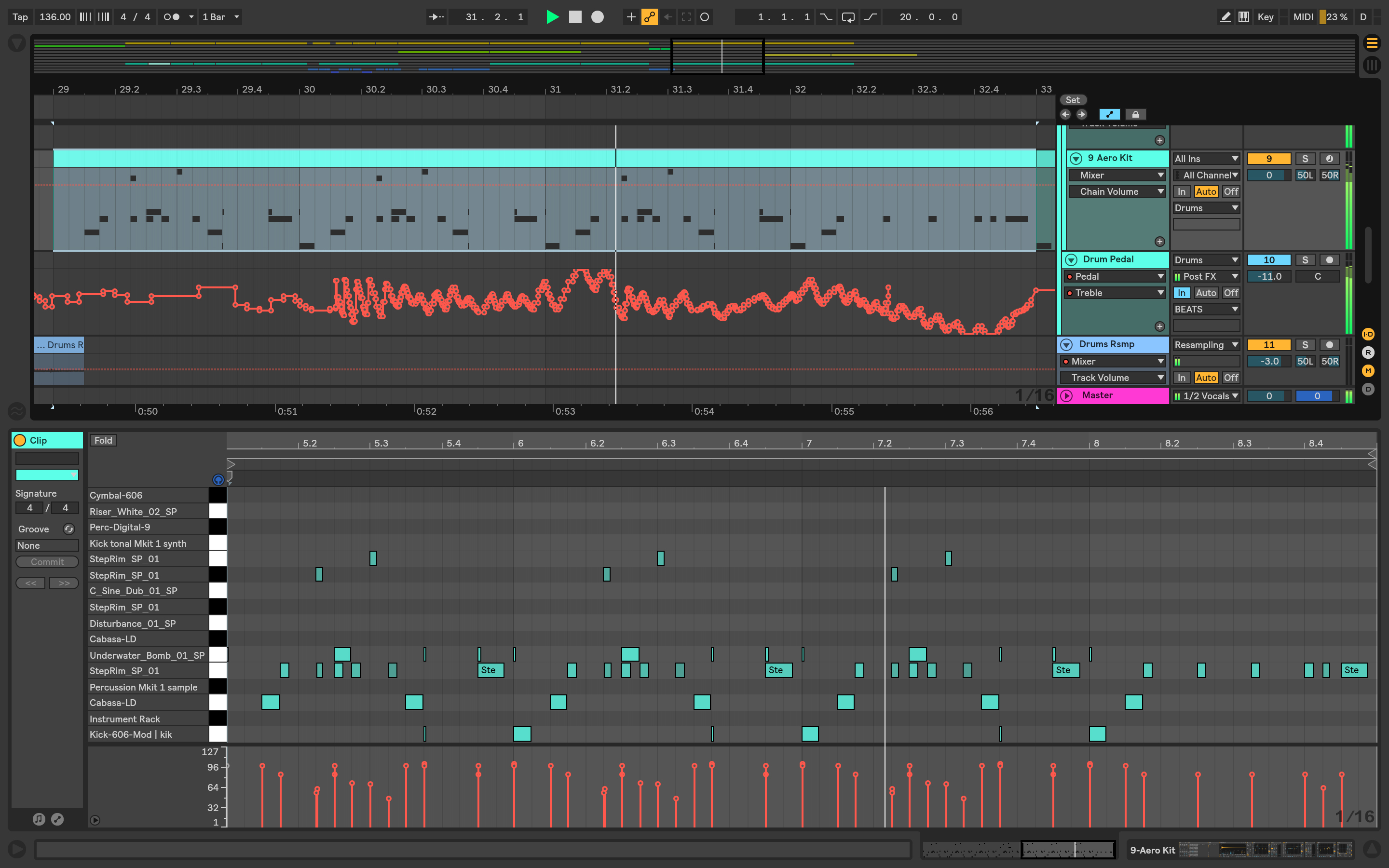
Ableton Live. By default I find it very neat, functional and organized. And you can tweak it to be even cleaner.

Post

I've settled on Live simply because of its minimalist, mostly clean design. I also like the non-modal, largely tool-less operation. It took some getting used to, but I'm quicker with it than any other DAW and I've used most of them extensively. It's hardly perfect, but it's my vote for least cluttered.

Studio One with its thin borders, monochrome tool icons, and tiny text and icons throughout gets my vote for most cluttered, followed by Cubase. That they have the same heritage seems no surprise.

Post

Thin borders? Borders on what? I'm looking at it right now and I can't see any borders on anything. And monochrome tool icons is the very definition of uncluttered.
As for cluttered, is this a language thing? Do people not know what the word means? I've just tried to find a screenshot of Live that looks less cluttered than Studio One but I can't. They all look like the one below, which is every bit as cluttered as Studio One.

Image

Actually, it's more cluttered thanks to all the extra contrast between elements. This one mostly looks better, except for the cluster-f**k in the top right.

Image

Seriously, what makes this more cluttered than either of those two?
You do not have the required permissions to view the files attached to this post.
NOVAkILL : Legion GO, AMD Z1x, 16GB RAM, Win11 | Audient EVO 8 | Lumi Keys | Studio Pro 8
Korg Odyssey, bx-oberhausen, Proxima, PolyMax, GR8, JP6K, Union, Atomika,
Invader 2, Flow Motion, Olga, TRK 01, Thorn, Spire, VG Iron

Post

BONES wrote: Thu Sep 02, 2021 11:47 pm
As for cluttered, is this a language thing? Do people not know what the word means?
Yes, the room I am sitting in now !

I need to start to getting rid of stuff that has accumulated that I do not need or use. But doing that would take a lot of mental effort in deciding what needs to go. I broke the golden rule of "one in - one out". Microsoft windows is cluttered because it is built on decades of old code. Cubase is cluttered for the same reason. Although in both cases the outward GUI does not reflect this.

So I guess in a virtual world clutter is not referring to the outward GUI which can still look very clean and nice, but the accumulation of virtual junk in virtual cupboards. It only matters when you try to find something that you know is there somewhere but is very hard to find. But even there the analogy breaks down, because it is possible to have very orderly and well organized clutter.

Post

cluttered across happens across time in movement, its not always captured in static images. theres also a friction that happens across time, friction against expectation & intuition.

I find ableton's GUI friction more unwieldly to use than it's reputation suggests. If feels cluttered when in a complicated mix, the device browser generally feels cramped, track organization and navigation still gets frustrating on big sessions. Im often fighting to see what I want to see. what i want to see is often on another view mode, or presented in an awkward size & position, or requires scrolling. the browser and plugin organization aren't helping me find things. At times feels like a max msp device thats been massively scaled up, as its history suggests.

In Studio One, I am often fighting to find what I want to see because too much undifferentiated information is presented at once. Despite the one-window approach, I find it visually noisy.

Cubase window's management, general UI culture & browser style is chaotic and antiquated for me.

Reaper feels unfamiliar no matter how many hundreds of hours i've put into it. If I leave it for a couple months, it's like I've never used it. I can't feel out any "grain" to it's UI style, it's feels like a chaotic labrynth of deeply nested & endless engineering features.

Logic and Bitwig feel the least uncluttered across these different dimensions, to me.

Post Reply

Return to “Hosts & Applications (Sequencers, DAWs, Audio Editors, etc.)”