Introducing REVERSIDE [BETA] new reverb plug-in from the author of Aether

VST, AU, AAX, CLAP, etc. Plugin Virtual Effects Discussion
Post Reply New Topic
RELATED
PRODUCTS
Reverside

Post

Reverside Reverb & 3D Spatial Plug‑In updated to version 0.9.9.b620 [21MAY26]

What’s new:
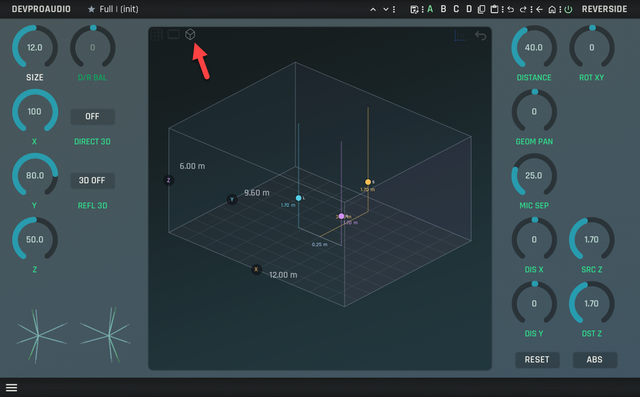
- Added 3D Projection view Position Display
- Enhanced 2D Position Display functionality
- Implemented Polar/Angular Reflection Displays on Pos and Refl pages
- Extended LR 3D Offset range/span
- Refined Early Reflection tracer/engine algorithms
- Added LR start and LR 3D offset markers to Reflections and Reverb displays
- Optimized auto-grid spacing in Filter/EQ/Rev displays for better uniformity
- Improved skin workflow with various fixes and adjustments
- Applied minor DSP enhancements and bug fixes

Mac and Windows demo versions are available on our website for downloading.

Demo limitations:
- Preset saving is disabled
- Plugin state is not restored from DAW project files
- Only one instance allowed per host

REVERSIDE is free for all 2CAudio and SpinAudio users.
For other customers, the plug‑in is available at a special pre‑release price of USD 115 (EUR 100).

Contact For questions, feedback, or beta-testing requests, email: info@devproaudio.com

REVERSIDE BUILD 620 NEW IMAGES

MAIN
Image

REFLECTIONS + ANGLES
Image

NEW 3D POSITION DISPLAY
Image

Denis,
DEVPROAUDIO
https://devproaudio.com

Post

The 3D display looks cool. Looking forward to checking this out!

Post

replying to funkybot:

>1) Zoom Views and Preset Browser Back and Forth
Result: you get returned to the Preset Browser. I get why. But I'm not going to want that.

the return button currently makes it go to previous page, not to the Main page.
so ideally there must be 2 buttons: one to go to previous page, one to main, and with the addition of Easy page it might require even 3!

>2)
Result: Explorer opens but not in the folder location with the presets. I literally have no idea where they are.

I'll check in in Windows. it does work in macOS and used to work in Windows some time ago :)

On Windows presets are stored in (as described in quickstart.pdf):
C:\ProgramData\Devproaudio\product\REVERSIDE\preset

>3) FR - Make the Preset Bar 'Always On'
I really like the Preset Browser in the Bottom Panel. Not necessarily the location, but how well laid-out it is and handy compared to the presets in the top bar.
But I really like the Help panel in the bottom bar. I can't have both on at the same time. Might be worth tweaking the top panel to display presets more like they do in the bottom panel.

ok I see what you mean, it's possible, let me think it over

>4) Question/FR - Moving Presets to a Different Folder and Renaming Presets

you can do it easily with Clipboard | Copy/Paste action menu commands

select the folder you want to move/copy.
in the action menu select 'Clipboard | Copy'
then select new location
in the action menu select 'Clipboard | Paste'
then enter the new name. done.
then remove the original folder if necessary
the only requirement is that folder level must stay the same. is you copy bank -> bank, folder -> folder, not bank -> folder or folder->bank

and your color themes look cool. btw in Reverside there are 2 more deeper levels of editing the UI. 1) you can make custom gradient themes (bottom menu: UI/Theme) and you can completely do your own skin. The whole UI is just a set of text (yaml) file.

Denis,
DEVPROAUDIO
https://devproaudio.com

Post

Thanks for getting back to me! Very much appreciated! A few other suggestions if I may:

1. With the latest build, I can't get the Control settings on the skin as saturated as prior builds. It seems like there's an opacity to the controls in the skin. Probably done to blend in a little better with the background panel, but I think it makes more sense to let the users set the colors and get the exact expected result, or even better, expose the opacity level as another parameter on the EDIT COLOR menu. Let users decide how much opacity they want.

2. Ditch the BROWSE button on the bottom right. Clicking the preset name in the top bar does the same. At the very list, make clicking the BROWSE button toggle the browser like the top preset bar does.

3. In the REVERSIDE logo (which I still think needs to move to the left, hopefully coming in an upcoming build), you've got ABOUT and PRESET first and second. I think the better order would be MAIN, SPACE, POS, REV, FILTER, EQ, PRESET, ABOUT.

4. I could even make the case that PRESET doesn't belong in that REVERSIDE menu list at all considering there are at least 4 different ways to access the Preset Browser currently: Preset name in the top panel, BROWSE button at the bottom panel, PRESET BROWSER button on the bottom-left hamburger icon, then PRESET selection in the REVERSIDE dropdown. That's a lot of different ways to go to the same place.

I'd suggest: just have clicking the preset options in the Top Panel as the one way into the Preset Browser. Remove it from the other places.

...I hope this feedback is helpful and constructive. If not, you can tell me to shut up or go away. Or just politely ignore it. I wouldn't mind. :)

Post

Funkybot's Evil Twin wrote: Thu May 21, 2026 6:48 pm The 3D display looks cool. Looking forward to checking this out!
How do you get the 3D view?
I'm only seeing the 2D one (Windows 11, VST3)

I'm definitely running ver B620 ;-)
Image

Image
There should be 3 switches here?
John Braner
http://johnbraner.bandcamp.com
http://www.soundclick.com/johnbraner
and all the major streaming/download sites.

Post

The icons are hard to see but it's a view, not a setting.

Image

Post

Aah OK, I found it - thanks ;). I can't see anything by "hovering", I have to actually click on the empty space and then the tiny icon appears.
You gotta think of something better Denis ;)

Also - why are the "sources" blue and pink in the 3D mode but both blue in 2D?
John Braner
http://johnbraner.bandcamp.com
http://www.soundclick.com/johnbraner
and all the major streaming/download sites.

Post

>funkybot

thanks for the feedback, I'll consider your suggestions.

>jbraner

the icons shall auto-appear when you hover mouse over the display. don't they do for you?

> Also - why are the "sources" blue and pink in the 3D mode but both blue in 2D?

I'll wire the colors of the 3D display to the skin color system in the next build

Denis,
DEVPROAUDIO
https://devproaudio.com

Post

the icons shall auto-appear when you hover mouse over the display. don't they do for you?
No, they don't appear when I hover, and there is nothing in the "help" area at the bottom.
Only the first icon works (visible and has help text) but the other two are not visible.
They only appear if you actually click on the space where you know they should be - and then you see them.
John Braner
http://johnbraner.bandcamp.com
http://www.soundclick.com/johnbraner
and all the major streaming/download sites.

Post

Here's what I see:
https://www.dropbox.com/scl/fi/6qcd0pqf ... kbohv&dl=0

Windows 11
Reaper 7.73
John Braner
http://johnbraner.bandcamp.com
http://www.soundclick.com/johnbraner
and all the major streaming/download sites.

Post

jbraner wrote: Sun May 24, 2026 1:11 pm Here's what I see:
https://www.dropbox.com/scl/fi/6qcd0pqf ... kbohv&dl=0

Windows 11
Reaper 7.73
I see the icons right there in your video, they are just quite dark. Maybe on your monitor the contrast doesn't make them easy to see?

Post

jbraner wrote: Sun May 24, 2026 1:11 pm Here's what I see:
https://www.dropbox.com/scl/fi/6qcd0pqf ... kbohv&dl=0

Windows 11
Reaper 7.73
Yep. The icons are there. They're low contrast, but they're there. You may have your monitor calibrated with the gama a little too low or something.

Post

Funkybot's Evil Twin wrote: Sun May 24, 2026 2:23 pm Yep. The icons are there. They're low contrast, but they're there.
Yes, they are - but I generally find Reverside's GUI rather on the low-contrast side... and no matter how I try to tweak the colours, it kind of looks a little faint and washed out. If the contrast was a little higher, I think these non-selected icons would have a much better visibility too.

Post

jens wrote: Sun May 24, 2026 5:09 pm
Funkybot's Evil Twin wrote: Sun May 24, 2026 2:23 pm Yep. The icons are there. They're low contrast, but they're there.
Yes, they are - but I generally find Reverside's GUI rather on the low-contrast side... and no matter how I try to tweak the colours, it kind of looks a little faint and washed out. If the contrast was a little higher, I think these non-selected icons would have a much better visibility too.
Yes, I agree. You can tweak the colors, but it seems like there's some level of Alpha transparency or something that prevents you from getting a full-range of colors. Between the prior beta and most current, it actually got a little worse. That's why I was suggesting allowing users to tweak the Alpha transparency when editing colors. I'm hoping that would allow for full control over the colors and contrast.

Post

Well, I can see the LH one and *maybe* the middle one but definitely not the RH one (the 3D one)
You can see them when I click over them.
Everything else on the PC looks fine. I'm looking on my laptop now - and it's no better.

I don't think we should have to re-adjust our screens for one plugin though ;-)

I'm sure Denis will make it better - that's why we're here and that's why we're giving feedback. ;)
John Braner
http://johnbraner.bandcamp.com
http://www.soundclick.com/johnbraner
and all the major streaming/download sites.

Post Reply

Return to “Effects”