


PG8X (inspired by the JX8P): new beta version uploaded
-

- KVRAF
- 11162 posts since 16 Mar, 2003 from Porto - Portugal
The version of 5 November. The last one I used was the 23 May. But I was referring to the font used in the Synth Edit version.martin_l wrote:Which version are you referring to? The font changed from the old SE version to the native version, and then in the latest batch of beta's (since a week or so) I changed the fonts again.fmr wrote:
EDIT 2: The new background is much better, and also looks nicer, but I liked the old font better (not just does it look better, it's also more readable, IMO).
Remember that the PG-800 didn't have those buttons, and the only thing resembling the JX-8P is the mimick LCD display. Allow me a suggestion: Why not the old Roland style buttons like you had in the previous versions, and with the labels above them?martin_l wrote:I will definitely rework those buttons, in particular the fonts in them. Probably I will use white font on the darker colours, and make then a bit larger so that I can accommodate slightly larger fonts.fmr wrote: Also, the buttons in the base panel definitely have to be revised. I simply had to take a guess on what red button did what, since they are positively unreadable to me. Even in the other buttons, the text is so small that it's hard to say what's written there.
I will stick with the overall look of them, as they are supposed to resemble the rubber buttons on the hardware, but I agree that they need more work on the details.Besides, they just don't fit the rest of the GUI, and they are ugly as hell.
The buttons were already one of the ugliest aspects of the JX-8P, I would not regret to see them go away. The Juno buttons were much nicer, and the Jupiter ones even better (if I'm not mistaken, you used the Jupiter style buttons previously). And the Juno buttons fit much better in the PG style, IMO.
OR, you could use PG-800 own buttons:

OR the Super JX style buttons:

Fernando (FMR)
-
- KVRian
- Topic Starter
- 960 posts since 27 Jun, 2009 from Germany
I will try a couple of buttons over the weekend, and see what might look best. I had comments before, favourable of the JX-8P style buttons. (Nostalgia, you know...)
I am on purpose not using JX-10 or MKS-70 style buttons, as this plugin is not a Super-JX, and I might want to use a similar style in possible future projects...)
The PG-800 buttons are also grey, and would leave the whole GUI very dull.
I will see what I can do, and also what other folks comment.
Cheers,
Martin
I am on purpose not using JX-10 or MKS-70 style buttons, as this plugin is not a Super-JX, and I might want to use a similar style in possible future projects...)
The PG-800 buttons are also grey, and would leave the whole GUI very dull.
I will see what I can do, and also what other folks comment.
Cheers,
Martin
-
- KVRAF
- 11162 posts since 16 Mar, 2003 from Porto - Portugal
Maybe dull, but definitely more balanced and readable. But it's your call, naturally. I was just giving a modest contribution.martin_l wrote: I am on purpose not using JX-10 or MKS-70 style buttons, as this plugin is not a Super-JX, and I might want to use a similar style in possible future projects...)
The PG-800 buttons are also grey, and would leave the whole GUI very dull.
And I definitely would love you to go on with those "possible future projects"

It's a natural step, after all.
Fernando (FMR)
-

- KVRist
- 405 posts since 14 Jul, 2005 from Germany
Noticed:
* Changes in panel display, when you modify and/or write a preset.
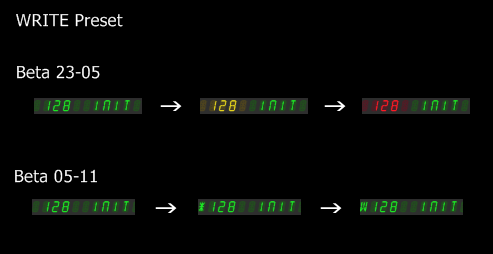
I prefer the colour style, or a mix of both, but guess the green is more like the hardware.
* There is room in the new info box when you click on the logo, e.g. for version info.
* Looks like the reddish hardware buttons are a bit orange.

* Changes in panel display, when you modify and/or write a preset.
I prefer the colour style, or a mix of both, but guess the green is more like the hardware.
* There is room in the new info box when you click on the logo, e.g. for version info.
* Looks like the reddish hardware buttons are a bit orange.
Last edited by RexXx on Fri Nov 07, 2014 11:07 pm, edited 1 time in total.
It`s not a bug... it`s a feature!
-

- KVRian
- 727 posts since 30 May, 2007 from Barkhamsted, CT, USA
(copying over my post from the FB page, smarter to put it here)
I've done a preliminary test... sounds good as usual!
So far I've loaded sysex files and saved test banks, and presets.
Then loaded them back in. I have three issues and a question.
1) On OSX 10.9.5, VST-32, Live 9, when I save out, it saved the path name as the file name,
e.g. "/Library/Audio/Plug-Ins/VST/Instruments/Synthesizers/PG8X Presets/test.PG8Xpreset" is the file name, which isn't a good idea to have as a name.
2) When you save out a patch as a preset, then try to load it into another patch location, it loads back into its original location only. e.g. save out patch 18 as a preset, switch to patch 53... load in patch 18? it loads into back into 18, not 53. Any chance we could make it load into any slot we choose?
3) I tried loading sysex patches through the AU version in Live (32-bit) with no success.
Question -- I've asked before with no results - does anybody have the Factory banks saved as sysex? The original fxb version on Martin's site does not load. If I have the factory patches as sysex, then I can continue to compare the patches against my real JX8P.
I've done a preliminary test... sounds good as usual!
So far I've loaded sysex files and saved test banks, and presets.
Then loaded them back in. I have three issues and a question.
1) On OSX 10.9.5, VST-32, Live 9, when I save out, it saved the path name as the file name,
e.g. "/Library/Audio/Plug-Ins/VST/Instruments/Synthesizers/PG8X Presets/test.PG8Xpreset" is the file name, which isn't a good idea to have as a name.
2) When you save out a patch as a preset, then try to load it into another patch location, it loads back into its original location only. e.g. save out patch 18 as a preset, switch to patch 53... load in patch 18? it loads into back into 18, not 53. Any chance we could make it load into any slot we choose?
3) I tried loading sysex patches through the AU version in Live (32-bit) with no success.
Question -- I've asked before with no results - does anybody have the Factory banks saved as sysex? The original fxb version on Martin's site does not load. If I have the factory patches as sysex, then I can continue to compare the patches against my real JX8P.
-
- KVRist
- 405 posts since 14 Jul, 2005 from Germany
Have you tried the sysex from Martin`s Dropbox presets folder?lionscub68 wrote: ... does anybody have the Factory banks saved as sysex? The original fxb version on Martin's site does not load. If I have the factory patches as sysex, then I can continue to compare the patches against my real JX8P.
https://www.dropbox.com/sh/m636vgxhta9e ... PG-8X?dl=0
It`s not a bug... it`s a feature!
-
- KVRian
- 727 posts since 30 May, 2007 from Barkhamsted, CT, USA
Those are all the accessory banks. I'm looking for the ROM presets.RexXx wrote:Have you tried the syx from Martin`s Dropbox presets folder?lionscub68 wrote: does anybody have the Factory banks saved as sysex? The original fxb version on Martin's site does not load. If I have the factory patches as sysex, then I can continue to compare the patches against my real JX8P.
https://www.dropbox.com/sh/m636vgxhta9e ... PG-8X?dl=0
-
- KVRAF
- 11162 posts since 16 Mar, 2003 from Porto - Portugal
I have the ROM presets in a SoundDiver library, but I couldn't manage to make PG-8X work with SoundDiver, and I also couldn't make it receive the Sys-X via MIDI (I imported the patches as a MIDI file, exported from SoundDiver, into a Cubase project, and directed them to a track where I had the PG-8X. I tried previously the same in VSTHost. In VSTHost, ir recognized the names, but the sounds were rubbish. In Cubase, after some experiment, I got the same behaviour: the names, but not the sounds. I tried with the Sys-X switches On and Off and with the Program Saving Behaviour On and Off.lionscub68 wrote:Those are all the accessory banks. I'm looking for the ROM presets.RexXx wrote:Have you tried the syx from Martin`s Dropbox presets folder?lionscub68 wrote: does anybody have the Factory banks saved as sysex? The original fxb version on Martin's site does not load. If I have the factory patches as sysex, then I can continue to compare the patches against my real JX8P.
https://www.dropbox.com/sh/m636vgxhta9e ... PG-8X?dl=0
Funny thing is I got SoundDiver to work directly with DeXed, and it was able to export patches and banks directly to the instrument, but DeXed has special parameters to define the Sys-X MIDI ports - maybe if something like this was implemented in PG-8X... but it's not a priority, IMO.
Fernando (FMR)
-

- KVRian
- 671 posts since 14 Jan, 2014 from The North.
I know the GUI is not yet finished, but it would be cool to have the lines added to certain parameters and the chorus layed out like this 
You do not have the required permissions to view the files attached to this post.
 All is good
-
- KVRAF
- 3332 posts since 18 May, 2003 from Sweden
This is a good idea, I think. Makes the GUI more structured and easier to navigate for sure!DrewDale wrote:I know the GUI is not yet finished, but it would be cool to have the lines added to certain parameters and the chorus layed out like this
/Joachim
If it were easy, anybody could do it!
-
- KVRist
- 405 posts since 14 Jul, 2005 from Germany
Yes. Noticed the missing lines too. Thought he will add them later.Spitfire31 wrote:This is a good idea, I think. Makes the GUI more structured and easier to navigate for sure!DrewDale wrote:I know the GUI is not yet finished, but it would be cool to have the lines added to certain parameters and the chorus layed out like this
It`s not a bug... it`s a feature!
-

- KVRian
- 1276 posts since 30 Apr, 2004 from Louisville, KY
Just a suggestion:
Plenty of space to make the bottom "LCD" panel larger to accommodate a lager, more legible font -- maybe the same height as the two rows of buttons?
Plenty of space to make the bottom "LCD" panel larger to accommodate a lager, more legible font -- maybe the same height as the two rows of buttons?
바보
-
- KVRian
- 727 posts since 30 May, 2007 from Barkhamsted, CT, USA
I think it's so funny how a huge number of folks here are making visual change suggestions which are not in line with the original product, which Martin is trying to emulate 1:1. In fact, the PG-800 looks pretty much just like his layout.
Just my opinion: how about a few more insights about the sound, is it comparable to the JX8P?
Or functionality?
I have a mono mode/sustain pedal bug I've reported a few times that I hope gets solved (which I think will easily by putting note priority ahead of sustain priority in mono mode from a programmer's point of view)... as well as forwarding any detailed experiences about loading, saving, reloading patches, which is where he is in programming right now.
Sorry for being grumpy, but... y'all are not helping with the interface distractions, IMO.
Just my opinion: how about a few more insights about the sound, is it comparable to the JX8P?
Or functionality?
I have a mono mode/sustain pedal bug I've reported a few times that I hope gets solved (which I think will easily by putting note priority ahead of sustain priority in mono mode from a programmer's point of view)... as well as forwarding any detailed experiences about loading, saving, reloading patches, which is where he is in programming right now.
Sorry for being grumpy, but... y'all are not helping with the interface distractions, IMO.
-

- KVRAF
- 7691 posts since 11 Jun, 2006
while i respect his wishes to create a photorealistic looking software version of a vintage synthesizer,
it just isn't functional sometimes when controls on the synth have very small print. in such cases
it makes sense to make some things larger yet keep the general shape and colors to keep
the original hardware's identity and also make it easy to use on a monitor screen with a mouse
pointer. the gui looks fine as-is to me, with reservations about the fuzzy small font on the
colored buttons. he has the sound engine capturing the personality of the hardware very close,
i'd like to see it using minimal cpu at idle.
it just isn't functional sometimes when controls on the synth have very small print. in such cases
it makes sense to make some things larger yet keep the general shape and colors to keep
the original hardware's identity and also make it easy to use on a monitor screen with a mouse
pointer. the gui looks fine as-is to me, with reservations about the fuzzy small font on the
colored buttons. he has the sound engine capturing the personality of the hardware very close,
i'd like to see it using minimal cpu at idle.
HW SYNTHS [KORG T2EX - AKAI AX80 - YAMAHA SY77 - ENSONIQ VFX]
HW MODULES [OBi M1000 - ROLAND MKS-50 - ROLAND JV880 - KURZ 1000PX]
SW [CHARLATAN - OBXD - OXE - ELEKTRO - MICROTERA - M1 - SURGE - RMiV]
DAW [ENERGY XT2/1U RACK WINXP / MAUDIO 1010LT PCI]
HW MODULES [OBi M1000 - ROLAND MKS-50 - ROLAND JV880 - KURZ 1000PX]
SW [CHARLATAN - OBXD - OXE - ELEKTRO - MICROTERA - M1 - SURGE - RMiV]
DAW [ENERGY XT2/1U RACK WINXP / MAUDIO 1010LT PCI]