

Thanks again, Thomas, for the in depth info. The more I hear about it the more I like it.
How do you select what clips show up in the full screen editor if you don't see the clips in that view like the arrange and mix?
The All In One Source Bitwig Information & Speculation Thread
-
Fernando Carvalho Fernando Carvalho https://www.kvraudio.com/forum/memberlist.php?mode=viewprofile&u=31855
- KVRist
- 208 posts since 5 Jul, 2004
How about the send/returns? how many? can you send into returns, create feedback loops?
how is bussing /gruping? you can have clips also on buses?
how is bussing /gruping? you can have clips also on buses?
Fernando Carvalho
http://soundcloud.com/fernandocarvalho
http://soundcloud.com/fernandocarvalho
-

- KVRAF
- 6541 posts since 9 Dec, 2008 from Berlin
Ogopogo wrote:Thanks again, Thomas, for the in depth info. The more I hear about it the more I like it.
How do you select what clips show up in the full screen editor if you don't see the clips in that view like the arrange and mix?

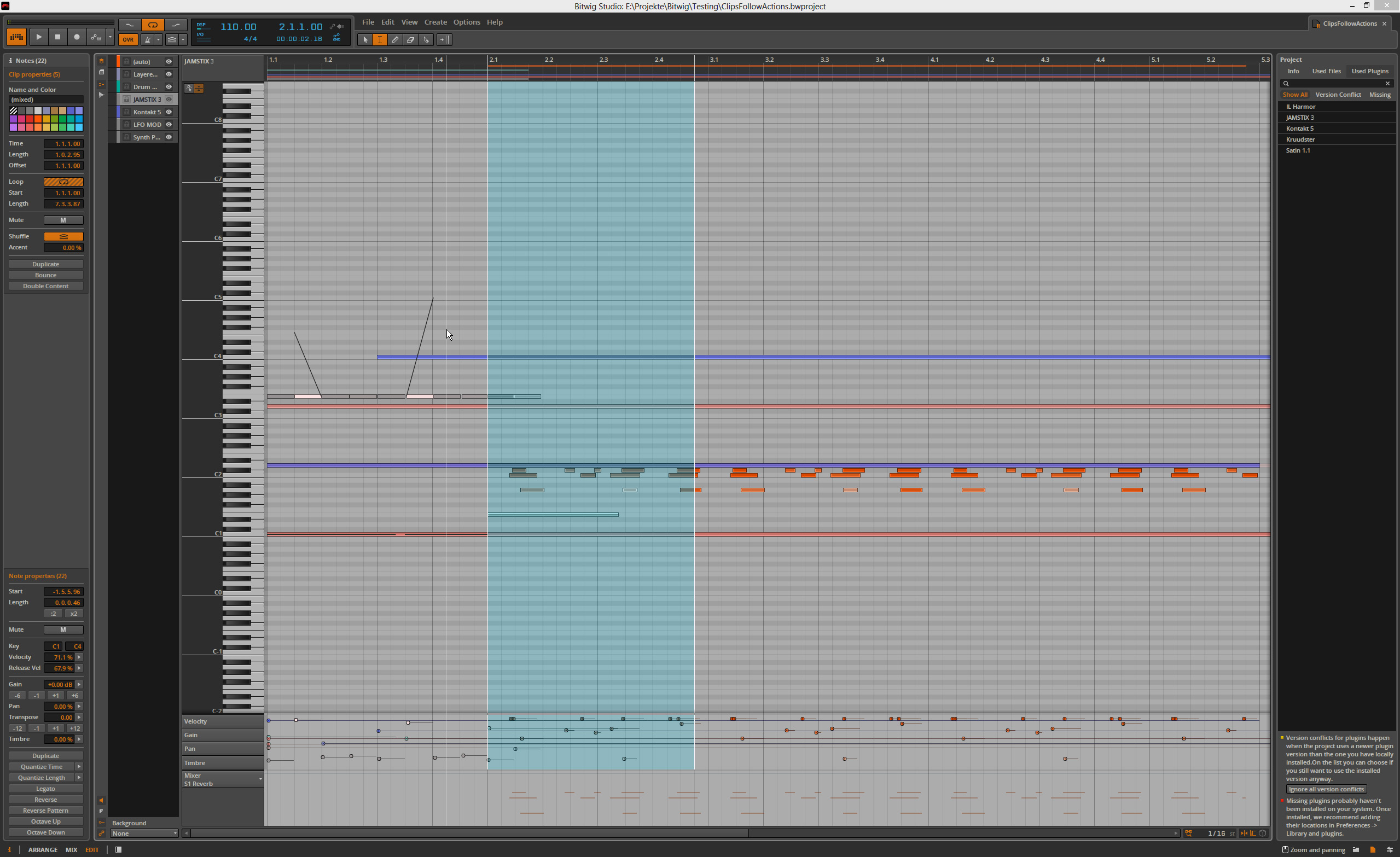
Fullscreen Edit is (my guess) mostly meant for detail edits that you can't or don't want to do in the edit window at the bottom, so you select what you want to edit and flick to the edit mode (there's a shortcut too).
I also think this is a great mode for the second screen together with the arrangement view on the main.
In this view, you have a list with everything that is selected ATM and little eye-icons to decide what you want to see.
And of course the lock icons for locking certain clips to this view, even if they are not selected.
Attached is a screenshot of the edit mode where I layered several midi clips on top of each other (one possible mode).
The notes are colour coded according to their clip colour and on top you can see the zoom area that also shows how the clips are laid out in the arrangement to help keeping an overview.
I also activated all the detail editing on the lower lane and there are notes with micro-pitch edits as seen in the last video from BW.
On the right you see the "Used Plugins" view. I don't have a version conflict or missing plugin in this test project, but I guess you get the drift

Cheers,
Tom
"Out beyond the ideas of wrongdoing and rightdoing, there is a field. I’ll meet you there." · Rumi
UrbanFlow.art · Instagram · YouTube
UrbanFlow.art · Instagram · YouTube
-
- KVRAF
- 6541 posts since 9 Dec, 2008 from Berlin
Sends: I created 100 and then I lost interestFernando Carvalho wrote:How about the send/returns? how many? can you send into returns, create feedback loops?
how is bussing /gruping? you can have clips also on buses?
Sends/Returns/Busses are called Effect Tracks in BW. Same principle as in Live, so not the huge and deep kind of setup but very clear. All that exist are shown in each track as a knob.
Yes, I showed clips on Effect Tracks and the master in one of the screenshots before.
No grouping that I can see, but take that with caution, I may miss something there.
There is automatic grouping for layered instruments, -effects and drum machines though.
These Effect tracks can only be sent to other Sends or the Master or any Output you have defined in your Audio-Setup, so no feedback. But this way, you can create a kind of groups yourself, send certain things to a certain Effect Track and from there to another or to the master.
I tried to create feedback within Effects Tracks but Bitwig is tracking if you send ET1 to ET2 and then try to send ET2 to ET1 - it's not available in the list.
Cheers,
Tom
"Out beyond the ideas of wrongdoing and rightdoing, there is a field. I’ll meet you there." · Rumi
UrbanFlow.art · Instagram · YouTube
UrbanFlow.art · Instagram · YouTube
-
Echoes in the Attic Echoes in the Attic https://www.kvraudio.com/forum/memberlist.php?mode=viewprofile&u=180417
- KVRAF
- 12040 posts since 12 May, 2008
no audio track groups? that would be surprising.
-
- KVRAF
- 6541 posts since 9 Dec, 2008 from Berlin
I'll investigate.Echoes in the Attic wrote:no audio track groups? that would be surprising.
"Out beyond the ideas of wrongdoing and rightdoing, there is a field. I’ll meet you there." · Rumi
UrbanFlow.art · Instagram · YouTube
UrbanFlow.art · Instagram · YouTube
-

- KVRAF
- 2562 posts since 1 Oct, 2013
On the bitwig site one of the thumbnails is for "layered editing" in which you see midi tracks with a selectable pen and dot icon, which I assumed were visibility and editability, but in your screen shot we only see the eye icon. So has that been changed so the eye is visiblity and whatever track is selected is editable?
One of the things I've been looking forward to is the ability to set up some midi tracks and then open the editor and get access to all of them and then just starting composing something kind of like this guy:
This is possible, right?
One of the things I've been looking forward to is the ability to set up some midi tracks and then open the editor and get access to all of them and then just starting composing something kind of like this guy:
This is possible, right?
-
Fernando Carvalho Fernando Carvalho https://www.kvraudio.com/forum/memberlist.php?mode=viewprofile&u=31855
- KVRist
- 208 posts since 5 Jul, 2004
Thanks a lot tom. Feedback loops are fundamental for my sound design, live and audiomulch I found they are good at this. For now I don't see BW for me.
Fernando Carvalho
http://soundcloud.com/fernandocarvalho
http://soundcloud.com/fernandocarvalho
-

- KVRAF
- 26963 posts since 3 Feb, 2005 from in the wilds
The Live 9.1 beta experience has been dramatically different than before (for me at least). When I file a bug report, Ableton has responded acknowledging it, and in some cases asking for further details. In the past it has been like speaking into a black hole. The bug tracking software from the user perspective is far better too.ThomasHelzle wrote:Sure, I personally am in the lucky position to not be under any production constraints.pdxindy wrote:Of course... but the choice today is not between Live 1 and BW 1... it is between Live 9 and Bitwig 1... even so it appears to stand up fairly well.ThomasHelzle wrote:
If you think that something important is missing from BW, keep in mind that this is 1.0
Look at Live 1.0 and BW looks VERY impressive
Cheers,
Tom
One other thing I meant to ask but forgot... one of the painful limitations of Live is it's handling of midi channels internally (collapsing all channels to 1)... How is Bitwig in this area?
I mostly value tools that inspire me and sometimes I even enjoy limitations when they are somehow interesting.
The Live 9 Beta process was a real downer for me - and it also was the result of 4 years of work...
I'm investigating Midi myself ATM with the Bitwig support, so stay tuned on that.
Cheers,
Tom
-
Echoes in the Attic Echoes in the Attic https://www.kvraudio.com/forum/memberlist.php?mode=viewprofile&u=180417
- KVRAF
- 12040 posts since 12 May, 2008
If you like feedback you should especially like Bitwig because the feedback is built right into certain effects like delay and reverb, where you can put effects in the feedback path of effects.Fernando Carvalho wrote:Thanks a lot tom. Feedback loops are fundamental for my sound design, live and audiomulch I found they are good at this. For now I don't see BW for me.
-
- KVRAF
- 6541 posts since 9 Dec, 2008 from Berlin
Good to hear that - the Live 9 beta was one of the most idiotic beta-experiences I ever had and the 8.4.1 Beta has been similarly unhappy.pdxindy wrote:The Live 9.1 beta experience has been dramatically different than before (for me at least). When I file a bug report, Ableton has responded acknowledging it, and in some cases asking for further details. In the past it has been like speaking into a black hole. The bug tracking software from the user perspective is far better too.
I'll keep Live 8. The tiny improvements in 9 are in areas I don't care about, some things are IMO even worse than before...
After 4 years, I wasn't prepared for a tiny updatelet for a price that doesn't have any relation to what I get.
I'll check back at version 10 or if they have a 75% off sale.
Cheers,
Tom
"Out beyond the ideas of wrongdoing and rightdoing, there is a field. I’ll meet you there." · Rumi
UrbanFlow.art · Instagram · YouTube
UrbanFlow.art · Instagram · YouTube
-
- KVRAF
- 1783 posts since 11 Jun, 2005 from Phoenix, Arizona
One feature that I like in Live is the ability to unlink the clip automation from the clip thus allowing the automation length to be different from the clip length. Has this made into BWS?
-
Fernando Carvalho Fernando Carvalho https://www.kvraudio.com/forum/memberlist.php?mode=viewprofile&u=31855
- KVRist
- 208 posts since 5 Jul, 2004
I will test it my self as soon it is posible. Freedom of routing is important for me. In live you can feed a return easily, with or without effects. Audiomulch is even nicer becouse you can patch every in & out everyway you want.Echoes in the Attic wrote:If you like feedback you should especially like Bitwig because the feedback is built right into certain effects like delay and reverb, where you can put effects in the feedback path of effects.Fernando Carvalho wrote:Thanks a lot tom. Feedback loops are fundamental for my sound design, live and audiomulch I found they are good at this. For now I don't see BW for me.
Fernando Carvalho
http://soundcloud.com/fernandocarvalho
http://soundcloud.com/fernandocarvalho
-
- KVRist
- 282 posts since 25 Nov, 2004
yup!UncleAge wrote:One feature that I like in Live is the ability to unlink the clip automation from the clip thus allowing the automation length to be different from the clip length. Has this made into BWS?