FL Studio 20.5 | Introducing a new free plugin FLEX

Audio Plugin Hosts and other audio software applications discussion
Post Reply New Topic
RELATED
PRODUCTS
FL Studio All Plugins Edition

Post

Image-Line wrote: Mon Jul 08, 2019 5:40 am
Distorted Horizon wrote: Mon Jul 08, 2019 5:28 am FLS 20 was the version that finally made me buy the software. So definitely there's something right :tu:

But Flex.. I installed the update, but can't find Flex anywhere? Maybe I'll check again today after a good sleep :)
Right-click the Plugin Database in the Browser and select - Refresh plugin list (fast scan) and look in Installed > Generators > Fruity AND make sure you are running FL Studio 20.5
Ah of course.. Thanks :tu:
I normally use Bitwig and it shows new stuff immediately so.. :lol:

Post

Distorted Horizon wrote: Mon Jul 08, 2019 5:28 am FLS 20 was the version that finally made me buy the software. So definitely there's something right :tu:
Yeah, me too! I've looked at it many times over many years, but we could never click; now it's like we've met in the middle. I even got a tidy little discount on my birthday, and I am just some guy who registered on their website. Incredible!

Anyway, my point earlier about hooking people and selling packs shouldn't be taken as a complaint; I was trying to point out that it was all very smartly done to give something nice to existing users, attract new users, and open another revenue stream (I already bought the Black Octopus pack). I didn't know what an "Edward" was or how this thread was gonna go. I'm kinda new around here.

tl;dr: Fl Studio: Good! Flex: Good! Who's "Edward"?

Post

Edward is IL´s inbuilt "Poltergeist"... :)

Post

Image-Line wrote: Sun Jul 07, 2019 11:10 pm
This case multiplied by the gol factor. He had a very clear vision of what he was trying to achieve and would bluntly tell a customer they were stupid for wanting to see audio recording live preview on the Playlist for example. Why? Because the peak meters were moving and clearly show the audio was being received (that sort of thing).
Those were the good old days. :hihi:

I actually like how the development of Fruityloops has progressed lately. Gol was obviously a great developer but often times he was completely incapable of understanding why one or other feature is needed from composers or engineers perspective (especially as all those features were already well implemented in more mature and professional software ages ago). Proper time signature management being one good example. I remember the word fights I used to get in regarding this. And of course, proper SMTP timecode support - I remember him completely dismissing this as useful for video-audio sync. Hearing this from a dev was completely stunning.

Of course, there's still many other things, like the mixer interface, where Frutiyloops still sucks compared to competition but I'm glad that some of those things are at least being addressed finally.

Though, you should hire a proper GUI designer. Having a vector interface is no excuse for it being ugly. Studio One has a scalable interface and it's leagues ahead in GUI design.
No signature here!

Post

robotmonkey wrote: Mon Jul 08, 2019 10:01 am
Of course, there's still many other things, like the mixer interface, where Frutiyloops still sucks compared to competition but I'm glad that some of those things are at least being addressed finally.

Though, you should hire a proper GUI designer. Having a vector interface is no excuse for it being ugly. Studio One has a scalable interface and it's leagues ahead in GUI design.
That´s where taste is different...

I am an absolute fan of the FLS mixer... it´s for me miles ahead everything else available on the market except a few little things which, I am sure, we´ll see improvements in the next years.

Same for me is valid for the GUI... I always liked the looks of FLS and it´s got better and better... FLS 20 for me is a pure beauty and a pleasure to look at...
Same goes for the GUI´s of native plugins...

Reaper is ugly, ProTools is ugly and these flat clips in Studio One are ugly... but FLS... no Sir... 8)

Post

"Studio One are ugly... but FLS... no Sir..." +1

I only miss Logic like screensets to able to keep open all the VSTs

opening/closing them constantly is highly PITA (from 2:10 on the video), we've got multiple playlist this should be the next this type of development, otherwise, the UI/X is super IMO
"Where we're workarounding, we don't NEED features." - powermat

Post

Fl studio is still the only DAW where playlist zoom is still dependent on the ppqn settings , iow you can''t zoom in on sample level
Not hating , just saying .
And yes , edison comes to the rescue but doesn't remedie the underlying issue
Eyeball exchanging
Soul calibrating ..frequencies

Post

btw. FL is the only DAW ( I don't know other) with scale highlighting, so don't have to count the intervals in your head during creating countermelodies for ex. (consonant/dissonant intervals can be seen very clearly)

another big thanks for this
"Where we're workarounding, we don't NEED features." - powermat

Post

xbitz wrote: Mon Jul 08, 2019 11:44 am btw. FL is the only DAW ( I don't know other) with scale highlighting
Reaper and Studio one has scale lock. SO only has basic stuff but Reaper has tons of scales (if you dl reascales ultimate pack).

Post

I think almost every daw has scale highlighting
Eyeball exchanging
Soul calibrating ..frequencies

Post

^^^ scale lock isn't the same, in FL it can be seen visually, so for ex. can build chords (with any extension) without thinking in/on it

also can see the quality of the chords etc.

"I think almost every daw has scale highlighting"
nope, S1, Reaper, Logic have scale lock that's all AFAIK
Last edited by xbitz on Mon Jul 08, 2019 1:12 pm, edited 2 times in total.
"Where we're workarounding, we don't NEED features." - powermat

Post

edit: too late

Post

xbitz wrote: Mon Jul 08, 2019 12:30 pm ^^^ scale lock isn't the same, in FL it can be seen visually, so for ex. can build chords (with any extension) without thinking in it

also can see the quality of the chords etc.

"I think almost every daw has scale highlighting"
nope, S1, Reason, Logic have scale lock that's all AFAIK
+1 :tu: ...while this can be simulated with ghost clips but is a lot of additional work and doesn´t look as good.

The only other DAW doing this is Tracktions Waveform and this is very handy...nothing gives you better visual advice where the scale notes are than the grid highlighting itself...

When locked to scale Reaper and S1 just highlight the keys on the piano roll which serves you not really when working a bit more towards the right of the screen...

On the other side the only DAW doing at least scale lock right is Reaper as it locks all selected notes to scale when moving existing ones...
S1 for example doesn´t lock all notes of an existing chord...it only locks the first note and the other follow in the same semitone intervals... what makes it a bit useless in this regard...

Post

Trancit wrote: Mon Jul 08, 2019 10:08 am
Same goes for the GUI´s of native plugins...

Reaper is ugly, ProTools is ugly and these flat clips in Studio One are ugly... but FLS... no Sir... 8)
For several native plugins like Directwave and Sytrus, for example, vectorized GUI was one step forward and two back. They were pretty ugly but now they are fugly. Also the usability went down the drain, especially for Directwave. Before it was ugly, but it at least had bright GUI and black text. Now, on normal size everything is still super small and in addition now there's grey text on black background. Absolutely amateurish GUI design. It just looks like crap now. Same goes for Sytrus.

And yes, Reaper is ugly. ProTools and Studio One on the other had have really good professional top of the line GUI design.
No signature here!

Post

Trancit wrote: Mon Jul 08, 2019 12:43 pm On the other side the only DAW doing at least scale lock right is Reaper as it locks all selected notes to scale when moving existing ones...
S1 for example doesn´t lock all notes of an existing chord...it only locks the first note and the other follow in the same semitone intervals... what makes it a bit useless in this regard...
- https://www.cakewalk.com/Documentation? ... ls.12.html

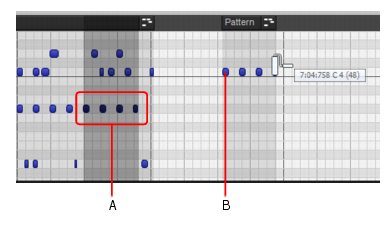
the biggest invention is in Sonar which able to use scale locking even using its pattern brush tool
Image
To transpose MIDI patterns
When painting melodic MIDI patterns in the Piano Roll view, you may want to transpose the pattern while painting. To do so, hold down the SHIFT key while painting. The pitch you click to start the painting gesture defines the first note in the pattern. If the pattern starts with multiple overlapping notes, the pitch you click defines the lowest note.
so you can paint and transpose your phrases at the same time ... hello IL team :wink:
"Where we're workarounding, we don't NEED features." - powermat

Post Reply

Return to “Hosts & Applications (Sequencers, DAWs, Audio Editors, etc.)”