RapidComposer v5 beta feedback and discussion

Official support for: musicdevelopments.com
Locked New Topic
RELATED
PRODUCTS
RapidComposer RapidComposer LE

Post

RapidComposer v5.5b9 is available!

Long time no beta version! Thanks for all the feedback!

Improvements:
  • Very precise, monophonic audio-to-MIDI conversion implemented with continuous pitch-bend and expression events. Important: pitch bend sensitivity must be set to 12 to get correct pitches!
  • Bigger font is used for displaying the timecode and bar position when both are displayed
  • 'Samples' can be displayed as the secondary time format
  • Improved MIDI file import allows multiple note ons (overlapped notes)
  • When using "Export as individual WAV/AIFF..." the track index is added to the filename, just in case more tracks have the same name.
  • Fixed: "Export as individual WAV/AIFF..." did not handle solo tracks well
  • Keyboard shortcut added to show/hide the composite track (Shift-C)
  • Keyboard shortcuts added to Export WAV/AIFF files
  • Fixed: audio tracks are not shown in the composite track
  • Fixed: muting MIDI CC lanes works
https://www.musicdevelopments.com
Home of RapidComposer, Melodya, MIDI Mutator and Syne
Summer Sale • June 3-15 • 40% off RapidComposer, Melodya, MIDI Mutator, Syne

Post

As many producers know, key mapping VSTs in your DAWs greatly enhances workflow, and I utilize this feature frequently. I've noticed that RC has some MIDI CC capabilities, but I can't find a way to connect the main buttons to Ableton Live.

If this functionality is already available, I would appreciate any guidance. This is something that could benefit many users, especially regarding workflow improvement. My main goal is to have the lightning button that control all channels map to live, This would give us the opportunity to randomly sift through different ideas without having to leave Ableton, increasing workflow without needing to have two programs open side by side.

This enhancement would significantly boost creativity, as I currently have to drag and drop files repeatedly. It would be greatly appreciated if this feature could be added if it isn't already present.
You do not have the required permissions to view the files attached to this post.

Post

My main goal is to have the lightning button that control all channels map to live, This would give us the opportunity to randomly sift through different ideas without having to leave Ableton
That would be really nice to have!

Post

The phrase variation mute issue is still there.. You miss the message I posted?

Post

Were do you set pitch bend sensitivity?

Post

It's still a pity that in the Audio in MIDI window there is no option to select a sound for the audio preview. It's very inconvenient when you don't expect what will sound now and how to change it.

Post

lulukom wrote: Tue Mar 04, 2025 7:04 am It's still a pity that in the Audio in MIDI window there is no option to select a sound for the audio preview. It's very inconvenient when you don't expect what will sound now and how to change it.
The currently selected track is used for preview. I'll try to add a menu for track selection there.

Thanks,
Attila
https://www.musicdevelopments.com
Home of RapidComposer, Melodya, MIDI Mutator and Syne
Summer Sale • June 3-15 • 40% off RapidComposer, Melodya, MIDI Mutator, Syne

Post

BluGenes wrote: Mon Mar 03, 2025 9:11 pm Were do you set pitch bend sensitivity?
For MIDI and soundfont instruments: in the track inspector:

Image

For VST3 instruments you can set it in the instrument editor window.
https://www.musicdevelopments.com
Home of RapidComposer, Melodya, MIDI Mutator and Syne
Summer Sale • June 3-15 • 40% off RapidComposer, Melodya, MIDI Mutator, Syne

Post

musicdevelopments wrote: Tue Mar 11, 2025 10:26 am
For VST3 instruments you can set it in the instrument editor window.
Not seeing that.. screen shot?

Also, why not make the default 12 for sound fonts and midi with that as a setting too..??

Post

It is generally not really possible to set from the host. 99% of the instruments do not handle Registered Parameter Number (RPN) messages, they just do not process raw MIDI messages. Another possibility is to look for a VST3 exported parameter named "Pitch Bend Range", "Bend Range", "PB Range" or similar. The instruments that I checked do not export such parameter. I found that pitch bend sensitivity cannot be set reliably from the host.

So you have to consult with the user guide of your VST3 plug-ins for how to set this.

E.g. for my synthesizer (Syne) it can be set here:

Image
Also, why not make the default 12 for sound fonts and midi with that as a setting too..??
For most synthesizers and according to the General MIDI standard the default sensitivity is 2 semitones.
https://www.musicdevelopments.com
Home of RapidComposer, Melodya, MIDI Mutator and Syne
Summer Sale • June 3-15 • 40% off RapidComposer, Melodya, MIDI Mutator, Syne

Post

It would be nice if we could multi-drag audio files into RC and have them each put on a track automatically.

Snag_7c3052f.png
You do not have the required permissions to view the files attached to this post.

Post

sj1 wrote: Tue Mar 11, 2025 12:43 pm It would be nice if we could multi-drag audio files into RC and have them each put on a track automatically.
Yes, good idea, I added it to my to-do list.
Thanks,
Attila
https://www.musicdevelopments.com
Home of RapidComposer, Melodya, MIDI Mutator and Syne
Summer Sale • June 3-15 • 40% off RapidComposer, Melodya, MIDI Mutator, Syne

Post

Hi.

I don't see any way offhand to trim the start or end of an audio file which has been dragged into RC.

For example, I would like to cut this one at m7 and discard to the right of that. Then I would have the correct-sized chunk for duplication, MIDI conversion, etc.

Snag_7c5c028.png

If this is currently possible please advise on how to do it, else it would be a helpful enhancement for the future.

Thanks!
You do not have the required permissions to view the files attached to this post.

Post

Yes, audio trimming, and generally, working with audio segments should be improved a lot. RC is not a DAW so the focus was not on audio tracks.

Thanks,
Attila
https://www.musicdevelopments.com
Home of RapidComposer, Melodya, MIDI Mutator and Syne
Summer Sale • June 3-15 • 40% off RapidComposer, Melodya, MIDI Mutator, Syne

Post

RapidComposer v5.5b10 is available!

Bug fixes and small improvements requested in this topic have been added to beta10. Thanks, everyone, for the bug reports and feature requests! :tu:
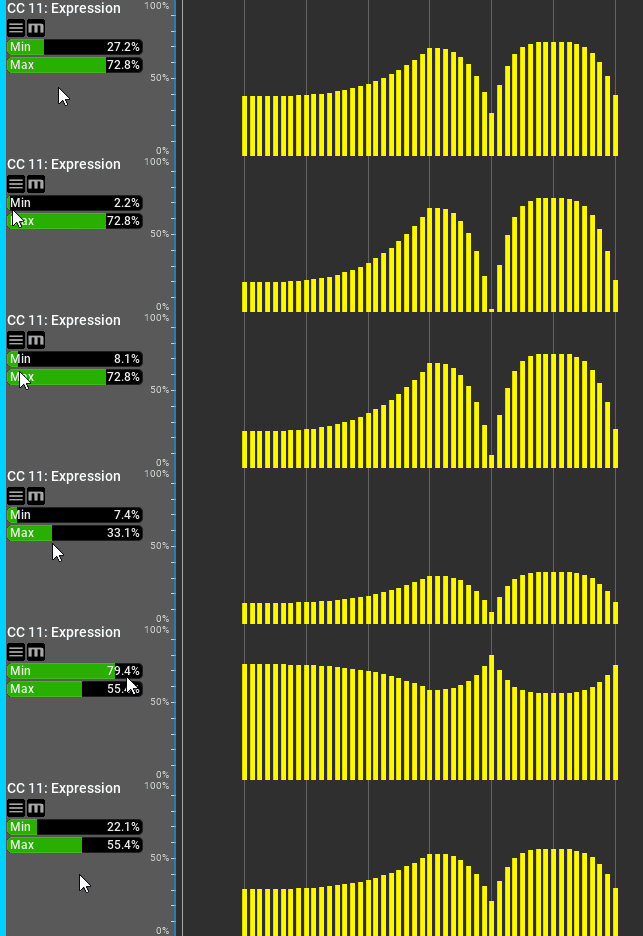
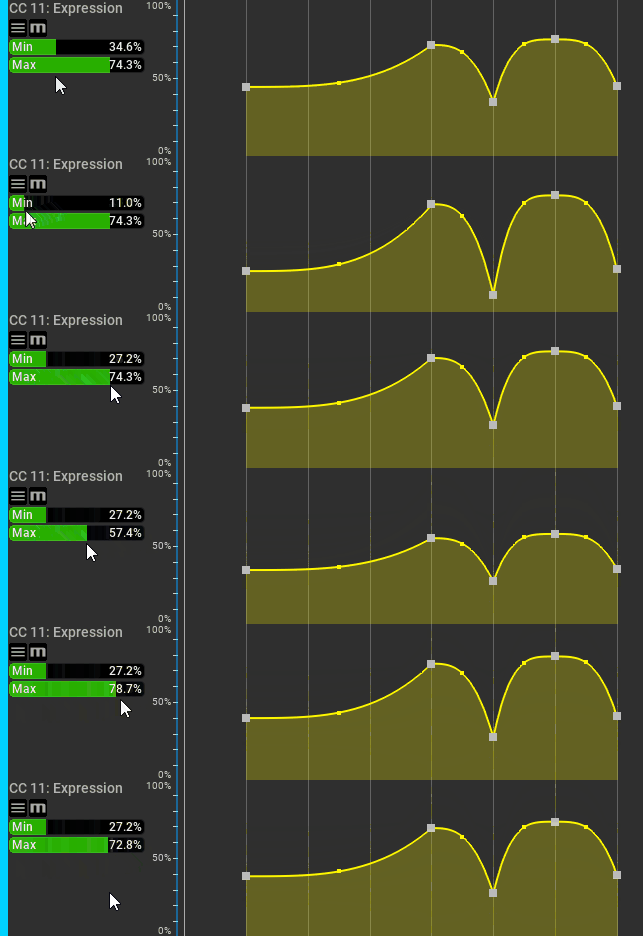
A convenient new feature allows you to quickly adjust CC values without having to edit them:

Image

This works with envelope curves too:

Image


Improvements:
  • 'Minimum' and 'maximum' sliders added to CC lanes to allow quick adjustments of all CC values
  • Shortcut added for the idea tool lightning button
  • Shortcuts added for "Regenerate all selected generators (shape only)" and "Regenerate all selected generators (rhythm only)"
  • Audio-to-midi preview: track selection added
  • Muting a phrase variation used by multiple phrases works now!
  • Improved the precision of the monophonic audio-to-MIDI converter
https://www.musicdevelopments.com
Home of RapidComposer, Melodya, MIDI Mutator and Syne
Summer Sale • June 3-15 • 40% off RapidComposer, Melodya, MIDI Mutator, Syne

Locked

Return to “MusicDevelopments”