


+1 same here..Squids, are we still getting our hybrid kit today?sergiobklyn wrote:Thanks for all the patches. I could not download two patches.
For kit MT JB Sonr Kit Patches Update there's this message: "File not found:4151" and for MT NDV Grtsch Kit Patches Update: "File not found:4273".
Serge
Ultimate Studio Drums II: The Sequel - GB Discussion Thread
-
- KVRist
- 167 posts since 9 Jan, 2010
-

- Sonic Reality Head Chef
- Topic Starter
- 8566 posts since 11 Mar, 2002 from Florida
Working on that. Having the extra "just patches zip" through the DownloadableSoundz system is somewhat a new thing so we're ironing out the digital delivery of that. It'll be sorted momentarily.tdm71 wrote:OK... I just downloaded the latest IP PLayer from my DLs and I tried to install it and I got the following message: "Install Failed. The following install step failed: run postflight script for Infinite Player Library"
I tried it several times and still no luck.... Squids????

We will also have 26 juicy Hybrid Kits to download later in the day as well! Extra bonus freebie for y'all.
-
- Sonic Reality Head Chef
- Topic Starter
- 8566 posts since 11 Mar, 2002 from Florida
Depending on the number of toms in a kit we will assign them to the "tom slots" starting with slot 6 and moving its way up. A five tom set will not have anything assigned to tom slot 1 (which is routed to Tom output 1).bruckner2 wrote:Just installed a freshly dl'd copy of the premier mt, applied the patches,
is there a way to route tom1 to the tom1 mixer output?
i've tried changing slots etc but tom1 always goes to the tom2 output
is this a scripting thing?
anyone?
This is that Premier set:
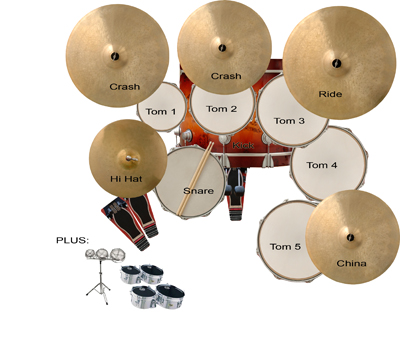
Premier Kick Drum: 22" x 18"
Mapex Snare: 14" x 6" (Brass)
Premier 3 Rack Toms: 8" x 8" & 10" x 9" & 12" x 10"
Premier 2 Floor Toms: 14" x 12" & 16" x 14"
Meinl 14" Hi Hats
Sabian Ride Cymbal 20"
Meinl Crash Cymbal 16"
Paiste Crash Cymbal 19"
Sabian HHX China 18"
So, if you want ANY of those toms to be routed out of Tom output 1 you can simply assign it to slot 1... but that will make it play on the iMap in that position.
The GM versions ALWAYS have 6 toms assigned to all 6 slots though and a quick solution to what you want MAY be to load up the GM and then at the VERY bottom of the keyboard (or the on screen Kontakt keyboard if you want) you can hit the mapping KEY SWITCH keys which are C-2 and D-2 which scroll up and down the mapping modes (between GM, VDRUM, iMAP). You can do that manually but it would be tedious to change the mapping mode for EACH kit piece one at a time... so this key switch is handy! Try it.
All of this is detailed thoroughly in the 100+ page manual coming next week... but for now I can be your manual.
 Or other users. We'll help each other understand how to use this amazingly powerful product!
-
- KVRist
- 167 posts since 9 Jan, 2010
Thats great squids..thanks man!!Squids wrote:Working on that. Having the extra "just patches zip" through the DownloadableSoundz system is somewhat a new thing so we're ironing out the digital delivery of that. It'll be sorted momentarily.tdm71 wrote:OK... I just downloaded the latest IP PLayer from my DLs and I tried to install it and I got the following message: "Install Failed. The following install step failed: run postflight script for Infinite Player Library"
I tried it several times and still no luck.... Squids????
We will also have 26 juicy Hybrid Kits to download later in the day as well! Extra bonus freebie for y'all.
-
- KVRer
- 3 posts since 8 Apr, 2010
Helo DM users and Squids, please, i really need a little help here !!
Sorry, but i'm a newbie and i don't know to fix this problem here.
I downloaded the Motown Soul MT three times, and of course the patch, twice.
But it's my only kit ( and the one i need most ! ) that have a problem.
The snare doesn't works very well. Only at velocitys above 124 i have a good amount of volume. Below, the volume drops down drasticaly. This behaviour can't be normal.
Please, if somebody could help me, i'll appreciate a lot.
Thanks in advance.
Sorry, but i'm a newbie and i don't know to fix this problem here.
I downloaded the Motown Soul MT three times, and of course the patch, twice.
But it's my only kit ( and the one i need most ! ) that have a problem.
The snare doesn't works very well. Only at velocitys above 124 i have a good amount of volume. Below, the volume drops down drasticaly. This behaviour can't be normal.
Please, if somebody could help me, i'll appreciate a lot.
Thanks in advance.
-
- Sonic Reality Head Chef
- Topic Starter
- 8566 posts since 11 Mar, 2002 from Florida
The solution is simple. Go into the SNARE of that kit, go to the VELOCITY page in the drop down on the interface of that snare within the kit. Bring the VELOCITY TO AMP down (there are only two knobs in this screen, I am talking about the one on the left). That should solve it for you. It is a preference by the way. For me, I like it how it is with a lot of dynamics. But each person plays differently and this adjustment is to one's personal preference.cgd wrote:Helo DM users and Squids, please, i really need a little help here !!
Sorry, but i'm a newbie and i don't know to fix this problem here.
I downloaded the Motown Soul MT three times, and of course the patch, twice.
But it's my only kit ( and the one i need most ! ) that have a problem.
The snare doesn't works very well. Only at velocitys above 124 i have a good amount of volume. Below, the volume drops down drasticaly. This behaviour can't be normal.
Please, if somebody could help me, i'll appreciate a lot.
Thanks in advance.
-
- KVRer
- 17 posts since 8 Apr, 2010
Hi squids !
unbelievable ! i've downloaded the last usd2patch, and after installing, the bruford kit, again, i know.... the reference for the samples is bad (directory : 4ryan) and we must do it manually, and then the tga reference is bad too, then manually it's OK...
david
unbelievable ! i've downloaded the last usd2patch, and after installing, the bruford kit, again, i know.... the reference for the samples is bad (directory : 4ryan) and we must do it manually, and then the tga reference is bad too, then manually it's OK...
david
-
Chester Desmond Chester Desmond https://www.kvraudio.com/forum/memberlist.php?mode=viewprofile&u=83128
- KVRian
- 821 posts since 3 Oct, 2005
First off, thanks for the MT patches. I appreciate that you were able to do it that way for us.
Do the aux channels work in MT kits? I could't get any to last night and thought maybe this was by design since there are so many other mixing options in these kits. I also haven't applied the patches so apologies if this is addressed in those.
Do the aux channels work in MT kits? I could't get any to last night and thought maybe this was by design since there are so many other mixing options in these kits. I also haven't applied the patches so apologies if this is addressed in those.
-
- KVRer
- 17 posts since 8 Apr, 2010
just an add : the bruford kit hihat doesn't have the hh settings too...dbotte wrote:Downloaded the patches for them but the ndv gretsch and premier mt kit doesn't have the new hihat script (no settings are appearing for the hh)...
-
- Sonic Reality Head Chef
- Topic Starter
- 8566 posts since 11 Mar, 2002 from Florida
Poor Ryan. Bruford must really have it in for him!dbotte wrote:Hi squids !
unbelievable ! i've downloaded the last usd2patch, and after installing, the bruford kit, again, i know.... the reference for the samples is bad (directory : 4ryan) and we must do it manually, and then the tga reference is bad too, then manually it's OK...
david
Anyway, the USD2 Phase 1 and 2 Global Patch Update has now been updated with the Bruford reference fix. We discovered a bug in Kontakt with regard to trying to reference samples over ethernet and that is how that happened... so it is fixed and we've noted that. If someone doesn't want to download the full patch update we're actually making JUST the Bruford Update as a zip on its own since that is the one that was having the most issues there... everything else was fine for STm kits.
This all seems more complicated than it really is. Kontakt is just very picky about references to sample paths and graphics.
-
- KVRer
- 17 posts since 8 Apr, 2010
thanks for the patch squids
i've found other problems for the hihat : if the "settings" button isn't here for mapping, i think this is not the new version of the VDRUM hihat, isn't it ?
So, if it's the case, i found the ancient one in those kits (i've installed all the updates, the last one a few minutes ago) :
bruford (oh no !), NDV premier timbale
i thought it was the same for MT kits : ndv gretsch and NDV premier, that i bought with the first GB, but after installing the patches, the new version of these two kits are in the ultimate studio drums 2 MT Kits directory and they have the Vdrum hihat !
sorry Squids but i think it's better for you to know...
can someone confirm ?
david
i've found other problems for the hihat : if the "settings" button isn't here for mapping, i think this is not the new version of the VDRUM hihat, isn't it ?
So, if it's the case, i found the ancient one in those kits (i've installed all the updates, the last one a few minutes ago) :
bruford (oh no !), NDV premier timbale
i thought it was the same for MT kits : ndv gretsch and NDV premier, that i bought with the first GB, but after installing the patches, the new version of these two kits are in the ultimate studio drums 2 MT Kits directory and they have the Vdrum hihat !
sorry Squids but i think it's better for you to know...
can someone confirm ?
david
-
- KVRer
- 18 posts since 12 Oct, 2008 from Southern Oregon
This tom 1 to slot 1 assignment makes total sense to me. The part that confuses me me is that in the Premier MT kit no matter what slot Tom 1 is assigned to it always comes out through the kontakt player's Tom 2 mixer output channel.
This really only presents a problem if I want seperate processing on Tom 1 from within K Player. So, my current work around is to run 2 instances of kontakt player in Sonar.
Sorry if this seems a little nuts ! I thought I would point the assignment problem out while you guys are working on various patches. Hope this helps ? Thanks
This really only presents a problem if I want seperate processing on Tom 1 from within K Player. So, my current work around is to run 2 instances of kontakt player in Sonar.
Sorry if this seems a little nuts ! I thought I would point the assignment problem out while you guys are working on various patches. Hope this helps ? Thanks
-
- KVRer
- 18 posts since 12 Oct, 2008 from Southern Oregon
You know I just tried something else. I assigned Tom 2 to slot 1 and not only does the sound not come out of Mixer out tom 2, it also doesn't show on the meters of either tom1 or tom2 mixer channels. So, when tom1 is in slot2 the mixer meters show activity on Tom2 channel. And when Tom 2 is assigned to slot 1 there is NO activity on the mixer channel for Tom1, BUT I can hear Tom2 even though there is no MIXER meter response.
Sorry about the caps! This was threating to be a bit confusin'.
"are you threating me? I need t p "
Sorry about the caps! This was threating to be a bit confusin'.
"are you threating me? I need t p "