


SynthMaster v2.6.21 Released: The search button has fiiinnnaaallllyyy arrived :)
-
- KVRAF
- 9146 posts since 28 Apr, 2013
Wondering what you mean by 'base version' as I've learned to disregard the update files and do a fresh full install of each version. Every 'update' I have ever done has never took properly and it's only been when I completely un-install the last version and install the full latest version that it works.kv331 wrote: Let me also reiterate the fact that if you have a base version installed, installing updates (not the full installers) is always fine.
Bulent
-
- KVRAF
- 9945 posts since 15 Sep, 2005 from East Coast of the USA
He means you don't have to reinstall the whole thing, just download and install this new update.BBFG# wrote:Wondering what you mean by 'base version' as I've learned to disregard the update files and do a fresh full install of each version. Every 'update' I have ever done has never took properly and it's only been when I completely un-install the last version and install the full latest version that it works.kv331 wrote: Let me also reiterate the fact that if you have a base version installed, installing updates (not the full installers) is always fine.
Bulent
It worked for me this morning.
-
- KVRAF
- 9146 posts since 28 Apr, 2013
Examigan wrote:He means you don't have to reinstall the whole thing, just download and install this new update.BBFG# wrote:Wondering what you mean by 'base version' as I've learned to disregard the update files and do a fresh full install of each version. Every 'update' I have ever done has never took properly and it's only been when I completely un-install the last version and install the full latest version that it works.kv331 wrote: Let me also reiterate the fact that if you have a base version installed, installing updates (not the full installers) is always fine.
Bulent
It worked for me this morning.
Yes, I know what he meant. But as I was pointing out, it has never worked properly for me. I have had to re-install each and every new version as a full install of the whole thing.
-
- KVRAF
- Topic Starter
- 7510 posts since 14 Nov, 2006 from Ankara, Turkey
Try to delete synthmaster folder under <my documents> folder. That might help
Works at KV331 Audio
SynthMaster voted #1 in MusicRadar's "Best Synth of 2019" poll
SynthMaster One voted #4 in MusicRadar's "Best Synth of 2019" poll
SynthMaster voted #1 in MusicRadar's "Best Synth of 2019" poll
SynthMaster One voted #4 in MusicRadar's "Best Synth of 2019" poll
-

- KVRAF
- 1758 posts since 15 Mar, 2013 from Germany
I just installed 2.6.21., and the BigTone patch "BT cellular pumper" just produces a rectangle wave of the same frequency regardless what note I press. Can't remember how this patches worked before, but this does not seem right. 
With "BT electro king" the mono/legato is completely borked, I can't play legato with it, it ignores all notes after the first note. Only staccato play works.
The search button does not work, I enter a word and hit the button but it simply does nothing. Hitting return in the textbox does not help either.
A lot of patches produce some brittle kind of noise in the lower key regions. E.g. "BT bootsie collins"
When selecting a category, many patches are listed twice. Only one of them can be selected though.
Big disappointment
With "BT electro king" the mono/legato is completely borked, I can't play legato with it, it ignores all notes after the first note. Only staccato play works.
The search button does not work, I enter a word and hit the button but it simply does nothing. Hitting return in the textbox does not help either.
A lot of patches produce some brittle kind of noise in the lower key regions. E.g. "BT bootsie collins"
When selecting a category, many patches are listed twice. Only one of them can be selected though.
Big disappointment
-
- KVRAF
- Topic Starter
- 7510 posts since 14 Nov, 2006 from Ankara, Turkey
Before coming to quick conclusions, let's investigate what's going wrong on your system:CableChannel wrote:Big disappointment
1. Do you have both 32bit and 64bit versions of SynthMaster installed? (on Windows)
2. Did you update both of them or only one of them? Please update both of them.
3. Please delete
Mac: /Users/Shared/SynthMasterTemp
Windows 7/8: C:\Users\Public\Public Documents\SynthMasterTemp
4. I tested the browser, entered pumper, pressed the search button, it works as expected (and I don't need to say that we have tested this functionality before releasing to the general public):
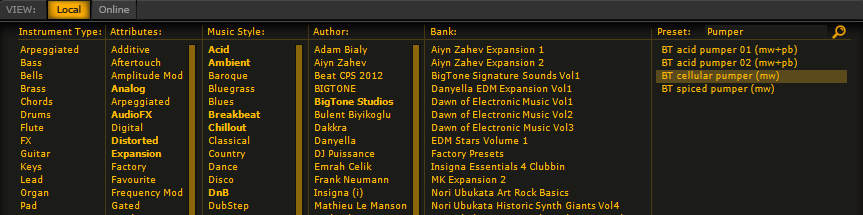
5. I also rendered the preset output with Reaper, I believe it is as expected:
http://www.synthmaster.com/synthmaster/ ... pumper.wav
6. I also checked out "BT Bootsie Collins..." preset, yes there's some noise in the lower notes. It looks like the HP filter of the EQ is causing that. I will debug this tonight and will release an update for it.
EDIT: Fixed the HP filter issue. Building a new update now.
Bulent
Last edited by kv331 on Mon Oct 27, 2014 12:59 am, edited 1 time in total.
Works at KV331 Audio
SynthMaster voted #1 in MusicRadar's "Best Synth of 2019" poll
SynthMaster One voted #4 in MusicRadar's "Best Synth of 2019" poll
SynthMaster voted #1 in MusicRadar's "Best Synth of 2019" poll
SynthMaster One voted #4 in MusicRadar's "Best Synth of 2019" poll
-

- KVRAF
- 4536 posts since 17 Jun, 2013 from very close to Paris, France
I add that I have many presets which enter in an endless loop as soon as I send a "note on" (whatever the way).
An example among tons and tons of others:
KEYS Moon elevator lounge
It's not the first time that I alert of this more than boring issue...
An example among tons and tons of others:
KEYS Moon elevator lounge
It's not the first time that I alert of this more than boring issue...
Build your life everyday as if you would live for a thousand years. Marvel at the Life everyday as if you would die tomorrow.
I'm now severely diseased since September 2018.
I'm now severely diseased since September 2018.
-
- KVRAF
- Topic Starter
- 7510 posts since 14 Nov, 2006 from Ankara, Turkey
I can not find that preset in any of our factory or expansion presets. Whose preset is that?BlackWinny wrote:I add that I have many presets which enter in an endless loop as soon as I send a "note on" (whatever the way).
An example among tons and tons of others:
KEYS Moon elevator lounge
It's not the first time that I alert of this more than boring issue...
BTW, did you alert me by contacting at: http://www.synthmaster.com/contactus.aspx ?

Works at KV331 Audio
SynthMaster voted #1 in MusicRadar's "Best Synth of 2019" poll
SynthMaster One voted #4 in MusicRadar's "Best Synth of 2019" poll
SynthMaster voted #1 in MusicRadar's "Best Synth of 2019" poll
SynthMaster One voted #4 in MusicRadar's "Best Synth of 2019" poll
-
- KVRAF
- 1758 posts since 15 Mar, 2013 from Germany
I only have the 64 bit version installed. I deleted the folder as you requested.kv331 wrote: Before coming to quick conclusions, let's investigate what's going wrong on your system:
1. Do you have both 32bit and 64bit versions of SynthMaster installed? (on Windows)
2. Did you update both of them or only one of them? Please update both of them.
3. Please delete
Mac: /Users/Shared/SynthMasterTemp
Windows 7/8: C:\Users\Public\Public Documents\SynthMasterTemp
4. I tested the browser, entered pumper, pressed the search button, it works as expected (and I don't need to say that we have tested this functionality before releasing to the general public):
5. I also rendered the preset output with Reaper, I believe it is as expected:
http://www.synthmaster.com/synthmaster/ ... pumper.wav
6. I also checked out "BT Bootsie Collins..." preset, yes there's some noise in the lower notes. It looks like the HP filter of the EQ is causing that. I will debug this tonight and will release an update for it.
EDIT: Fixed the HP filter issue. Building a new update now.
Bulent
Search button works now.
Still seeing presets doubled, not all, but e.g. in Lead category.
Pumper still not working. It has to do with the mono/legato feature, that just does not work on my machine. When I touch the glide time button, it starts doing something. But that just seems not to correctly initialize. I have that problem with all patches using mono or legato mode
-

- KVRAF
- 14498 posts since 16 Feb, 2005 from Planet Earth, Somewhere
kv331 wrote:............
EDIT: Fixed the HP filter issue. Building a new update now.
Bulent
Hi Bulent,
will this build be called .22 or will it be .21?
is it up as yet?
thanks
rsp
sound sculptist
-
- KVRAF
- Topic Starter
- 7510 posts since 14 Nov, 2006 from Ankara, Turkey
For the doubled presets, please delete:CableChannel wrote: Still seeing presets doubled, not all, but e.g. in Lead category.
Pumper still not working. It has to do with the mono/legato feature, that just does not work on my machine. When I touch the glide time button, it starts doing something. But that just seems not to correctly initialize. I have that problem with all patches using mono or legato mode
<My Documents>\SynthMaster\SynthMasterPresets.xml file
(optionally) <My Documents>\SynthMaster\Config\SynthMasterConfig.txt (last used/saved preset folders are stored in the config file)
I know about the mono legato issue, I posted the rendered output above. I can never reproduce the issue so I can not fix it
Bulent
Works at KV331 Audio
SynthMaster voted #1 in MusicRadar's "Best Synth of 2019" poll
SynthMaster One voted #4 in MusicRadar's "Best Synth of 2019" poll
SynthMaster voted #1 in MusicRadar's "Best Synth of 2019" poll
SynthMaster One voted #4 in MusicRadar's "Best Synth of 2019" poll
-
- KVRAF
- Topic Starter
- 7510 posts since 14 Nov, 2006 from Ankara, Turkey
I am uploading now. I didn't increase the version number, still 21. When it's done I'll download, test and then announcezvenx wrote: Hi Bulent,
will this build be called .22 or will it be .21?
is it up as yet?
thanks
rsp
 - I have an automated process for all of this otherwise updates would be a hell for me -
Works at KV331 Audio
SynthMaster voted #1 in MusicRadar's "Best Synth of 2019" poll
SynthMaster One voted #4 in MusicRadar's "Best Synth of 2019" poll
SynthMaster voted #1 in MusicRadar's "Best Synth of 2019" poll
SynthMaster One voted #4 in MusicRadar's "Best Synth of 2019" poll
-
- KVRAF
- 1758 posts since 15 Mar, 2013 from Germany
I did that, deleting the SynthMasterConfig.txt fixed the mono/legato issue. So it seems to be some configuration setting that can cause that.kv331 wrote: For the doubled presets, please delete:
<My Documents>\SynthMaster\SynthMasterPresets.xml file
(optionally) <My Documents>\SynthMaster\Config\SynthMasterConfig.txt (last used/saved preset folders are stored in the config file)
However sill seeing presets doubled.
-
- KVRAF
- 1758 posts since 15 Mar, 2013 from Germany
Hm I compared the files and the differences didn't have anything to do with legato, so I copied my old SynthMasterConfig.txt back there, and now the legato still works. Strange. I guess Synthmaster has cleaned up something else when generating the config file, but that was NOT stored in the config file but elsewhere. Windows Registry? Or some other files/folders?
But the cellular pumper indeed works with one preset file and does not work with the other.
But the cellular pumper indeed works with one preset file and does not work with the other.